You open the leave spreadsheet to approve a holiday request and notice three other files containing salaries, sickness notes and right-to-work documents. One sits in a shared drive, another is attached to an old email thread, and printed forms are waiting in a tray near the office printer. Nobody intended to create a security problem, but employee information has gradually spread beyond a clearly controlled HR system.
That situation is common in small businesses. Employee data security isn't only about stopping hackers. It also covers who can open a file, whether a record is accurate, how long the business keeps it, and what happens when the information is no longer needed. Good controls help HR, managers and operations staff do their jobs without exposing personal information through ordinary, preventable mistakes.
Table of Contents
- What Employee Data Security Really Means for Small Businesses
- Why Employee Data Is a Growing Breach Category
- UK Compliance Duties Every HR Lead Should Know
- Common Threats and Everyday Mistakes
- Technical Controls That Actually Work for Small Teams
- How to Respond When Something Goes Wrong
- How an Employee Management Platform Reduces Risk
- A 30-Day Employee Data Security Action Plan
What Employee Data Security Really Means for Small Businesses
Employee data includes much more than a personnel file. Names and addresses, salary details, leave requests, sickness information, performance notes, payroll records and right-to-work documents can all identify or materially affect a worker. The UK Business Data Survey 2026 found that employee data is already handled widely by businesses with employees, including when digitised data is considered. That distribution makes everyday systems, not just dedicated HR software, part of your security boundary.
A useful way to understand employee data security is to compare digital records with a physical filing cabinet. You'd lock the cabinet, give keys only to people who need them, check that documents are filed correctly, keep each document for a sensible period, and shred records that no longer have a purpose. Digital security applies the same discipline to spreadsheets, email, shared drives and cloud applications.
Four questions for every employee record
- Confidentiality: Can only authorised people see the information? A line manager may need to know whether someone is absent, but may not need access to salary details or another team's sickness records.
- Integrity: Is the information accurate and protected from unauthorised changes? A wrongly edited leave balance can affect payroll, staffing and trust.
- Availability: Can the right person access the correct record when they need it? A security measure that prevents HR from finding an approved absence at the right time creates an operational problem.
- Responsible disposal: Does the business remove or securely destroy information once it no longer has a valid business or legal purpose?
Security therefore belongs to the people who create, use and approve records. HR leads decide what information a process needs. Managers handle absence and leave data. Finance may use payroll information. Operations teams often control shared folders and user accounts.
Practical rule: Treat every copy of employee information as a record with an owner, a purpose, an access decision and a disposal date.
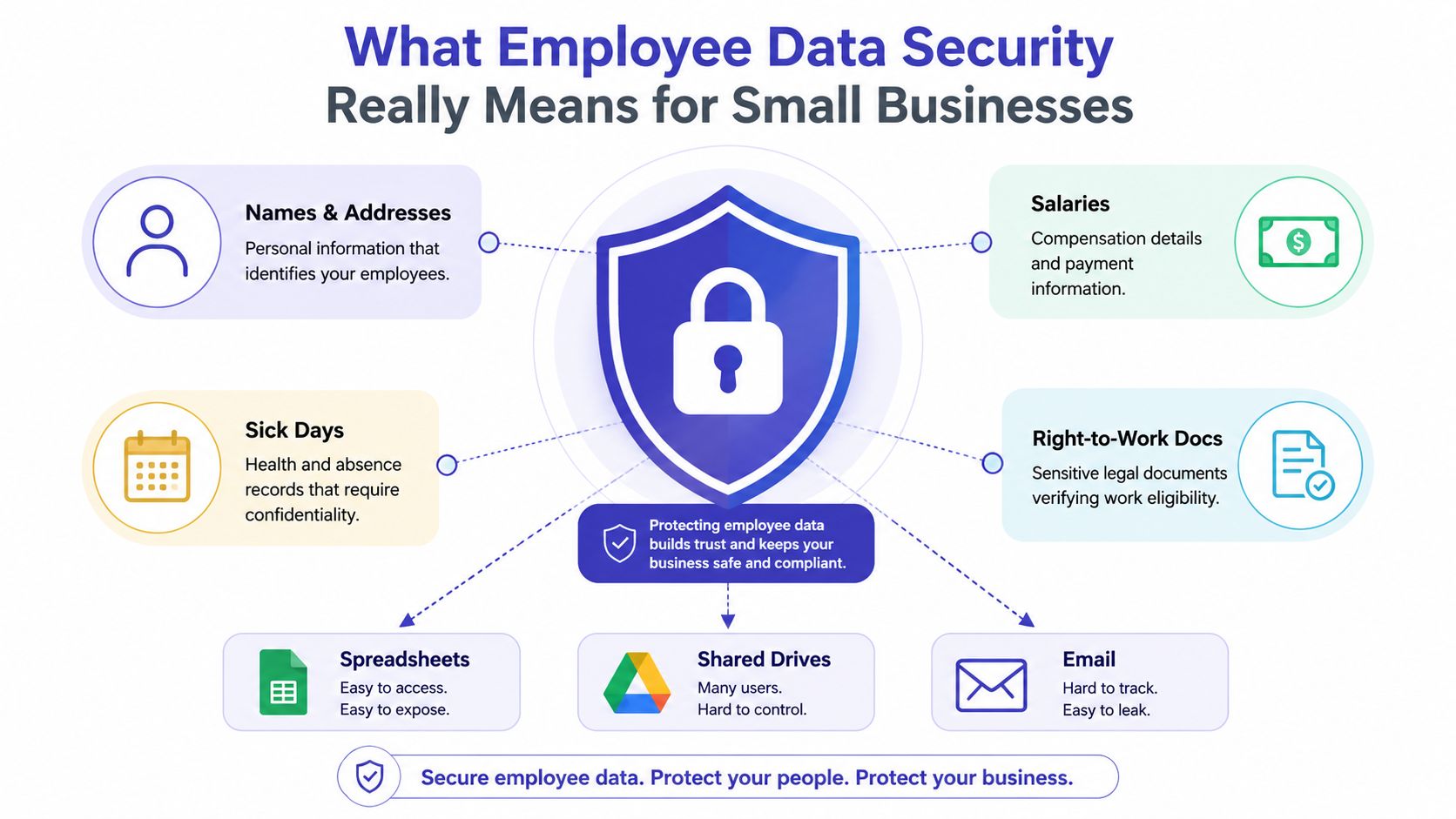
Moving information from manual systems into a platform can reduce confusion, but digitisation alone doesn't make data secure. The business still needs sensible permissions, accurate records, defined retention and a process for responding when something goes wrong.
Why Employee Data Is a Growing Breach Category
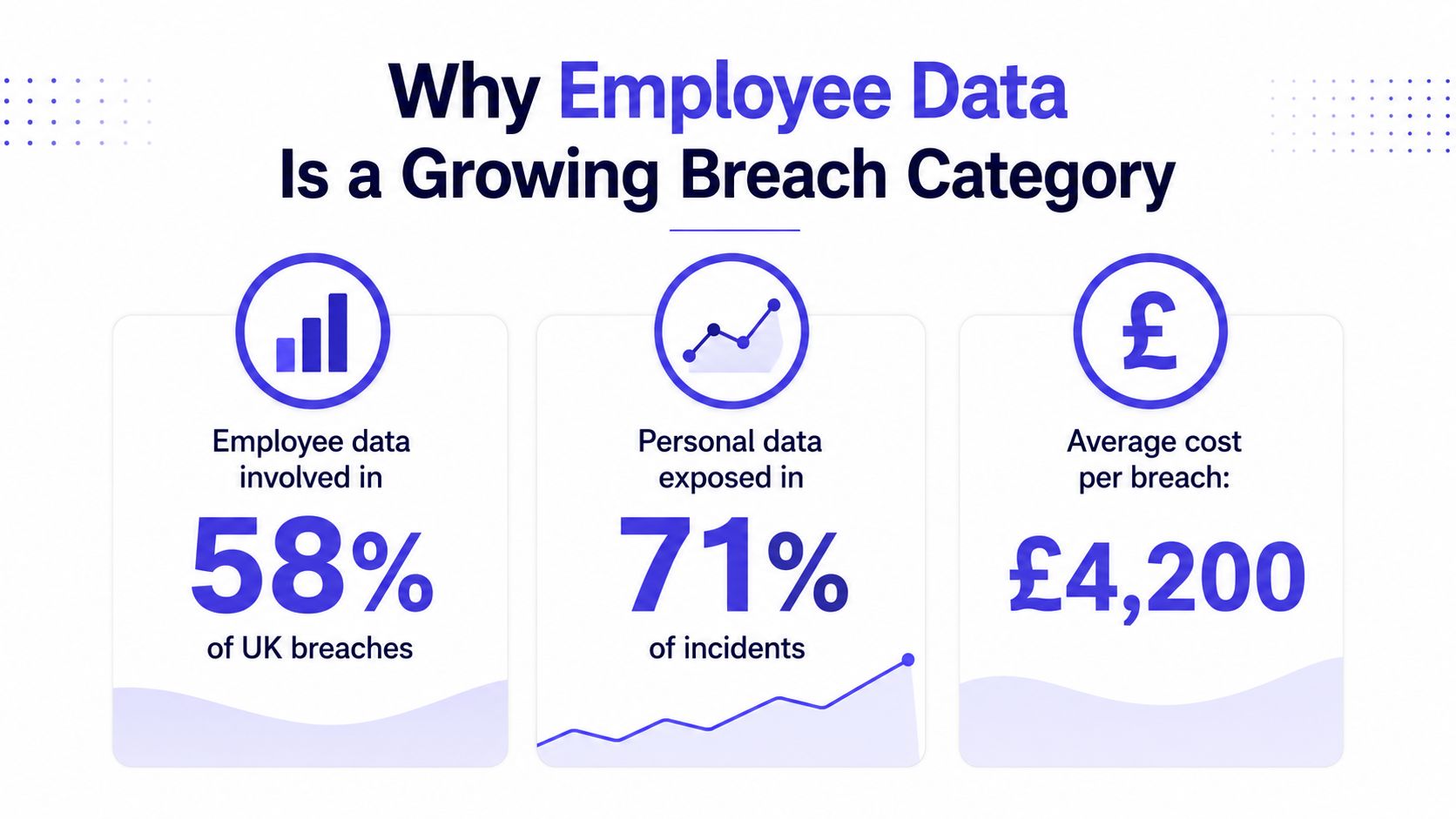
UK reporting shows that employee information is a recurring breach concern, and the trend has moved upwards. Analysis reported 2,279 employee-data breach reports received by the ICO in 2022, rising to 3,208 in 2023, 3,679 in 2024 and 3,872 in 2025. The same analysis described an increase of about 70% from 2022 to 2025, while the 2024 figure was the highest level in at least six years at that point. These figures come from People Management's analysis of employee data breaches.
The numbers don't mean every incident involved an advanced attacker. Phishing attacks targeting employee data increased by 56% in the year to 2024, from 486 incidents to 758, according to the same analysis. Phishing matters because attackers often target the person who manages payroll or HR access rather than trying to defeat the entire technology environment.
Cyber and non-cyber exposure
Cyber incidents include phishing, stolen credentials, malware, ransomware and unauthorised system access. Non-cyber incidents include a letter sent to the wrong address, a spreadsheet attached to the wrong email, a lost folder, a printed document left beside a printer or an ex-employee retaining access to a shared drive.
The distinction helps with diagnosis, but it shouldn't narrow your response. A strong firewall won't retrieve a paper absence form posted to the wrong recipient. A password policy won't stop a manager selecting the wrong autocomplete address in an email.
UK paper records provide a clear warning. Reporting identified 11,141 paper data breaches reported to the ICO between 2020 and 2025, including 2,103 involving employee information. It also reported 330 employee-data incidents in 2025 alone, potentially affecting as many as 28,000 workers based on the organisations' sizes. The figures and operational lessons are set out in Security Brief's report on UK paper data breaches.
Find your open windows
Think of security as a building. The locked front door represents technical defences. The open back window represents an uncontrolled spreadsheet, an over-permissioned folder or an old paper file. Small businesses need to inspect both.
Start by asking where a manager can see employee information, where HR exports it, who receives it by email and which records still exist outside the main system. Those answers often reveal more useful improvements than buying another security product.
UK Compliance Duties Every HR Lead Should Know
UK GDPR compliance becomes manageable when you translate legal duties into routine decisions. Before collecting a record, decide why you need it, which lawful basis supports the processing, who needs access and how long the information should remain available. Put that reasoning into a privacy notice and internal record so another person can understand the decision later.
Health and sickness information requires particular care because it can fall within special category data. Maternity and absence details may reveal health or other sensitive circumstances, so access should be narrower than access to an ordinary team calendar. A manager may need enough information to plan cover, while HR or an authorised administrator handles the underlying details.
Make data protection the default
Use the following questions whenever you create or change an HR process:
- What is the purpose? Collect only information needed for leave administration, payroll, absence management or another defined task.
- Who needs it? Give access based on the person's role, not convenience or seniority.
- Is it accurate? Provide a way to correct outdated addresses, balances, dates and employment details.
- How is it explained? Tell workers what you collect, why you use it, who may receive it and how long you expect to retain it.
- When does it leave the system? Set a review and deletion rule instead of allowing records to remain indefinitely.
The ICO's employment practices code says employers should establish and follow standard retention times for different categories of worker information, base those periods on business need, and remove personal information that is no longer relevant after employment ends. There isn't one universal statutory retention period for every employment record. Common UK practice may include personnel files for employment plus 6 years, payroll records for 6 years under PAYE rules, right-to-work documents for 2 years after employment ends, and disciplinary records while a warning remains live plus a defensible review period, as outlined in this UK employment records retention guide.
For a worked example, create a leave and absence schedule with separate categories. Keep current leave records while they support administration, payroll or dispute handling. Review absence details when employment ends, identify any continuing legal or business need, restrict the record during that review, and securely delete information that no longer serves a purpose. Record the reason for the chosen period rather than copying a generic rule from another organisation.
Prepare for individual rights and breaches
Employees can ask how their personal information is used and may request access to it. Good records, clear ownership and organised systems make those requests easier to locate and answer accurately.
The ICO says a notifiable personal data breach should be reported without undue delay and, where possible, within 72 hours of becoming aware of it. A notification needs the nature of the breach and the approximate number of affected individuals, among other details. That requirement makes detection, recordkeeping and escalation part of HR operations, not a private IT decision.
Readers who work across jurisdictions may also find this plain-language explanation of what HIPAA means for staff useful for comparison, although UK employers must apply the rules relevant to their own processing. The ICO's guidance on GDPR and employee data provides further UK-focused context for reviewing leave, absence and HR records.
Common Threats and Everyday Mistakes
A payroll administrator receives an email that appears to come from a software provider. The message asks them to sign in to review an urgent payroll issue. The page copies the provider's branding, but the link sends the administrator to an attacker who captures the login details. That is a cyber incident.
A different problem starts with a manager forwarding a sickness email. They intend to send it to HR, but select the wrong contact with a similar name. The message includes details that the recipient shouldn't see. No attacker is involved, yet the business has still disclosed employee information.
Look beyond the headline threats
Small businesses should inspect these exposure points:
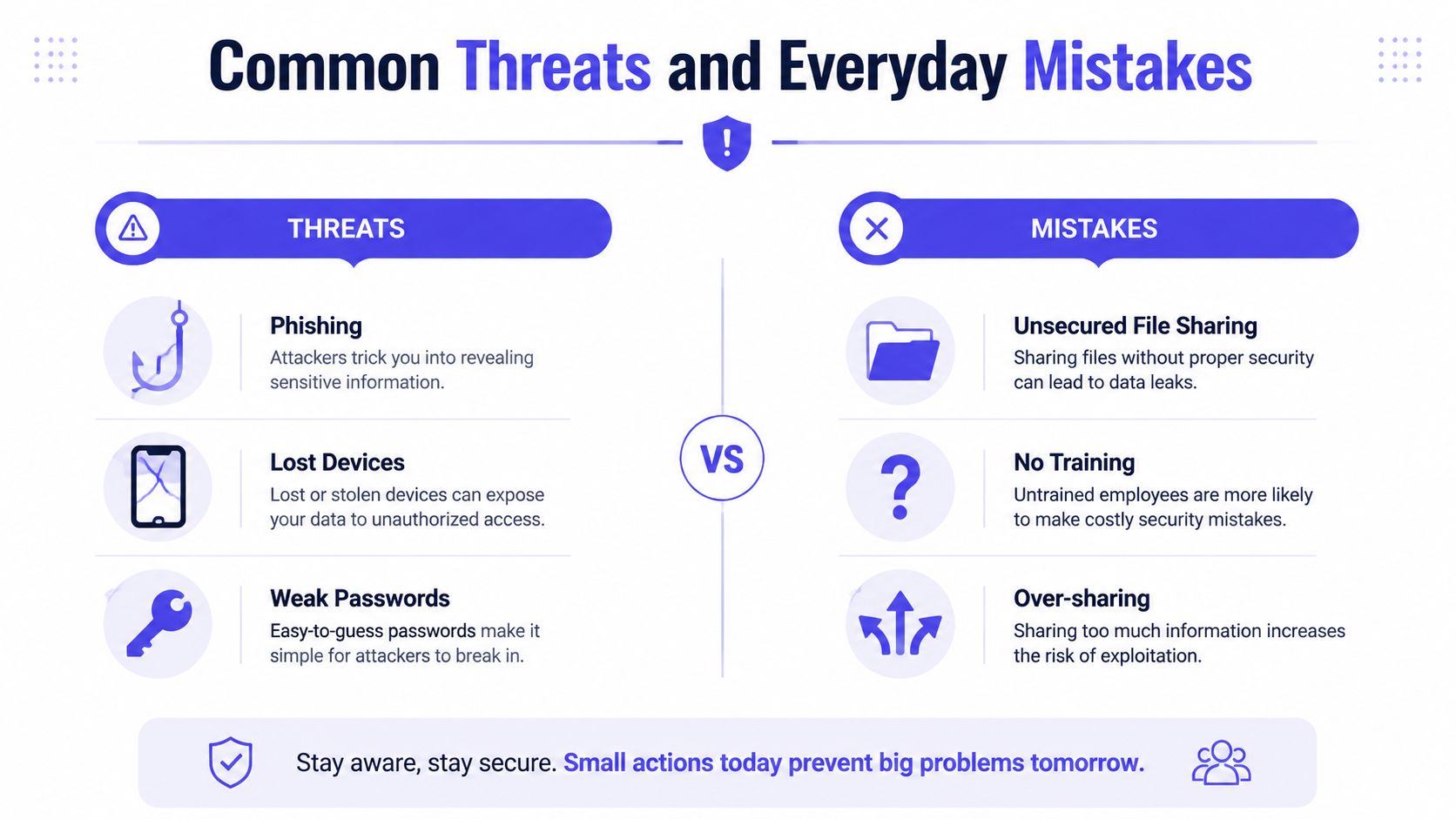
- Phishing: HR, payroll and finance accounts attract messages designed to trigger quick action. Staff need a simple way to verify unusual requests and report suspicious messages.
- Lost devices: A laptop or phone may contain downloaded reports, email attachments or cached cloud files. Device locking, encryption and remote account controls reduce the consequences.
- Former users: An employee who leaves may still have access to a shared drive, mailbox, spreadsheet or third-party application unless somebody removes it.
- Weak spreadsheet protection: A password on a file doesn't answer who should access it, whether copies exist or whether somebody changed a value.
- Uncontrolled sharing: Links with broad permissions can expose information beyond the intended group. Email attachments create additional copies that are difficult to track.
- Paper handling: Printed absence notes, payroll reports and personnel documents can be left in printers, meeting rooms or unlocked drawers.
The operational risks often feel harmless because each action looks small. One copied tab, one forwarded email or one old login can create a chain of exposure. Staff may also keep local downloads because the official process feels slow, which creates a shadow record outside the business's normal controls.
The safest process is usually the one that makes the correct action easier than the shortcut.
Ask your team to show you how they handle a leave request from beginning to end. Follow the information through submission, approval, reporting, payroll and deletion. You'll see whether the business relies on private inboxes, downloaded files, printed forms or shared folders with more access than the process requires.
Short training should cover the actual decisions staff make. Show people how to check a recipient, share a restricted file, report a suspected phishing message and dispose of printed records. A policy nobody can apply during a busy afternoon won't protect the organisation consistently.
The following video can support a practical discussion about employee data security and everyday handling:
Technical Controls That Actually Work for Small Teams
Technical controls don't need to be complicated to be useful. Think of a hotel key-card system. A cleaner's card opens the rooms they need, a guest's card opens one room, and the system records access. Your HR tools should follow the same principle.
Give each role the right key
Role-based access assigns permissions to a job function. HR may manage employee records, a line manager may approve leave for their team, and an employee may view and submit their own requests. Least privilege means starting with the smallest access needed and expanding it only when the work requires it.
Remove access promptly when someone changes role or leaves. Use named accounts rather than shared logins, and turn on multi-factor authentication where the service supports it. For a broader explanation of identity management cloud security, consider how identity controls connect user accounts, permissions and cloud services.
Protect records throughout their life
Encryption at rest protects stored information if a storage layer or device is accessed improperly. Encryption in transit protects information while it moves between a user and a service. Backups should be protected by separate access controls and tested by restoring a file, not merely assumed to work because a scheduled job completed.
Audit logs answer practical questions. Who changed an absence date? Who approved the request? Who exported a report? A shared spreadsheet rarely gives a small business the same clear trail as a structured application with individual accounts and recorded actions.
Use a structured HR document management system alongside a documented policy. A system can enforce permissions, but people still need to know what information belongs in it and what mustn't be copied into personal folders.
| Record Type | Common Retention Period |
|---|---|
| Personnel files | Employment plus 6 years in common practice |
| Payroll records | 6 years under PAYE rules in common practice |
| Right-to-work documents | 2 years after employment ends in common practice |
| Disciplinary records | While the warning remains live, plus a defensible review period |
These are common practices, not a single rule for every employer. The ICO's employment guidance supports setting periods according to business need and removing information that is no longer relevant.
If resources are limited, fix access and offboarding first. Add MFA and secure backups next, then improve audit logging, retention automation and reporting. Don't wait for a perfect system before closing obvious access gaps.
How to Respond When Something Goes Wrong
A calm response starts with a short sequence that somebody can follow under pressure. Write the names of the people responsible for each step, keep the note somewhere accessible, and update it when systems or staff change.
Contain, assess and notify
- Contain the exposure. Recall an email if possible, ask the unintended recipient to delete it, remove a public link, disable a compromised account or secure the misplaced paper. Don't delete relevant evidence while trying to tidy up.
- Assess the facts. Record when the business discovered the issue, what happened, which data was involved, whose information may be affected and who could have received it.
- Escalate internally. Tell the data protection lead, HR owner, senior manager or responsible adviser. Give them the facts, not guesses or blame.
- Decide on notification. The ICO requires a notifiable breach to be reported without undue delay and, where possible, within 72 hours of awareness. Keep a written record of the decision, including why the business concluded that notification was or wasn't required.
- Communicate with affected workers. If the risk warrants it, explain what happened, what the business has done and what the employee should do next. Use clear language and avoid speculation.
Suppose a manager sends sickness details to the wrong recipient at 10:00 on Monday. The clock starts when the organisation becomes aware of the breach, not when the manager first created the email. By 10:00 on Thursday, the 72-hour window has passed, so the responsible person must already have assessed whether the incident is reportable and prepared the required information.
Recover and learn
Restore access only after confirming that the account or file is controlled. Check whether unauthorised copies remain, correct affected records and preserve the incident timeline. Then ask why the mistake was possible. A dropdown that makes wrong recipients easy to select, a shared folder with inherited permissions or an unclear absence process may need changing.
Your incident note should capture:
- Discovery: Date, time, reporter and initial facts.
- Scope: Data categories, affected people, systems and recipients.
- Actions: Containment, access changes, recovery and advice given.
- Decision: ICO assessment, notification reasoning and communications.
- Follow-up: Policy changes, training and owner for each improvement.
Documentation before an incident makes good judgement possible during one. The ICO's personal data breach reporting guide explains the reporting duty and the information a notification should contain.
How an Employee Management Platform Reduces Risk
A spreadsheet is easy to start and difficult to govern as a business grows. Several people may edit it, download it, email it or create their own version. It resembles a paper diary that everyone can read and rewrite, with no dependable record of which copy is current.
A purpose-built employee management platform changes the workflow. Employees submit leave through their own access, managers approve requests for the people they supervise, and HR receives a structured record rather than a chain of messages. Role-based permissions reduce unnecessary visibility, while audit trails can show what happened to a request.
For a small business, moving leave and absence tracking into a controlled system is a governance decision, not a software purchase. It can remove shadow spreadsheets, reduce email attachments, and give staff a consistent place to work. Reports and calendars also help authorised users plan cover without exposing unrelated HR information.
A platform won't replace a lawful-basis assessment, retention schedule, staff training or an incident process. It also won't prevent an authorised user from making a poor decision. The value comes from making secure behaviour the normal path, with structured approvals, individual access and fewer uncontrolled copies.
Businesses reviewing the employee experience can assess whether a staff login portal supports the access model they want. The right tool should fit the organisation's roles and processes, rather than forcing every person into the same broad view.
A 30-Day Employee Data Security Action Plan
Use the first month to build habits, not a large paperwork project.
- Week one, map the data: List spreadsheets, inboxes, paper files, shared drives and cloud applications that hold employee information. Name an owner for each location.
- Week two, tighten access: Remove former users, review manager permissions, replace shared accounts and turn on multi-factor authentication where available.
- Week three, control retention: Separate current records from old records, agree business reasons for keeping each category, and define secure deletion or shredding steps.
- Week four, prepare for incidents: Write the contain, assess, notify, recover and learn sequence. Brief HR, managers, finance and operations staff on how to report mistakes quickly.
Keep the routine going after the month ends. Review access when people change roles, delete records when their purpose ends, and test whether staff can find the right process without creating an unofficial copy. Each small improvement reduces regulatory exposure and limits the human cost of an avoidable disclosure.