
Most modern holiday management software solutions, whether it's a dedicated tool like LeaveWizard or a broader HR suite, come equipped with employee self-service (ESS) features. In simple terms, these platforms give your team the power to manage their own leave requests, check their holiday balances, and see who's in or out on a shared calendar.
This isn't just a minor perk; for small businesses, it's a game-changer. It drastically cuts down the administrative slog for managers and HR, freeing them up from endless emails and spreadsheet updates. The result is a much more efficient and happier team.
Empowering Teams With Self-Service Holiday Management
Employee self-service is more than just a convenience; it’s a strategic move that fundamentally changes how small businesses handle time off. Giving employees direct access to their own leave information builds a culture of transparency and accountability.
It gets rid of the usual bottlenecks—those back-and-forth email chains and manual data entry that are so prone to mistakes and frustration. The whole point is to create a process that’s smooth, accurate, and empowering for everyone.
The move towards accessible, cloud-based tools is happening all over the UK. Projections show that cloud solutions will make up a massive 65.4% of the UK software distribution market by 2025. Small and medium-sized businesses are a huge part of this shift, driving 38.2% of the market as they embrace more flexible systems for today's hybrid work setups.
Core Employee Self-Service Features and Their Business Impact
To really get why an ESS portal is so valuable, it helps to look at what it actually does. These aren't just flashy add-ons; they are practical tools that solve real operational headaches for growing businesses. These features are designed so that even when staff are away, they can still keep connected and in control on holiday.
Let's break down the most essential features and the direct impact they have on a small business.
Core Employee Self-Service Features and Their Business Impact
| Feature | Core Functionality | Primary Benefit for Small Businesses |
|---|---|---|
| Leave Requests | Employees submit holiday requests directly through a portal or mobile app. | Cuts down the admin workload and gets rid of manual paper forms for good. |
| Real-Time Balance | Staff can view their remaining holiday entitlement and leave history at any time. | Drastically reduces the number of HR queries about allowances, helping staff plan better. |
| Team Calendar | A shared calendar shows approved leave, giving everyone visibility of team availability. | Helps managers avoid scheduling clashes and makes resource planning much easier. |
| Automated Approvals | Managers get instant notifications and can approve or deny requests right from the platform. | Speeds up the entire approval process, keeping work moving without delays. |
Ultimately, a good ESS platform provides a clear and consistent way for everyone to manage leave. If you'd like to get into the nitty-gritty, you can learn more about the benefits of employee self-service software in our detailed guide.
Why ESS is a Strategic Move for Small Businesses
For a small business on the upswing, employee self-service (ESS) is much more than a handy feature – it's a genuine strategic asset. When you bring in holiday management software with solid ESS tools, you’ll see a direct and positive impact on your efficiency, financial planning, and even your company culture.
Think about it: when employees can manage their own leave, the administrative headache for HR and line managers shrinks almost overnight. This simple shift frees up a surprising amount of time, letting your leadership team focus on growing the business instead of chasing down forms or fixing spreadsheet typos. It also brings a level of accuracy that manual tracking just can’t touch, making sure everyone is working from the same, correct information.
Building a Culture of Transparency and Trust
Giving your team direct access to their own leave information helps build a culture of transparency. When a staff member can instantly check their remaining holiday allowance or see the team calendar, it cuts out all the back-and-forth and prevents misunderstandings about entitlements. This clarity builds trust and subtly signals that you value your employees' autonomy.
By giving team members ownership of their leave data, you move from a top-down, permission-based culture to one of mutual respect and accountability. This subtle shift is powerful, reducing friction and improving overall morale and engagement.
This kind of trusted environment has a real knock-on effect on productivity. People who feel trusted and respected are simply more likely to be engaged and motivated, which means they contribute more effectively to the business's goals.
Sharpening Your Financial and Operational Planning
The benefits don't stop with HR. For anyone managing the company's finances, real-time absence data from an ESS portal is incredibly valuable for accurate resource planning and payroll forecasting. Knowing exactly who is off and when allows for smarter budget management and helps you avoid the sting of unexpected staffing costs.
Likewise, operations managers can head off scheduling conflicts before they even become a problem. A clear, shared team calendar ensures that projects are always properly staffed, preventing bottlenecks and keeping work flowing smoothly. That kind of visibility is absolutely critical for hitting deadlines and maintaining the quality of your service.
This is all part of a bigger picture where small companies are turning to affordable, mobile-friendly software to get more done. As businesses look for more transparency, lightweight tools that don’t need a huge IT setup and let employees manage their own admin are becoming essential. You can find out more about this shift in market research on digital business tools. At the end of the day, a system with strong ESS features is directly linked to better productivity and a more organised, engaged team.
How to Choose the Right Holiday Management Software
Picking the right holiday management software isn't just about ticking boxes on a feature list. You need to dig a little deeper to figure out how a platform will actually work for your team in the real world. A structured approach helps you choose a tool that doesn't just fix admin headaches but genuinely improves everyone's experience.
Your first port of call should always be the user experience, from both an employee's and a manager's point of view. A clunky, confusing interface is a recipe for disaster – people just won't use it, and you'll be back to square one. When you're on a free trial, really put it through its paces. How intuitive is it for someone to request a day off? Can a manager quickly see who else is away before approving it? It should feel effortless.
A critical factor in your evaluation should be the platform's mobile accessibility. A system with a dedicated, user-friendly mobile app is no longer a luxury but a necessity for modern, flexible workforces.
This is especially true if you have people working out in the field or teams who aren't always tied to a desk. A good mobile app means leave can be managed on the go, making the whole process simpler and more efficient for everyone involved.
Key Evaluation Criteria for Your Checklist
As you start comparing your options, it’s best to use a consistent set of criteria. This way, you’re comparing apples with apples and can focus on what really matters to your business.
Your evaluation should really nail down three core areas:
- Customisation and Policy Support: Can the software actually handle your company's unique leave policies? Look for flexibility in setting up accrual rules, defining different leave types (like TOIL or duvet days), and managing carry-over allowances. A system that forces you to change your policies to fit its limitations is a major red flag.
- Integration with Existing Tools: How well does the platform play with the other software you’re already using? Seamless integration with calendars like Outlook or Google Calendar is a must-have for giving everyone visibility of team schedules. It's also worth checking for payroll integration or at least simple data export options to cut down on manual data entry and reduce the risk of errors.
- Reporting and Analytics: The right software should offer you more than just a list of who's off and when. Check out its ability to generate reports on absence trends, holiday entitlement liabilities, and departmental attendance patterns. This kind of data is gold for strategic planning and can help you spot potential burnout issues before they become serious problems.
Comparing The Best ESS Holiday Management Software
Choosing the right holiday management software isn’t just about ticking boxes on a feature list. The real test is how these tools perform in the everyday situations your team will face. A feature might look great on paper, but if it’s clumsy or confusing to use, it won’t deliver the value you’re looking for.
Instead of a generic rundown, let’s look at how leading platforms, including our own LeaveWizard, handle specific, common tasks. This approach uncovers those subtle but critical differences in user experience and efficiency that really make or break a system. We’ll see how they stack up when put to the test.
When evaluating these tools, the key areas to focus on are the user interface, mobile access, and how well it integrates with your other systems.
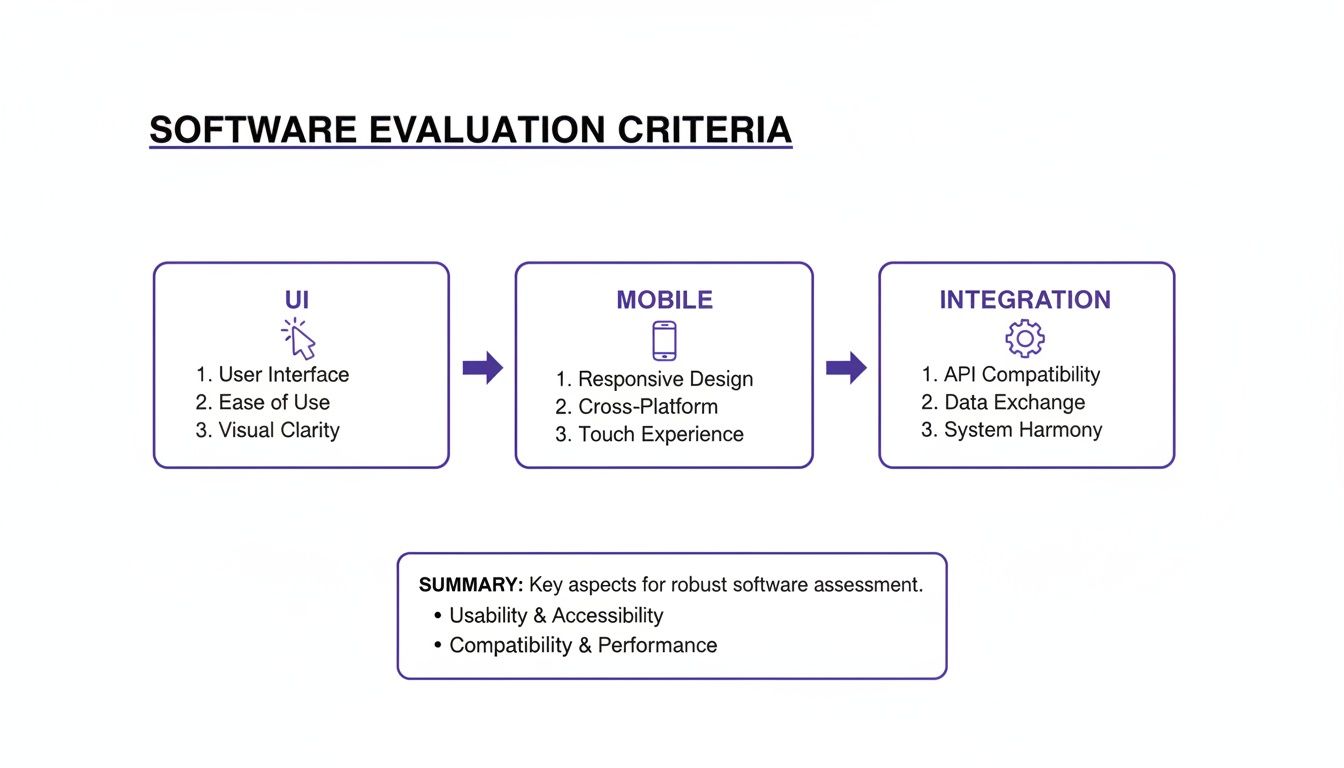
Getting these three elements right is what separates a tool that’s merely functional from one your team will actually enjoy using.
Use Case 1: An Employee Requesting Holiday
The most common interaction anyone will have with this software is booking time off. If this process is anything less than seamless, you're starting off on the back foot.
LeaveWizard nails this with a clean, intuitive interface. An employee can log in, instantly see their remaining allowance, check the team calendar for clashes, and fire off a request in less than a minute. It’s designed to be self-explanatory, which means less time spent on training.
Competitor A offers a similar function, but it's often buried within a larger HR suite. This can make a simple task feel a bit clunky, requiring a few extra clicks through different HR modules just to get to the leave request form.
Competitor B is all about the mobile-first experience. Its app is incredibly slick for straightforward holiday requests, which is perfect for teams out in the field. The downside is that its desktop version can sometimes feel like an afterthought.
Use Case 2: A Manager Assessing Team Availability
For a manager, context is everything. Approving a holiday request isn't just about clicking 'yes'—it's about understanding the impact on team coverage and deadlines.
A key differentiator for managers is the ability to see the complete picture before making a decision. The software should present team availability, overlapping requests, and employee leave history on a single, clear screen to prevent scheduling conflicts.
This is where LeaveWizard shines. It gives managers a dedicated dashboard showing the entire team's calendar. Before approving anything, they can spot overlaps or periods of low coverage at a glance. This visual approach is brilliant for preventing accidental understaffing.
Competitor A, by contrast, might force a manager to run a separate report or toggle between different calendar views to get the same information. And with Competitor B’s mobile focus, the big-picture team view is sometimes less detailed on a small screen, making it better for quick approvals than for more considered strategic planning.
Use Case 3: An Employee Tracking Their Allowance
Nothing builds trust like transparency. Employees need to know exactly where they stand with their holiday allowance—what they've used, what's booked, and what's left. It needs to be clear, accurate, and accessible in real-time.
Each platform handles this differently. LeaveWizard provides a clear, graphical breakdown of used, booked, and remaining days, which is easy to understand at a glance. Competitor A tends to present this in a more traditional table format; it’s functional, but less engaging. Competitor B sticks to its minimalist approach, showing a simple number on the app's home screen, prioritising speed over a detailed breakdown.
For a deeper dive into the top systems, have a look at our guide to the top 10 leave management systems for 2025.
To bring these differences to life, let’s compare how each platform handles these common scenarios side-by-side for a typical UK small business.
Use Case Comparison of Top ESS Holiday Management Platforms
| ESS Scenario | LeaveWizard | Competitor A | Competitor B |
|---|---|---|---|
| Simple Holiday Request | Submits via desktop or mobile app in under 60 seconds with calendar view. | Navigates through a broader HR portal; can be slower due to more clicks. | Excels with a streamlined mobile app, ideal for on-the-go requests. |
| Checking Team Cover | Manager dashboard provides an instant, visual overview of team overlaps. | Often requires running a separate report or switching between calendar views. | Mobile view can be limited, making it harder to assess full team impact. |
| Viewing Leave Balance | Graphical chart clearly shows used, booked, and remaining allowance. | Displays balance in a text or table format; less intuitive. | Shows a simple number on the app home screen; lacks detailed breakdown. |
| Complex Leave (e.g., TOIL) | Dedicated workflows to track and approve time off in lieu. | Handled as a generic 'other leave' type, may require manual tracking. | Limited functionality; better suited for standard annual leave. |
As you can see, while all platforms cover the basics, the how makes all the difference. The best choice depends entirely on your team's specific needs—whether that’s detailed reporting for office staff or lightning-fast mobile access for field teams.
A Practical Guide to Implementing Your New System

Successfully launching a new holiday management system is about more than just flipping a switch on new tech; it's about managing change. A thoughtful, step-by-step rollout is what makes the difference between a tool that’s merely available and one that becomes a genuine asset. The goal is to make the transition so seamless that your team actually wants to use it.
A well-planned implementation sidesteps the usual pitfalls of confusion and resistance. It requires a clear strategy that covers everything from getting your data sorted to training your staff, ensuring everyone feels supported and confident right from the start.
Staging a Successful Rollout
To guarantee a smooth transition, it's best to break the implementation down into manageable stages. This structured approach prevents anyone from feeling overwhelmed and lets you iron out any wrinkles before they impact the whole business. A methodical rollout simply builds confidence and momentum.
A great place to kick things off is with a pilot programme. Pick a small, representative group of employees to test the system out. This is your chance to get real-world feedback and tweak your configuration before the full company-wide launch.
Here’s a practical, step-by-step plan that works:
- Data Migration: Start by accurately importing all your employee data—names, roles, and, crucially, existing leave entitlements. Double-checking this information for accuracy is non-negotiable; it prevents payroll headaches and entitlement disputes later on.
- Policy Configuration: Now, customise the software to reflect your specific leave policies. This means setting up rules for annual leave accrual, carry-over limits, and any unique leave types your company offers, like time off in lieu (TOIL).
- Manager Training: Get your line managers up to speed so they know exactly how to approve requests and manage team calendars. They are your front-line support, and their confidence in the system will rub off on their teams.
- Employee Onboarding: Schedule brief training sessions or, even better, share simple user guides and video tutorials. The key is to focus on the benefits for them—like checking their balance instantly or booking leave from their phone—to build a bit of buzz.
A common mistake is getting lost in the technical setup and forgetting about the people. The most successful rollouts are always backed by proactive communication that clearly explains why the change is happening and how it makes life easier for everyone, not just the management team.
Communication and Training
Clear, consistent communication is the bedrock of a successful launch. Before the system goes live, let your team know what’s coming. Frame it as an upgrade that gives them more control over their own time off. To learn more about this, explore our detailed guide on the value of employee self-service for HR and the impact it has.
Keep your training materials simple and accessible. A one-page quick-start guide or a punchy two-minute video showing how to request leave is far more effective than a dense manual nobody will read. Throughout the launch, make sure you're available to answer questions and offer support. This reinforces the idea that the new system is there to make everyone's work life a little bit easier.
Making the Right Choice for Your Business
Picking the right holiday management software isn't about finding a single "best" option. Honestly, there isn't one. The best platform is the one that slots perfectly into your team's day-to-day workflow and fits your company culture.
Think about it this way: a fast-growing tech startup full of people who live on their phones will have completely different needs from a more established company. That startup will probably want a slick, mobile-first experience. In that case, something like LeaveWizard is a serious contender because its app makes requesting and approving leave on the go feel effortless.
On the other hand, a larger, more traditional business with complex, multi-layered approval chains might need a broader HR suite with more granular control. These systems are often better at handling intricate leave policies and departmental structures, making sure everything stays compliant with long-standing internal rules. As you weigh up your options, it's also worth looking into the classic debate of custom software versus off-the-shelf solutions to be sure you're making a fully informed decision.
Situational Recommendations
To make things a bit clearer, let's look at a few common scenarios:
- For Mobile and Field-Based Teams: Don't compromise on the mobile app. For employees who aren't chained to a desk, quick access and a simple interface are non-negotiable. If the app is clunky, they just won't use it.
- For Teams with Complex Policies: You need to prioritise robust customisation. Your system must be able to handle different accrual rates, TOIL, and specific departmental rules without needing awkward workarounds.
- For Businesses Focused on Simplicity: Stick with a dedicated leave management tool rather than an all-in-one HR platform. They are almost always easier to get up and running and require far less training for your team.
The most important step? Get your hands dirty. Move past the glossy feature lists and actually test the software. Signing up for a free trial lets your team click around, experience the interface, and see how it copes with your real-world leave requests.
This hands-on approach is the only way to truly know which platform offers the self-service features that will actually make a difference to your business.
Frequently Asked Questions
When you're close to picking a new holiday management system, a few practical questions always pop up. Thinking about security, how it connects with your other software, and how your team will adapt is completely normal. Getting these last details sorted is key to choosing a platform that you and your team will love.
Here are some straightforward answers to the questions we hear most often from small business owners right before they make a decision.
How Secure Is Employee Data in a Cloud-Based Self-Service System?
Any reputable holiday management platform takes data security very seriously. The good ones use robust measures like end-to-end data encryption and store your information in secure UK data centres that are fully compliant with GDPR. On top of that, they should have strict role-based access controls.
These controls are non-negotiable. They’re what stop employees from seeing anyone else's personal information and ensure managers can only view data for their own teams. Before you sign up, always ask a provider for their specific security credentials and data protection policies to make sure you're comfortable.
The best systems are built on a foundation of trust. This means not only protecting data from external threats but also ensuring internal privacy is respected through carefully designed access permissions.
Will an ESS System Integrate With Our Existing Payroll Software?
Most modern leave management tools are built to play nicely with other business software. You'll often find they offer direct connections to popular payroll systems like Xero or Sage, or at the very least, provide simple ways to export data, like a CSV file.
This is a huge time-saver. It automates getting absence data into your payroll run, which dramatically cuts down on the chance of manual entry errors and helps make sure everyone gets paid accurately and on time. Don’t forget to check the specific integration options for any system you’re looking at.
How Long Does It Take for Employees to Learn a New ESS System?
Honestly, not long at all. The best platforms are designed to be so intuitive that they need hardly any training. In our experience, most employees can figure out how to request leave, check their remaining holiday balance, and see the team calendar in just a few minutes.
To make the switch completely seamless, look for a provider that gives you helpful onboarding materials, like quick video tutorials or easy-to-follow guides. We also find that running a quick, informal kick-off session for the team is a great way to build confidence and get everyone on board from day one.


