Think of employee self-service software like the online banking app on your phone. Instead of queuing at the bank for every little thing, you can check your balance, transfer money, and manage your finances with a few taps. It’s the same idea for your work life. Instead of chasing HR for payslips or filling out paper forms for time off, you just log in and handle it yourself.
This simple shift gives you more control and, crucially, frees up your HR team to focus on the things that really matter, not just admin.
What Exactly Is Employee Self Service Software?
At its heart, employee self-service (ESS) software is a secure, central hub where employees can manage their own HR-related tasks. It takes all those routine administrative jobs that used to land on an HR manager's desk and puts them directly into the hands of the employee via a simple, intuitive portal. This isn't just about making things a bit more convenient; it's a fundamental change in how modern businesses operate, especially as more of us work remotely or in hybrid setups.
Let's paint a picture of the old way. An employee wants to book a holiday. First, they have to find the right paper form, fill it out, and then hand it to their manager. That manager then needs to sign it and pass it along to HR. The whole process can take days, relies on bits of paper that can easily get lost, and creates a mountain of paperwork.
Now, imagine that same task with employee self-service software. The employee logs into a portal on their phone, sees a team calendar showing who is already off, and picks their dates. The request is sent, the manager gets an instant notification, and they can approve it with a single click. The system then automatically updates all the relevant calendars and leave balances. What used to take days now takes a couple of minutes.
The Shift from Manual HR to Self Service Automation
Moving from manual tasks to self-service automation isn't just a minor tweak—it's a complete operational upgrade. The difference becomes starkly clear when you compare the old, clunky methods with the slick, modern approach.
The table below breaks down just how different the day-to-day reality is for HR teams and employees.
| The Shift from Manual HR to Self Service Automation |
| :— | :— | :— |
| HR Task | Traditional Manual Process | Employee Self Service (ESS) Process |
| Holiday Requests | Employee fills out a paper form, gets manager approval, and HR manually updates spreadsheets and calendars. | Employee requests time off via a portal, the manager approves with one click, and the system auto-updates everything. |
| Updating Personal Info | Employee emails HR with new address/bank details, HR manually re-enters the data into multiple systems. | Employee logs in and updates their own details directly, ensuring accuracy and saving HR time. |
| Accessing Payslips | HR prints and distributes paper payslips or manually emails individual PDF files each month. | Employees can securely access and download current and past payslips anytime, from any device. |
| Sickness Reporting | Employee calls or emails manager, who then informs HR. Details might be recorded inconsistently. | Employee logs their absence in the system, which automatically notifies the manager and records the reason. |
It's easy to see how ditching the old ways delivers huge benefits:
- Massive Time Savings: Think of all the hours HR staff used to spend on repetitive admin. That time is now freed up for more valuable, strategic work.
- Fewer Human Errors: When you automate data entry and calculations for things like holiday allowances, you wipe out the risk of simple mistakes.
- Happier, Empowered Employees: Giving staff direct access to their information builds a culture of trust and autonomy, which leads to higher job satisfaction.
This infographic really drives home the difference in efficiency and satisfaction.
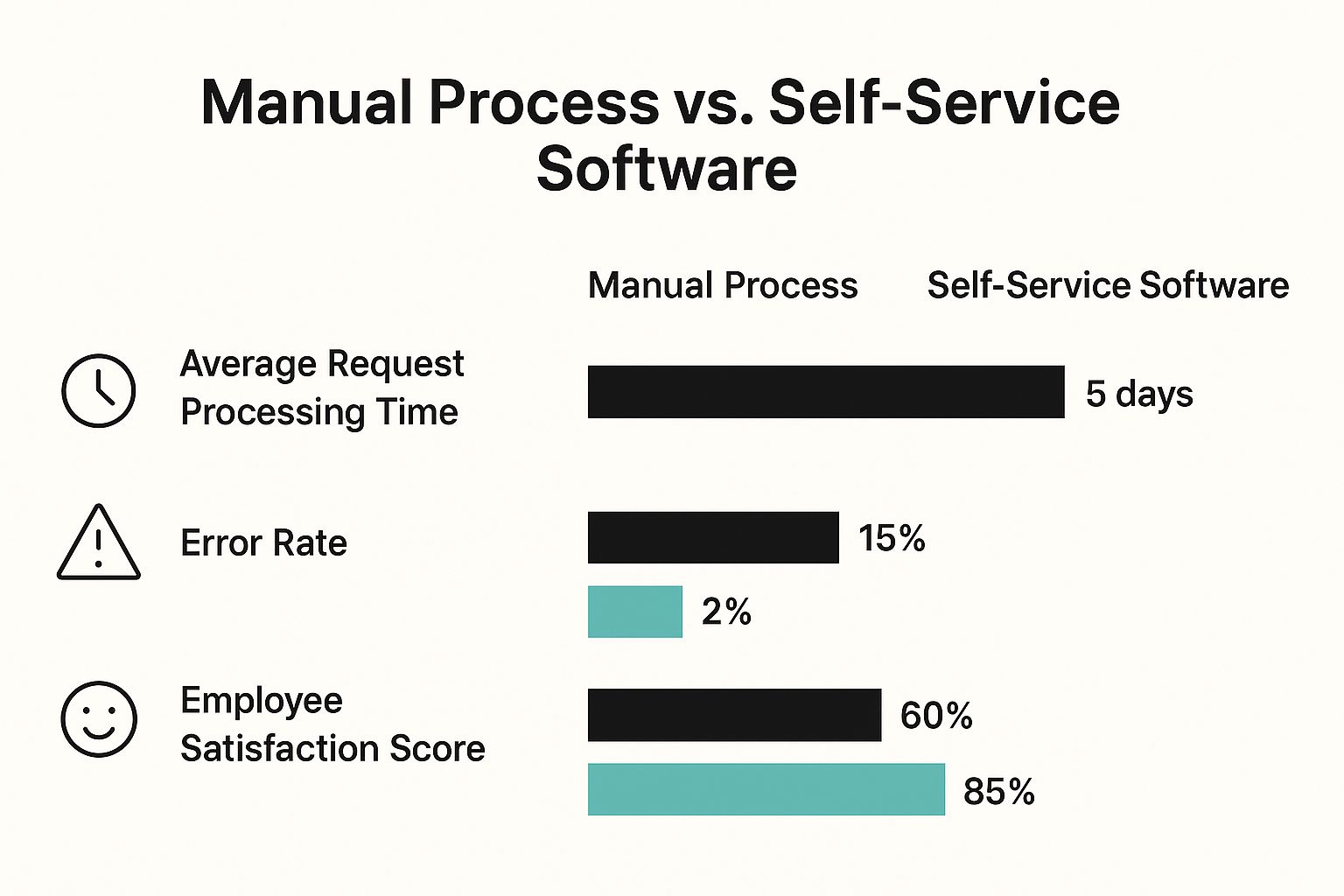
The data speaks for itself. Moving to a self-service system can cut down request times from days to hours and significantly boost employee happiness.
A Growing Market and a Modern Necessity
This isn't just a fleeting trend; it’s a full-blown movement. The global Employee Self Service (ESS) Software market was worth around USD 9.3 billion in 2023 and is expected to rocket to USD 22.4 billion by 2033. In the UK, this growth is being driven by a widespread push to digitise HR functions as companies look for better ways to support their people.
Think of an ESS platform as a digital handshake between an employee and the company. It makes every interaction smoother, quicker, and more transparent for everyone.
At the end of the day, this kind of technology has moved from being a "nice-to-have" luxury to an essential tool for any efficient, forward-thinking business. By offering a solid employee self service HR system, companies can cultivate a more agile, open, and productive workplace where everyone—employees, managers, and HR—wins.
The Real-World Benefits of Adopting an ESS System
It’s one thing to talk about what a piece of software can do, but it's another thing entirely to see how it actually changes your day-to-day operations. When you bring in employee self-service software, you’re not just adding another tool to the box. You're fundamentally improving how your people and your business interact. The results are real, and they create a ripple effect that touches everything from individual job satisfaction to high-level company strategy.
Think about it from an employee’s perspective. Someone needs to check how many holiday days they have left. Instead of firing off an email to HR and waiting, they just open an app on their phone and see it instantly. That simple act gives them a sense of control and trust, which are huge drivers for engagement.
When your team feels empowered and respected, their satisfaction with their jobs naturally goes up. They spend less time chasing down information and more time focused on the work that matters. It’s a shift from being dependent on HR for basic tasks to feeling self-sufficient.
Boosting Operational Efficiency and HR Productivity
One of the first things you'll notice is a huge leap in efficiency. All those little administrative jobs that used to nibble away at your HR team's day are suddenly handled automatically by the employee self-service software.
Take a simple holiday request. The old way involved paper forms, email chains, and someone manually updating a spreadsheet or calendar. An ESS system automates that entire process—from the initial request to the final approval and calendar update. The admin work practically disappears.
And that’s no small thing. Some studies suggest employees can spend up to 30% of their time just looking for information. By giving them a central hub to find what they need, you’re handing that time back to them and, crucially, to your HR team.
An ESS system acts like an automated assistant for your HR department. It handles the repetitive, low-value tasks, freeing up your skilled HR professionals to concentrate on strategic work like talent development, company culture, and employee well-being.
This lets HR move from a reactive, administrative role to a proactive, strategic one. Instead of getting bogged down in paperwork, they can analyse workforce trends, spot skill gaps, and develop initiatives that actually push the company forward. You can explore more about these specific employee self-service benefits in our detailed article.
Enhancing Data Accuracy and Simplifying Compliance
Let's be honest: manual data entry is a recipe for errors. A single typo in someone's bank details or address can create a real mess for both the employee and the business. Employee self-service software neatly solves this by putting the employee in charge of their own information. After all, nobody has a greater incentive to get it right than they do.
This direct control results in much cleaner, more reliable data across the board. When an employee moves house, they update their address once in the portal, and it's instantly corrected everywhere it needs to be. You get a single source of truth, which cuts out the confusion and headaches caused by conflicting information.
This level of accuracy is also a massive help when it comes to compliance. With regulations like GDPR, getting data handling right isn't just good practice; it's a legal requirement. An ESS system supports this by:
- Controlling Access: Ensuring only the right people can see or change sensitive information.
- Creating Audit Trails: Automatically logging who made what change and when, giving you a clear record.
- Simplifying Data Requests: Making it simple for employees to access their own data, which is a cornerstone of GDPR.
With the growth of hybrid working in the UK, providing these kinds of modern digital tools is becoming essential for good HR management. Candidates, especially those early in their careers, simply expect these seamless digital experiences. Failing to offer them can lead to disengagement before they've even properly started.
Must-Have Features in Modern ESS Software

When you start looking at different employee self service software platforms, it’s easy to get lost in a sea of features and technical jargon. Not all functionalities are created equal, and some are far more critical to your daily operations than others. To find the right fit, you need to look beyond the sales pitch and understand which features deliver genuine, practical value to your business and your people.
Think of it like buying a car. You could be dazzled by fancy add-ons like a panoramic sunroof or a high-end sound system. But if the car doesn’t have reliable brakes, a decent engine, and functional steering, none of the flashy extras matter. The same logic applies here; you need to prioritise the core, non-negotiable features first.
This section acts as a buyer’s guide, breaking down the essentials that separate a basic system from a truly effective one. We’ll explore the 'why' behind each feature, helping you build a clear checklist for your evaluation process.
Intuitive and Mobile-First Interface
In a world where we manage our lives from our phones, a clunky, desktop-only system is a non-starter. A clean, intuitive, and mobile-responsive interface isn't a luxury; it's the most fundamental requirement. If your employees can’t figure out how to book a holiday or check their payslip in a few taps, they simply won't use the software.
Your team, especially those not tied to a desk, needs to access the portal from anywhere. A field-based salesperson should be able to log sickness on their phone, and a warehouse operative should be able to check their remaining leave during their break. The user experience should feel as effortless as using any other modern app.
In the UK, the rise of remote and mobile workforces has made this even more crucial. Mobile-friendly ESS platforms are becoming the standard, allowing employees to access HR services from any location. This ensures that features like leave management and wellness programmes are always within reach, which is key for supporting employee wellbeing. You can discover more insights about the UK HR payroll software market and its trends.
Powerful Leave and Absence Management
Managing time off is often one of the biggest administrative headaches for any business. A robust leave management module is the cure. This goes far beyond a simple request-and-approve button.
A truly powerful system should include:
- Customisable Policies: The ability to set up different leave policies for different teams or individuals, accounting for things like tenure-based holiday accrual or regional bank holidays.
- Team Visibility Calendars: A clear, shared calendar that shows who is off and when. This prevents accidental clashes and helps managers ensure adequate staffing levels at all times.
- Automated Calculations: The software should automatically calculate remaining leave balances, taking into account requests, approvals, and company-wide shutdowns. This eliminates spreadsheet errors for good.
A great leave management tool doesn't just track time off; it provides the foresight needed to manage your workforce effectively. It turns a reactive administrative task into a proactive planning tool.
Secure Payroll and Document Access
One of the most used features of any employee self service software is the ability to access payroll information. Employees need a secure, easy way to view and download their current and past payslips without having to ask HR.
This feature should be protected with strong security measures, ensuring that an employee can only ever see their own sensitive information. Beyond payslips, the portal should also serve as a secure digital filing cabinet for other important documents like employment contracts, P60s, or policy handbooks.
Seamless System Integrations
No HR system operates in a vacuum. The best ESS platforms are designed to play nicely with the other software you already use. Seamless integration is key to creating a truly connected and efficient workflow.
For example, connecting your ESS platform to your accounting software can automate how leave data is factored into payroll runs. An integration with your project management tool could sync approved holidays to project timelines. These connections eliminate the need for double data entry, reduce the risk of human error, and create a single, unified source of truth across your business operations. When evaluating platforms, always ask about their integration capabilities and existing connectors.
Your Roadmap to a Successful ESS Implementation
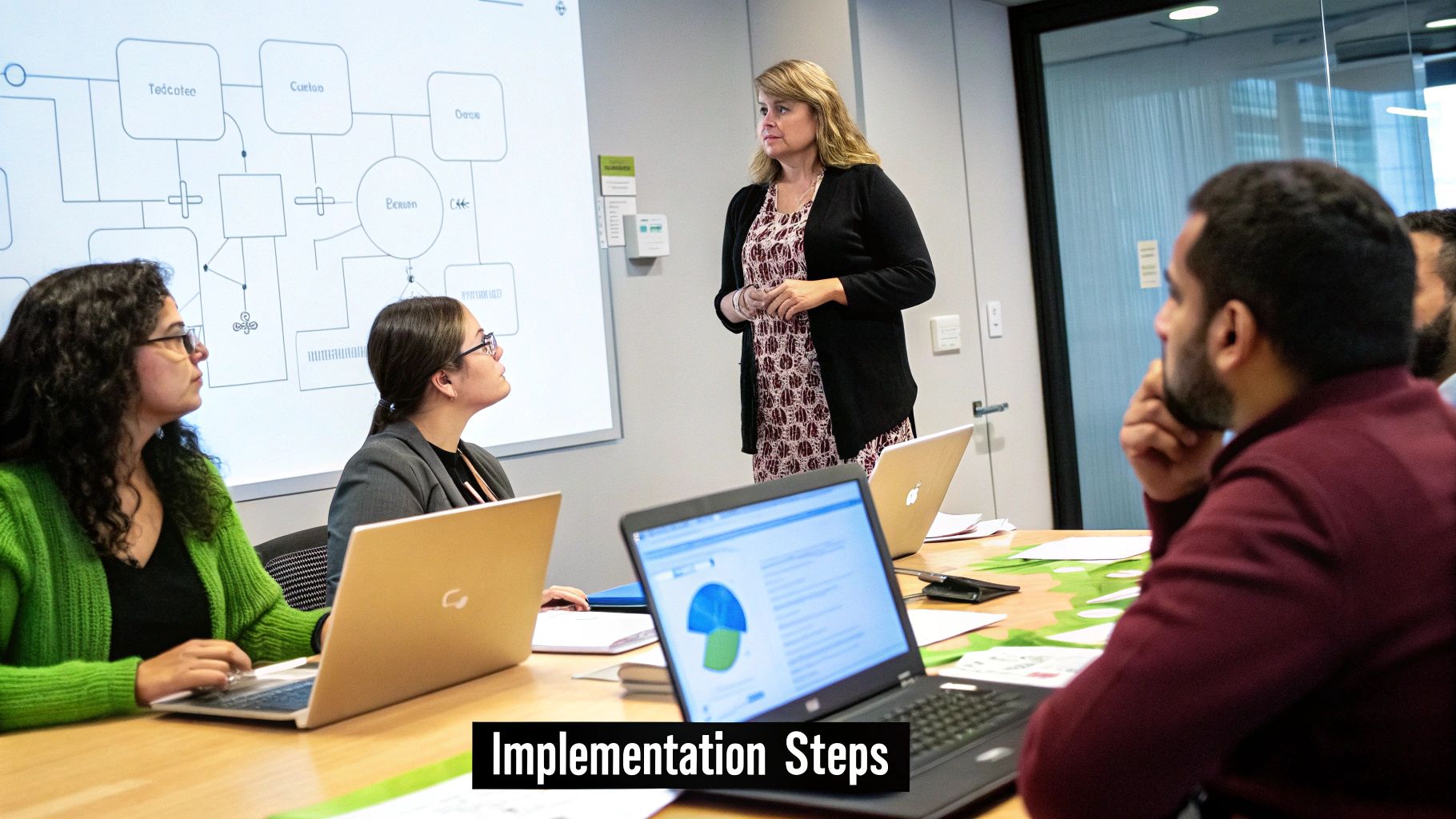
Introducing new software into your business is never just about technology; it’s always about people. A brilliant employee self-service software platform can look amazing on paper, but it only delivers on its promise if your team actually uses it. A successful rollout needs a thoughtful plan that handles the technical side of things and, maybe more importantly, the human side of change.
Without a clear roadmap, even the best software can end up gathering digital dust. The goal is to make the switch so smooth and the benefits so obvious that your team doesn't see it as another chore. Instead, they should welcome it as a genuinely useful tool that makes their work lives easier.
Think of this as your guide through the key stages, from the first spark of an idea to getting your whole team on board. Following these steps helps you sidestep the common tripwires and make sure your new ESS system becomes a valued part of how your company works.
Stage 1: Laying the Groundwork
Before you even think about moving data, you need to build a solid foundation. This is all about getting everyone on the same page and being crystal clear about what you want to achieve. Getting this initial planning phase right is absolutely critical for long-term success.
First up, you need your leadership team's backing. Present a clear business case that spells out the benefits you're aiming for, like cutting down HR admin time, getting more accurate data, and giving employees a better experience. Show them exactly how the software will solve today’s headaches and help the company hit its goals.
Next, you need to define what success actually looks like for your business. This means setting clear, measurable objectives.
- Objective: Slash the time HR spends on leave requests by 75% within three months.
- Objective: Get an 80% adoption rate across all staff within the first month.
- Objective: Completely phase out spreadsheet-based holiday tracking by the end of the quarter.
Having these specific targets gives you a yardstick to measure your progress against and keeps the entire project focused.
Stage 2: The Technical Setup and Data Migration
Once your plan is set, it’s time to get your hands dirty with the technical side of things. This stage involves setting up the software to fit your company's unique policies and moving all your existing employee data into the new system.
Configuration is where you mould the software to your needs. This means setting up your specific leave policies, deciding who needs to approve what, and customising who can see and do things within the system. A well-configured system works for you, not the other way around.
Data migration can feel like a huge task, but it’s perfectly manageable with a good plan. For any business moving to a new digital platform, a structured approach is a must; using a comprehensive cloud migration checklist can help make sure nothing gets missed. The real key is to start with clean data. Make sure everything is accurate and up-to-date before you start the transfer.
Key Insight: Treat data migration as a spring clean for your HR records. It's the perfect opportunity to fix old mistakes and create a single, reliable source of truth for all employee information from now on.
Stage 3: Driving Adoption Through People
This is the final and most crucial stage, and it’s all about your people. The success of your employee self-service software lives or dies by user adoption. This is where you need to be great at managing change, turning any potential resistance into genuine enthusiasm.
Start talking about the new system early and be completely transparent. Explain why you're making the change and spell out what’s in it for them directly—less paperwork, instant access to their info, and more control. Frame it as a positive step forward that makes life easier.
Training is non-negotiable. Don’t just email out a user manual and hope for the best. Run hands-on training sessions designed for different groups (employees, managers, and admins). Keep the sessions short, focused, and practical. It’s also a great idea to record them so people can watch them back later.
Finally, find a few "champions" in different departments. These are the enthusiastic team members who can be the first point of call for their colleagues, answering questions and championing the new system from a peer's perspective. Their support is invaluable for building momentum and turning your new software into a resource everyone actually wants to use.
Choosing the Right ESS Partner for Your Business
Picking employee self-service software isn't just another purchase; it’s the start of a long-term relationship. The right provider won't just hand you a product and walk away. They’ll give you a solution that grows with your business, understands your day-to-day headaches, and genuinely helps you succeed. To find a true partner, you need to look beyond a simple checklist of features.
Think about the common pain points that inspired your search in the first place. Picture the daily struggle of tracking time off on spreadsheets, the constant worry of being understaffed because holiday requests clashed, or the sheer admin nightmare of calculating everyone's leave allowance. The right software doesn’t just put these tasks online; it actually solves the problems behind them.
So, when you're looking at different options, you're really searching for proof that they've designed their platform to tackle real-world business challenges. This means you need to dig a little deeper.
Evaluating a Potential Partner
Choosing an ESS provider is a bit like other major business decisions. The homework you need to do is similar to the advice in a guide on how to choose a web design company, where you’d check their past work, their expertise, and the kind of support they offer down the line. You're not just buying a tool; you're investing in a partnership.
Here are the key things to focus on:
- Solving Your Specific Pains: Do they get the unique challenges of your industry or company size? A generic, one-size-fits-all system rarely cuts it.
- Ease of Use: A system packed with features is useless if your team finds it too confusing to use. The interface needs to feel simple and intuitive for everyone.
- Support and Onboarding: What kind of help do you get during the setup and beyond? A real partner will offer solid training and be easy to reach when you run into problems.
- Scalability: Can the software keep up as your business grows? The platform should be able to handle more employees and new policies without needing a complete replacement.
Key Insight: The best employee self service software partners don't just sell you features; they offer a solution. They've thought about your needs and built a system that makes workflows smoother, prevents common mistakes, and gives you useful insights.
LeaveWizard as a Case Study
Let's use LeaveWizard as a real-world example of what this looks like. Instead of just being a basic digital calendar, LeaveWizard was built to directly solve the core leave and absence management issues that frustrate so many small to medium-sized UK businesses.
The whole system is designed to simplify complicated processes. For instance, the leave request feature is much more than a digital form. It includes a live team calendar, so both employees and managers can spot potential staffing conflicts right away, even before a request is sent. This one simple feature prevents one of the biggest headaches in holiday planning.
This glimpse of the LeaveWizard homepage shows its professional, user-friendly design—a massive factor in getting employees to actually use the system. A clean layout hints at a system that’s easy to get around in, which is exactly what you want from a strong ESS partner.
What’s more, LeaveWizard’s approval flows are completely customisable. This means you can create different rules for different teams, making sure requests always go to the right manager. This flexibility shows a deep understanding that no two businesses are run the same way. The platform’s reporting dashboards also turn raw attendance data into helpful information, allowing managers to see absence patterns and plan their resources better. These are all signs of a system built to solve problems, not just record data.
When you focus on these kinds of practical features, you can see how a dedicated solution delivers on the real benefits of an ESS system. It empowers your team, frees up admin time, and gives managers the tools they need to plan ahead. When choosing your provider, look for that clear connection between their features and your business goals. A truly effective employee self service portal should feel like a natural part of your HR strategy.
Frequently Asked Questions About ESS Software
It’s only natural to have a few questions when you’re thinking about bringing in new technology. Moving to an employee self-service software platform is a big step, and it's smart to do your homework. We find that decision-makers often bring up the same points about security, cost, getting it set up, and—crucially—whether their team will actually use it.
This section gets right to the point, tackling those common questions head-on. We want to give you clear, straightforward answers to clear up any lingering doubts so you can move forward with confidence.
Is Employee Self Service Software Secure?
This is usually the first question people ask, and for good reason—you’re handling sensitive personal data. The short answer is yes, any reputable ESS platform is built with security as its absolute foundation. Think of it like your online banking portal; it uses multiple layers of protection to keep your financial information safe, and a good ESS system does the same for employee data.
Modern platforms are designed to be incredibly robust. Security isn't just a feature; it’s woven into their very fabric. Key security measures you should expect to see include:
- Data Encryption: All your data, whether it's just sitting on a server or being sent across the internet, is scrambled into an unreadable code. This means that even if someone managed to intercept it, it would be completely useless without the specific key to unscramble it.
- Role-Based Access Control (RBAC): This is a vital feature. It simply means people can only see the information that’s relevant to their job. An employee can see their own payslips, a manager can approve their team's holiday requests, and an HR admin has broader access—but nobody sees data they aren’t supposed to.
- Regular Security Audits: Good vendors are constantly testing their own systems for weaknesses and pay for outside experts to audit them too. This proactive approach helps them stay one step ahead of any potential threats.
On top of all this, these systems are designed to help you comply with strict data protection laws like GDPR. By keeping all your data in one secure place with controlled access, an ESS platform often makes it far easier to stay compliant than juggling scattered spreadsheets and paper files.
How Long Does Implementation Take?
The mere thought of a long, complicated software rollout is enough to put anyone off. But implementing a modern, cloud-based employee self-service software is often much quicker and less painful than you’d imagine. The exact timeline can depend on your company’s size and how complex your setup is, but we're not talking about the months-long sagas of the past.
For most small to medium-sized businesses (SMBs), the whole process can be wrapped up in a matter of weeks, not months. The main reason is that modern Software-as-a-Service (SaaS) platforms are already built; they just need to be configured to match your company's specific rules and policies.
Key Insight: A successful and speedy implementation depends less on the technology itself and more on having a clear plan. A dedicated implementation partner and well-organised data are the two biggest factors in a swift rollout.
The process usually breaks down into a few key stages: the initial setup and configuring your policies, migrating your data (like importing employee records), and then the final step of training your team and going live. With a good provider holding your hand and a dedicated contact person on your team, it can be a very smooth journey.
Will My Employees Actually Use The Software?
This is a completely fair question. You can invest in the best tool in the world, but if nobody uses it, what’s the point? The good news is that adoption rates for well-chosen ESS platforms are typically very high, mainly because they are built to make employees' lives easier.
Getting your team on board really comes down to a few simple things:
- User-Friendliness: The system has to be intuitive. If an employee can book a holiday or check their payslip with the same ease as they'd order a takeaway on an app, they will use it. A clunky, confusing interface is the number one killer of adoption.
- Mobile Accessibility: In today's world, this is non-negotiable. People expect to handle quick tasks on their phones, whether they're on a break, at home, or on the move.
- Clear Communication of Benefits: When you launch the system, you have to sell the "what's in it for me?" aspect. Show your team exactly how it will save them time and cut out hassle. It’s not just another piece of corporate software they have to use; it’s a tool that gives them more control.
Once employees realise they can get instant answers and handle requests in seconds—without having to chase down someone in HR—they quickly see the value. That convenience factor alone is a huge driver for getting everyone on board.
Can ESS Software Integrate With Our Existing Payroll System?
Yes, absolutely. In fact, this is a non-negotiable feature for any worthwhile ESS platform. A system that can't talk to your other core business software doesn't solve problems—it creates new ones. The whole point is to create a seamless flow of information, and integration is how you get there.
Most leading employee self-service software solutions are built with this in mind. It usually works in one of two ways:
- Pre-Built Integrations: Many platforms come with ready-made connectors for popular payroll, accounting, and other HR systems. This is usually the simplest, most "plug-and-play" option.
- API Access: For more custom setups or less common software, providers offer an Application Programming Interface (API). An API is basically a set of rules that lets different software programs talk to each other. It gives your technical team or a developer the tools to build a custom bridge between your ESS and just about any other system you use.
Proper integration means that when a manager approves leave in the ESS portal, for example, that data automatically flows through to payroll without anyone having to type it in again. This doesn't just save a massive amount of time; it also dramatically cuts down the risk of expensive human errors.