You've got a spreadsheet called “HR access”, another called “annual leave”, and at least one former employee whose name still appears in both. Someone updates permissions when they remember. Someone else shares a password because a manager needs to approve an absence quickly. Nobody can confidently explain who can see employee records today, or whether that access disappeared when a person changed jobs.
That's the access problem facing many small businesses. Role based access control gives you a practical way out, but only if you treat roles as part of everyday people management, not as a one-off IT diagram. Build access around the work people do, separate requesting from approving, and connect every change to a clear Joiners, Movers and Leavers process.
Table of Contents
- The Day a Former Manager Still Has the Keys
- What Role Based Access Control Really Means
- RBAC Compared With Other Access Models
- Designing Roles Around Real Jobs
- A Practical Implementation Path and Role Matrix
- Wiring RBAC Into Your Leave and HR Stack
- Audit, Compliance and Access Reviews
- Common Mistakes and How to Avoid Them
The Day a Former Manager Still Has the Keys
A 35-person design agency discovered the problem through an ordinary pay-query email. A finance lead was checking why an employee's pay had changed when the email revealed that a former line manager had discussed the employee's long-term sick leave.
The former manager had left months earlier and now worked for a competitor. Yet their old login still opened the shared HR folder. The folder contained absence notes, leave records and other information that the former manager no longer needed, or should ever have been able to view.
Nobody had deliberately granted malicious access. The agency had relied on a spreadsheet, weak shared passwords and ad-hoc permission changes. When the manager left, the business removed them from a team chat but didn't remove their access everywhere else. The spreadsheet recorded who was supposed to have access, not who could open the files.
That distinction matters. A small business can't keep access safe by asking people to remember every change across every tool. It needs a repeatable operating routine.
Practical rule: If access changes depend on someone remembering an informal task, the process has already failed.
The fix is straightforward in principle. Define roles such as Line Manager, Payroll Admin and HR Owner. Assign those roles based on job responsibilities rather than individual names. Then connect role changes to joiners, movers and leavers, so a promotion, transfer or departure triggers an access decision instead of an overlooked spreadsheet edit.
Before you change anything, answer three questions:
- Who can see what today?
- Who changed those rights?
- Who reviews them?
If the answer to any question is “we're not sure”, start there.
What Role Based Access Control Really Means
Role based access control, or RBAC, restricts access according to a person's job function. A user receives permissions through an assigned role, rather than receiving a separate collection of direct permissions for every application, folder or record.
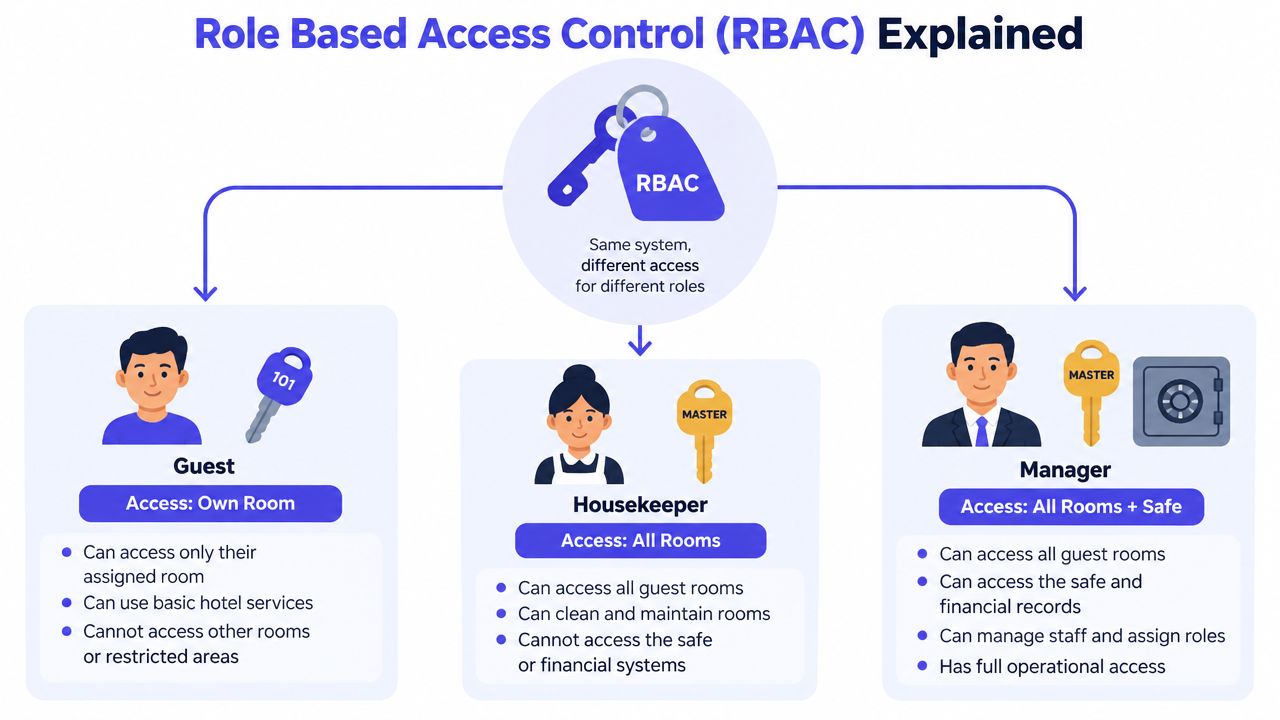
The hotel key-card analogy makes the model easy to understand. A guest card opens one room. A housekeeping card opens the rooms the housekeeper needs to service. A manager card opens rooms and a safe. The cardholder doesn't negotiate a new permission for every door. Their role determines the access.
In a business, the same relationship has three parts:
- User, the person or machine identity.
- Role, the job function assigned to that identity.
- Permission, the action or resource the role can use.
Sarah shouldn't receive permanent edit rights just because she happens to manage payroll this month. The Payroll Admin role should contain the required payroll permissions, and Sarah should hold that role while she performs that work. When she leaves or moves to another function, the business removes or changes the role. The permissions follow the role, not Sarah's name.
The UK NCSC describes RBAC in cloud environments as assigning fine-grained permissions to a human or machine identity, with roles scoped to one or more resources. Its design principle is that each role should have only the permissions needed for its purpose, supporting least privilege through UK NCSC cloud user-management guidance.
Make the policy sentence usable
A useful policy definition is:
Access is granted to named users through defined job roles, and each role receives only the permissions required to perform its approved responsibilities.
That sentence is short enough to include in a policy and specific enough to guide an administrator. It also leaves room for temporary access, provided the exception is approved, logged and removed.
For a small business, start with four core roles: Employee, Line Manager, Payroll Admin and HR Owner. Add an Auditor role when someone needs reporting access without operational editing rights. Your access system should also preserve an audit trail, so learn how to manage audit logs in role based access before rolling out sensitive permissions.
For a visual explanation of the workflow, this video provides another introduction to the model:
RBAC Compared With Other Access Models
RBAC is not the only way to control access. Small businesses commonly encounter attribute-based access control, access control lists and discretionary access control, often without choosing them deliberately.
ABAC makes decisions using attributes about the user, resource or request. A rule might combine department, device type, location or working context. That can provide finer control, but it demands more careful policy design and more maintenance than most small teams need at the start.
An ACL attaches entries directly to a resource. A shared drive might list individual users or groups who can read, edit or administer a folder. ACLs work well for a limited number of files and a small group of owners. They become difficult to govern when every folder has its own exceptions.
DAC gives the resource owner discretion to grant access. It's flexible, but it spreads security decisions across employees who may not understand the wider consequences of sharing sensitive data.
| Model | Setup Cost | Admin Effort | Granularity | Audit Ready | Best Fit |
|---|---|---|---|---|---|
| RBAC | Low to moderate | Low once roles are stable | Good for job functions | Strong | Most 10 to 100 person businesses |
| ABAC | Moderate to high | High | Very high | Strong if documented | Complex context and device rules |
| ACL | Low initially | Rising with each resource | Resource-specific | Variable | Small shared-drive arrangements |
| DAC | Low initially | Distributed and inconsistent | Resource-owner controlled | Weak to variable | Informal collaboration with low sensitivity |
This table leads to a clear recommendation. Use RBAC as the default model for a 10 to 100 person business. It's cheap enough to introduce, simple enough for non-technical managers to understand and structured enough to support an access review.
ABAC is overkill until you need rules based on location, device or request context. Don't buy complexity to solve a problem you don't have. ACLs remain useful inside a shared drive, but use groups that reflect your RBAC roles rather than adding individual exceptions forever.
RBAC should be your operating model. ACLs can support it at the file level.
For broader network concepts, the IT Cloud Global network access control guide offers useful background on how access decisions fit into a wider security architecture. Keep the implementation proportionate, though. Your first goal is not to build an enterprise identity programme. It's to stop sensitive data being controlled by forgotten names and shared passwords.
Designing Roles Around Real Jobs
Start with responsibilities, not job titles. Titles are often unreliable in small businesses. The same person may lead a team, prepare payroll, cover reception and manage a client account. A role should reflect a specific access need, not the wording on an organisational chart.
List the recurring activities that touch sensitive information:
- Leave administration: View balances, submit requests and approve absences.
- Payroll work: Export hours, review pay-related data and provide reports.
- People management: View team calendars and approve requests for direct reports.
- HR administration: Edit employee records, configure policies and review access.
- Assurance: Read reports and change records without editing operational data.
Group those activities into stable roles. A sensible starter set includes Line Manager, Payroll Admin, HR Owner, Department Viewer and Read-Only Auditor. Use the government's guidance on managing user privileges as the governing principle: users should receive the rights needed for their business role and no more.
| Role | View Own Leave | Approve Team Leave | Edit Employee Records | Export Payroll Data | Manage Roles & Users |
|---|---|---|---|---|---|
| Line Manager | Yes | Yes, direct reports only | No | No | No |
| Payroll Admin | Yes | No | Limited, where required | Yes | No |
| HR Owner | Yes | Yes, where authorised | Yes | Where required | Yes |
| Department Viewer | No or limited | No | No | No | No |
| Read-Only Auditor | Report access | No | No | No | No |
Three roles that expose bad design
A Line Manager should approve leave for direct reports, but shouldn't edit pay rates or employee master records. The system should limit the manager's view to the team they supervise, not to every employee in the company.
A Payroll Admin may need to export hours and absence information for payroll processing. That person shouldn't approve their own leave request. If the payroll administrator also manages a team, create an explicit separation between those responsibilities rather than adding every available permission to one account.
The HR Owner can manage employee records, configure workflows and run quarterly access reviews. Even here, “full access” doesn't mean unrestricted personal convenience. Keep emergency or privileged activity separately controlled, logged and reviewed.
The HR guidance for small businesses is useful when translating everyday responsibilities into clear ownership. Segregation of duties should be deliberate: the requester, approver and administrator shouldn't all be the same person for sensitive actions.
A Practical Implementation Path and Role Matrix
You can move from spreadsheet-based access tracking to a workable RBAC model in one working week if you keep the first version deliberately small. Don't attempt to model every exception before anyone has used the basic roles.
Build the first version in six steps
Step 1, inventory current access. List every person, application, shared folder and sensitive action. Record what each person can view, edit, approve, export or administer. Mark anything based on a shared login as an immediate accountability problem.
Step 2, create the starter matrix. Use Employee, Line Manager, HR Admin, Payroll Admin and Auditor. Separate view rights from edit rights. If a role can approve, write down exactly whose requests it can approve.
Step 3, define approval depth. Line Managers should approve within their reporting line only. HR Admin should handle cross-team requests or exceptions. Payroll Admin should process approved information, not approve their own requests.
Step 4, enforce least privilege. Begin with the smallest useful permission set. The UK Government Digital Service least-access standard says teams should define roles, grant the required privileges and use the least-privileged role as the default. It also specifies that privileged access sessions in non-development environments should last no more than 30 minutes, and that privileged access should be removable through a Joiners, Movers and Leavers process managed by line managers, as set out in the GDS least-privilege standard.
Step 5, write role charters. Give each role an owner, purpose, permissions, approval boundary and removal trigger. Keep each charter to one page.
Step 6, pilot before rollout. Test the model with two teams. Ask managers where the workflow blocks legitimate work, then adjust the role definition rather than granting random direct access.
Copy-ready matrix template
| Role | View Team Calendar | Approve Leave Requests | Edit Absence Balances | View Reports | Configure Roles |
|---|---|---|---|---|---|
| Employee | Own or permitted team view | No | No | Personal only | No |
| Line Manager | Direct team | Direct team | No | Team reports | No |
| HR Admin | All authorised teams | Cross-team or exception | Yes | Organisation-wide | Yes |
| Payroll Admin | Required team data | No | Limited or no | Payroll reports | No |
| Auditor | Read-only | No | No | Read-only reports | No |
For go-live, confirm that roles are defined, owners are assigned, the Joiners, Movers and Leavers process is linked, and a review date is set. Don't launch until every role has a named business owner who can explain why each permission exists.
Wiring RBAC Into Your Leave and HR Stack
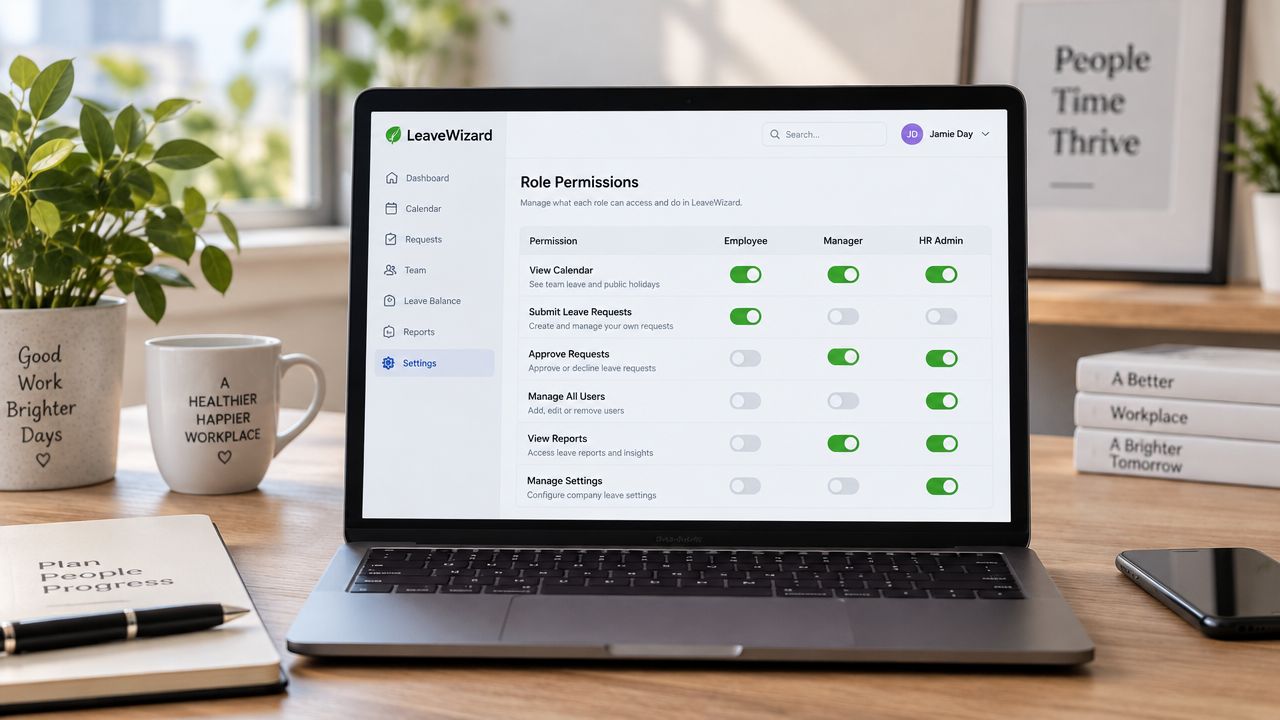
A leave and absence platform can become the practical home for RBAC because the permissions map directly to daily work. Staff need self-service access to their own leave. Managers need approval access for direct reports. HR needs configuration and employee-record controls. Auditors need reports without editing rights.
In a small business, map those needs to four straightforward permission sets:
- Employee: Submit and view personal leave requests.
- Line Manager: Review and approve requests from direct reports.
- HR Admin: Manage employee records, policies, balances and exceptions.
- Auditor: View reports and access history without changing operational data.
LeaveWizard assigns users the roles Administrator, Manager or Employee, with access to pages and functions determined by the assigned role. Use that product structure only as an example of the principle. The important decision is the boundary behind each role, especially where a manager's access stops and HR administration begins.
Make the directory the source of truth
Role assignment shouldn't depend on manual edits inside the leave tool. Use a single sign-on provider such as Microsoft Entra ID or Google Workspace, and make the HR system or directory the source of truth for job changes.
Directory synchronisation or SCIM can support automated Joiners, Movers and Leavers updates where the products support it. Automation won't fix a badly designed role catalogue, so review the mapping first. A moved employee should lose the old manager role and receive the new role as part of the same approved change.
The LeaveWizard and Okta integration provides a useful example of how identity systems can connect with leave administration. Whatever your stack, protect privileged roles with multi-factor authentication and retain access-change logs long enough to support internal reviews and relevant obligations.
Use this go-live check:
- Confirm SSO is working.
- Enable MFA for HR Admin and Payroll Admin.
- Verify leavers are removed within 24 hours.
- Test that a former manager can't view current team calendars.
- Record who approved each role assignment.
Audit, Compliance and Access Reviews
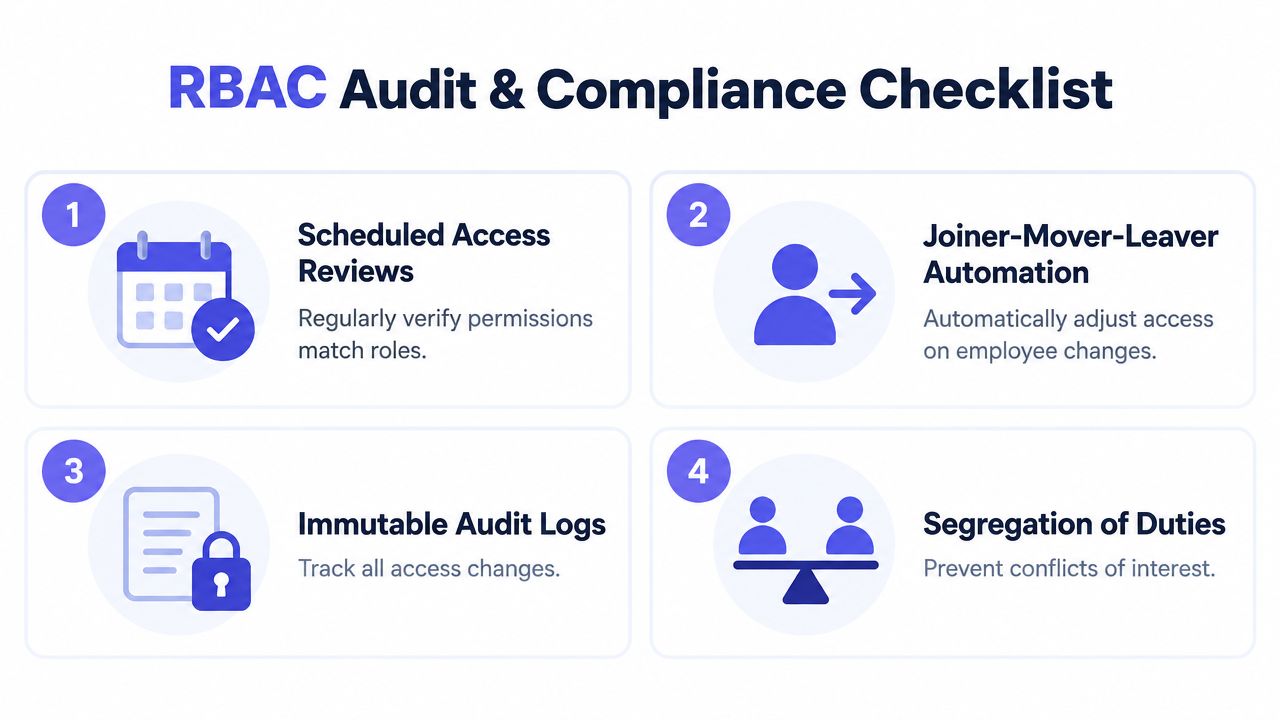
RBAC helps with audit because it turns a vague question, “Who can access employee data?”, into a reviewable set of records. You can show the role definition, the people assigned to it, the approval that authorised the assignment and the change log that records later updates.
The UK NCSC says access should be limited to authorised users with unique credentials and authenticated requests. Its public-sector guidance also rejects a one-size-fits-all permission set. Staff should be segmented by role, and view-only users shouldn't receive admin-level access, as explained in the NCSC authorised-user principles.
NHS England applies the same logic directly to identity management. Its guidance says RBAC is key to meeting access requirements and gives the practical example that someone who only needs to view records should receive a view-only role, not an admin or super-user role. Its identity and access control guidance is particularly useful for businesses handling sensitive employee information.
Run a disciplined quarterly review
At each quarterly review:
- Pull the current role and permission report.
- Reconcile assignments against current responsibilities, not just job titles.
- Flag former managers, temporary cover arrangements and people with multiple roles.
- Check that approval and administration remain separated.
- Record corrections and obtain sign-off from the role owners.
Retain role definitions, approval records, access-change logs, review evidence and leaver confirmations. The audit trail should show what changed, who approved it and why.
The NHS developer model demonstrates how explicit this mapping can become. Users hold predefined roles, roles link to predefined activities, and users can hold multiple roles. Its national RBAC structure uses Job Roles, identified by “R” codes, Activities, identified by “B” codes, and a Baseline Policy for the default role-to-activity mapping, described in NHS national RBAC developer guidance.
Good RBAC produces evidence during normal work. It shouldn't require an emergency reconstruction before an inspection.
For practical risk context, pair access reviews with an insider threat awareness guide. Protecting employee data also requires secure operational handling, including the controls outlined in LeaveWizard's employee data security guidance.
Common Mistakes and How to Avoid Them
Small-business RBAC usually fails through neglect, not technical impossibility. Owners create a few roles, then bypass them whenever a person needs something unusual. The exception becomes permanent, the role catalogue grows, and nobody can tell whether the permissions still match the job.
| Mistake | Risk Created | Corrective Action |
|---|---|---|
| Cloning permissions for one person | Role sprawl and hidden exceptions | Consolidate duplicate roles and assign a role owner |
| Using shared logins | No reliable accountability | Enforce named accounts and individual authentication |
| Never reviewing promotions or transfers | Former permissions remain active | Schedule quarterly attestations against current responsibilities |
| Letting requesters approve their own leave | Conflicts of interest and weak oversight | Separate requester, approver and administrator duties |
| Treating RBAC as an IT project | Access falls behind organisational changes | Embed reviews into the Joiners, Movers and Leavers process |
Fix the five failure points
Role sprawl needs an owner. If one employee receives a custom role, ask whether the permission reflects a genuine recurring function. If it does, add that function to a standard role. If it doesn't, approve time-limited access and remove it after the task.
Shared accounts must end. A shared password destroys the answer to “who changed that record?” Give each user a named account, require authentication and record administrative activity.
Promotions need an access event. Moving someone from employee to manager should remove obsolete permissions as well as add new ones. Don't assume the old rights are harmless. A new manager may need team-calendar visibility but not payroll export access.
Approval conflicts need design, not trust. Pair leave approval with payroll controls so the person requesting an absence can't approve it and alter the resulting payroll data without oversight.
Reviews need a calendar date. Assign each role a business owner and require that owner to attest that the permissions remain appropriate. Put the review into the same people-change routine used for joiners, movers and leavers.
Give each corrective action a 30-day owner. If nobody owns the fix, the spreadsheet will become the access system again.