At 8:45 on a Monday, an HR admin in a 35-person UK accountancy firm already has four competing deadlines. A new starter is due at 9am, two line managers have emailed about long-term sickness, payroll needs variable-hours updates by Wednesday, and a candidate has withdrawn from an accepted offer.
The first hour is triage. The admin confirms the starter's right-to-work evidence, checks whether the sickness cases need an SSP1 follow-up, updates the payroll action list, and records the failed hire so nobody sends a welcome pack to someone who isn't joining. The rest of the day gets blocked around onboarding paperwork, a call chasing an SSP1, a meeting with the finance director about holiday-pay reconciliation, and the questions that arrive from managers who've assumed HR will remember the details.
That constant switching is what makes the responsibilities of HR admin deceptively difficult. The work looks clerical from the outside, but late or inaccurate administration can affect pay, staffing, employee trust, and the company's ability to prove compliance. Good HR admin creates a dependable connection between managers, payroll, employees, and legal obligations.
Table of Contents
- A Day in the Life of an SMB HR Admin
- What HR Admin Really Does in a Small Business
- The Seven Core Duties You Cannot Delegate
- Onboarding and Offboarding as a Workflow
- Absence and Leave Administration
- Records Compliance and Reporting
- Moving Beyond Spreadsheets
- KPIs and a Priority Checklist
A Day in the Life of an SMB HR Admin
The new starter needs more than a contract. HR admin must check right-to-work documentation, confirm personal details, send the handbook, organise induction information, and make sure payroll has the correct start date and pay details. If one item is missing, the employee may arrive without system access or appear incorrectly in the payroll file.
The sickness emails require a different response. A manager may describe an absence as “long term”, but the HR admin needs the dates, absence reason, contact history, fit-note position, and next review point. The administrator isn't deciding whether an employee is fit to work or leading an employee-relations case. They're making sure the information reaches the right person and that the record is complete.
Payroll creates another deadline. Variable hours, unpaid leave, changes to working patterns, and leaver information need to be checked before the bureau's cut-off. A payroll provider can process the file, but it can't know whether a manager's late email is accurate, approved, or missing a related absence entry.
Practical rule: Triage by legal risk, payroll cut-off, employee impact, and operational disruption, not by the order messages arrive.
By lunchtime, the candidate withdrawal has triggered recruitment clean-up. The offer record needs closing, communications need updating, and any personal data must be stored or removed in line with the organisation's retention approach. The finance director's holiday-pay reconciliation then turns several separate leave entries into a question about whether the business can demonstrate accurate records.
That's the actual job. HR admin holds the sequence together while managers raise issues informally, payroll works to fixed deadlines, and compliance requirements continue in the background. The duty list below turns that messy morning into practical responsibilities, control points, and tools that make the role survivable rather than reactive.
What HR Admin Really Does in a Small Business
In a small business, HR admin is the connective tissue between line managers, payroll, and compliance. Managers often spot the issue first, but they may not record it consistently. Payroll needs clean, approved inputs by a deadline. Compliance depends on records that are complete, appropriately stored, and retrievable when somebody asks for them.
The role commonly reports to an HR manager, finance director, or managing director. In practice, the administrator usually sits between an HR information system or leave platform and an outsourced payroll bureau. That position matters because the admin sees the hand-offs that other teams see only in isolation.
The boundary between administration and generalist HR
An HR generalist may advise on policy design, employee relations, investigations, workforce planning, and manager capability. HR admin supports those decisions by maintaining accurate data, controlling documents, applying standard calculations, monitoring deadlines, and escalating exceptions.
A useful distinction is ownership:
- HR admin owns the process record: The administrator confirms what happened, when it happened, who approved it, and what action remains open.
- The manager owns the operational context: The manager explains the employee's working situation, confirms team coverage, and completes required conversations.
- Payroll owns payroll processing: The bureau or payroll specialist applies the submitted, validated information within the payroll system.
- The HR lead owns judgement: The HR manager or senior leader handles sensitive decisions, policy interpretation, and complex employee-relations matters.
SSP1 illustrates why a routine task can be a legal gate. If an employee doesn't qualify for Statutory Sick Pay, the employer must send form SSP1 within 7 days of the employee's first day off sick, according to official SSP1 guidance. The HR admin may not decide eligibility alone, but they must identify the case, gather the relevant information, chase the decision, and make sure the form is issued on time.
Anyone preparing for the role should understand these boundaries before an interview. A practical set of answers for HR interview prep can help candidates explain how they handle accuracy, confidentiality, prioritisation, and stakeholder hand-offs without reducing the job to filing.
The Seven Core Duties You Cannot Delegate
The responsibilities of HR admin are easiest to manage when ownership is explicit. The administrator may coordinate most of the work, but managers, payroll providers, and HR leaders still retain their own decisions.
- Onboarding administration: HR admin owns the checklist, documents, reminders, and system requests. The manager prepares the role and induction, while IT or the relevant provider creates access.
- Offboarding and leaver process: HR admin owns the leaver record, payroll notification, property-return checklist, and document control. The manager confirms the final working arrangements, while payroll processes the final pay.
- Absence and leave tracking: HR admin owns the central ledger, evidence trail, approval status, and payroll hand-off. Managers confirm operational facts and support conversations.
- Payroll liaison and data hand-off: HR admin validates starters, leavers, variable hours, unpaid leave, deductions, and approved changes. The payroll bureau processes the file and raises exceptions.
- Personnel record-keeping: HR admin maintains employee data, contracts, acknowledgements, absence records, and access controls. The employee and manager must provide accurate updates.
- Compliance and statutory reporting: HR admin maintains calendars, evidence, retention controls, and reporting inputs. Senior HR or finance owners approve interpretations and submissions.
- HR reporting and people metrics: HR admin produces consistent headcount, absence, leave, starter, leaver, and payroll-query reporting. Leaders decide what action to take.
CIPD reports that UK sickness absence has reached 9.4 days per worker per year, up from 7.8 days in 2023 and 5.8 days before the pandemic, as stated in its workplace absence update. The implication for an SMB is practical: an incorrect absence date, missed SSP action, or unrecorded holiday isn't just a tidy-up issue. It can affect cover, pay, reporting, and the fairness of later decisions.
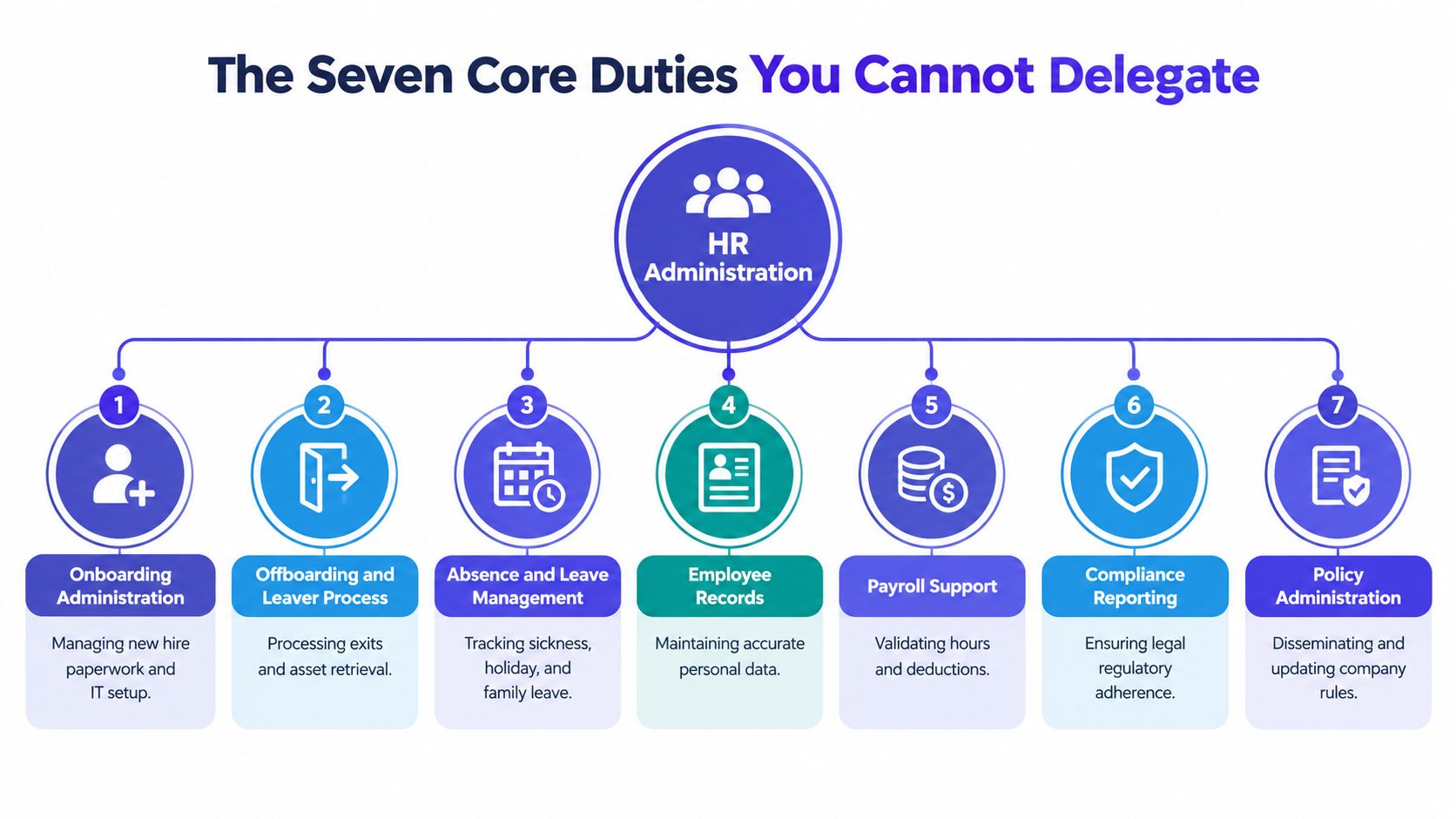
The strongest teams give each duty a clear trigger, owner, deadline, evidence location, and escalation route. Without those controls, onboarding and offboarding become the visible symptoms of a wider data problem.
Onboarding and Offboarding as a Workflow
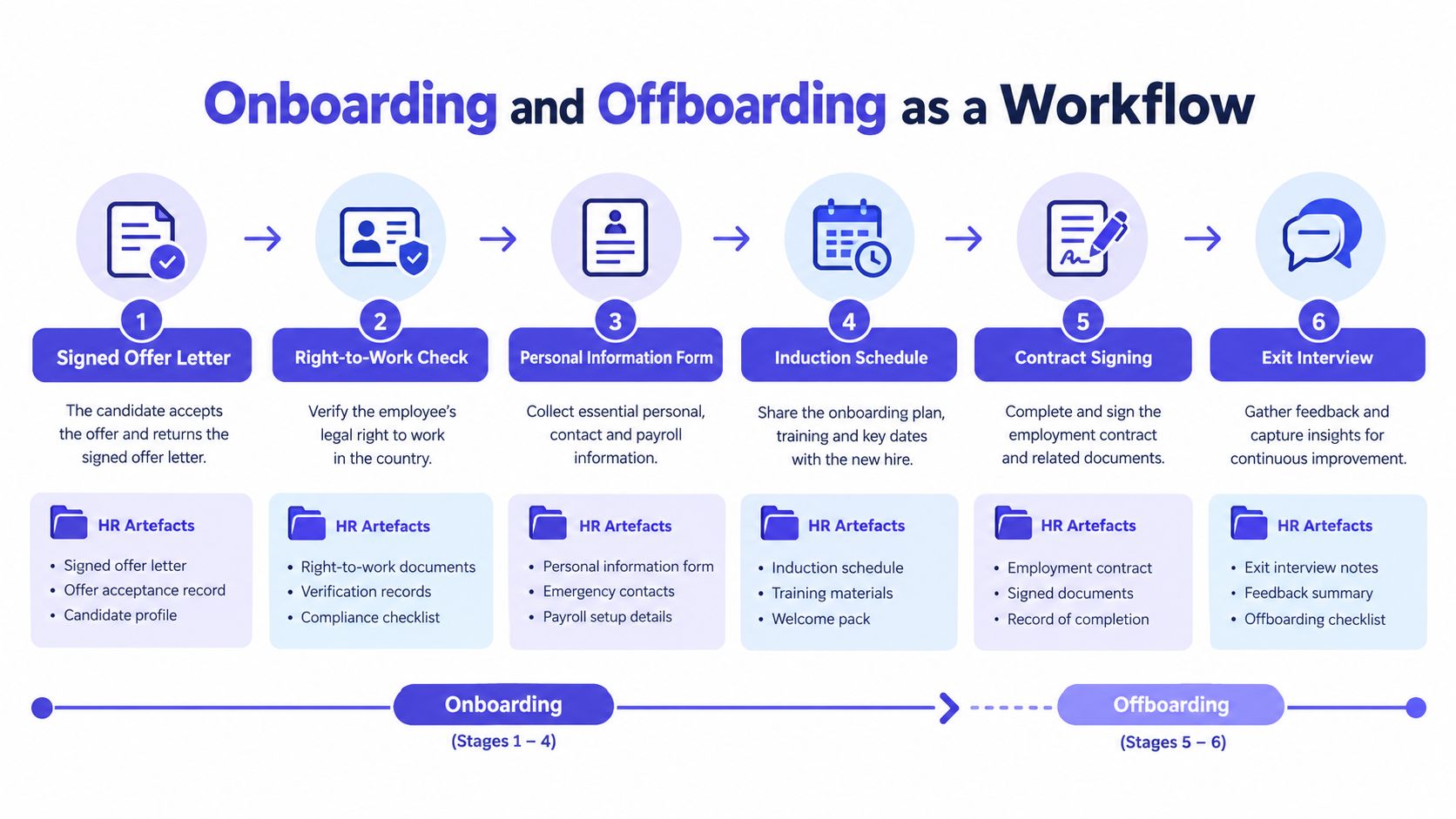
Onboarding starts when the offer is accepted, not when the employee walks through the door. HR admin should create a controlled sequence that captures the right-to-work check, personal information form, contract, handbook acknowledgement, induction schedule, and system access requests.
A practical workflow looks like this:
- Signed offer letter: Store the accepted offer and confirm the proposed start date.
- Right-to-work check: Record the check, evidence, and any follow-up required.
- Personal information form: Collect payroll, contact, emergency-contact, and other required employee details securely.
- Contract and handbook acknowledgement: Confirm that the employee received the correct documents and record acknowledgement.
- Induction schedule: Coordinate the manager, colleagues, equipment, systems, and mandatory introductions.
- Probation reminder: Set the review date and make the manager's responsibility visible.
The administrator owns the sequence and exceptions. The manager owns the quality of the induction, while IT, finance, and payroll complete their specialist actions. A structured employee onboarding checklist helps prevent the common failure where each team assumes somebody else has completed the next step.
Offboarding should mirror the same discipline. HR admin records the resignation or termination details, notifies payroll early, confirms the final working date, starts the company-property return list, coordinates system-access removal, handles reference requests, issues the exit questionnaire, and reviews what data should remain in the employee file.
A leaver form sent to payroll the day before the pay run is not a process. It's an avoidable escalation.
The final data review matters as much as the final payslip. HR admin should check outstanding holiday, unpaid leave, deductions, benefits, equipment, access, and documents. The manager confirms handover and team communication, but the admin makes sure the record closes cleanly.
Absence and Leave Administration
Absence administration is where small-business HR teams feel the cost of weak process most quickly. Managers remember conversations differently, employees report absences through different channels, and payroll needs dates that match the underlying record. A single absence ledger gives the business one place to record the first day, expected return, evidence, contact, review points, leave category, and payroll impact.
For sickness, the administrator should separate what the employee has reported from what the business has verified. A self-certification record, fit note where relevant, return-to-work discussion, and long-term absence review should not be scattered across email threads. The HR lead may decide how to handle a complex case, but the administrator keeps the timeline usable.
SSP requires particular care. Employers must pay eligible workers £123.25 per week or 80% of average weekly earnings, whichever is lower, and SSP can be paid for up to 28 weeks, according to GOV.UK employer sick-pay guidance. HR admin should record the absence dates, check the eligibility workflow, send validated information to payroll, and flag cases where SSP1 action is required.
CIPD's absence figure makes the operational point clear. At 9.4 days per worker per year, absence data must support trend review rather than only answer, "Who is off today?" A useful record helps the business identify repeated patterns, prepare return-to-work conversations, and escalate cases under the organisation's policy.
UK statutory leave types at a glance for HR admin
| Leave Type | Entitlement / Duration | Statutory Pay | Evidence HR Admin Holds | Admin Action |
|---|---|---|---|---|
| Annual leave | Holiday entitlement under the worker's applicable rules | Holiday pay where applicable | Approved request, balance, dates taken, pay record | Check entitlement, approval, balance, and payroll impact |
| Maternity leave | Statutory maternity leave | Statutory maternity pay where eligible | Notice, expected week of childbirth information, leave dates | Record dates, notify payroll, track return arrangements |
| Paternity leave | Statutory paternity leave | Statutory paternity pay where eligible | Employee notice and requested dates | Validate notice, update leave record, notify payroll |
| Adoption leave | Statutory adoption leave | Statutory adoption pay where eligible | Matching or placement evidence where required | Protect confidentiality, record dates, update payroll |
| Shared parental leave | Shared parental leave arrangement | Statutory shared parental pay where eligible | Notices, declarations, booking details | Maintain the agreed schedule and update payroll |
| Parental leave | Statutory parental leave | Usually unpaid | Request and approved dates | Apply the policy consistently and update the record |
| Parental bereavement leave | Statutory bereavement leave | Statutory pay where eligible | Employee notification and dates | Handle sensitively, record absence, notify payroll |
| Sick leave | Absence duration depends on the case | SSP where eligible | Self-certification, fit notes, review notes | Track dates, trigger reviews, validate payroll input |
CIPD's family-leave guidance for managers covers maternity, paternity, adoption, neonatal, shared parental, parental, and parental bereavement leave. HR admin translates those categories into consistent records, approvals, evidence storage, and payroll instructions. That consistency protects employees from being treated differently and helps managers plan cover without exposing unnecessary personal information.
Records Compliance and Reporting
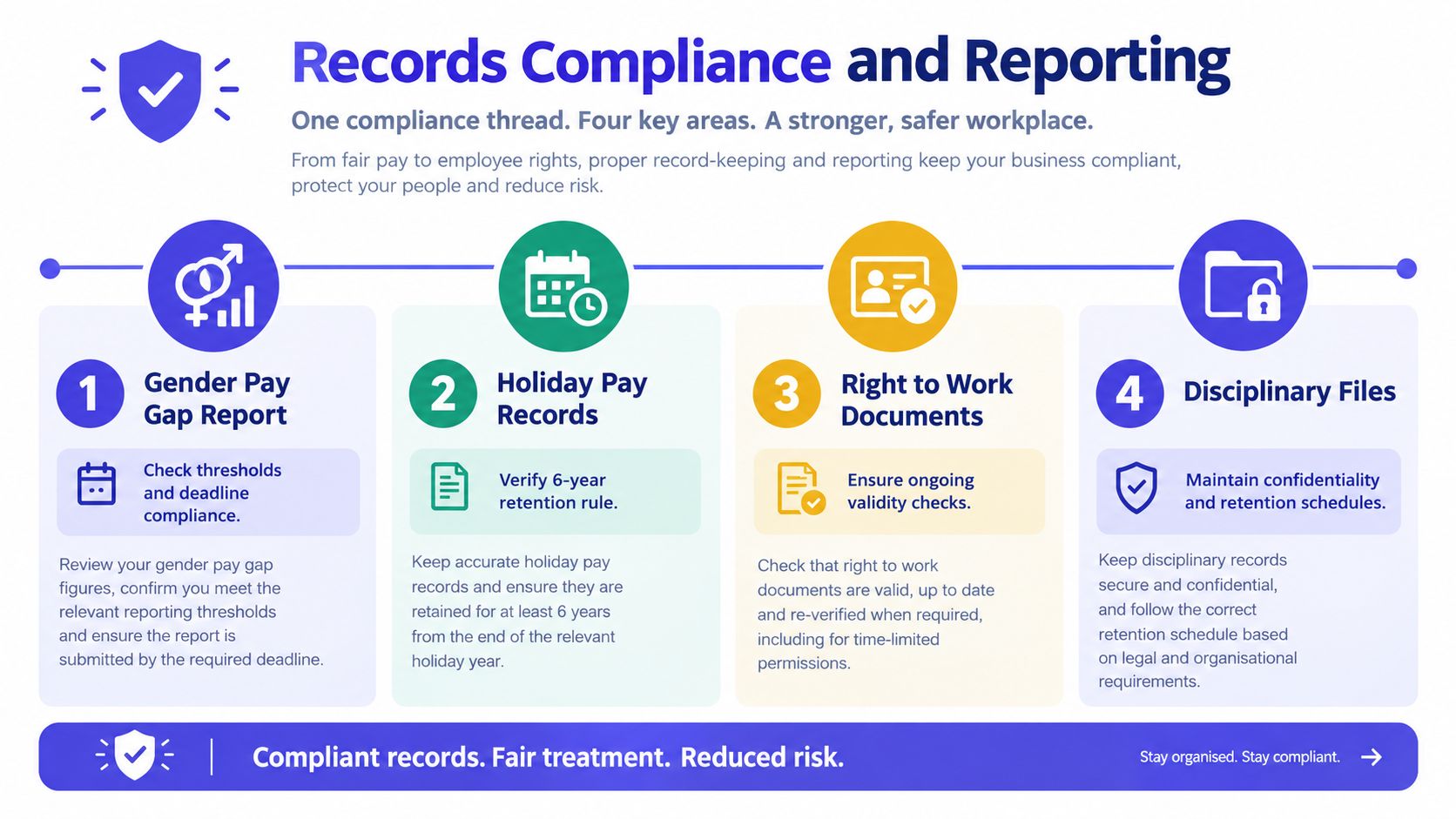
Record-keeping is not a separate filing exercise. It is the control layer behind payroll, absence reporting, leave balances, right-to-work checks, and responses to employee or regulator queries.
UK government retention guidance says annual leave, public holiday, and flexitime records should be retained for three years from the end of the employee leave year before destruction, while some HR records may be kept until the employee reaches 85 and then reviewed, as set out in the government human-resources records schedule. From 6 April 2026, employers must keep detailed annual-leave and holiday-pay records for at least 6 years, including leave days taken and holiday pay paid, according to GOV.UK holiday-pay guidance.
The format can vary, but retrieval can't depend on one person remembering an old spreadsheet tab. Use consistent employee identifiers, clear folder names, role-based permissions, version history, and a documented retention and deletion process. Sensitive absence and family-leave evidence should be restricted to people who need it.
The reporting thread
Working Time Regulations add another practical control. Employers don't need to record every daily working hour, but they must keep evidence showing compliance with the 48-hour weekly maximum, night-work limits, regular health assessments for night workers, and restrictions on young workers for 2 years, according to Acas working-time rules.
A weekly absence summary, headcount report, starter and leaver list, and statutory-leave report should draw from the same controlled records. Duplicating figures into separate files creates opportunities for contradiction. Reporting is useful only when the underlying data has an owner and a correction route.
If an investigator emails on Tuesday asking for two years of rest-break records for one depot, a well-run SMB should be able to identify the relevant workers, retrieve the source records, show any approvals or exceptions, and explain the retention basis without reconstructing the history from inboxes. The response time depends on the company's process, but retrieval should be a routine search, not an emergency archaeology project.
For practical controls around structured employee files, permissions, and searchable documents, an HR document management system can provide a more dependable foundation than shared folders with unclear ownership.
Moving Beyond Spreadsheets
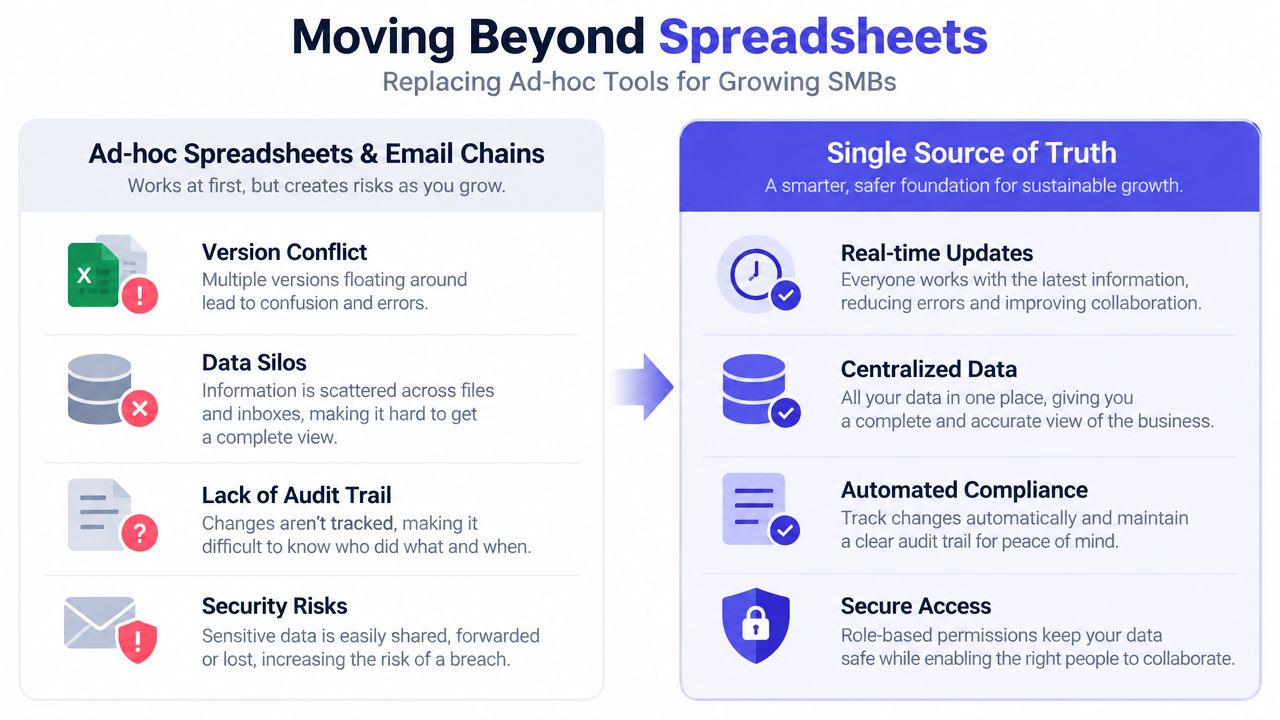
Spreadsheets fail in predictable ways. Two managers edit different copies of the absence tracker, an employee's approved leave remains in an email thread, payroll rekeys a change from a file, and nobody can show who approved the final balance. The problem isn't that spreadsheets are useless. It's that they don't provide workflow, permissions, calculation logic, or an audit trail without substantial manual design.
The pressure increases as a small business grows. Once several line managers are submitting changes, HR is no longer the only person touching the data, and payroll has its own cut-off, informal methods become fragile. A spreadsheet can store a value, but it won't reliably enforce the approval route behind that value.
What a controlled system adds
Purpose-built leave and absence tooling can centralise requests, route them to the correct approver, maintain live balances, and preserve approval history. It can also reduce the need for HR admin to copy information between emails, calendars, trackers, and payroll files.
The right test isn't whether a platform has the longest feature list. Test whether it answers these questions without manual detective work:
- Who requested the leave?
- Who approved it, and when?
- What balance and policy applied?
- What absence information must reach payroll?
- Can an administrator retrieve the record and explain a correction?
Control before convenience: Automating a bad policy only makes errors travel faster. Map the approval rules and exceptions before selecting software.
A specialist leave platform such as LeaveWizard provides administrator access to employee and leave information, approval workflows, centralised records, and reports. It can sit alongside an HRIS and payroll process rather than replacing every HR system. Businesses reviewing payroll hand-offs can also examine practical guidance on PathSource Consulting payroll controls for a wider view of validation and ownership.
For teams ready to retire a shared holiday tracker, replacing a holiday spreadsheet should start with the workflow, not the data import. Decide what the source of truth is, who approves exceptions, and how corrections are recorded.
KPIs and a Priority Checklist
Good HR admin metrics show whether the process is dependable, not whether the team is busy. Review a small set monthly:
- Onboarding time to productive: Shows whether the joiner workflow gives managers and new starters what they need.
- Absence rate per FTE: Highlights staffing pressure and data-quality gaps.
- Bradford Factor score: Helps identify absence hot spots for appropriate manager review.
- Payroll query count per cycle: Shows whether validation and hand-offs are working.
- Record-retention compliance rate: Tests whether required records are present, correctly classified, and within their retention period.
- Subject access request response time: Indicates whether employee data is organised and retrievable.
- HR request resolution time: Provides a service-quality measure without rewarding rushed answers.
Use the first week back to complete this checklist:
- Audit the absence register against payroll.
- Confirm the SSP eligibility and SSP1 process.
- Reconcile annual-leave carry-over balances.
- Verify right-to-work document expiry dates.
- Tighten joiner and leaver checklists.
- Confirm every manager's approval route.
- Review outstanding fit notes and return-to-work actions.
- Check holiday-pay record coverage for the applicable retention requirements.
- Test access permissions for sensitive employee records.
- Publish one clear route for HR requests and escalations.
Consistency beats complexity. A small business doesn't need an elaborate HR operating model before it can improve. It needs one trusted record, clear ownership, reliable deadlines, and enough reporting to spot a problem before payroll, compliance, or employee trust absorbs the cost.