
On average, a full-time UK employee works somewhere between 162 and 174 hours per month. While this gives you a handy ballpark figure, the actual number can swing quite a bit depending on the specific month, bank holidays, and what’s written in an individual’s employment contract.
Your Quick Guide to Monthly Working Hours

Knowing how many hours are in a working month is absolutely fundamental. It's the bedrock of accurate payroll, smart resource planning, and fair leave management. But one of the most common pitfalls is leaning too heavily on a single average number.
The reality is that every month is different. This constant fluctuation can lead to some costly errors if you’re not paying attention.
Think of it like a monthly household budget—your total spending changes depending on what’s going on that month. A short month like February has fewer working days than a long one like March, and that directly impacts the total work hours. This guide will help you move beyond those rough estimates and give you the tools for a much more precise calculation.
Understanding the National Average
Data from the Office for National Statistics gives us a great starting point. For example, full-time employees in the UK were working an average of 36.5 hours per week in late 2024.
If you annualise that figure, it works out to about 158 hours per month. Notice how that differs from the initial estimate? This is why it’s so important to understand the gap between a simple weekly average and the specific hours in any given month. For a deeper dive, you can explore more about UK working hour trends.
The key takeaway is this: an "average" month is a helpful concept for high-level planning, but you need month-specific calculations for financial and operational accuracy. Ignoring the monthly variations is a recipe for payroll mistakes and scheduling headaches.
To give you a clearer baseline, let’s look at how standard weekly contracts translate into average monthly hours. The table below provides a solid starting point before we get into the details that make these numbers shift from one month to the next.
Average Monthly Work Hours for Common UK Schedules
This table shows the average monthly hours calculated from standard full-time weekly work schedules.
| Weekly Hours | Calculation (Weekly Hours x 52 / 12) | Average Monthly Hours |
|---|---|---|
| 35 Hours | (35 x 52) / 12 | 151.67 Hours |
| 37.5 Hours | (37.5 x 52) / 12 | 162.5 Hours |
| 40 Hours | (40 x 52) / 12 | 173.33 Hours |
These figures are your annualised averages, which smooth out the differences between longer and shorter months. They're perfect for forecasting but remember that the actual hours in any single month will vary.
How to Calculate Monthly Work Hours Step by Step
Moving past a simple average is crucial when you need real precision, especially for things like payroll or resource planning. While the average gives you a decent ballpark figure, figuring out the exact work hours for a specific month demands a sharper pencil. Let's walk through the two best methods for calculating how many work hours are in a month.
The first approach gives you a solid annual average, perfect for high-level planning. The second, however, delivers the pinpoint accuracy you absolutely need for financial tasks. Getting comfortable with both gives you the flexibility to plan effectively, whether you're looking at the big picture or the immediate details.
The Annual Average Formula
This first formula is your go-to for high-level forecasting, setting annual budgets, or working out general leave allowances. It essentially smooths out the lumps and bumps of shorter and longer months to give you a consistent, predictable number to work with. It's quick, easy, and gives you a solid foundation for any long-term planning.
The formula itself is pretty straightforward:
(Weekly Contracted Hours × 52 Weeks) ÷ 12 Months = Average Monthly Hours
Let's put this into practice. Imagine an employee, Alex, who works a standard 40-hour week.
- Step 1: First, multiply Alex's weekly hours by the number of weeks in a year: 40 hours × 52 weeks = 2,080 hours per year.
- Step 2: Now, just divide that annual total by the number of months: 2,080 hours ÷ 12 months = 173.33 average monthly hours.
That number, 173.33, is a reliable average you can lean on for long-range strategy. But it’s important to remember it won’t reflect the actual hours worked in a short month like February or a long one like March. For that, we need to get more specific.
The Month-Specific Formula for Payroll Accuracy
When it comes to payroll, "close enough" just doesn't cut it. Accuracy is everything. This second formula calculates the exact number of work hours for one particular month, taking its unique number of working days into account. This is the method you should always use for salaries and wages.
Here’s the formula for getting it spot-on:
(Number of Workdays in the Month × Daily Hours) = Exact Monthly Hours
Let's stick with our example of Alex, who works 8 hours a day (40 hours / 5 days). We need to calculate his hours for March, which has 21 working days (Monday to Friday) this year.
- Step 1: Find the number of working days in the month you're looking at. For March, it’s 21.
- Step 2: Multiply those working days by Alex's daily hours: 21 days × 8 hours/day = 168 hours.
See the difference? The annual average gave us 173.33 hours, but the actual hours Alex is contracted to work in March are 168. This five-hour gap is exactly why using a month-specific calculation is so critical for accurate payroll. It prevents over or underpayment and ensures everything is fair and compliant, every single pay run.
Why Your Working Hours Fluctuate Each Month
Ever notice how some months feel like a sprint and others a marathon, even if your salary stays the same? It’s not your imagination. The number of working hours in any given month is a moving target, and it all comes down to the simple layout of the calendar.
Relying on a single, fixed average for how many work hours in a month is a common trap that leads to payroll mistakes and wonky schedules. The reality is that two key things are always changing: the length of the month and how many weekdays it contains. A short month like February will naturally have fewer working days than a long one like March or July.
This might sound obvious, but the knock-on effect is huge. For a business with weekly recurring tasks, a month with five Mondays is a completely different beast from one with only four.
The Calendar's Natural Rhythm
The best way to think about it is that the work year has its own rhythm. The constant shift in how the days fall means your available working days are always in flux.
This is where sticking to a rough average gets you into trouble, while a precise, month-by-month calculation keeps everything accurate.
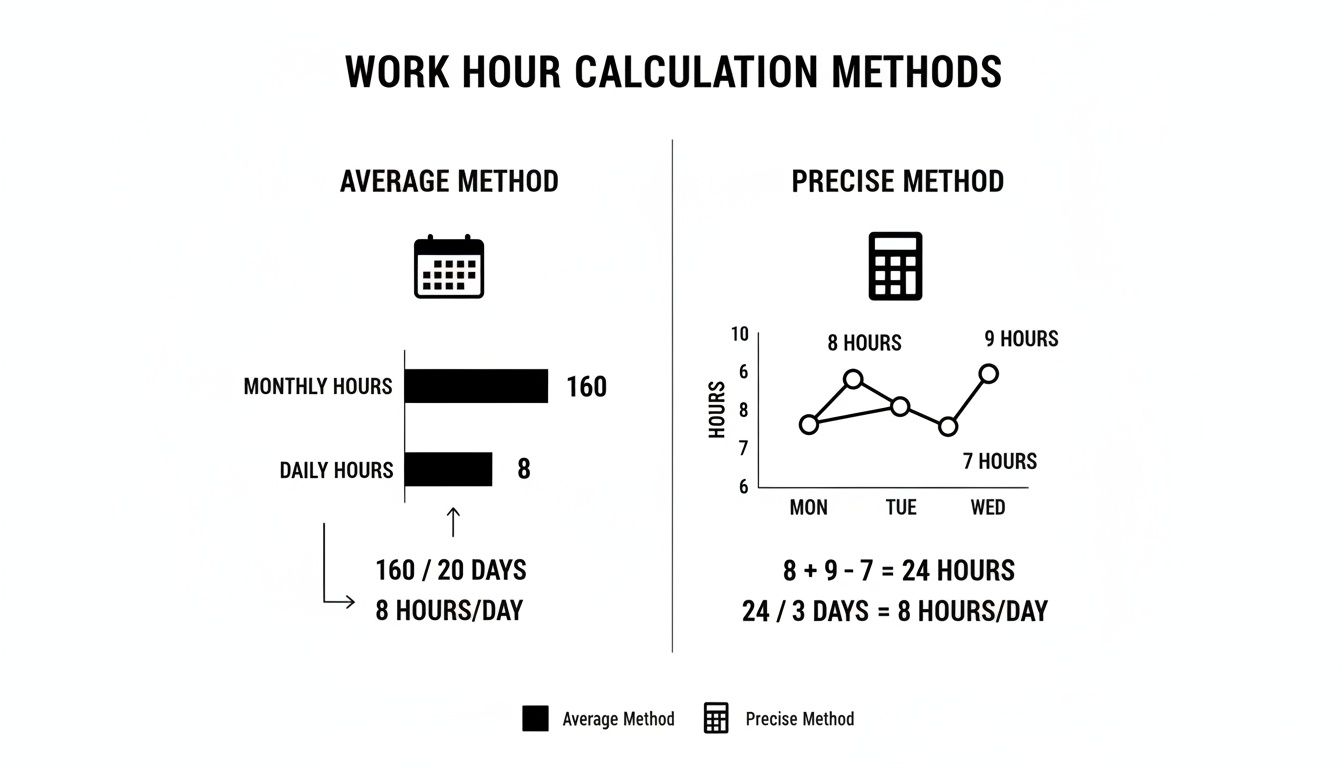
As you can see, the precise method is the only way to go for accurate payroll. This approach is the bedrock of flexible systems like annualised hours, where an employee's total yearly hours are spread out to match the peaks and troughs of business demand. You can get a deeper understanding of this model by reading our guide on what annualised hours are.
Bank holidays throw another spanner in the works. Whether Easter falls in March or April, or how the Christmas bank holidays land, can dramatically alter the working landscape of those months.
Lots of businesses make the mistake of using a consistent average like 173.33 hours every single month. For genuine accuracy in payroll and resource planning, you have to calculate hours based on the actual number of working days in that specific month, minus any bank holidays.
Visualising the Monthly Differences
Let’s put some real numbers to this. The table below breaks down how much the total work hours can change throughout a standard non-leap year for someone working a typical 8-hour day from Monday to Friday.
Sample Working Days and Hours by Month (Non-Leap Year)
| Month | Total Days | Number of Working Days (Mon-Fri) | Total Work Hours (8-Hour Day) |
|---|---|---|---|
| January | 31 | 23 | 184 Hours |
| February | 28 | 20 | 160 Hours |
| March | 31 | 23 | 184 Hours |
| April | 30 | 21 | 168 Hours |
| May | 31 | 23 | 184 Hours |
| June | 30 | 22 | 176 Hours |
| July | 31 | 21 | 168 Hours |
| August | 31 | 23 | 184 Hours |
| September | 30 | 21 | 168 Hours |
| October | 31 | 22 | 176 Hours |
| November | 30 | 22 | 176 Hours |
| December | 31 | 21 | 168 Hours |
Just look at that. The difference between the shortest month (February at 160 hours) and the longest ones (like January at 184 hours) is a massive 24 hours.
That’s the equivalent of three full working days. It perfectly illustrates why a one-size-fits-all number doesn’t work and why getting specific each month is essential for running a smooth operation.
Adjusting Hours for Leave and Overtime
Calculating the baseline for how many work hours in a month is a great start, but it's only half the story. The reality of any workplace is that people take holidays, fall ill, and sometimes need to work extra hours to meet deadlines.
These human elements aren't exceptions; they are a normal, expected part of running a business that must be accurately factored into your monthly totals. Failing to properly subtract paid leave or add overtime doesn't just mess up your records—it can lead to incorrect pay, damage employee trust, and even create legal headaches. This is where a simple monthly average falls short and a more detailed approach becomes essential.
Subtracting Hours for Annual and Sick Leave
When an employee takes paid time off, whether it’s a week-long holiday or a couple of sick days, their workable hours for that month obviously go down. The key is to subtract these hours from their total potential hours to get to the actual number of hours they worked.
Let’s imagine an employee, Sarah, who works an 8-hour day. In June, there are 22 working days, giving her a baseline of 176 hours (22 days x 8 hours). But she decides to take a five-day holiday to recharge.
- Leave Calculation: 5 days × 8 hours/day = 40 hours of leave.
- Adjusted Monthly Total: 176 potential hours – 40 leave hours = 136 actual work hours.
This simple adjustment is critical for accurate payroll. While Sarah gets paid for her holiday, the hours she was physically at work are different. Trying to track this manually for a whole team can quickly become a tangled, error-prone mess, which is why a system that handles these deductions automatically is so valuable.
Accurate payroll depends on distinguishing between paid hours and worked hours. Forgetting to subtract leave can skew your data on productivity and resource allocation, making it harder to plan effectively for future projects.
Adding Hours for Overtime
On the flip side, you have overtime. When someone works beyond their contracted hours to finish a critical project, those extra hours must be added to their monthly total. This isn't just about being fair; it's a legal requirement.
Consider another employee, David, who also has a baseline of 176 hours for June. He works an extra 10 hours over two weekends to meet an important client deadline.
- New Monthly Total: 176 base hours + 10 overtime hours = 186 total hours.
This new total is what his pay for that month should be based on. Getting overtime calculations right is vital, especially as different rates often apply depending on when the hours were worked. For a complete overview of the rules, our essential UK guide on how to calculate overtime provides a detailed breakdown.
Automated systems like LeaveWizard are designed to handle these variables effortlessly, ensuring every minute of extra work is recorded and compensated correctly without you having to lift a finger.
How Industry and Contract Type Impact Working Hours
Let's be honest, a "standard" month of work is anything but standard across the UK. The numbers you'd crunch for an office-based role will look completely different from those for a farm worker or a freelance designer.
The industry you're in and the types of contracts you manage are two of the biggest factors that will shape how many work hours in a month you can actually expect. Trying to apply one single average to everyone is a recipe for scheduling chaos and payroll headaches. Some sectors are known for longer, more demanding schedules, while others offer more flexibility. This isn't just a feeling; the data shows huge differences across the workforce.
Sector-Specific Work Cultures
National averages are great for headlines, but they often hide the massive variations between industries. While a typical UK employee might work somewhere around 36-37 hours a week, some sectors operate way outside that norm.
For example, recent analyses show that workers in agriculture, forestry, and fishing regularly log average weekly hours topping 41 hours. Flip that around, and you’ll find the accommodation and food services sector records much lower averages, often hovering around 26–27 hours per week. You can dig deeper into these sectoral work hour variations to get a fuller picture.
These gaps really highlight why a one-size-fits-all approach is destined to fail. The context of your industry is everything.
It's crucial for managers to apply the right framework to their specific workforce. Using an office-based 9-to-5 calculation for a logistics team with weekend shifts will inevitably lead to costly mistakes and employee dissatisfaction.
How Contract Types Change the Calculation
Beyond industry norms, the type of employment contract is fundamental. You simply can't calculate monthly hours accurately without considering it, as each structure demands its own approach.
- Full-Time Employees: These staff members have a set number of contracted hours per week, usually between 35 and 40. Your calculation for them is based on the number of their specific working days in any given month.
- Part-Time Employees: Here, you have to work with their exact pro-rata hours. If you used a full-time average, you'd end up with significant overpayments and completely wrong holiday entitlement calculations.
- Freelancers and Contractors: These individuals are a different ball game entirely. They typically track their hours meticulously and bill for the exact time spent on projects. There's no "average" month; their hours are entirely variable and tied to the work at hand.
When you're thinking about how different contracts affect working hours, it’s a good idea to look into resources on hiring your first employee to make sure you set clear and correct expectations right from the start.
Streamlining Hour Tracking and Payroll

If you're still battling spreadsheets to figure out how many work hours are in a month, you know firsthand how quickly it can spiral into a tangled mess. Trying to manually calculate hours, especially once you throw leave and overtime into the mix, isn't just a headache; it's a breeding ground for human error.
It only takes one broken formula or a single typo to throw off your payroll entirely. Those small mistakes can erode employee trust and even put you at risk of non-compliance. Let's be honest, that manual grind is time you could be spending on work that actually pushes your business forward.
Embracing Automation for Accuracy
There’s a much smarter way to manage employee hours these days. Modern software can take the entire process off your hands, automating everything from start to finish. These systems calculate baseline hours for any given month, instantly adjust for all types of leave, and correctly add in any approved overtime without you lifting a finger.
This switch from manual to automated tracking is a game-changer. It means your payroll is spot-on every single time, wiping out the stress and risk that comes with doing it by hand. When looking to improve operations, many businesses find that implementing automated payroll solutions can significantly boost accuracy and save time.
By automating hour tracking, you transform a tedious administrative chore into a reliable, efficient system. This not only ensures everyone is paid correctly but also provides clear, real-time data for better business decisions.
From Simple Tracking to Smart Decisions
The payoff of automation goes well beyond just saving time on data entry. Suddenly, managers have a clear, up-to-the-minute picture of team availability and how work is distributed. This insight allows them to plan resources more effectively, get ahead of staffing needs, and make confident decisions backed by solid data.
A powerful time and attendance system gives you this level of clarity without any effort. The practical results for your business are obvious:
- Slash Administrative Time: Free up your HR team and managers from countless hours spent buried in spreadsheets.
- Guarantee Payroll Accuracy: Do away with costly errors and ensure you’re always compliant with labour laws.
- Improve Resource Planning: Use real-time data to schedule your staff and manage projects with confidence.
Ultimately, automation turns the complicated question of monthly work hours into a simple, solved problem. It gives you the freedom to focus on what truly matters.
Got Questions About UK Work Hours?
Working out monthly hours can feel like a bit of a minefield, especially when you're trying to square everything with UK regulations and different types of contracts. Getting clear, straightforward answers is the key to making sure everything is fair, compliant, and above board.
Let's tackle some of the most common questions that pop up for managers and employees alike when it comes to managing work hours in the UK.
What’s the Legal Maximum for Monthly Work Hours in the UK?
Under the Working Time Regulations, most UK employees can’t be forced to work more than an average of 48 hours per week. This is usually averaged out over a 17-week period, which works out to roughly 208 hours a month.
It's not a completely rigid rule, though. Employees can voluntarily sign an 'opt-out' agreement if they want to work more than the limit. Also, some jobs are exempt from the 48-hour cap entirely, like roles in the emergency services or certain transport sectors.
How Do I Figure Out Monthly Hours for Part-Time Staff?
The method is pretty much the same as for full-timers, but you absolutely have to use their specific contracted hours. Never just guess or use a full-time average—it’ll throw all your numbers off.
For any given month's payroll, the formula is simple and direct:
(Number of Their Workdays in the Month × Their Daily Hours) = Exact Monthly Hours
Let's say you have a part-time employee who works 4 hours a day, 3 days a week. If a particular month has 12 of their scheduled workdays, their total for that month would be 48 hours (12 days × 4 hours). Using their precise hours is crucial for getting pro-rata pay and holiday entitlement calculations right.
Does Unpaid Leave Change the Monthly Hour Calculation?
Yes, it certainly does. When an employee takes unpaid leave, you have to subtract those hours from their total workable hours for that month. It’s a simple two-step process for payroll. First, figure out their total potential hours for the period, then just deduct the hours for the unpaid days they took off.
Making this adjustment ensures they’re paid correctly for the time they actually worked. It keeps your financial records accurate and is fair to the employee. If you forget to deduct unpaid leave, you’ll end up overpaying them and creating a headache for your reporting.


