
On average, a full-time working month in the UK has somewhere between 160 and 173 hours. This isn't a hard and fast rule, of course. It’s more of a baseline figure, calculated by taking a standard 37.5 or 40-hour work week and multiplying it by the average number of weeks in a month, which works out to 4.33.
Your Quick Guide to Monthly Working Hours

Trying to pin down exactly how many hours are in a working month can feel a bit like trying to hit a moving target. The number of days is always changing—from 28 in February up to 31 in July—so a single, fixed number is impossible.
Despite this, you still need a reliable average for things like payroll, forecasting, and planning out your team's workload. This is where a simple bit of maths comes in handy: multiplying weekly hours by 4.33.
This magic number (4.33) comes from dividing the 52 weeks in a year by the 12 months. It gives HR and finance departments a consistent, predictable baseline to work from before they start factoring in the tricky variables like public holidays or employee leave. Getting your head around this average is the crucial first step for any business owner who needs accuracy in their planning.
Average Hours for Common UK Contracts
To make this crystal clear, let's see how this calculation plays out for standard full-time contracts here in the UK.
The simple table below gives you a quick reference for estimating monthly hours based on the most common weekly schedules.
Average Monthly Working Hours by Weekly Schedule
| Weekly Contracted Hours | Calculation (Hours x 4.33) | Average Monthly Hours |
|---|---|---|
| 35 Hours | 35 x 4.33 | 151.55 Hours |
| 37.5 Hours | 37.5 x 4.33 | 162.38 Hours |
| 40 Hours | 40 x 4.33 | 173.20 Hours |
These figures are your starting point, the raw calculation before any deductions.
Across the United Kingdom, the data shows that full-time employees log around 1,867 hours annually. When you break that down, it comes out to roughly 156 hours per working month. This reflects the national standard for a full-timer who averages 35.9 hours a week. For small business owners, it’s a stark reminder of how quickly those weekly hours add up, even before you consider holidays or absences. If you'd like to dive deeper into UK labour data, Clockify's analysis offers some great insights.
For payroll managers and business owners, this average monthly hour calculation is the bedrock of financial planning. It's the essential baseline used to forecast wage costs, manage project budgets, and ensure compliance with UK labour laws.
Average vs Annual: Which Way Should You Calculate Working Hours?

While the quick 4.33 calculation gives you a solid estimate, payroll and financial planning often demand a sharper pencil. To get that extra precision, UK businesses generally lean on two core methods for figuring out an employee's contracted monthly hours.
Each method has its own strengths. Choosing the right one really boils down to whether you need month-to-month consistency or dead-on annual accuracy.
Think of it like choosing a camera lens. One gives you a reliable, all-purpose view that’s perfect for most situations. The other offers a wider perspective that smooths out the details over a larger area. Both are useful, but for different jobs.
Method 1: The Average Month Method
The first approach is the Average Month Method, a slightly more refined version of our back-of-the-napkin calculation. It uses 4.333 weeks per month, which better accounts for that fractional remainder that adds up over a year.
This method is fantastic for providing a consistent, predictable monthly figure for salary calculations and resource planning. It's straightforward and widely used because it keeps things simple. Crucially, it ensures an employee's baseline pay doesn't wobble from one month to the next, which is great for morale and makes admin much easier.
- Formula: Weekly Contracted Hours × 4.333
- Example (40-hour week): 40 hours × 4.333 = 173.32 hours per month
This gives you a reliable number you can use month in, month out. But because it's still an average, it doesn't perfectly align with the calendar year. That brings us to the second, more holistic approach.
The real difference between these methods is their perspective. The Average Month Method is all about creating a consistent monthly number. The Annualisation Method, on the other hand, prioritises smoothing out the hours over the entire year for a more accurate long-term average.
Method 2: The Annualisation Method
The second approach is the Annualisation Method. This formula calculates the total working hours in a full year and then divides them evenly across the 12 months. Many consider this the most accurate way to determine an average monthly figure for salaried employees.
It provides a slightly different, but often more precise, answer for how many hours are in a working month.
- Formula: (Weekly Contracted Hours × 52 weeks) / 12 months
- Example (40-hour week): (40 hours × 52) / 12 = 173.33 hours per month
As you can see, the difference is tiny—just 0.01 hours in this case. But for businesses with large teams or those needing meticulous financial accuracy, the Annualisation Method is often the go-to. It perfectly aligns an employee's monthly pay with their annual salary.
This is often the basis for the common idea that a 40-hour week equates to 173 hours per month. Interestingly, official data shows a slightly different picture. Last year, full-time UK workers averaged 37 hours weekly, which works out to about 160 hours monthly. You can dig into more UK labour statistics on average weekly hours of work at ibisworld.com.
Ultimately, both methods will get you very close. The key is to pick one and stick with it across your organisation. Consistency is what prevents payroll confusion and ensures everyone is treated fairly.
Of course, knowing the hours is only half the battle. You also need to understand how many working days in a month there are to manage leave effectively.
How Public Holidays and Leave Impact Monthly Hours
That baseline calculation for your average working month? It’s a great starting point, but it's just that—a start. The real world of bank holidays, annual leave, and unexpected sick days is where accuracy really starts to matter for payroll and resource planning.
Get this part wrong, and you can end up with some serious errors, like overpaying staff or completely misjudging your team's capacity for a project. Every single day off represents a direct deduction from that month's total working hours.
Subtracting Non-Working Hours
Think of your baseline monthly hours (say, 173.33 for a 40-hour week) as a full bucket of water. Every day of leave—whether it’s a planned holiday or a sick day—is like scooping out a cup. To know how much is left, you have to track every single scoop.
For a full-time employee working an eight-hour day, each day they're away reduces the monthly total by eight hours. Simple as that.
- Bank Holidays: These are fixed dates that reduce working hours for pretty much the whole team.
- Annual Leave: Planned holidays taken by individual employees.
- Sick Leave: Unplanned absences that still need to be recorded and subtracted from the total.
Trying to track these deductions manually across a team is a minefield. One forgotten bank holiday or a misrecorded sick day can easily throw your payroll into disarray, creating administrative headaches and, worse, frustrating your employees.
The accuracy of your monthly working hour calculation is only as good as your system for tracking absences. Without a reliable process, your baseline number becomes almost meaningless, leading to costly payroll mistakes and skewed productivity data.
A Practical Example in May
Let’s make this tangible. Take May, a month that usually gives us two bank holidays here in the UK. We'll look at a full-time employee on a 40-hour-per-week contract, whose baseline is 173.33 working hours for the month.
If you just went with that average number, you'd process payroll for the full 173.33 hours. But reality paints a very different picture.
- Early May Bank Holiday: 1 day off = -8 hours
- Spring Bank Holiday: 1 day off = -8 hours
- Employee's Annual Leave: 2 days taken = -16 hours
All of a sudden, the employee’s actual working hours are way lower. Failing to subtract these 32 hours (that’s four full working days!) would mean a substantial overpayment for just one person. Now, imagine that mistake scaled across an entire team—the financial hit becomes obvious.
There are loads of fascinating details about these national days off, and you can learn some interesting facts about UK bank holidays in our related article.
Impact of Leave on Monthly Working Hours (40-Hour Week Example)
The table below shows just how much absences can chip away at the baseline hours month by month.
| Month | Baseline Hours (173.33) | Absences | Adjusted Working Hours |
|---|---|---|---|
| April | 173.33 | 1 Bank Holiday (8 hours) | 165.33 Hours |
| May | 173.33 | 2 Bank Holidays (16 hours) + 2 days annual leave (16 hours) | 141.33 Hours |
| June | 173.33 | No Bank Holidays, 5 days annual leave (40 hours) | 133.33 Hours |
This calendar-based reality is exactly why a proper system is non-negotiable. Relying on spreadsheets or wall calendars becomes more and more risky as your business grows. It makes an automated solution a vital tool for keeping payroll accurate and your operations running smoothly.
Calculating Hours for Part-Time Employees
Things get a bit more nuanced when you’re figuring out monthly hours for part-time employees. You can’t just use the full-time average—it’s not fair, and it can land you in hot water legally. The secret is the pro-rata calculation, which simply means making sure that part-timers get their pay and holiday time in direct proportion to the hours they actually work.
This method scales the full-time equivalent (FTE) baseline down to match the individual’s contract. If you're an HR manager juggling a mix of different contracts, getting this right is non-negotiable. It’s the only way to ensure everyone is treated fairly and to sidestep some of the most common payroll headaches.
Calculating these adjusted monthly hours for any employee, full-time or part-time, follows a pretty straightforward path. This flowchart lays out the core steps, from establishing the baseline to getting the final, adjusted figure for the month.
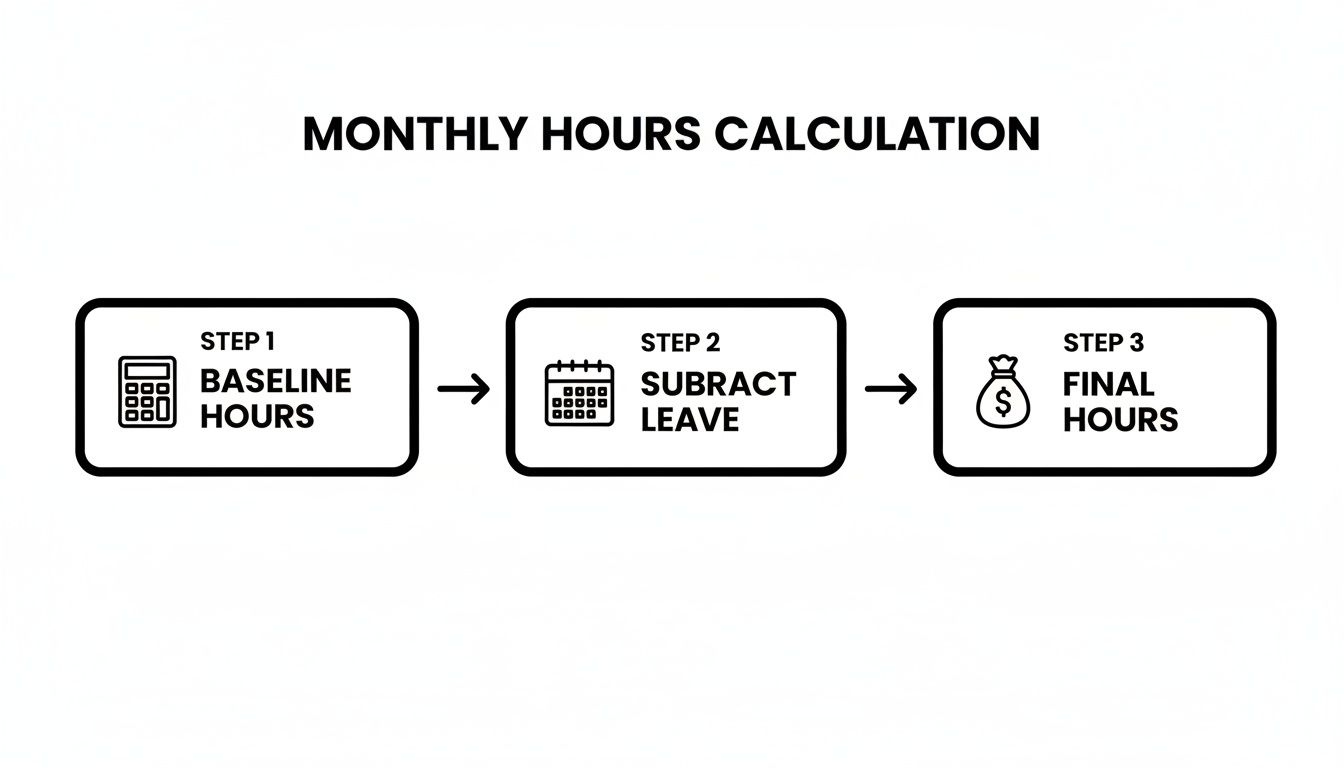
As you can see, every calculation has to start from a consistent baseline. From there, you subtract any time off—whether it's holiday, sick leave, or a bank holiday—to land on the correct number of hours for that month's payroll.
The Challenge of Bank Holidays
Bank holidays throw a real spanner in the works for part-time staff. Imagine an employee who works Tuesday to Thursday. They will miss out on every single bank holiday that falls on a Monday. On the flip side, their colleague who works Monday to Wednesday gets the benefit of every single one.
Over the course of a year, this creates a massive imbalance in paid time off. If you don't correct for it, one employee could end up working far more hours than the other for the same proportional pay. That's not just unfair; it's a potential HR nightmare waiting to happen.
The core principle is fairness. A part-time employee should not be penalised or unfairly advantaged because their normal working days happen to fall on a bank holiday. The goal is to ensure they receive a pro-rata equivalent of all public holidays.
The solution is to calculate a pro-rata bank holiday entitlement for every part-time employee. For a detailed walkthrough, we highly recommend reading our guide on calculating holidays for part-time workers to make sure you get it exactly right.
A Practical Pro-Rata Example
Let’s walk through a typical scenario to see how this works in the real world.
Say you have an employee, David, who works 24 hours a week—three 8-hour days. At your company, a full-time week is 40 hours, or five 8-hour days.
-
Determine the Pro-Rata Percentage: First, you need to figure out David's hours as a percentage of a full-timer.
- (24 hours / 40 hours) x 100 = 60%
-
Calculate Pro-Rata Baseline Hours: Next, you apply that percentage to the standard full-time monthly baseline. If your full-time baseline is 173.33 hours, then David's pro-rata monthly hours are:
- 173.33 hours x 60% = 104 hours
This 104-hour figure is David's personal monthly baseline. It's the starting point before you account for any annual leave he takes or his share of bank holidays, ensuring his pay accurately reflects his part-time schedule.
Why Accurate Hour Tracking Is a Business Imperative
Getting the numbers right when calculating hours in a working month is about so much more than just signing off on payslips. Think of it as the financial heartbeat of your business. If your tracking is off, even slightly, it sends ripples through everything from budget forecasting to legal compliance.
For your finance team, precision is everything. Every hour miscalculated is a potential overpayment—a small leak that can seriously drain resources over time. When these numbers are spot on, they become the bedrock for confident financial forecasting, letting you plan for growth with a crystal-clear view of your labour costs.
The stakes are just as high for HR. Accurate tracking is your safety net, ensuring you stay compliant with UK Working Time Regulations and protecting both the business and your employees. It’s also the key to managing leave fairly, making sure everyone gets their correct entitlement without confusion or disputes.
Beyond Payroll: The Strategic Advantage
This isn’t just about ticking boxes. Accurate hour tracking hands you crucial data that can completely reshape your operational strategy. When you know exactly how many hours your team is putting in, you gain powerful insights into resource allocation.
Suddenly, you can see which projects are eating up the most time, spot potential burnout risks before they become a problem, and plan future capacity with much greater certainty.
What was once an administrative headache becomes a source of valuable business intelligence. Manual spreadsheets, on the other hand, are a recipe for disaster. A single typo can cascade through an entire month’s payroll, leading to time-consuming corrections and, worse, damaging employee trust.
Getting a firm grip on your monthly working hours isn’t just about avoiding mistakes; it’s about unlocking a clearer understanding of your operational efficiency. It’s the data that allows you to move from reactive problem-solving to proactive strategic planning.
The average UK full-time role involves roughly 160 working hours a month. This figure comes from blending official weekly hour data with the 4.33-week average. For small businesses, even minor slip-ups in tracking these hours can compound quickly across the entire team, significantly inflating payroll costs. You can find more insights on UK employment trends at tradingeconomics.com.
The Power of an Automated System
This is where automated systems become a real game-changer. They completely remove the risks that come with manual entry and provide a single, reliable source of truth for everyone in the business.
An automated dashboard gives you a clear, at-a-glance view of employee leave and availability.
This centralisation means finance, HR, and operations are all working from the same real-time data. It stops the disconnects that lead to costly errors. By automating deductions for holidays and absences, you turn a complex, error-prone task into a seamless, reliable process.
Common Questions About UK Working Hours
When you get down to the brass tacks of calculating monthly working hours, a lot of specific questions tend to pop up, especially when you're dealing with unique employee situations. We've pulled together some of the most common queries we hear from business owners and HR managers to give you clear, straightforward answers.
This section gets into the practical, day-to-day scenarios you’re bound to face, from sorting out overtime to managing contracts for your salaried team. The goal is to give you the confidence to handle any calculation that lands on your desk.
How Should We Calculate Hours for Salaried Employees?
For salaried staff, the idea of "monthly hours" is less about what they get paid (since their salary is fixed) and more about internal bookkeeping. You still need a consistent number for things like resource planning, holiday entitlement, and making sure you’re sticking to the Working Time Regulations.
The most reliable way to do this is the Annualisation Method. It’s pretty simple:
- Get the Annual Total: Take their weekly contracted hours and multiply by 52. For a standard 40-hour week, that’s 2,080 hours a year.
- Find the Monthly Average: Now, just divide that annual figure by 12. This gives you a consistent average of 173.33 hours per month.
Using this approach keeps your internal records tidy and ensures their equivalent hourly rate doesn't jump around from month to month, no matter how many working days there are.
What Is the Maximum Number of Hours an Employee Can Work?
Under UK law, the Working Time Regulations 1998 are very clear: most employees can’t be required to work more than an average of 48 hours per week. This average is usually calculated over a 17-week period.
The key word here is average. It’s perfectly fine for an employee to work more than 48 hours in one week, as long as it all balances out to stay at or below the limit over that 17-week window.
Employees can choose to "opt-out" of the 48-hour week if they want to. This has to be a voluntary, written agreement and can never be a condition of their employment. They can also cancel this opt-out agreement whenever they like, as long as they give the proper notice.
How Does Overtime Affect Monthly Hour Calculations?
Overtime is simply any time worked beyond an employee's contracted hours. These hours need to be tracked separately from their standard time, both for accurate payroll and to keep an eye on that 48-hour weekly average.
When you're calculating the total hours for a month that includes overtime, here’s how to do it:
- Start with the Baseline: Use the employee’s standard monthly hours (e.g., 173.33).
- Add Approved Overtime: Tack on the total number of overtime hours they worked during that specific month.
- Adjust for Absences: Don't forget to still subtract any hours for annual leave, sick days, or bank holidays.
Following these steps ensures the final number accurately reflects all the paid work they did. Getting this right is crucial, especially since overtime is often paid at a higher rate.
Do We Include Unpaid Breaks in Monthly Hour Totals?
Nope. Unpaid breaks should never be included in your calculation of total working hours. "Working hours" are strictly defined as the time an employee is actually doing their job.
For instance, an employee on a 40-hour-a-week contract might be at the workplace for 45 hours if they take an hour-long unpaid lunch break each day. However, you only count the 40 hours of actual work. Making this distinction is vital for staying compliant and getting payroll right.
How Are Working Hours Calculated for Zero-Hour Contracts?
Calculating monthly hours for someone on a zero-hour contract is a completely different ball game. Since there are no guaranteed minimum hours, you can't start with a baseline. Instead, you just add up the hours they actually worked.
It’s a direct count:
- Record Daily Hours: Log the exact number of hours the person worked each day.
- Sum for the Month: At the end of the pay period, add up all those daily hours.
That final total is what you use to calculate their pay. Even though there's no set monthly average, you still have to track their hours meticulously to make sure they accrue the right amount of holiday pay.


