It's the busiest part of summer. Three employees have requested the same week off, one balance is based on last year's spreadsheet, another sits in an email thread, and a colour-coded cell says someone is available when they're already on holiday. You're trying to approve leave, protect customer cover, answer a payroll query, and work out which version of the file is correct.
That setup is common in growing UK teams. It may work while leave patterns are simple, but it becomes fragile as headcount, contract types, locations, and absence records multiply. UK employers also face a substantial operational cost from absence. The CIPD recorded 7.8 days of absence per employee per year, representing 3.4% of working time lost, in its 2023 report covering 918 organisations and more than 6.5 million employees. The UK absence-management overview from Champion Health explains why that makes reliable tracking a workforce-planning issue, not merely an admin preference.
Holiday tracker software can remove much of that uncertainty, but only if you choose it for the risks your business faces. The right system should make balances trustworthy, approvals visible, staffing easier to plan, and records defensible. The wrong one adds another login, another data set, and another problem for HR to maintain.
Table of Contents
- When Spreadsheets Stop Cutting It
- What Holiday Tracker Software Actually Does
- Core Features Worth Paying Attention To
- Spreadsheets vs Dedicated Holiday Tracker Software
- How to Choose the Right Tool for Your Business
- Common Use Cases and How LeaveWizard Fits
- Rolling Out a New System Without the Headache
- Signs You Are Ready to Move Beyond Spreadsheets
When Spreadsheets Stop Cutting It
At first, a shared spreadsheet feels sensible. The team can see holidays, managers can add colour codes, and nobody needs to learn new software. The trouble starts when several small exceptions collide. One employee joins part-way through the leave year, another works irregular hours, a third carries days forward, and a manager edits a formula to fix an urgent request.
By the time the team reaches roughly 10 to 30 employees, those exceptions often expose the weak points. Nobody knows whether the balance in the current workbook includes yesterday's approval. A manager approves leave in email, but the spreadsheet remains unchanged. Finance asks for an absence summary, and the figures don't reconcile because sickness, annual leave, and cancelled requests were recorded differently.
The consequences are operational:
- Overbooked cover: several people take the same critical days off because nobody had a reliable team view.
- Payroll queries: an incorrect deduction or balance creates avoidable investigation.
- Policy breaches: a carry-over limit, approval rule, or blackout period gets missed.
- Management delays: a line manager spends time reconstructing history instead of planning work.
- Employee disputes: staff can't easily prove when they requested leave or what was approved.
Practical rule: If one person has to explain which spreadsheet tab is authoritative, the process already lacks proper control.
The problem isn't that spreadsheets are always wrong. They're simply poor at maintaining a reliable transaction history when multiple people edit them, when rules differ between workers, and when absence becomes unpredictable. The cost of paper, Excel, and email leave management is measured in more than licence fees. It includes lost management time, coverage mistakes, and the effort required to reconstruct decisions.
A dedicated system becomes worth considering when leave administration starts interrupting payroll, scheduling, or employee relations. The decision should be based on control and visibility, not on whether a spreadsheet still opens.
What Holiday Tracker Software Actually Does
Holiday tracker software is a central system for recording leave requests, applying entitlement rules, updating balances, and showing availability to the people who need it. An employee submits a request, the appropriate manager reviews it, the system records the decision, and the calendar reflects the result without someone copying information between files.
That creates one source of truth. Employees can check their remaining allowance, managers can see planned absences, and HR can review the history behind a balance. The system should also distinguish annual leave from sickness and other absence types, because a team's capacity picture is incomplete when every absence sits in an undifferentiated calendar.
A useful tracker normally handles four stages:
- Set the rules: configure entitlement, accrual, carry-over, bank holidays, and approval routes.
- Capture the request: let employees submit dates and leave types through self-service.
- Apply the decision: notify the right manager and record approval, rejection, or cancellation.
- Report the result: show balances, absence history, availability, and exports for payroll or review.
It's important to define the boundaries. A holiday tracker isn't automatically a full HRIS, payroll engine, recruitment platform, or performance-management system. It may integrate with those tools, but its main job is to make leave and absence records accurate and usable.
The best choice for a small business is usually a focused product rather than a sprawling HR suite. You need enough configuration for UK rules and your contracts, but not a collection of modules that duplicates payroll, calendars, or identity management. A simple workflow that managers use will outperform a feature-heavy platform that requires constant administration.
Core Features Worth Paying Attention To
A feature deserves budget only when it removes a specific failure in your current process. Start with the calculation and record-keeping problems, then assess convenience features.
Automated balance calculation
Manual formulas are the first place spreadsheet systems become unreliable. A proper rules engine should apply entitlement, accrual, part-year employment, carry-over, and contract differences consistently. UK workers generally receive 5.6 weeks of paid holiday, normally capped at 28 days for a five-day week, and bank holidays can form part of that entitlement. The GOV.UK holiday entitlement guidance sets out the basic framework.
Irregular-hours and variable-pay arrangements need particular attention. For some irregular-hours cases, entitlement is calculated using 12.07% of hours worked in a pay period, while part-year starters require pro-rating. The government calculation guidance for different contract types explains why a generic “days per year” field isn't sufficient.
Self-service requests and approvals
Employees should submit leave themselves and see its status without asking HR to interpret an inbox. Managers need a clear queue, approval history, and notifications for pending decisions. This removes the common failure where a request is approved in a message but never entered into the central record.
Shared team calendar
A calendar should show approved leave, pending requests where appropriate, public holidays, and other absence types. It must make coverage risk visible before a manager approves a request. Calendar integrations can help, but don't accept a one-way sync that creates a second source of truth.
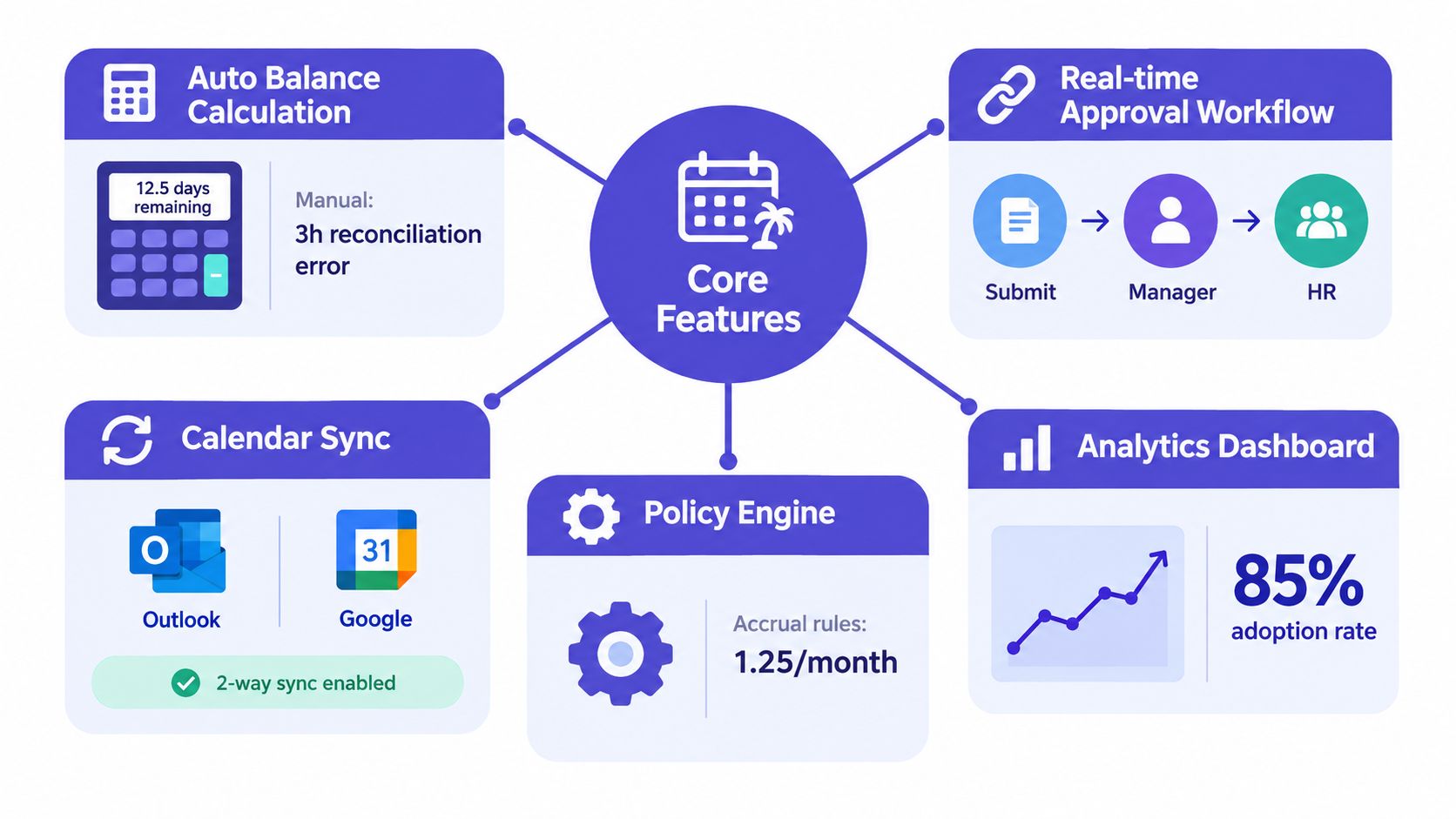
Configurable policies
Your tool should support different entitlement groups, accrual methods, carry-over rules, approval chains, and bank-holiday treatment. Don't accept a system that forces every employee into one policy because it looks easier during setup. The shortcut becomes manual work later.
Reporting and exports
Reports should separate holiday from sickness, show balances and transactions, and export cleanly for payroll or audits. From 6 April 2026, employers must retain detailed annual-leave and holiday-pay records for at least six years, including days taken and holiday pay paid, according to the GOV.UK holiday-pay and entitlement reforms. That makes an auditable history and sensible retention controls a selection requirement, not a bonus.
Sickness tracking, public-holiday calendars, multi-manager workflows, payroll connections, calendar sync, and single sign-on can all be valuable. Pay for them when they solve a live operational problem. Skip modules that merely duplicate systems you already trust.
A short product demonstration can show how these functions work in practice:
Spreadsheets vs Dedicated Holiday Tracker Software
The comparison should focus on control, not whether one option looks more modern. A spreadsheet can record dates. A dedicated system can apply rules, preserve decisions, and present the information in a way that supports daily scheduling.
| Dimension | Spreadsheets | Dedicated Holiday Tracker Software |
|---|---|---|
| Balance accuracy | Relies on formulas, manual updates, and someone checking exceptions | Applies configured rules and updates balances after transactions |
| Availability | Depends on people editing the right file and interpreting colour codes | Provides a shared calendar with current requests and approved absence |
| Compliance | Policies are documented separately or enforced manually | Encodes entitlement, carry-over, bank-holiday, and approval rules |
| Admin effort | Managers chase requests and reconcile changes across files | Employees submit requests and managers approve them in one workflow |
| Audit history | Version history may not explain every decision clearly | Records requests, approvals, changes, cancellations, and balances |
| Payroll preparation | Requires manual filtering and reconciliation | Produces structured reports and exports for review |
The UK rules are not a single flat annual number. Most workers receive 5.6 weeks, some workers need pro-rating, and some irregular-hours cases require an hours-based calculation. A spreadsheet can be configured for this, but the business must maintain every formula and test every exception.
A dedicated system also improves visibility, but it won't fix weak policies. If managers approve leave inconsistently, software will preserve inconsistent decisions more neatly. You still need clear rules for notice, coverage, carry-over, blackout periods, and escalation.
Decision test: Keep the spreadsheet only if you can explain who owns it, how every balance is checked, and how an approval can be retrieved without searching email.
The comparison between LeaveWizard and traditional spreadsheets is useful when assessing whether your current process is creating avoidable administrative work. The answer usually becomes clear when you count the number of manual hand-offs rather than the number of spreadsheet tabs.
How to Choose the Right Tool for Your Business
Don't start with a long feature checklist. Put direct questions to each vendor and reject vague answers.
Can it model our actual policies?
Ask the vendor to demonstrate a part-year starter, an irregular-hours worker, different entitlement groups, carry-over, bank holidays, and a change in working pattern. Don't accept “fully configurable” as proof. You need to see the rule applied to a realistic employee record.
Check whether managers can administer ordinary changes without technical support. A system that requires a consultant for every policy adjustment will become expensive and slow.
Does it connect to our working systems?
Test calendar, payroll, HR, identity, and single sign-on integrations against your current stack. Clarify whether the connection is one-way or two-way, how failed syncs are reported, and who owns reconciliation when records disagree.
Ask where data is hosted and whether UK data residency is available if your organisation requires it. Review access controls, retention, backups, and the process for exporting records when you leave the provider.
Can employees use it without training sessions?
Open the mobile experience and ask an employee unfamiliar with the system to request leave. If the route is hard to find, adoption will suffer. Managers should also be able to approve from a phone when they're away from their desk, without sacrificing the audit record.
Will the reports answer management questions?
Ask for separate holiday and sickness reports, team availability, unused entitlement, approval history, and payroll exports. Reporting should help you investigate a balance dispute or absence pattern, not just display attractive charts.
The latest CIPD data points to the need for that operational view. Average sickness absence reached 9.4 days per employee per year, compared with 7.8 days in 2023 and 5.8 days before the pandemic, according to the CIPD Health and Wellbeing at Work report. The report makes a strong case for treating absence data as capacity information.
Finally, demand transparent pricing. Ask whether the fee is per employee, whether contractors or inactive users count, whether extra leave types cost more, and what implementation or support includes. Total cost of ownership includes migration, configuration, training, integrations, administration, and future policy changes. A low subscription can be poor value if your team spends months maintaining it.
Common Use Cases and How LeaveWizard Fits
A good tracker earns its place in ordinary work, not only during an audit. Consider the moments that currently force someone to open a workbook.
A line manager wants to know who will be available next week before assigning customer work. With a live team calendar, approved holiday and other absence can be viewed together, while pending requests remain visible for a decision. That reduces the need to message each employee or search an outdated file.
An employee wants to request leave from a phone while travelling or working remotely. Self-service lets the employee check their balance, choose the dates, submit the request, and see the approval status without routing every question through HR. The manager receives a defined action rather than an informal message that can disappear in a busy inbox.
An HR or finance lead needs to prepare a sickness review or payroll report. A system that separates holiday, sickness, and other absence types provides a cleaner record than a calendar where every absence is represented by a different colour. It also gives the reviewer a transaction history instead of forcing them to reconstruct changes from workbook versions.
A director needs confidence that leave and carry-over decisions have been handled consistently. Configurable entitlement rules, approval records, and reporting create an auditable trail. That doesn't replace good management judgement, but it makes the judgement visible and easier to review.
For small UK teams, LeaveWizard is one option that combines self-service leave requests, manager approvals, entitlement and allowance calculations, public-holiday handling, live availability calendars, and reporting in a leave-management system designed around small-business administration. Its value should be judged against your policies and workflow, not against a generic promise to “transform HR”.
The operational benefit is straightforward. Employees get clearer balances, managers get a usable availability view, and HR spends less time resolving disputes caused by missing or conflicting records.
Rolling Out a New System Without the Headache
A poor migration can make a new tracker look worse than the spreadsheet it replaced. Clean the data before you configure anything.
Start with a controlled data audit
Export the current workbook and stop making uncontrolled edits. Remove duplicate employee records, confirm employment dates, separate holiday from sickness, verify current balances, and document unresolved discrepancies. If a balance can't be verified, flag it for an employee and manager review instead of importing guesswork.
Configure the first policy carefully
Set entitlement rules, accrual timing, part-year treatment, carry-over, public holidays, approval roles, blackout periods, and absence categories. Write down the policy decisions before entering them into the system. This gives you a reference for testing and prevents administrators from making inconsistent interpretations during setup.
Pilot before full launch
Use a representative pilot group that includes different contracts, managers, and working patterns. Test requests, rejections, cancellations, carry-over, calendar visibility, reports, and payroll exports. A pilot should expose configuration problems while the old process is still available for reference, but it shouldn't run so long that staff continue treating the spreadsheet as authoritative.
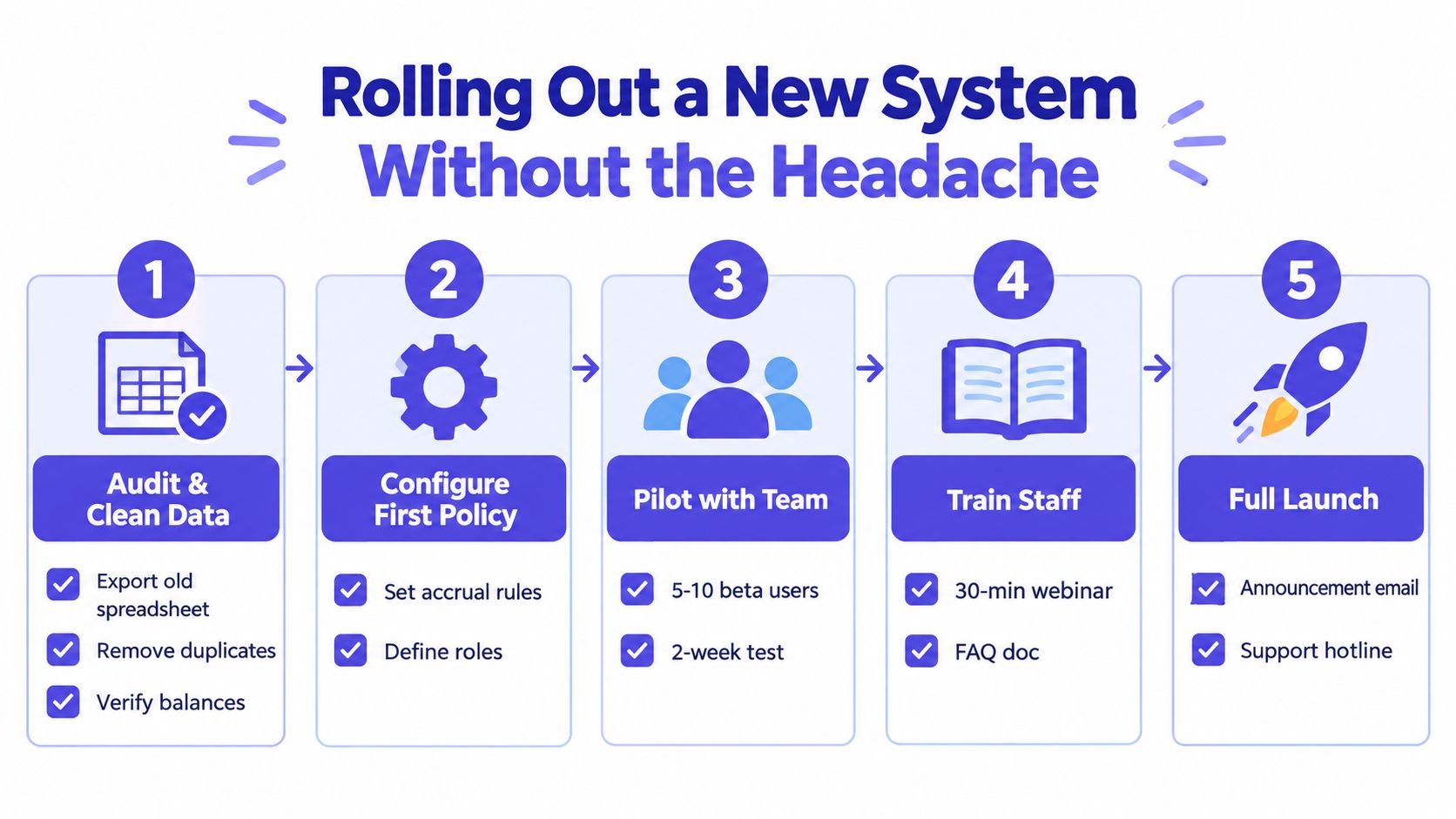
Before launch, tell employees exactly where to request leave, how balances are calculated, and who approves requests. Give managers a short guide showing how to review coverage and what to do when a request conflicts with operational needs.
Use the practical guidance on implementing a new leave-management system to structure the change, but keep ownership inside the business. The HR or operations lead should approve the policy configuration and sign off the migration.
During the first 30 days, check:
- Payroll reconciliation: compare the first export with the approved source records.
- Balance questions: record every employee query and identify repeated configuration errors.
- Approval activity: look for requests still being handled by email or chat.
- Calendar accuracy: confirm public holidays, cancellations, and team visibility.
- Adoption feedback: ask employees and managers what slows them down.
- Legacy control: switch off edits to the old spreadsheet once the new system is authoritative.
Signs You Are Ready to Move Beyond Spreadsheets
You're ready when the process requires detective work. Recurring balance disputes at month-end indicate that employees and managers don't trust the record. If the same person must explain manual adjustments repeatedly, the business has an information-control problem.
Look for these signals:
- Reconciliation is routine: someone spends a material part of each pay or reporting period checking formulas and edits.
- Approvals happen elsewhere: managers use email, chat, or verbal conversations because the spreadsheet doesn't provide a dependable workflow.
- History is difficult to produce: you can't retrieve the original request, approval, amendment, or cancellation quickly.
- Policies are diverging: part-time, irregular-hours, hybrid, or location-based arrangements require separate workarounds.
- Coverage causes anxiety: managers discover clashes only after leave has been approved.
- Compliance questions are increasing: headcount growth makes statutory entitlement, carry-over, and holiday-pay records harder to verify.
The choice is a simple go or no-go decision. If your spreadsheet is stable, policies are uncomplicated, one person owns the process, and reports are easy to produce, you may not need to move immediately. If errors affect payroll, employee trust, staffing, or audit readiness, delaying the change only preserves the risk.
Your next step should be practical. List the last few leave problems, identify the manual action behind each one, and test shortlisted tools against those exact scenarios rather than a vendor's generic feature tour.