A Monday morning exposes whether your leave process is helping the business or creating risk. In a 35-person UK services firm, two sickness calls arrive before 9am, an annual leave request sits untriaged in a shared inbox, and the holiday spreadsheet shows a conflicting booking. The manager now has to work out who is available, whether the request can be approved, and whether the absence record will reach payroll accurately.
That isn't a feature problem. It's an operations problem. Compare cloud-based staff leave management systems against the decisions a manager must make under pressure: who is off, what entitlement remains, whether cover exists, and whether the record will stand up when payroll or an audit team asks for evidence.
The right platform won't remove sickness absence or eliminate judgement. It will give managers a current record, consistent approval rules, and a usable trail of decisions. The wrong platform turns a spreadsheet into a more expensive place to lose information.
Table of Contents
- The Monday Morning The Real Reason SMEs Leave Spreadsheets Behind
- Seven Decision Criteria That Matter
- A Side-by-Side Feature Matrix for UK Leave Platforms
- UK Compliance, Sickness Absence, and Why the Rules Just Changed
- Three Real-World Scenarios for Picking the Right Fit
- A Practical Migration Checklist From Spreadsheet to Cloud
- Recommendations Tied to Business Needs and How LeaveWizard Fits
- Frequently Asked Questions for Buyers
The Monday Morning The Real Reason SMEs Leave Spreadsheets Behind
The first sickness call comes from a client-facing employee. The second comes from someone scheduled to open the office. Neither person has submitted an absence record yet. While the manager starts calling around for cover, an employee emails a holiday request that has already been entered informally on a team calendar.
The spreadsheet says one thing. The shared inbox says another. A line manager has approved the request verbally, but the person responsible for payroll hasn't seen it. Nobody has a reliable view of the team's availability.
Small businesses discover the cost of manual leave administration here. The problem isn't that a spreadsheet can't contain dates. The problem is that it can't reliably coordinate requests, approvals, entitlement calculations, sickness records, cover planning, and audit history when several people update different versions or rely on different channels.
The historical business case is clear. UK commentary has estimated absence costs at around 3% of payroll, while an older estimate placed the annual cost to employers at £11.6 billion in 2002. Those figures are historical indicators, not a forecast for every SME, but they show why small recording errors can become material when repeated across a workforce. The same discussion reported that 30% to 35% of organisations were frustrated by spreadsheet limitations, and that 29% of HR leaders didn't know their current unplanned absence levels. The evidence on spreadsheet limitations and absence costs points to a visibility failure, not merely an inconvenience.
Practical rule: If a manager can't answer “who is unavailable, why, until when, and who approved it?” without opening several files, the process has outgrown the spreadsheet.
A cloud system earns its subscription by shortening the gap between an absence event and management action. It should show live leave status, route requests to the right approver, calculate entitlement consistently, and preserve the record. That is the standard to use when assessing what a paper, Excel, and email leave process is costing your business.
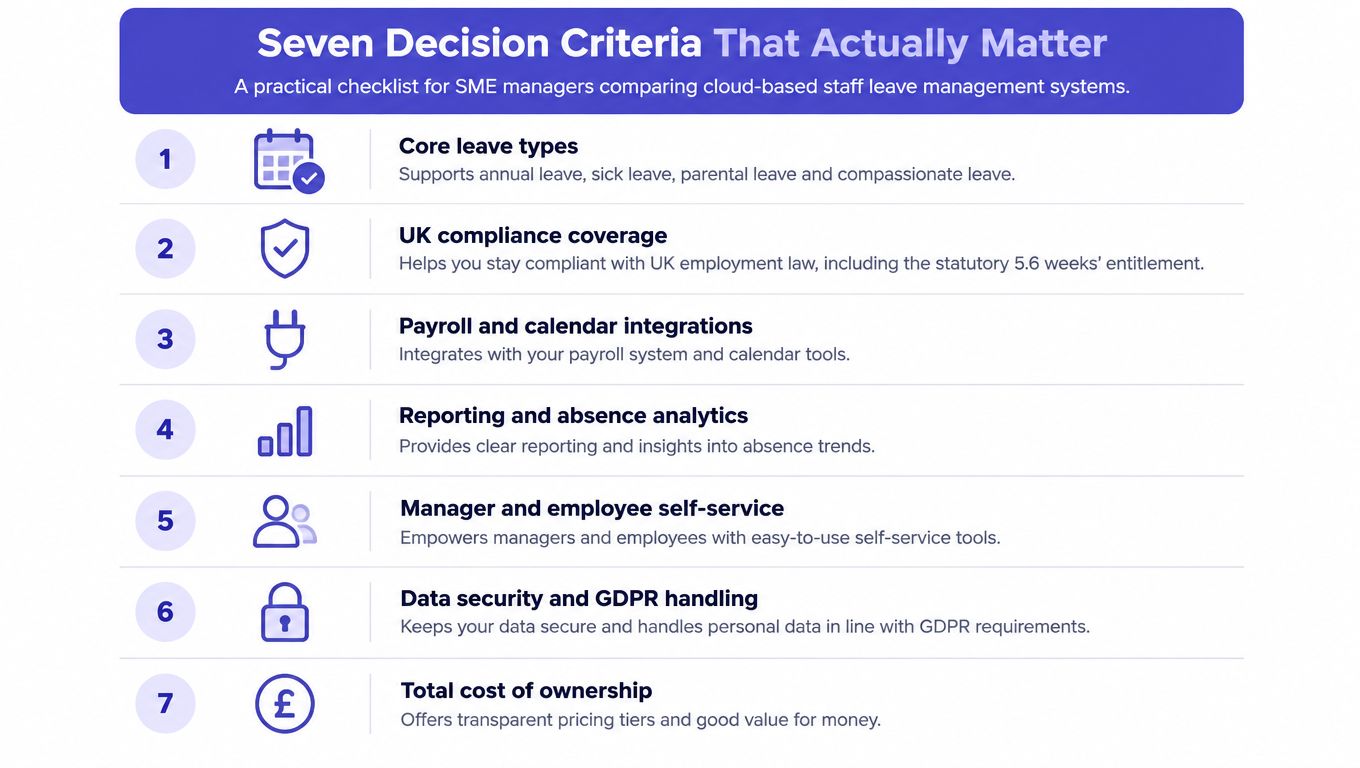
Seven Decision Criteria That Matter
A leave platform earns its place when it improves the decisions managers make on a busy Monday. Test each product against real absence events, approval delays, payroll handoffs, and the records an SME may need later. A long feature list matters less than a reliable workflow that managers will use.
1. Core leave coverage
The system should manage annual leave and sickness as a minimum, with configurable options for other leave types in your policies. Check approval routing, balance visibility, team calendars, notes, and an auditable change history. A holiday booking tool that treats sickness as an afterthought will leave an absence-heavy SME without enough control.
2. UK entitlement and policy controls
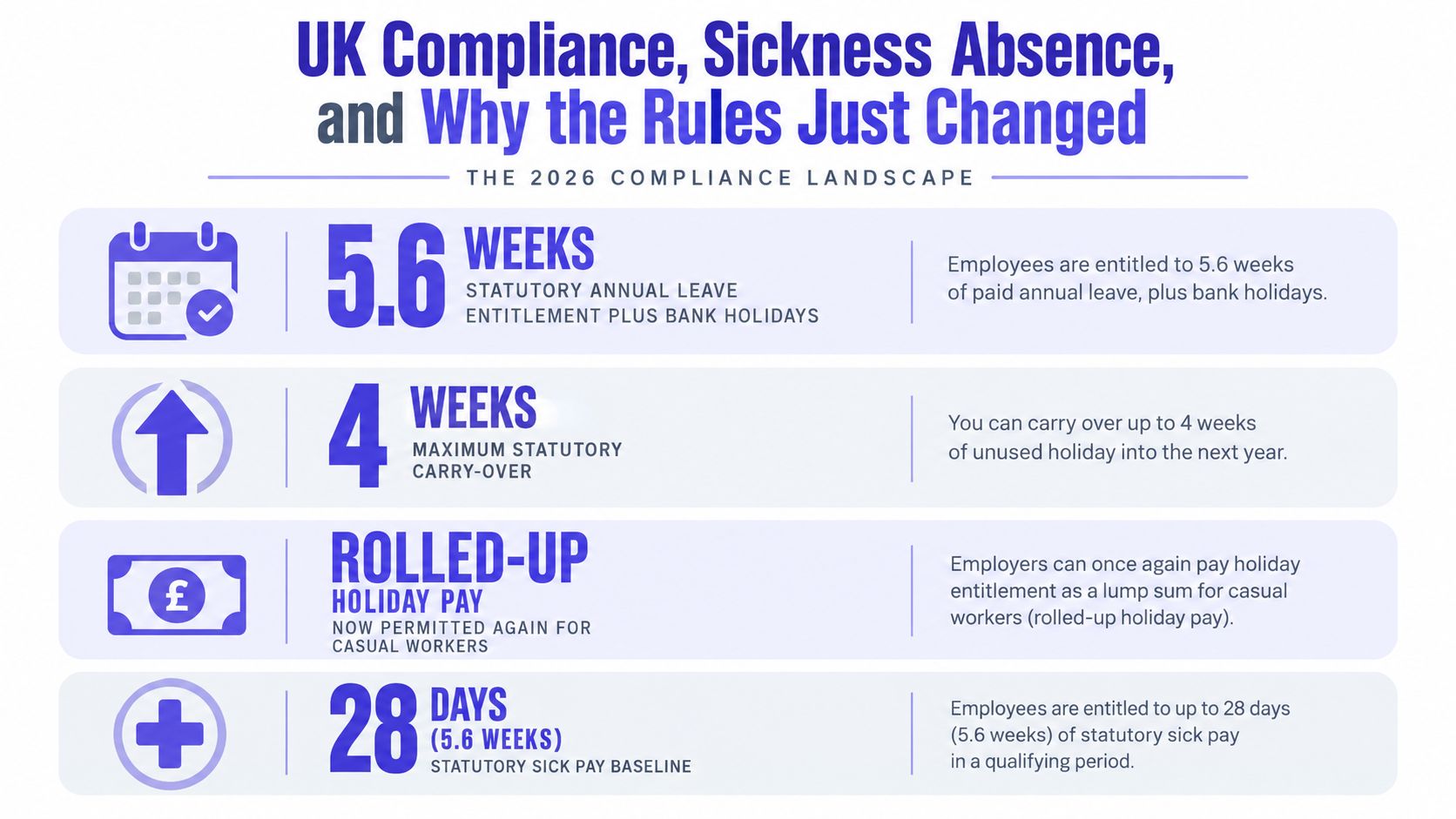
Almost all UK workers are entitled to 5.6 weeks of statutory annual leave, equal to 28 days for someone working a five-day week. Part-time, irregular-hours, and part-year workers also have entitlement under the relevant rules. Use GOV.UK's holiday entitlement guidance as the reference point when testing the platform's accrual engine.
The software should support pro-rating, different leave years, configurable carry-over, and clear policy distinctions. It must also handle accrual for irregular-hours and part-year workers, where GOV.UK states that first-year accrual works out to 12.07% of hours worked in a pay period. Compare the product's settings with The official calculation guidance, rather than accepting a generic “UK compliant” label.
3. Payroll and calendar integrations
Test the complete route from approval to payroll. Can finance export records in a usable format? Does the platform connect with Outlook or Google Calendar? Can it notify managers in the tools they already open?
Leave Dates, for example, lists integrations with Slack, Google Calendar, Outlook, and Zapier, alongside UK bank holiday support and approval notifications. Its published pricing starts at about £0.75 per user per month, with a five-user minimum and a 30-day free trial. Confirm current commercial terms directly before relying on those details.
4. Mobile self-service
Employees should request leave, check balances, and record an absence without sending HR another email. Managers should approve or reject requests from a phone when they are away from a desk. This matters during sickness events, when waiting for an administrator to update a spreadsheet creates avoidable uncertainty.
Usability decides adoption. A technically capable system still fails if employees continue using informal messages and managers cannot see the resulting record.
5. Reporting and absence insight
Holiday totals do not show whether sickness is becoming a management problem. Look for sickness logs, return-to-work notes, absence duration, repeat patterns, and exportable reports. Sage HR is noted in UK comparisons for Bradford Factor support and native payroll integration, while Breathe HR includes holiday booking, sickness logging, and return-to-work notes from £24 per month for up to 10 users. This UK absence-management comparison shows why reporting depth deserves its own test.
6. Growth and access control
A system that suits a small office can become difficult to manage as departments, approvers, part-time workers, or multiple locations are added. Check role permissions, employee visibility, approval hierarchies, and administrator controls. Sensitive sickness details should not be visible to everyone who can view general availability.
Ask how the product handles new teams and changing responsibilities before you commit. Rebuilding permissions after rollout is slower than testing them during selection.
7. Total cost, not headline price
Calculate the subscription, implementation work, support, payroll connection, extra modules, and the cost of adding employees. Confirm whether pricing is per employee, per active user, or tiered. The cheapest monthly figure can become expensive if it requires manual payroll work or another system for absence reporting.
A broader HR suite such as Charlie HR is positioned as an all-in-one product covering leave, onboarding, reviews, and compliance guidance at about £4 to £5 per month. That wider scope may reduce tool sprawl, but it can also add capabilities an SME replacing a spreadsheet does not need immediately. This UK comparison of leave platforms sets out that distinction.
A Side-by-Side Feature Matrix for UK Leave Platforms
The matrix below is an editorial fit assessment, not a vendor certification or independent product test. I've weighted UK compliance, sickness handling, reporting, and pricing transparency more heavily than cosmetic features because those are the areas that create operational exposure for an SME.
The 1-to-5 scores are decision aids. They reflect how well each platform type fits the stated requirement based on the product positioning and capabilities described in the supplied UK comparisons. They aren't claims that one vendor will deliver the same result for every business.
| Criterion | LeaveWizard | Leave Dates | Breathe HR | Charlie HR |
|---|---|---|---|---|
| Core leave workflow | 5 | 4 | 4 | 4 |
| UK compliance controls | 5 | 4 | 4 | 4 |
| Payroll and calendar connections | 4 | 5 | 3 | 3 |
| Mobile and employee self-service | 5 | 4 | 4 | 4 |
| Absence reporting and insight | 5 | 3 | 4 | 3 |
| Scalability beyond 50 staff | 4 | 3 | 4 | 4 |
| Pricing transparency and breadth | 4 | 5 | 4 | 3 |
| Best fit | Specialist leave and absence control | Lightweight calendar-led teams | Wider HR administration | All-in-one HR workflows |
A specialist platform wins when leave and absence are the immediate operational problem. It keeps the workflow close to the manager's daily work: request, approve, record, report, and plan cover. That focus can be more valuable than paying for performance or onboarding modules before the business has fixed its leave records.
Leave Dates is strongest for teams that want a straightforward leave process with visible calendar and notification connections. Its trade-off is depth. If sickness analysis, return-to-work records, or more involved absence reporting drive the purchase, test those workflows rather than assuming holiday booking features will cover them.
Breathe HR and Charlie HR make more sense when the business wants a wider HR system. Breathe HR has a clearer absence-management angle in the supplied comparison, while Charlie HR's broader positioning may suit a company trying to consolidate several HR tasks. The cost of that breadth is potential complexity and a less focused buying decision.
UK Compliance, Sickness Absence, and Why the Rules Just Changed
Leave software should be judged as a record-keeping system rather than a booking calendar. UK statutory entitlement is 5.6 weeks, split between four weeks under regulation 13 and 1.6 weeks under regulation 13A. The additional 1.6 weeks may carry into the next leave year where a relevant agreement permits it. From April 2026, employers must keep annual leave and holiday pay records for at least six years, so The government consultation material on holiday entitlement should inform both carry-over rules and retention requirements. Choose a platform that supports policy-based decisions rather than one universal reset.
Test the system with a regular-hours employee, a part-time employee, and an irregular-hours worker. Check each balance, accrual, carry-over position, and payroll export. If an administrator still needs a separate calculation sheet to verify the results, the platform has not removed the underlying risk.
Sickness raises the operational stakes. The CIPD reported in September 2025 that UK employees were off sick for an average of 9.4 days in the previous 12 months, compared with 7.8 days in 2023 and 5.8 days pre-pandemic. Long-term absence was increasingly linked to mental ill health, at 41%, and musculoskeletal injuries, at 31%. The CIPD absence update supports a buying requirement for sickness records, return-to-work workflows, and trend analysis alongside annual leave approvals.
On Monday morning, a manager should be able to see whether an absence remains open, what follow-up is due, and whether a pattern needs attention. Bradford Factor reporting can flag repeated short absences, but it should support a fair management conversation, not replace one.
Retention controls matter as much as reporting. The system needs controlled access, a reliable history, exportable records, and a defined retention process. The guidance on moving away from HR spreadsheets is relevant to SMEs whose files lack version control and audit visibility.
Use this guide to managing sickness absence to build a vendor test script. Ask each supplier to demonstrate fit-note handling, return-to-work notes, permissions, and report export before you compare prices.
Three Real-World Scenarios for Picking the Right Fit
Headcount helps narrow the shortlist, but team shape determines the workflow. A 12-person office with one approval chain has different needs from a 60-person retailer with shift pressure, even if both want a cloud platform.
Scenario one, the 12-person professional services firm
Every manager approves leave, annual leave accuracy matters more than detailed absence analytics, and the business wants employees onboarded quickly. A lightweight specialist tool is the sensible choice because it removes the shared spreadsheet without forcing the firm to implement a wider HR suite.
The trade-off is clear. The firm may get fewer broader HR functions, but it avoids paying for modules that don't solve its immediate problem.
Scenario two, the 60-person hybrid retailer
This business has rotating shop-floor shifts, recurring exposure to short absences, and a payroll integration dependency. It needs stronger sickness reporting, manager visibility, and a dependable route from approved absence to payroll.
A deeper leave platform is the better fit. A broader HR product can work if payroll and document storage already justify the subscription, but a basic calendar tool will leave too much manual work around absence patterns and shift cover.
Scenario three, the 25-person distributed consultancy
The team works across locations, uses flexible or unlimited leave policies, depends on multi-currency payroll, and allocates people to projects. Mobile self-service, Slack notifications, calendar visibility, and integration breadth matter more than shop-floor rota functionality.
The buyer should prioritise the employee experience and the ability to connect leave status with existing collaboration and finance processes. The trade-off is that a platform optimised for project resourcing may not offer the same depth of absence intervention as a specialist absence system.
| SME Profile | Headcount | Key Pressure | Recommended Type | Trade-off Accepted |
|---|---|---|---|---|
| Professional services firm | 12 | Accurate annual leave and quick approvals | Lightweight specialist tool | Less wider-HR functionality |
| Hybrid retailer | 60 | Shifts, sickness patterns, payroll dependency | Deeper absence platform or HR suite | More setup and configuration |
| Distributed consultancy | 25 | Mobile access, integrations, project resourcing | Integration-led specialist platform | Less rota-specific control |
The right question isn't “which tool has the most features?” It's “which failure would hurt us most on Monday morning?” Choose the platform that directly prevents that failure.
A Practical Migration Checklist From Spreadsheet to Cloud
A successful migration is a controlled process, not a data upload followed by an announcement. Treat the spreadsheet as a source to audit, not as an unquestioned record.
1. Audit and clean the data
Map every spreadsheet column to a destination field before importing anything. Identify duplicate employees, inconsistent leave types, old balances, missing approval notes, and dates entered in different formats. Flag balances that need a manual true-up, then freeze legacy edits so the source doesn't keep changing during migration.
Keep a signed record of opening balances. If an employee disputes an entitlement later, you need to show what was transferred and who approved the correction.
2. Configure policies before inviting employees
Set leave types, entitlement rules, accrual methods, carry-over conditions, approval chains, and public-holiday calendars. Test regular-hours, part-time, and irregular-hours examples separately. Don't let employees log in until the administrator has checked the results against the organisation's written policy.
3. Run a two-week pilot
Use two managers and a handful of employees from each department. Ask them to submit annual leave, cancel a request, record sickness, approve from mobile, and check the team calendar. Include the awkward cases, such as overlapping requests, a backdated absence, and a balance corrected after import.
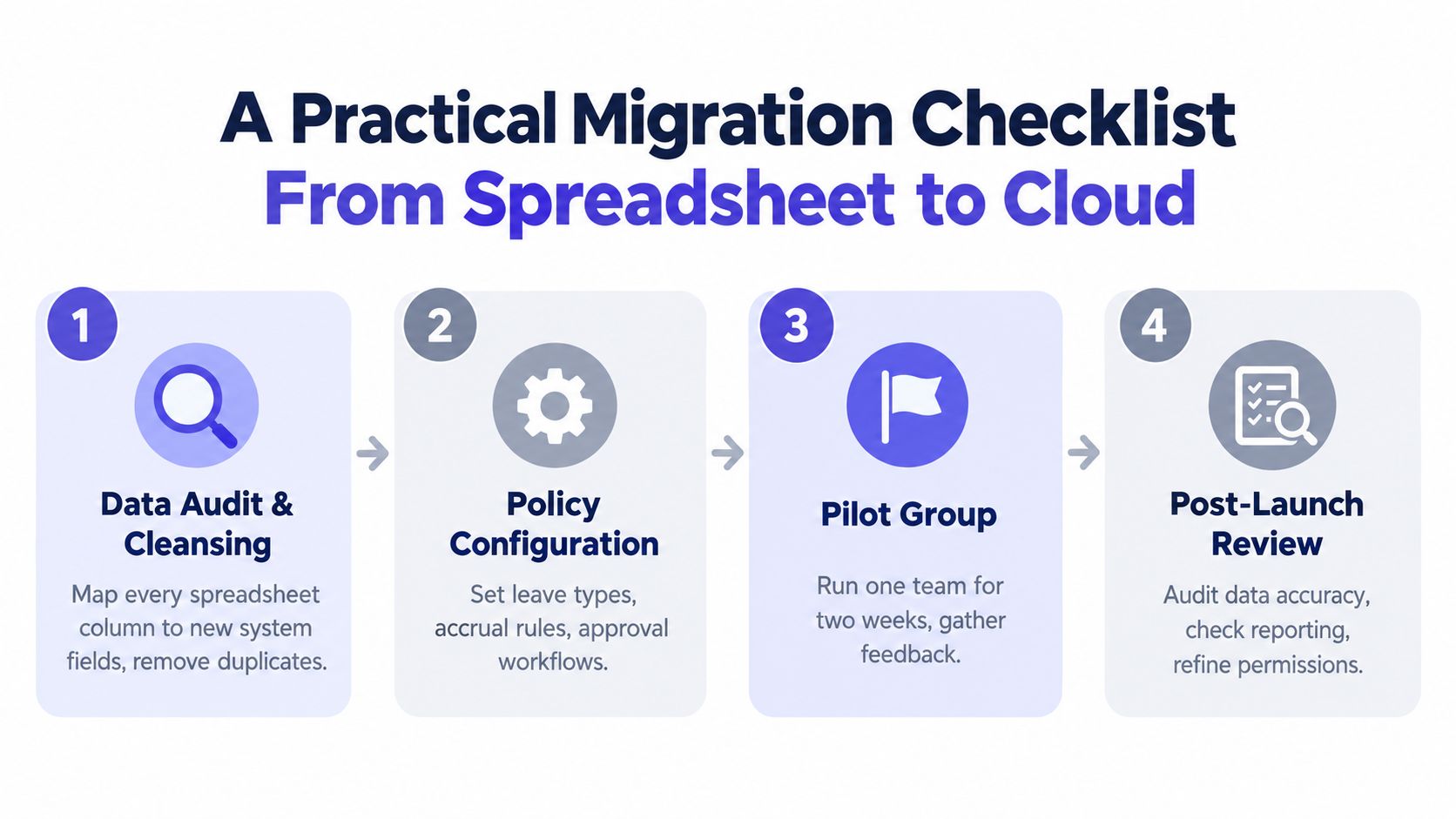
4. Review after launch
At the first-month review, check data quality, request turnaround time, employee adoption, and payroll reconciliation accuracy. At the six-week review, confirm that permissions work as intended, records are retained correctly, and absence reports support the management conversations you need.
The migration test: Don't ask whether the system imported the spreadsheet. Ask whether a manager can handle an unexpected absence without opening the old file.
Keep the spreadsheet read-only for the agreed transition period, then restrict access further. A parallel process that runs indefinitely recreates the same version-control problem you paid to remove.
Recommendations Tied to Business Needs and How LeaveWizard Fits
The matrix produces a clear result when matched to the three scenarios. A small firm with straightforward approvals shouldn't buy broad HR functionality just because it appears on a feature list. A retailer with recurring sickness patterns shouldn't choose a tool that only makes holiday booking easier.
For the 12-person professional services firm, my primary recommendation is a specialist leave platform. LeaveWizard provides leave requests, approvals, reporting, team calendars, real-time availability, and calendar connections including Outlook and Google Calendar, according to the supplied product information. That combination fits a firm that needs fast onboarding and reliable manager control without taking on an entire HR suite.
The trade-off is breadth. A specialist platform won't necessarily replace every HR process, so the buyer should confirm whether onboarding, performance reviews, document storage, or other functions are required now rather than later.
For the 60-person hybrid retailer, choose between a specialist system with strong leave depth and Breathe HR if the wider HR subscription already makes sense. The deciding test is not the holiday calendar. It is whether managers can record sickness consistently, review repeat patterns, connect the result to payroll, and plan cover across rotating shifts.
For the 25-person distributed consultancy, a specialist platform remains a strong fit where mobile self-service, calendar visibility, and notifications are central. Charlie HR becomes the alternative if performance review capability is a near-term priority and the business prefers one broader HR environment.
| SME Scenario | Primary Pick | Alternative | Key Trade-off |
|---|---|---|---|
| 12-person professional services firm | Specialist leave platform | Broader HR suite | Specialist depth versus wider HR coverage |
| 60-person hybrid retailer | Specialist absence platform | Breathe HR | Reporting depth versus broader administration |
| 25-person distributed consultancy | Integration-led specialist platform | Charlie HR | Self-service focus versus performance features |
My buying rule is direct: choose the narrowest platform that fully solves the operational problem you have today, provided it can retain records and support the next stage of growth. Don't pay for breadth to compensate for an unclear process. Configure the workflow, test the awkward absence cases, and then decide whether extra HR modules earn their place.
Frequently Asked Questions for Buyers
How should we compare pricing?
Start with the employee charging model. Confirm whether the fee is per employee, per active user, or based on a tier, then ask what the tier includes. Check support, implementation, integrations, payroll exports, reporting, and any setup charge separately. A low monthly price isn't low if administrators must keep a second system to fill the gaps.
Can we export our data?
Ask for a practical demonstration, not a promise. The export should cover balances, leave history, sickness records, configuration, approvals, and employee identifiers in an open, usable format. Confirm what happens at contract end, how long access remains available, and whether the vendor charges for migration assistance.
What happens during the first statutory year?
Document opening balances and the reason for every manual adjustment. Test carry-over, accrual proration, part-time rules, and backdated records before launch. Keep a controlled copy of the old spreadsheet as evidence, but don't allow it to become a second live system.
Are we stuck if we choose badly?
No, provided you secure export rights and keep your policy configuration documented. A poor choice creates switching work, but clean records, defined approval rules, and a tested data map make recovery manageable. The expensive decision is staying with a platform that can't produce the records managers and payroll need.