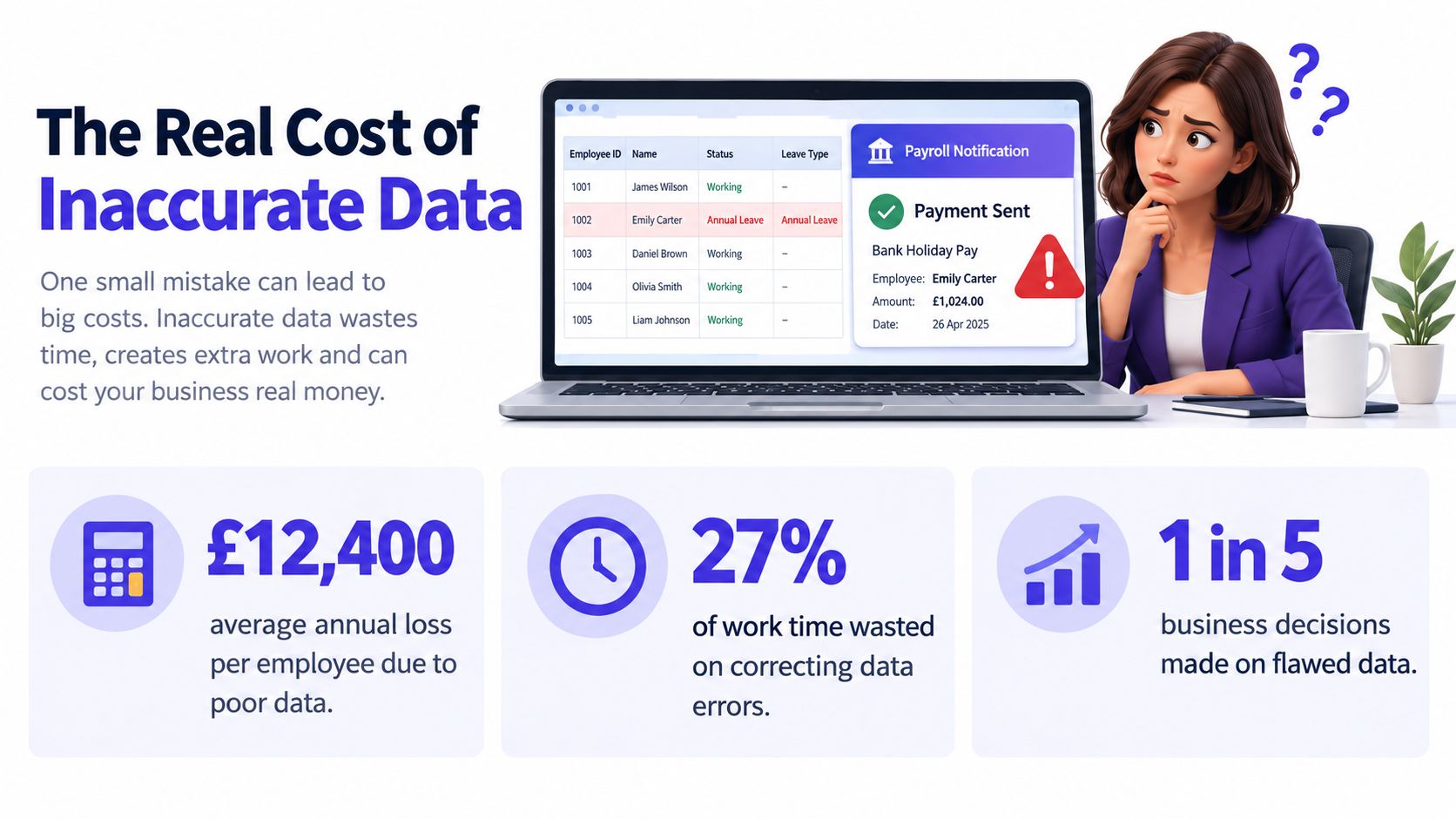
Your manager's spreadsheet says an employee is on annual leave. Payroll has already processed a bank holiday payment. A second manager has booked the same person to cover a critical shift because they were working from a different version of the file. By the time someone notices, the business is correcting payroll, rebuilding the rota and explaining contradictory information to an employee who did nothing wrong.
That isn't a minor spreadsheet nuisance. It's a data accuracy failure. The practical definition is simple: a record is accurate when it matches reality at the moment someone uses it to make a decision. Improving accuracy means fixing the way information is captured, validated and governed, not adding more columns to an already fragile workbook.
Table of Contents
- What Inaccurate Data Actually Costs Your Business
- Find the Root Cause Before You Fix Anything
- Data Entry Best Practices That Actually Stick
- Validation Rules and Automation That Catch Errors Early
- A Practical Example With Leave Tracking
- Monitoring, KPIs and Governance That Keep Accuracy Honest
What Inaccurate Data Actually Costs Your Business
A wrong leave date rarely stays in one spreadsheet. It can distort payroll, team coverage, entitlement balances and absence reporting, while forcing a manager to search emails and messages for the reliable version. Finance then spends time reversing a correction that should never have been needed, and the employee receives conflicting information from the same business.
The UK Information Commissioner's Office guidance on the accuracy principle requires personal data to be accurate and kept up to date where necessary. It also requires inaccurate information to be rectified or erased without delay. Accuracy therefore belongs in daily operations and compliance controls, not just database maintenance.
Prevention beats retrospective cleanup
Correcting rows after a failure creates visible activity, but it rarely removes the cause. Someone must find the original evidence, decide which version is trustworthy, update connected records and explain the change. If the same mistake can enter again tomorrow, the team has paid to delay the next failure.
Put the control at the point of entry. A leave request should select an employee from an existing record, check the dates against working patterns and flag conflicts before approval. A payroll export should draw from a defined source, rather than asking someone to retype figures from a spreadsheet.
Practical rule: If a person must remember a rule every time they enter data, the process is too weak.
Small businesses do not need to rebuild their entire technology stack. Define what each field means, restrict risky inputs, assign an owner and review exceptions on a regular cadence. These controls address the three failure points directly: capture, validation and governance. Accuracy improves when the workflow makes the correct action easier than the incorrect one.
Find the Root Cause Before You Fix Anything
Teams start with the visible symptom. They remove a duplicate row, correct a spelling mistake or ask people to “be more careful”. That approach fails because the same conditions remain in place. Diagnose the failure under capture, validation or governance before choosing a solution.
Capture errors
Capture errors happen when the original information is entered incorrectly or incompletely. A manager types an employee's name differently from the HR record, selects the wrong absence reason or leaves the end date blank because the form doesn't make it mandatory.
Look for free-text fields, inconsistent date formats, duplicate employee identifiers and instructions that depend on local knowledge. If two people interpret “holiday start” differently, they can enter different but apparently valid records.
Validation gaps
Validation gaps allow a record to pass even though it conflicts with another fact. An employee submits leave that overlaps an existing booking, enters an end date before the start date or requests more entitlement than the applicable policy allows.
The UK Government Data Quality Framework defines accuracy as the degree to which data matches reality and recommends measuring quality at both record and dataset level. That distinction matters. One valid-looking row doesn't prove that the dataset is reliable.
Governance failures
Governance failures appear after the data has been entered. Nobody knows who owns the field, corrections overwrite the original value and there's no evidence showing why a change was made. The business may have a technically complete record that cannot withstand a challenge or audit.
For teams that need a broader method for investigating failures across connected systems, this practical guide to root cause analysis for cloud incidents offers a useful way to separate immediate symptoms from underlying process and system causes.
Run this quick self-audit:
- Free text: Which fields could use a dropdown or controlled list?
- Evidence: How many records have no link to an approved request, payroll record or other source?
- Reconciliation: How often does a comparison between systems find a mismatch?
- Corrections: How many changes were made without a reason, timestamp or named owner?
The answers will tell you where to start. Don't buy a new platform before you understand the failure pattern you're paying to remove.
Data Entry Best Practices That Actually Stick
Good capture starts with fewer decisions. Every ambiguous field invites a different interpretation, while every unnecessary field gives people another reason to bypass the form or keep a private note.
Use a short data dictionary for the records that matter most. Define the field name, purpose, permitted values, owner and evidence source. Standardise dates, employee IDs, business locations and absence categories before you migrate old spreadsheet data. “Location” should not mean “office”, “home base” and “cost centre” in different parts of the business.

Make the form do the remembering
Use dropdowns for controlled choices such as absence reason, approval status and business location. Use free text only where the business needs an explanation. A dropdown can prevent "annual leave", "holiday" and "AL" becoming three different categories that later require manual mapping.
Make fields mandatory when the downstream process cannot work without them. Don't make everything mandatory by default. A cluttered form encourages workarounds, so keep the visible questions limited to information needed for the decision and collect sensitive detail only where there's a clear purpose and appropriate access control.
The person closest to the event should create the record whenever possible. The employee can submit the leave dates, the manager can approve or challenge them, and the system can calculate the resulting balance. Re-typing the same event at month-end creates a second opportunity for error.
A short style sheet pinned beside the form often delivers more value than a long policy document. State which date format to use, what each absence category means, when to use a half-day, and where to record a phased return. Plain instructions remove ambiguity before it becomes bad data.
Use the video below as a practical prompt for reviewing how your team enters employee information and where the form could remove avoidable decisions.
Validation Rules and Automation That Catch Errors Early
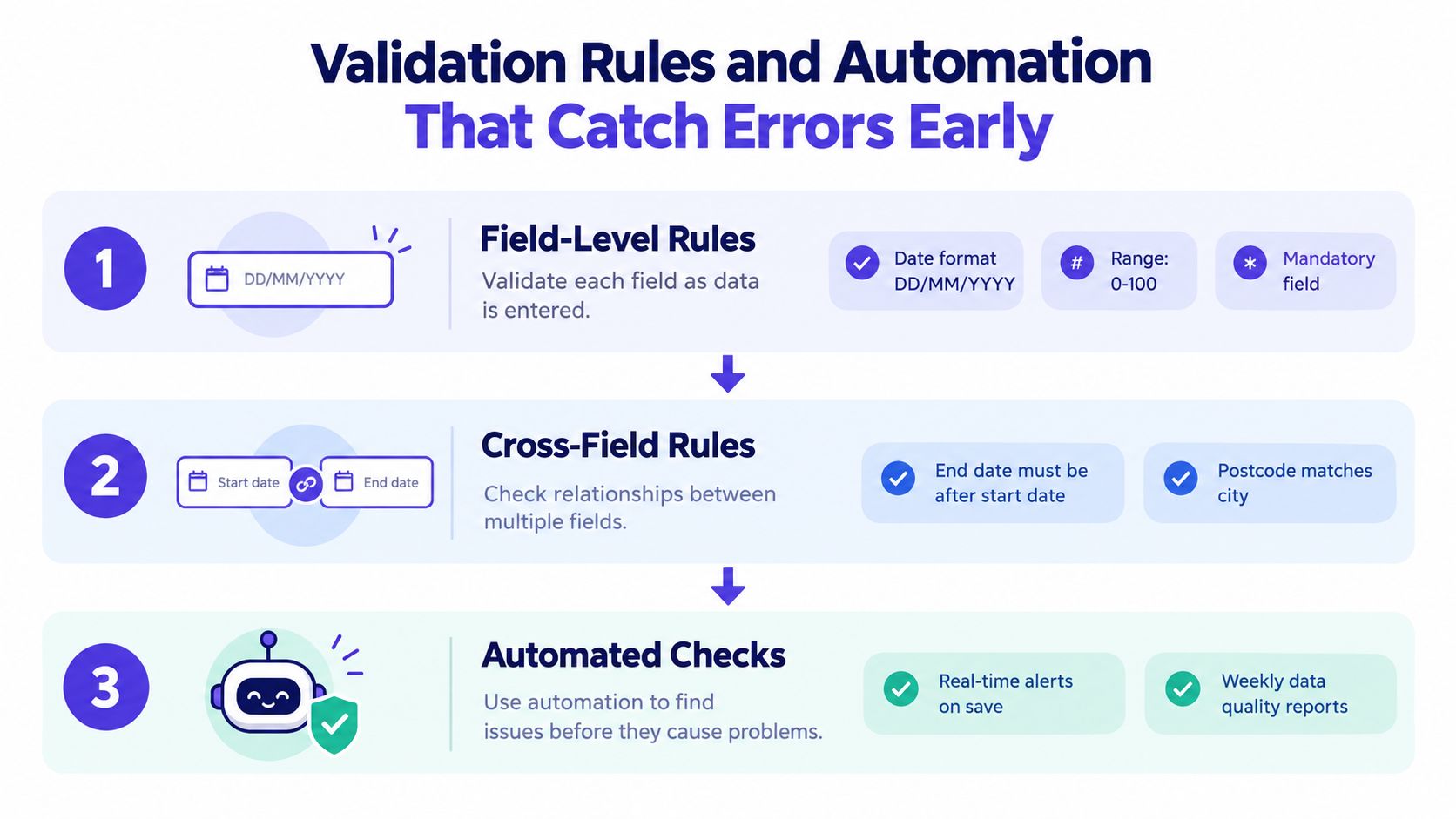
Validation should happen in layers. Start with the value itself, then compare it with related fields and finally check it against other systems and records.
Field-level rules catch basic defects. Require a recognised date format, prevent blank employee identifiers and limit values to an allowed range. These controls are simple, but they stop many errors before they enter the dataset.
Cross-field rules test whether the record makes sense as a whole. An end date must follow the start date. The requested leave must fit the employee's working pattern. The entitlement calculation must use the correct policy and cannot exceed the available allowance.
Consider an employee requesting leave that overlaps an existing booking. The form should identify the conflict before submission, show the affected dates and ask the requester to resolve or explain it. If a manager needs to decide whether an exception is legitimate, the system should route the conflict to that manager with the relevant context and a clear resolution action.
Connect once, reuse everywhere
Pull employee identity, contractual hours, working pattern and holiday year from a defined system of record. Don't ask a manager to retype information that already exists elsewhere. Each duplicated input creates another version that can drift away from reality.
Automated exception alerts are more useful than silent rejection. Tell the responsible person what failed, which record is affected and what evidence they need to provide. A weekly report can then show unresolved conflicts, missing fields, duplicated transactions and records that have become stale.
From 6 April 2026, ACAS states that employers must record holiday taken, holiday carried over from previous years, holiday pay and payments made in lieu of untaken holiday, retaining those records for at least six years. The ACAS guidance on keeping holiday records also says the record should explain what holiday pay includes, such as bonuses or commission. Your validation design must therefore cover the full holiday record, not just whether a date was approved.
A Practical Example With Leave Tracking
A growing business replacing a shared leave spreadsheet needs more than a digital copy of the same grid. The useful change is to create one controlled workflow for identity, entitlement, requests, approvals and corrections.
Take a business using LeaveWizard as its leave-tracking system. The employee submits a request through self-service, using their own record rather than asking an administrator to retype the dates. The system applies the configured policy, calculates the relevant balance, checks the request against working patterns and existing bookings, and sends it to the appropriate approver.
The manager sees current team availability before approving the request. That prevents the familiar situation where two people rely on different spreadsheet versions and discover a coverage problem after the rota has been published. Smartphone self-service also lets employees submit or review records without passing details through several intermediaries.
Keep the audit trail intact
A reliable record shows who created the request, who approved it, what changed and when. If an employee challenges a balance, the administrator can investigate the entitlement calculation, carry-over setting or policy rather than guessing from overwritten cells.
The same principle applies to corrections. A corrected absence should retain the original value, the reason for the change, the evidence used and the person who made the update. The system should distinguish employee-entered information, manager-approved information and system-calculated values so the business can see where an error began.
Configurable policies matter as the business grows. Different teams may have different accruals, carry-over arrangements or entitlement rules, and those rules need to be applied consistently rather than maintained in separate personal workbooks. Real-time balances, approval routing and reporting reduce the number of manual handoffs, which is where spreadsheet processes become brittle.
The broader lesson is straightforward: the right system enforces the right rules at the point of work. It doesn't depend on every employee remembering the latest formula or finding the newest version of a shared file.
Monitoring, KPIs and Governance That Keep Accuracy Honest
Accuracy fades when nobody measures it. A successful migration still breaks down when teams stop checking exceptions, change a policy without updating the rules, or approve corrections privately in email. Treat accuracy as a system with three failure points: capture, validation and governance.
Use continuous reconciliation instead of waiting for an annual HR audit. Compare leave transactions with payroll, HR records and manager approvals on a defined schedule. The ICO's accuracy principle guidance, cited earlier, supports documented correction procedures, regular reviews, consistent formats, validation rules and alerts for missing or incorrectly formatted information.
Use this operating rhythm:
- Weekly: Review open exceptions, overlapping leave, missing evidence and stale records.
- Monthly: Sample corrected records against approved requests or payroll evidence.
- Quarterly: Review definitions, ownership, access permissions, recurring errors and system changes.
Training should be short, role-specific and repeated whenever the process changes. Employees need clear instructions for submitting records. Managers need a defined method for approving, challenging and resolving exceptions. Administrators need a correction process that preserves the original history.
For teams connecting several business systems, this practical overview of data governance for SAP and Microsoft explains how ownership, controls and consistency can be managed across platforms.
The ONS sickness absence figures for 2024 report 148.9 million working days lost through sickness or injury, averaging 4.4 days per worker. The figures show why definitions must be controlled. If one team records hours lost while another records calendar days, management compares measures that describe different things.
Use this wall-ready checklist:
| KPI | What it measures | Realistic target |
|---|---|---|
| Reconciliation coverage | Whether active employee records were checked against source systems | 100% of active employees each cycle |
| Critical exception ageing | How long serious unresolved errors remain open | Zero critical errors beyond one working day |
| Correction rate | Whether identified errors are being resolved | Track each cycle and investigate deterioration |
| Repeat-error rate | Whether the same failure keeps returning | Falling trend, with an owner for recurring causes |
| Sampled agreement with source evidence | Whether corrected records match approved requests or payroll records | 100% agreement in the selected sample |
Assign a named owner to every dataset. Restrict access by role, preserve version history and notify downstream users when an inaccurate record has already been shared. Accuracy holds only when the business can show what changed, why it changed and whether the corrected value matches reality.
LeaveWizard gives small businesses one place to manage leave requests, entitlement calculations, approvals, balances and employee availability instead of disconnected spreadsheets. Visit LeaveWizard to review its leave workflow and record management features.