The shared leave spreadsheet started as a sensible fix. Everyone could open it, employees added holiday dates, and a manager checked the coloured cells before approving a request. Then the team grew. Someone overwrote a formula, another person approved leave by email, sickness was recorded in a chat message, and the spreadsheet still showed the employee as available. By the time a manager noticed the clash, the client deadline was already at risk.
A leave tracker for a team should solve a capacity problem, not merely display a calendar. It needs to keep entitlement, requests, approvals, absence, availability and staffing information connected without pretending they're all the same record. The right system gives employees a clear self-service process and gives managers enough reliable information to plan cover.
Table of Contents
- Why Spreadsheets Stop Working for Growing Teams
- The Features a Team Leave Tracker Needs
- Aligning the Tracker with UK Holiday and Absence Policy
- Tracking Planned Leave, Sickness, and Hybrid Availability Separately
- Setting Up and Rolling Out the Tracker in Four Weeks
- Integrations That Save Real Admin Time
- Common Rollout Mistakes and How to Avoid Them
Why Spreadsheets Stop Working for Growing Teams
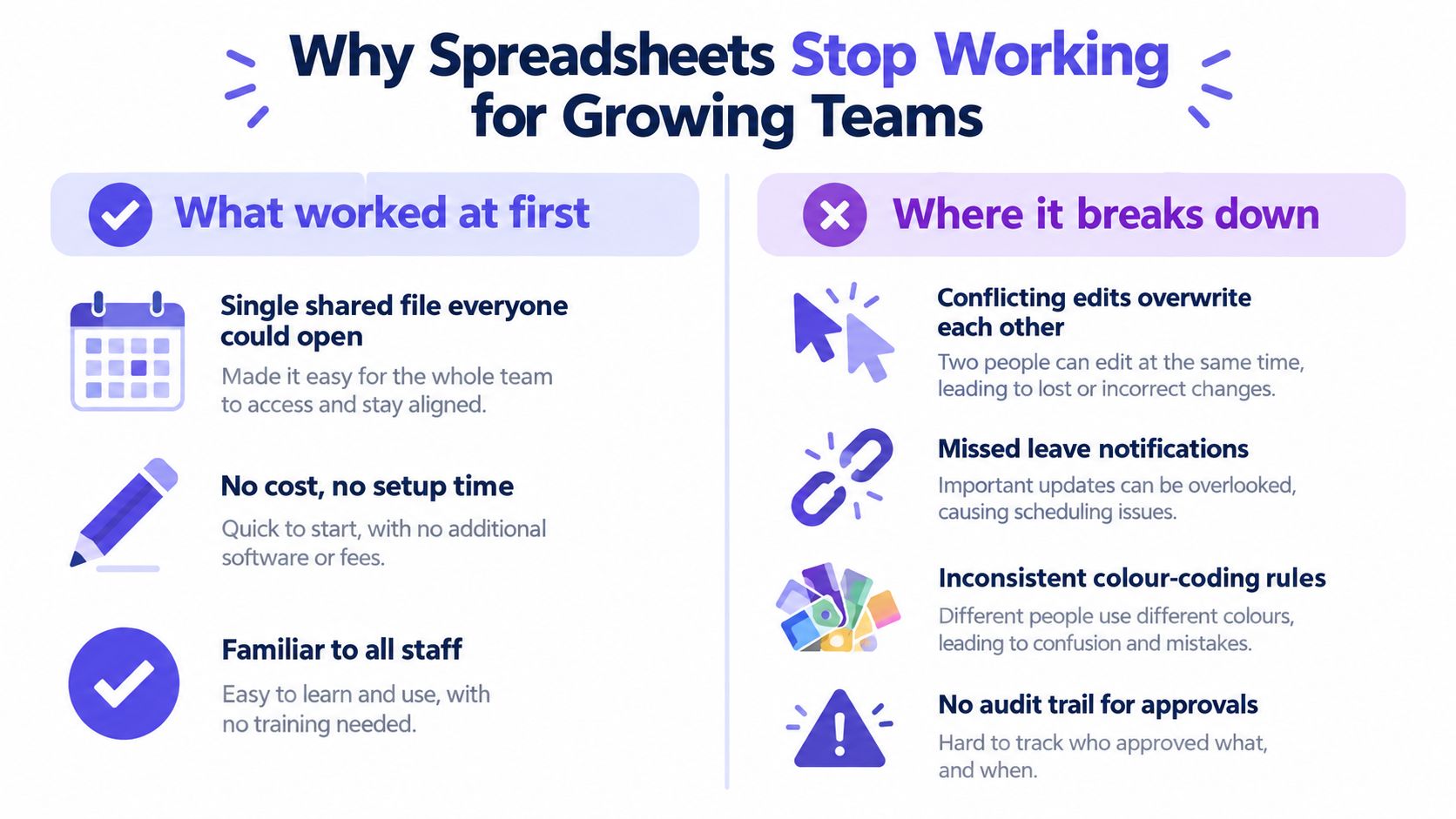
Spreadsheets work well when the process is small, stable and owned by one person. They become fragile when several managers edit them, employees request leave through different channels, and HR has to reconcile the result with payroll. A calendar grid can show dates, but it can't reliably explain why someone is unavailable, whether leave is approved, how much entitlement remains, or who changed the record.
The first failure is usually version control. One manager downloads a copy, another edits the shared file, and a third keeps a private tab for their team. A request can appear approved in one place and pending in another. Colour-coding makes the problem worse when each team invents its own meaning for blue, green or orange cells.
The second failure is approval history. An email saying “approved” isn't a durable workflow. It can be buried, forwarded without context or separated from the dates it refers to. When someone challenges a balance or asks why a request was rejected, HR needs the request, decision, approver and timestamp in one record.
Define the problem before choosing software
Start by listing the decisions your current file fails to support:
- Can the employee take this leave? The tracker must calculate entitlement and remaining balance rather than rely on a manually updated number.
- Has the right person approved it? The system should keep a visible request status and approval history.
- Who is available? Managers need planned leave, sickness and working arrangements represented clearly enough to assess cover.
- Can HR explain the balance later? Records should preserve adjustments, policy settings and relevant changes.
- Can payroll use the data? Leave records need a dependable export or integration rather than a last-minute copy and paste.
A proper tracker is therefore a single source of truth for leave administration, not a more attractive spreadsheet. It should also support the wider operating model. If you're reviewing HR processes more broadly, these practical ways to future-proof HR provide useful context on reducing manual dependency as teams grow.
The decision isn't always “spreadsheet or software”. It's whether your current process can produce one accurate answer when an employee, manager or finance colleague asks for it. Use this assessment of spreadsheets for leave management to test the existing process against that standard.
Practical rule: If a manager has to check three places before approving one request, the process is already too complicated.
The Features a Team Leave Tracker Needs
A team can have a polished calendar and still make poor capacity decisions. Assess every feature by the operational question it answers: who is away, who can cover the work, which absence type is involved, and whether the record can withstand later review. Mobile access and colourful dashboards matter only after those basics work.
Start with requests and approvals
Employees should submit leave themselves, choose the correct leave type, and see the status without sending a follow-up message. Managers should receive the request, review relevant team coverage, and approve or reject it in the same workflow. Reject any tool that stores final dates but loses the decision trail.
Entitlement calculation must separate statutory entitlement, contractual allowance, accrued leave, leave taken, adjustments, and remaining balance. It should apply part-time and irregular-hours rules without requiring HR to maintain parallel formulas. A balance that cannot be explained is an administrative risk, even when the displayed number looks plausible.
Use the calendar for capacity planning, not as a dumping ground for every absence record. At team level, it should show who is unavailable and distinguish approved, pending, and rejected requests. Managers need filters for team, date, leave type, and approval status. HR needs wider reporting with controlled access, while employees should not see private information that has no bearing on their work.
Sickness belongs in the operational picture, but it needs a different workflow from annual leave. Managers should be able to record an unplanned absence, restrict visibility, and support a return-to-work process. A holiday calendar with a sickness note added to it does not provide enough control.
| Feature category | Operational problem it solves for an SMB | Watch out for |
|---|---|---|
| Self-service requests | Employees stop relying on email and chat for routine applications | A form with no clear status or approval owner |
| Entitlement and balances | HR can reconcile available leave without manual formula checks | Fixed rules that ignore worker patterns or contracts |
| Team calendar | Managers can identify clashes and plan cover | One view that mixes approved, pending, and rejected leave |
| Sickness recording | Unplanned absence becomes visible for capacity planning | Excessive medical detail or unrestricted access |
| Reporting and exports | HR and finance can review absence and payroll-relevant records | Attractive charts without an audit trail |
| Roles and permissions | Each user sees the information required for their job | All managers receiving access to sensitive records |
Keep the shortlist to three products. Score each against the hardest policy case, such as irregular-hours accrual, and eliminate any tool that cannot handle it without side spreadsheets.
Aligning the Tracker with UK Holiday and Absence Policy
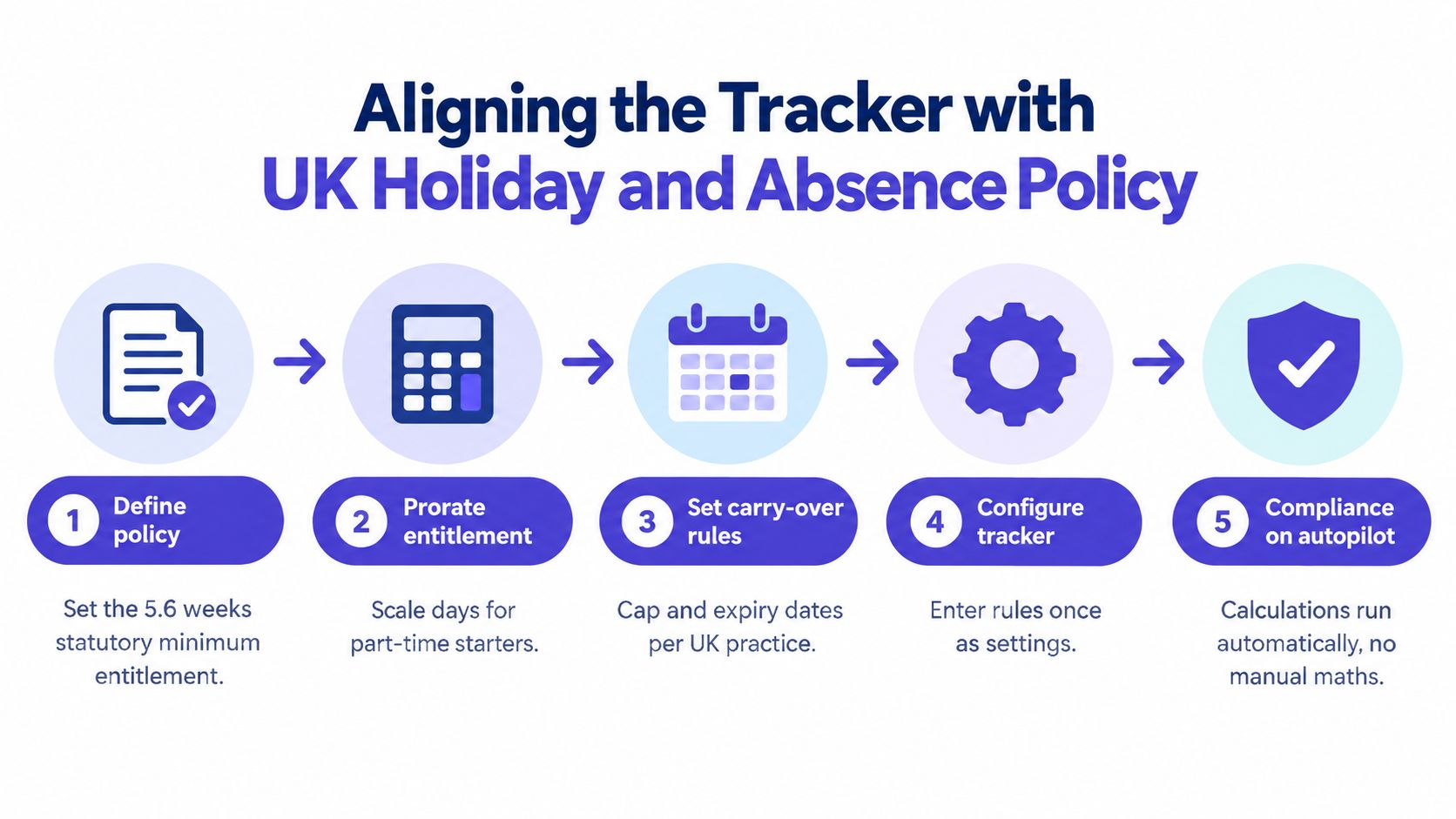
A leave tracker becomes a capacity-planning tool only when its rules match the worker's contract. Configure the policy before importing employee data. UK workers are generally entitled to 5.6 weeks of paid holiday each year under the Working Time Regulations 1998. For a typical five-day week, that means at least 28 paid days. A regular three-day week has a statutory minimum of 16.8 days. The entitlement applies to agency workers, part-time employees, zero-hours workers and people with irregular hours. GOV.UK's holiday entitlement guidance confirms that statutory entitlement is capped at 28 days, so a six-day worker does not automatically receive 33.6 statutory days.
Set the leave year first. Then configure working patterns, contractual additions and carry-over rules. A part-year starter receives a prorated share of the full-year entitlement based on the proportion of the leave year spent employed. For example, a full-time five-day worker starting halfway through the leave year has an unrounded calculation of 28 × 6/12 = 14 days, using the GOV.UK calculation method for different contract types.
Configure irregular-hours accrual carefully
For leave years beginning on or after 1 April 2024, eligible irregular-hours and part-year workers can accrue statutory leave from actual hours worked in each pay period. The calculation is hours worked ÷ 100 × 12.07, rounded to the nearest hour and subject to the 5.6-week maximum. A pay period with 68 hours worked produces 8.2076 hours, which rounds to 8 hours, according to the holiday entitlement and pay reforms.
Store hours worked, accrued entitlement, leave taken, adjustments and the leave year for every pay period. Keep contractual leave above the statutory minimum in a separate policy layer. Do not apply the 12.07% method outside the qualifying categories, round every shift separately, or remove the history needed to reconcile payroll.
Use this rollout sequence:
- Classify each worker pattern. Separate full-time, part-time, irregular-hours and part-year arrangements.
- Enter leave-year dates and policy rules. Record caps, carry-over treatment, public holidays and contractual additions. For a ready-made starting point, use this UK employee leave policy template to capture those rules before configuring the tracker.
- Import validated employee data. Check start dates, working days, hours and existing balances before activation.
- Test edge cases. Use a starter, a part-time employee and an irregular-hours worker as test records.
- Reconcile with payroll. Confirm that leave balances and holiday-pay records remain distinct.
For eligible irregular-hours and part-year workers, employers may use rolled-up holiday pay at a minimum rate of 12.07% of total pay in each pay period, paid with normal wages and shown separately on the payslip. The ACAS guidance on rolled-up holiday pay explains why this calculation belongs in a separate payroll record, not inside the employee's leave balance.
Tracking Planned Leave, Sickness, and Hybrid Availability Separately
A manager needs two answers, not one. Who is off, and who is available for this work, site, shift or time zone? A single calendar often answers neither accurately because annual leave, sickness and hybrid availability have different meanings, permissions and operational consequences.
Planned leave is a request and entitlement record. It needs an approval status, leave type, dates and remaining balance. Sickness absence is an unplanned absence record, usually with restricted access and a return-to-work process. Hybrid availability describes where and when someone expects to work, which is not the same as being absent.
Treat absence as a capacity signal
The Office for National Statistics sickness absence analysis estimated that sickness or injury caused 148.9 million working days to be lost in the UK in 2024, an average of 4.4 days per worker. The figure was 0.5 days fewer per worker than in 2023, but 0.2 days above the 2019 pre-pandemic level. The sickness-absence rate was 2.9% in the public sector and 1.8% in the private sector.
Those figures make sickness a planning issue, not a footnote. The tracker should show that coverage is affected without displaying diagnoses to colleagues who don't need them. Store only the information required for the operational process, restrict medical details by role, and give managers access to absence duration, expected return information and cover implications rather than unnecessary health history.
The CIPD reports that sickness absence reached 9.4 days per employee in 2025, compared with 7.8 days in 2023 and 5.8 days before the pandemic. It also identifies mental ill health as the leading cause of long-term absence and the second most common cause of short-term absence in its health and wellbeing research. Use those findings to justify supportive processes and sensible access controls, not punitive monitoring.
Hybrid work adds another layer. CIPD research found that 74% of organisations had hybrid working, 65% required minimum workplace attendance, and 14% of employers allowing hybrid work planned to introduce or increase mandatory attendance over the following 12 months, as reported in its flexible and hybrid working research. Keep work location, core hours, handovers and minimum staffing requirements separate from holiday entitlement.
A useful operational model resembles the way specialist organisations document staffing and scheduling, including the approach described in how tutoring centres manage operations. The lesson is simple: connect the records for planning, but don't merge them into one indiscriminate status field.
Setting Up and Rolling Out the Tracker in Four Weeks
A four-week rollout is realistic if the team treats it as a policy and data project rather than a software installation. Don't try to recreate every historical spreadsheet tab. Decide what must be accurate from day one, migrate that information, and archive the old file as read-only evidence.
Week one and policy mapping
Document the leave year, statutory and contractual entitlement, public-holiday treatment, carry-over rules, worker types, approval owners and sickness process. Clean the existing spreadsheet before import. Remove duplicate employees, resolve negative or unexplained balances and identify rows that no one can confidently verify.
Week two and configuration
Enter working patterns, leave categories, accrual rules, approval chains and access permissions. Decide who counts as an approver when a line manager is away. Configure notifications so employees know when a request is received, managers know when action is needed and HR can identify exceptions without chasing every person.
Week three and a controlled pilot
Use one team with a realistic mix of working patterns. Ask employees to submit a planned leave request, managers to approve it, and HR to check the balance and audit record. Test a sickness notification and a hybrid availability record separately. The pilot should expose unclear policy language before the whole company sees it.
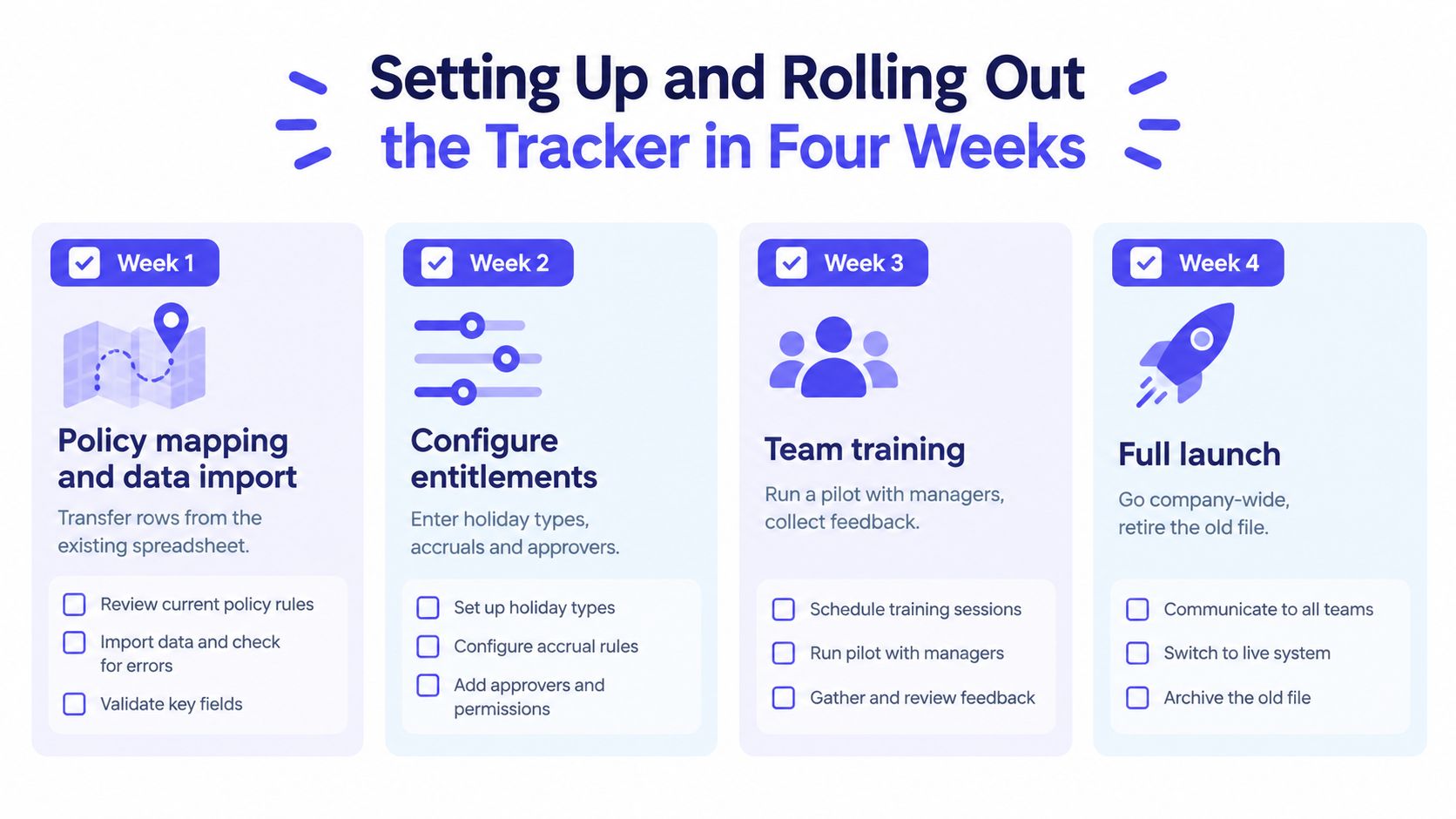
Week four and full launch
Train employees on requesting leave and checking balances. Train managers on coverage views, approval decisions, sickness recording and privacy boundaries. Explain which records belong in the tracker and which conversations must remain confidential.
On launch day, check these items:
- Balances: Compare a sample of employee balances with the approved policy and payroll records.
- Approvers: Submit requests for each team and confirm that the correct manager receives them.
- Visibility: Verify that employees, managers and HR see different levels of information.
- Calendars: Check public holidays, non-working days and team filters.
- Notifications: Confirm that requests, decisions and changes generate the expected alerts.
- Old files: Set the spreadsheet to read-only and tell staff where the new source of truth lives.
The strongest rollout message is operational: “Use this record so the team can plan cover.” Employees adopt systems more readily when the reason is clear.
Integrations That Save Real Admin Time
Integrations should remove duplicate entry. They shouldn't create another place where leave can be edited without the tracker knowing about it.
Start with calendar synchronisation. Approved leave should flow to the calendars people already use, while the leave tracker remains the source of truth for entitlement, approval and balance. A calendar event shouldn't be able to change an employee's allowance.
Payroll and HR integrations are valuable when ownership is explicit. Employee identity, start date, working pattern and pay-period hours may flow into the tracker, subject to validation. Approved leave, accrual results and payroll-relevant holiday-pay information may flow out. Keep policy interpretation and approval history in the leave system, where HR can audit it.
Single sign-on reduces account administration and supports cleaner access control. Team chat notifications can shorten approval delays, but they should link back to the request rather than become a parallel approval channel. A message in Slack or Microsoft Teams is a prompt, not the official decision.
Adopt in stages
During the first week, stabilise the core workflow. Employees should submit requests in the tracker, managers should approve them there, and HR should review exceptions.
During the first month, connect the team calendar and configure notifications. Check whether staff still send requests by email or maintain shadow sheets. If they do, fix the process before adding more integrations.
During the first quarter, connect payroll or HR data if the core records reconcile cleanly. Review exports, failed synchronisations and permission boundaries with finance and HR. Guidance on integrating leave management with Slack is useful when chat notifications form part of the workflow, but don't let convenience turn Slack into an unofficial database.
Common Rollout Mistakes and How to Avoid Them
Most failed rollouts aren't software failures. They're policy and data failures wearing a software-shaped disguise.
Teams launch before deciding how carry-over, public holidays, starters, sickness and hybrid availability work. They train managers but leave employees unsure where to submit requests. They focus on annual leave because it's visible, then discover that sickness information is scattered across messages. They also expect a tracker to resolve hybrid-work confusion when the organisation hasn't defined expected attendance or coverage requirements.
Run this audit before launch:
- Policy: Can an employee read the rules without asking HR to interpret them?
- Data: Can HR explain every imported balance and adjustment?
- Workflow: Is there one named approver and a backup for each team?
- Privacy: Can managers plan cover without seeing unnecessary medical information?
- Adoption: Are employees using the system for every new request?
- Control: Is the old spreadsheet read-only and archived?
Watch for early drift. Shadow spreadsheets reappear. Approval times lengthen. Managers approve requests in chat. HR manually corrects balances without recording why. Those signals mean the process needs attention, even if the software is functioning correctly.
A leave tracker for team use only delivers reliable planning when the underlying policy, data and habits are reliable. Fix those three elements, and the technology becomes the easy part.