It's 9:00 on Monday morning. Two employees have requested the same day off by email, another has updated a shared spreadsheet, and a manager has approved a request in a chat message that finance hasn't seen. You're trying to work out who is available, whether anyone has exceeded their allowance, and whether the rota still has enough cover. By lunchtime, a simple holiday request has become a trail of tabs, messages and uncomfortable follow-ups.
That situation is common in small businesses because leave sits across several jobs at once. HR needs accurate records, managers need dependable coverage, finance needs correct payroll information, and employees need a clear answer before they make plans. A time off request app brings those activities into one operational view, so your team can plan ahead instead of repairing mistakes after they happen.

Table of Contents
- Introduction to Smarter Time Off Management
- What a Time Off Request App Actually Does
- Why Small Businesses Outgrow Spreadsheets
- Core Features and Integrations That Matter Most
- How to Choose the Right Time Off Request App
- Rolling Out Your New App Without Disruption
- Compliance Payroll and UK Leave Rules Explained
- Real Results and Next Steps for Your Team
Introduction to Smarter Time Off Management
Leave management becomes harder as a business grows. A verbal agreement may work for one person, but larger teams bring overlapping requests, different working patterns, part-day absences, sickness records and changing approval responsibilities. A spreadsheet can hold some of this information, yet it rarely gives employees, managers and finance one current view.
The operational risk extends beyond administration. A missed update can leave a manager expecting someone who is away, give finance the wrong paid-hours information, or force an employee to chase an answer. Small businesses feel these gaps quickly because one unplanned absence can affect customer service, delivery work and the workload shared by the rest of the team.
A time off request app acts as a control centre for those decisions. It connects leave records with team availability, payroll information and approval history, so a request can be checked against the work that still needs cover. Each record becomes a clear handoff between the employee, manager, HR and finance, rather than another isolated spreadsheet entry.
UK employers must also track a defined statutory minimum. Most workers are entitled to 5.6 weeks of paid holiday, usually 28 days for someone working a five-day week. The GOV.UK's holiday entitlement guidance summarises these rules. Accurate tracking therefore supports compliance as well as everyday planning.
Practical rule: Treat every leave request as an operational event. It affects availability, approval, pay, records and sometimes compliance.
The guide follows a practical route from spreadsheet-based work to a managed system: understand what the app controls, identify where manual processes fail, choose useful features, plan a low-disruption rollout and turn UK leave rules into clear system requirements.
What a Time Off Request App Actually Does
Think of a time off request app as a shared control tower for availability. An airport control tower doesn't fly the aircraft, but it gives the people making decisions a common view of movement, timing and potential conflict. A leave app plays a similar role for employees, managers, HR, finance and operations.
The workflow usually follows four connected actions:
- An employee submits a request. They choose the leave type, dates and, where supported, part-day times. Self-service means the employee enters the information at the source rather than asking HR to retype an email.
- The appropriate manager reviews it. The manager sees the relevant balance, policy conditions and team availability before approving, rejecting or querying the request.
- The calendar reflects the decision. Once approved, the absence appears in the shared availability view, helping managers plan cover and helping colleagues understand capacity.
- The record stays auditable. The system retains the request status and related details, giving HR and finance a dependable history instead of forcing them to reconstruct decisions from inboxes.
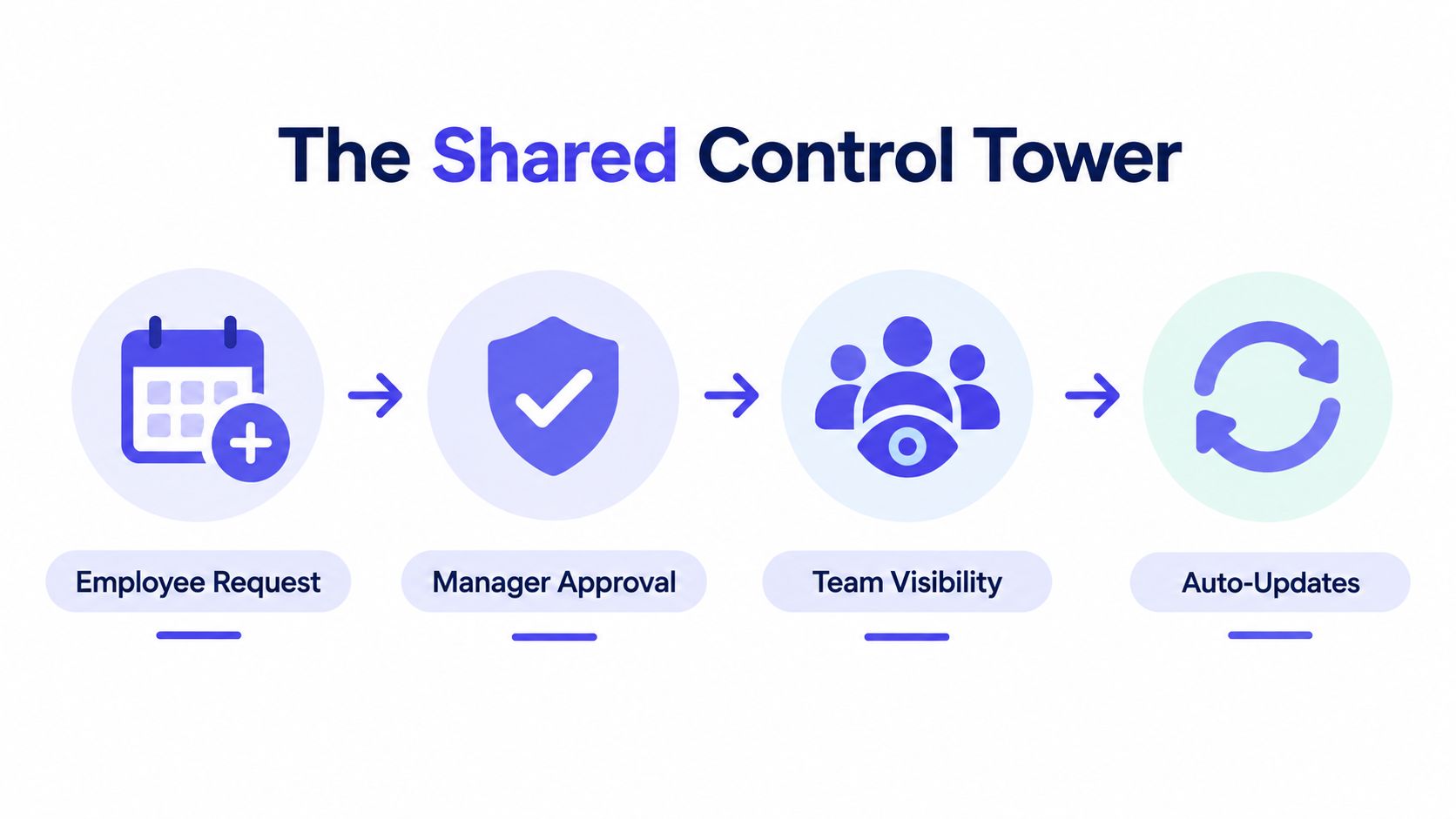
One record for several teams
The value comes from the connections between those steps. An employee sees whether a request is pending or decided. A manager sees the effect on coverage. HR can review balances and policy application. Finance can use approved absence information when checking payroll inputs.
That shared record also reduces the “which version is correct?” problem. An email may contain the latest answer, while a spreadsheet contains the latest balance, and a calendar contains the latest schedule. A properly configured app brings those views together so people aren't working from contradictory information.
The app should also distinguish time off from broader availability information. A holiday request is a specific absence that needs approval. An employee may also have recurring unavailability, such as a regular caring commitment or another work obligation. Keeping those concepts separate helps managers understand whether someone is taking leave or cannot work at a particular time.
The workflow is easier to understand in motion, particularly for managers who currently handle requests through messages and calendar invitations.
A good app doesn't remove managerial judgement. It puts that judgement in the right place, after the manager can see the balance, dates and coverage implications. That turns approval from inbox archaeology into a visible business decision.
Why Small Businesses Outgrow Spreadsheets
Spreadsheets usually fail through small inconsistencies rather than one dramatic breakdown. Someone enters a request in the wrong row. A manager changes a date but forgets the calendar. A formula references the previous year's allowance. An employee sends a sickness update by email while the holiday tracker remains unchanged.
Each mistake creates a second task. Someone must find the original message, confirm what was agreed, correct the balance, update the calendar and explain the result. The business pays for that work through interrupted operations, slower decisions and avoidable uncertainty.
The visibility problem
A spreadsheet can show recorded leave, but it doesn't necessarily show live workflow state. A manager needs to know whether a request is pending, approved, rejected or awaiting clarification. They also need to see whether the absence overlaps with other approved leave, key shifts or periods when the business has limited cover.
The UK absence environment makes that visibility important. The Office for National Statistics sickness absence statistics for 2025 report 148 million working days lost, an average of 4.4 days lost per worker, and an absence rate of 2.0%. Those figures describe the wider labour market, but they also show why absence records need more than a static holiday table.
CIPD reports that UK employees were off sick for an average of 9.4 days in the last 12 months, compared with 7.8 days in 2023 and 5.8 days pre-pandemic, in its workplace absence analysis. For a small team, one unplanned absence can force a manager to rearrange shifts, move work between colleagues or contact customers.
The control problem
Manual tracking also makes policy application inconsistent. One manager may approve a request after checking the rota, while another relies on memory. HR may notice an issue only when reconciling payroll. Employees then receive different experiences for similar requests, which damages confidence in the process.
A time off request app creates controls around that workflow:
- Centralised records: Everyone works from the same approved dates and statuses.
- Approval history: HR can see who acted and when, rather than relying on forwarded messages.
- Calendar visibility: Managers can identify conflicts before agreeing to leave.
- Structured reporting: Operations can review absence patterns without rebuilding the data first.
Operational test: If a manager can't answer “who is away, when, and what has been approved?” from one current view, the process still has a control gap.
The point isn't that spreadsheets are always useless. They can support an interim register or a simple export. They become risky when they act as the approval workflow, calculation engine, calendar and audit record at the same time.
Core Features and Integrations That Matter Most
A capable app works as a connected system rather than a collection of isolated buttons. The employee submits a request, the manager assesses its operational effect, the calendar updates, and the resulting record becomes available for reporting or payroll checks.
Start with rules and calculations. The app should handle different leave types, working patterns, accrual arrangements and balances without asking HR to maintain fragile formulas. It should also show enough detail for an administrator to understand how a balance was reached.
Approval workflows should reflect the business structure. A small company may need one line manager, while a growing organisation may require department approval, HR review or an escalation route when a request remains pending. Look for status notifications, delegated approval and a history of changes.
A real-time calendar is the operational centre. It should let managers filter by person, team or leave type, identify overlapping absence and distinguish approved leave from requests still awaiting a decision. Mobile access matters because employees and managers aren't always at a desk when a request needs attention.
Reporting connects leave administration to planning. Useful reports can show balances, upcoming availability, sickness events and historical absence by employee, team or period. Payroll and calendar integrations reduce duplicate entry, but test what synchronises, when it synchronises and whether corrections flow in both directions.
For teams spread across locations or working with external specialists, consistent access and clear ownership matter as much as the number of integrations. Businesses considering wider workforce support may also find context in nearshore staffing for U.S. companies, particularly when coordinating distributed teams across operational boundaries.
| Feature | What It Solves | Priority for Small Business |
|---|---|---|
| Self-service requests | Removes email re-entry and gives employees ownership | Must-have |
| Approval workflow | Shows pending, approved and rejected decisions | Must-have |
| Shared availability calendar | Exposes coverage conflicts before approval | Must-have |
| Automated entitlement rules | Reduces balance and accrual formula errors | Must-have |
| Payroll integration | Limits duplicate data entry during payroll checks | High priority |
| Mobile access | Lets people submit and review requests away from a desk | High priority |
| Advanced analytics | Supports deeper absence and workforce analysis | Useful as the business grows |
| Chat integration | Places notifications in an existing work channel | Useful where the team relies on chat |
If Slack is central to your daily work, review how LeaveWizard can integrate with Slack as part of the wider workflow assessment. The right integration should make the approved record easier to find, not create another disconnected approval route.
How to Choose the Right Time Off Request App
Feature lists rarely make the decision by themselves. Several products may offer calendars, approvals and reports, but differ sharply in policy flexibility, support and the amount of administration required after launch.
Begin with the employee experience. Ask a few people who don't work in HR to submit a realistic request from a phone and a browser. Can they find the right leave type, understand their balance and see the status without instructions? If the answer is no, adoption will suffer regardless of the platform's technical depth.
Test the rules with real scenarios
Don't evaluate an app only with a straightforward full-week holiday. Use examples that expose the system's limits:
- A part-day request that overlaps with a working shift.
- A cancellation after approval.
- A sickness record that needs supporting self-certification information.
- A worker whose contract type changes during the leave year.
- Two team members requesting overlapping dates.
- A request that may need carry-over treatment.
Check whether the app makes the calculation and decision path visible. A black-box total creates a future support burden because HR still has to explain the result manually.
Score the decision, not the sales demo
Create a simple matrix and score each shortlisted product against the criteria that matter to your business. Use an agreed scale such as low, medium and high rather than pretending every feature carries equal value.
| Decision area | Question to ask | Evidence to request |
|---|---|---|
| Ease of use | Can employees complete common actions without training? | Live trial with real scenarios |
| Policy flexibility | Can the rules represent your worker types and leave year? | Configuration walkthrough |
| Coverage planning | Can managers see team availability before approval? | Calendar demonstration |
| Payroll accuracy | Can approved records be reconciled with payroll inputs? | Export or integration test |
| Security and access | Can permissions limit sensitive information appropriately? | Access model and documentation |
| Support | Who helps when a rule or migration issue appears? | Named support process |
| Cost and growth | Does pricing remain understandable as the team changes? | Written pricing assumptions |
Include HR, finance, operations and at least one line manager in the trial. Their questions will differ, and that is useful. HR may focus on audit history, finance on pay-period exports and operations on coverage.
Selection also affects wider management routines. For example, clear team building approval strategies can help organisations coordinate activities without creating avoidable clashes with leave and staffing commitments. For a broader comparison, use this overview of leave management systems for 2025 as one input, then validate every option against your own policies and scenarios.
Rolling Out Your New App Without Disruption
A smooth rollout starts with clean decisions, not data entry. Before importing anything, agree which leave types exist, who approves them, how sickness is recorded, what the leave year is and how historical balances should be treated.
Prepare the foundation
Create a short implementation register covering:
- People: employee names, teams, managers and working patterns.
- Balances: current entitlements, used leave, pending requests and approved future leave.
- Policies: approval routes, carry-over treatment, public holiday handling and contract categories.
- Connections: payroll, calendars, messaging tools and reporting recipients.
Clean the source spreadsheet before migration. Remove duplicate employee records, resolve conflicting dates and mark uncertain balances for review. Don't import ambiguity and hope the app will fix it.
Configure and test in stages
Set up the rules with a small pilot group first. Include a regular-hours employee, an irregular-hours or part-year worker where relevant, a manager and someone responsible for payroll checks. Submit test requests, reject one, amend another, cancel an approved request and compare the resulting records with your agreed policy.
Train managers on decisions they'll make every week, not every available setting. They need to know how to check coverage, respond to a request, handle an exception and find the audit history. Employees need a short explanation of where to request leave, how to check status and whom to contact if their balance looks wrong.
Change-management habit: Keep the old tracker available for reference during the transition, but choose one system as the official record from the agreed go-live date.
Communicate the change before launch and repeat the message through the channels employees already use. During the first few weeks, review pending requests and failed notifications daily. Track questions, fix confusing instructions and avoid accepting side-channel approvals, because those quickly recreate the fragmented process you replaced.
Compliance Payroll and UK Leave Rules Explained
A leave request can look simple until payroll asks how the balance was calculated. For a small business, the time off request app should act as an operational control centre, linking employee requests with staffing coverage, accurate pay records and compliance checks.
UK leave rules make a configurable rules engine useful. Workers generally receive 5.6 weeks of paid holiday, normally 28 days for a five-day worker. The statutory entitlement is capped at 28 days for people working more than five days a week. The app should apply the agreed rule consistently and show the calculation behind each balance.
Irregular-hours and part-year workers need separate treatment. For leave years beginning on or after 1 April 2024, government reforms allow the 12.07% accrual method based on actual hours worked. Holiday pay for variable-pay workers can use a 52-week reference period, according to the government guidance on holiday pay and entitlement reforms. The rules engine should distinguish worker categories, retain worked-hours data by pay period and show how entitlement and pay were calculated.
For irregular-hours and part-year contracts, GOV.UK's calculation guidance states that entitlement can be calculated at 12.07% of hours worked in a pay period. The result is rounded up to the nearest hour where entitlement is 0.5 hours or more. Store these values as visible policy settings, rather than leaving them buried in a spreadsheet formula.
Sickness needs its own workflow. For absence lasting 7 days or less, an employee does not need a fit note and can use self-certification, with the recording method agreed by the employee and employer, as set out in GOV.UK's sick leave guidance.
Carry-over depends on the reason and the organisation's policy. A government annual leave policy example describes sickness-related limits and a policy example allowing up to 10 days to carry over. Configure those rules deliberately, keep an audit trail and ask a qualified adviser to review unusual cases. For practical context, see this guide to UK holiday pay rules.
Real Results and Next Steps for Your Team
A small business gets value from a time off request app when the Monday morning view becomes dependable. Managers can see coverage before approving leave, employees can check their request status without chasing HR, and finance can reconcile approved absence records with greater confidence.
The improvement isn't limited to fewer spreadsheet edits. A shared calendar supports proactive planning, reports reveal recurring absence patterns, and a consistent approval trail helps the business explain how decisions were made. Those controls give HR more time for employee support and give operations a clearer basis for staffing decisions.
Start by listing your current leave types, approval routes, payroll touchpoints and recurring sources of confusion. Then test LeaveWizard and comparable tools with real requests, including sickness, part-day leave and changing worker patterns, before choosing a rollout date.