A manager asks whether three people can take the same week off. You open the shared spreadsheet and find one tab for requests, another for balances, a colour-coded calendar that nobody updates consistently, and a formula that appears to count bank holidays twice. By the time you've reconciled the dates, the team is waiting for an answer and payroll is approaching.
A staff annual leave planner should do more than record approved dates. It should calculate entitlement correctly, distinguish annual leave from other absence types, show who is available on each working day, and stop a request from creating an avoidable coverage gap. For a growing small business, that means treating leave as an operational workflow, not an isolated HR spreadsheet.
Table of Contents
- Core Components of a Reliable Leave Planner
- Calculating Statutory Entitlements and Pro-Rata Balances
- Designing Approval Workflows and Shift Coverage Logic
- When to Upgrade From Spreadsheets to LeaveWizard
- Managing Remote Teams and Preventing Unused Leave
- Rolling Out Your New Leave Policy to Staff
Core Components of a Reliable Leave Planner
A spreadsheet can show that someone booked annual leave. It rarely shows whether the request fits the team's working patterns, shift coverage, entitlement rules and approval history. Those gaps create two separate risks: approving leave that leaves a service short-staffed, or recording absence in a way that produces an inaccurate balance.
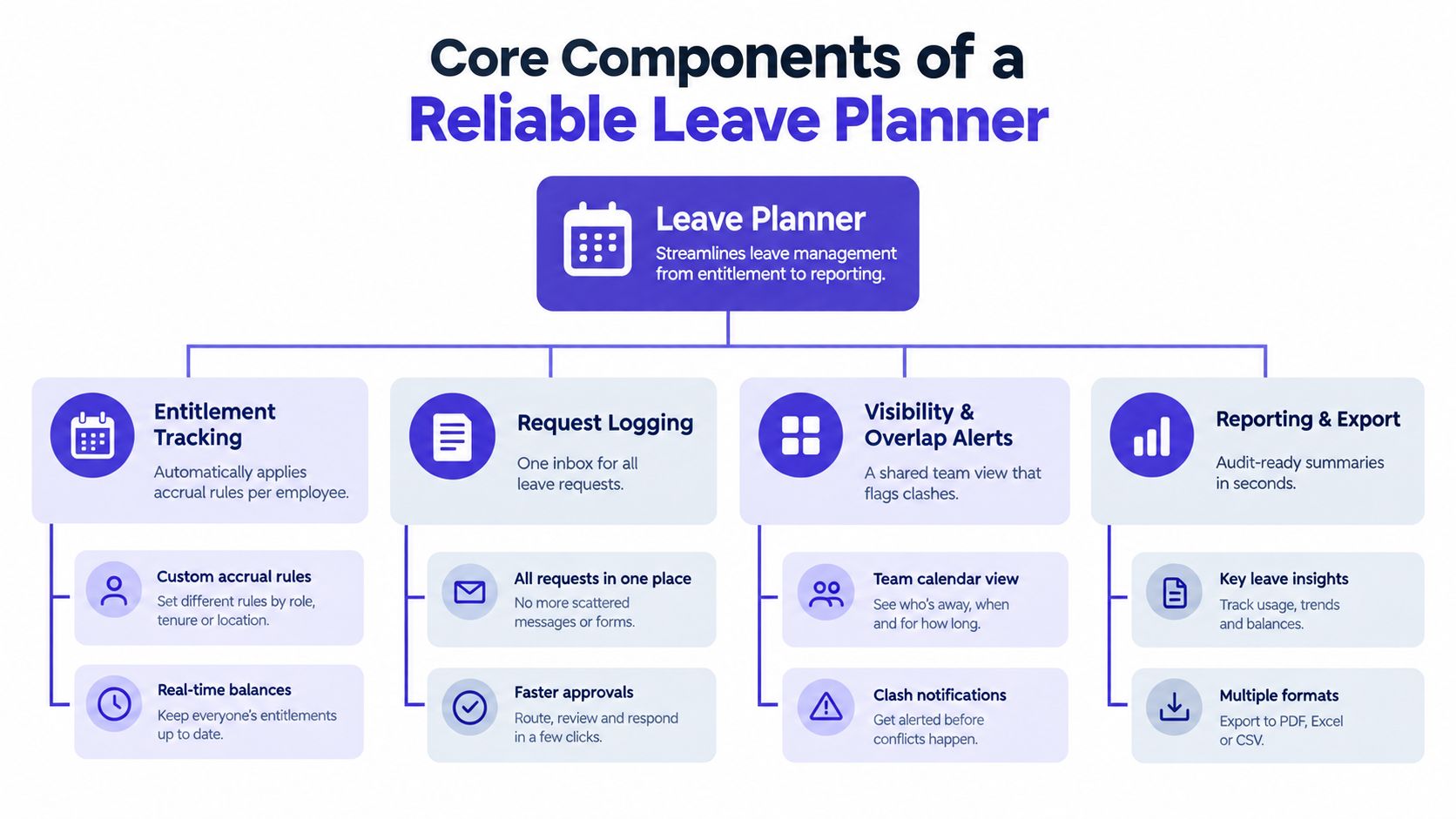
A reliable staff annual leave planner keeps four connected layers:
- Entitlement tracking: Store each employee's working pattern, leave-year dates, statutory entitlement, contractual extras, accrual rules and approved carry-over separately. The UK statutory baseline is 5.6 weeks of paid holiday, or 28 days for a full-time five-day worker. Bank holidays may be included in that allowance or provided in addition. The UK government entitlement guidance explains the baseline employers need to apply.
- Request logging: Give staff one route for submitting requests, with dates, duration, any required reason and approval status held in one record. Email approvals and verbal agreements should not become the system of record.
- Visibility and overlap alerts: Show team availability by working day, rather than presenting only individual bookings. Managers need to see overlapping leave, minimum headcount and unresolved requests before approving a date.
- Reporting and export: Retain changes to entitlement, approvals, cancellations, carry-over and absence categories. This record supports payroll checks, management reporting and investigations into disputed balances.
Build the calendar around capacity
An individual calendar answers one question: when is an employee away? An operational calendar answers the question managers need to resolve: can the remaining team deliver the work on each affected day?
That requires the planner to represent working patterns, shift assignments, bank holidays and non-working days as rules. A spreadsheet usually depends on someone applying those rules manually. LeaveWizard can automate the request, approval and calendar workflow, then surface conflicts against the configured team capacity. The setup still needs accurate working patterns and coverage rules, because automation cannot correct poor inputs.
Practical rule: Never approve a request from the employee view alone. Check available team capacity for every affected working day.
Keep holiday and sickness separate. They may both reduce the number of people available, but they serve different payroll, entitlement and reporting purposes. A combined “days off” total hides whether a staffing problem came from planned leave, sickness or another absence category. Use distinct absence codes, then connect them to the same capacity view so managers can see the operational effect without corrupting leave balances.
A dependable planner therefore does more than count bookings. It links statutory and contractual records to real availability, flags a coverage problem before approval, and preserves an audit trail when dates or balances change. That combination is difficult to maintain across disconnected spreadsheet tabs, particularly as teams add shifts, change working patterns or approve leave through several channels.
Calculating Statutory Entitlements and Pro-Rata Balances
Start with the employee's working pattern, then apply the leave-year rules. Don't begin with a spreadsheet cell labelled “annual allowance” and assume the same number works for everyone.
Step one, establish the entitlement basis
A full-time worker on a five-day week is normally entitled to 5.6 weeks, which equals 28 days. Bank holidays can sit inside that allowance or be provided in addition, so the planner must record the employer's policy rather than assume one treatment.
Part-time staff receive the same 5.6-week entitlement on a pro-rata basis. For example, someone working three days per week has an entitlement of 16.8 days, calculated by multiplying the working days by 5.6. The planner should calculate this from the working pattern and preserve the underlying logic, so a change from three to four working days updates future entitlement without rewriting historical bookings. For a practical explanation of the calculation method, use this guide to calculate pro-rated leave.
Step two, separate the balance layers
Keep these values distinct:
- Current-year entitlement, based on the employee's working pattern and contract.
- Bank holidays, identified according to whether the employer includes them in the allowance.
- Approved leave, counted only against the relevant leave year.
- Pending requests, displayed for capacity planning but not deducted until policy allows.
- Carry-over, imported separately and subject to the employer's rules.
- Other absence, such as sickness and TOIL, tracked with separate codes.
The distinction between approved and pending leave matters operationally. A manager may need to see a provisional coverage risk before the request is decided, but payroll and the employee's live balance shouldn't treat an unapproved request as taken holiday.
Step three, protect the leave-year boundary
A common spreadsheet failure is counting a booking against the year in which it was entered rather than the year in which the leave occurs. Split bookings that cross the boundary, apply each part to the correct period and retain the original request for audit purposes.
Carry-over also needs explicit rule logic. Workers can normally carry over up to 8 days into the next leave year with employer agreement, while workers receiving more than the statutory minimum may be allowed to carry over untaken leave above that minimum. The UK government guidance on holiday carry-over and reforms should be checked when writing the policy.
Leave continues to accrue during sick leave, so a planner must not stop accrual just because an employee is recorded as absent. Use separate absence codes and accrual rules. Combining sickness, holiday and TOIL into one total may look efficient, but it hides the information needed to calculate the correct balance.
Designing Approval Workflows and Shift Coverage Logic
Approval should be a capacity decision as well as an entitlement decision. An employee can have enough holiday remaining and still be unable to take a particular date if approving the request would leave a shift below its minimum staffing level.
Set the coverage rule before requests arrive. For each team, location or shift, record the minimum number of people required and, where relevant, the skills that must be present. Then compare planned availability against that threshold for each actual working day. Exclude weekends, bank holidays and non-working days from the calculation, otherwise the planner will flag risks on days when the team wasn't expected to work.
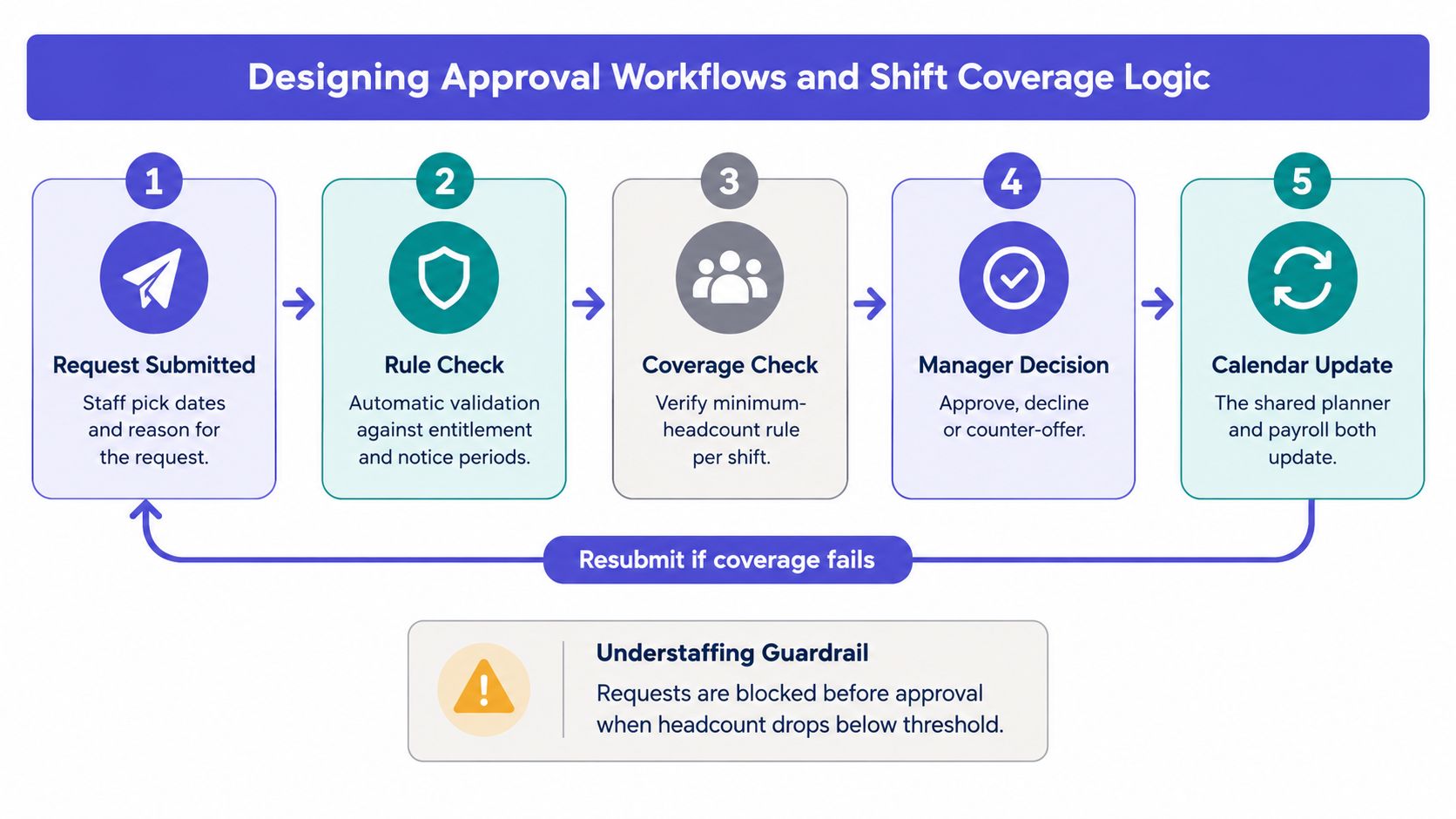
A practical workflow looks like this:
- The employee selects dates through the self-service request route.
- The planner checks entitlement, leave-year boundaries, notice rules and any blackout dates.
- The system compares the request with approved leave and minimum headcount.
- The correct line manager approves, declines or suggests alternative dates.
- The calendar and relevant reporting records update once the decision is complete.
Replace email chains with controlled decisions
Email is useful for communication, but it makes a poor approval database. A request can sit in a manager's inbox, appear in a personal calendar and remain absent from the shared spreadsheet. Another manager may approve a conflicting request without seeing the first one. Manual colour coding doesn't solve the underlying problem because the information remains distributed across systems and people.
Use routing rules based on team, reporting line, location or shift. Add a clear status such as pending, approved, declined or cancelled, and record who made the decision. Blackout dates can be used for known peak periods, but they should be communicated in advance and applied consistently.
The coverage view should also show concentration risk, not only individual clashes. A holiday week may technically pass the headcount rule while leaving one experienced person responsible for all critical work. Managers should be able to review availability by day, identify bottlenecks and counter-offer dates before approving the request.
Watch this workflow in practice:
A good guardrail blocks or escalates a request before approval when staffing drops below threshold. It doesn't remove managerial judgement. It gives managers the information needed to make a fair decision without reconstructing the team schedule by hand.
When to Upgrade From Spreadsheets to LeaveWizard
A spreadsheet remains reasonable when the team is small, working patterns are simple and one person can reliably maintain the file. It becomes fragile when several people edit it, employees work different schedules, leave years vary or managers need a live view of operational coverage.
The decision shouldn't be based only on headcount. Look at the number of rules the planner must enforce and the cost of correcting errors. If staff request leave by email, managers approve in chat and an administrator updates the workbook later, the business already has a workflow problem even if the spreadsheet itself is neatly formatted.
| Feature | Spreadsheet Template | LeaveWizard Platform |
|---|---|---|
| Entitlement calculation | Manual formulas, often copied between tabs | Automated leave and absence calculations based on configured rules |
| Employee requests | Email, chat or direct editing | Self-service requests through web and mobile access |
| Approval control | Managers update shared files or reply to messages | Centralised manager approval workflow |
| Coverage visibility | Manual filters, colours and calendar maintenance | Live view of who is working, who is away and where gaps may exist |
| Leave-year handling | High risk of wrong-period counting | Rules can be applied consistently across leave years |
| Reporting | Custom formulas and manual exports | Central calendars and reports for operational review |
| Audit trail | Depends on version history and user discipline | Requests, decisions and balance changes remain in a central record |
The most dangerous spreadsheet errors aren't obvious broken formulas. They include counting leave against the wrong leave year, mixing annual leave with TOIL, forgetting a working-pattern change and treating a pending request as approved. A dedicated platform doesn't remove the need for a sound policy, but it can enforce the workflow more consistently.
Use this comparison of LeaveWizard with traditional spreadsheets when assessing the trade-off.
A practical decision test
Stay with a spreadsheet if one owner can reconcile balances quickly, all staff follow the same pattern and coverage decisions are made from a separate, reliable rota. Start planning a move when employees need self-service access, managers work across different teams, requests regularly overlap or payroll requires repeated manual checks.
A system change is also justified when the business is growing faster than its controls. The question isn't whether software looks more modern. It's whether the current process gives employees accurate balances and gives managers enough information to approve leave safely.
Managing Remote Teams and Preventing Unused Leave
A remote employee can appear available just because nobody sees them away from the office. Flexible hours, different locations and limited overlap make absence harder to spot, while a spreadsheet may show a clear calendar even when several people are planning leave for the same period. Employees can also postpone holidays because no manager notices that their balance is growing.
Unused leave creates a coverage problem alongside a wellbeing concern. UK leave-planning data found that more than 60% of workers skipped some annual leave across 2022 and 2023, and over 18 million of the UK's 29.7 million workers did not take all the leave to which they were entitled, according to UK guidance on recording sickness absence and managing returns to work. That pattern places responsibility on managers to monitor balances and create opportunities for leave, rather than leaving employees to resolve the issue alone.
Turn the planner into an early-warning tool
Check balances throughout the leave year, not only during the final quarter. A useful dashboard should flag employees with substantial leave remaining, pending requests that may create a cluster and popular dates when remote colleagues are seeking the same time off.
Set clear rules for competing requests:
- Publish priority rules: Explain what happens when several employees request the same dates. Use rotation, first-approved requests, business-critical coverage or a defined combination of these methods.
- Show team availability: Let remote employees view approved leave and working status without revealing unnecessary personal details.
- Monitor location and time-zone needs: A distributed UK team may need local cover, handover time or overlapping working hours, even when every employee is in the same country.
- Prompt early planning: Remind employees to book leave before balances become an end-of-year problem, while allowing managers to protect service coverage.
- Separate planned and unplanned absence: Keep annual leave distinct from sickness when reviewing availability and absence rates.
The guide to managing remote teams can help managers adapt leave processes for employees who do not share an office.
A spreadsheet can record requests, but it usually depends on someone checking balances, comparing dates and following up with managers. LeaveWizard can automate the workflow around requests, approvals and balance visibility, making emerging coverage risks easier to identify before they affect service delivery. Managers still decide whether leave can be approved. The planner gives them earlier information to arrange cover, redistribute work and reduce a year-end rush, while supporting fair access to leave and protecting continuity and cash flow.
Rolling Out Your New Leave Policy to Staff
A planner fails when employees don't trust the balance or don't know which route to use. Launch the process as a policy change, not merely as a new piece of software. Explain what employees gain, what managers must do and which existing channels will no longer count as a formal request.
Start by validating the rules and historical data. Confirm each employee's working pattern, current-year entitlement, approved leave, carry-over and any relevant policy exceptions. Give staff a defined opportunity to check their imported balance before the new process becomes the official record.
Use a simple launch checklist
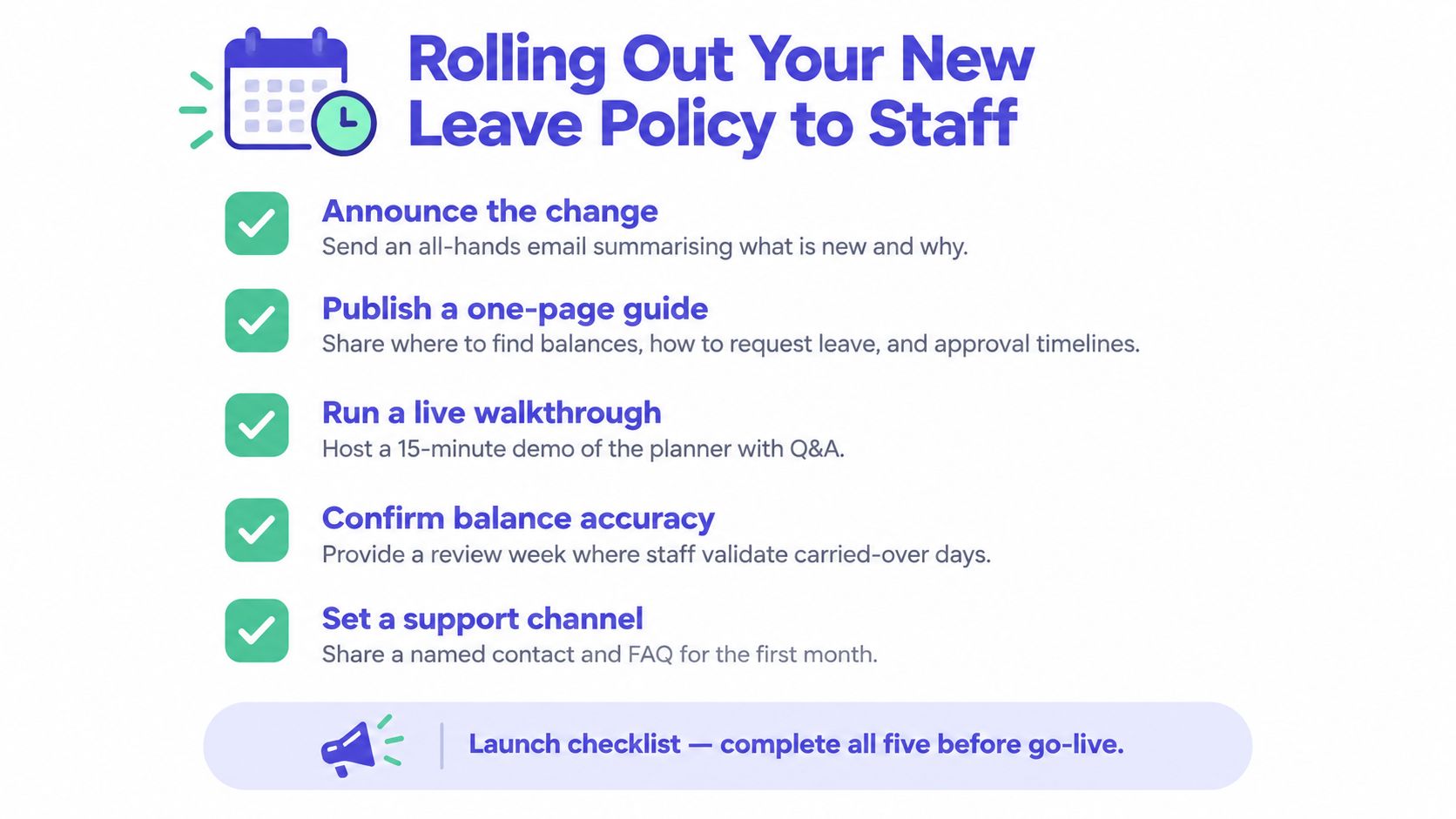
- Announce the change: Send an all-staff message explaining what is changing, why the business is changing it and the date from which requests must use the planner.
- Publish a one-page guide: Show employees where to find balances, how to submit a request, how notice periods work and when managers respond.
- Run a live walkthrough: Demonstrate a request, approval and cancellation using the web portal or smartphone app. Leave time for questions.
- Confirm balance accuracy: Give staff a review period to check carried-over days, working patterns and approved historical leave.
- Set a support channel: Name a contact for the first month and maintain an FAQ covering common balance, approval and cancellation questions.
Line managers need separate training because their responsibility is more than clicking approve. They must check coverage, apply the same policy across the team, explain declined requests and escalate exceptions consistently.
Keep a feedback loop open after launch. Track repeated questions, disputed balances and requests that fail because of unclear rules. A transparent leave process supports retaining your best team members because employees can plan time away with more confidence and see that the business treats access to leave fairly.