Your shared inbox is overflowing, the leave spreadsheet is already out of date, and someone has just asked whether the Manchester team can join a customer meeting from home. Staff are split between the office, their houses and a regional hub, while managers are trying to coordinate work through email, chat and last-minute calendar changes.
That's the point at which many growing UK businesses start comparing Slack vs Microsoft Teams. The wrong approach is to sit through two product demos and count features. The right approach is to ask which platform will help your people hand over work, find documents, request leave and respect agreed working boundaries without creating another administrative burden.
For most small and medium-sized businesses, Microsoft Teams is the better default if Microsoft 365 is already central to the business. Slack is the stronger choice for firms that want a focused, calmer messaging layer and are prepared to manage document storage, identity and meetings separately. The recommendation depends less on which product has the longer feature list and more on how your people work.
Table of Contents
- The Decision Every Growing UK Business Faces
- What Slack and Microsoft Teams Actually Are
- Feature by Feature for Small and Medium Businesses
- Pricing, Bundling and Total Cost of Ownership
- Integrations and Admin Controls for HR and Operations
- Remote Work, Boundaries and the Hidden Hybrid Problem
- Which Tool Fits Which UK SMB Scenario
- Your Short Decision Checklist
The Decision Every Growing UK Business Faces
An operations lead at a 40-person firm rarely wakes up wanting to replace a chat tool. The trigger is usually practical. A leave request sits in a spreadsheet that nobody updated. A customer asks for an urgent response while the account owner is away. A project handover is buried in a shared inbox, and a colleague sends a message on Saturday because their status only says “away”, not “on approved leave”.
Slack and Teams can both improve that situation, but neither platform fixes an unclear process by itself. They become useful when the business defines where requests go, how managers confirm cover, where the final document lives and how employees signal that they're unavailable.
The choice also affects more than daily messaging. Your platform will sit between HR, operations, finance, line managers and customer-facing staff. It will influence whether people use channels or direct messages, whether files remain attached to conversations or move into a document library, and whether an absence notification reaches the people responsible for coverage.
Practical rule: Choose the platform that makes the correct workflow easier than the workaround.
This comparison focuses on UK SMB realities, especially hybrid work, existing Microsoft 365 investment, employee boundaries and absence visibility. It won't rank every integration or discuss enterprise procurement in the abstract. Instead, it gives you a situational recommendation.
If you already run Outlook, SharePoint, OneDrive and Microsoft identities, Teams deserves the presumption. If your staff want a dedicated collaboration layer that keeps chat at the centre and doesn't force every conversation into a Microsoft ecosystem, Slack deserves a serious evaluation.
The most important test is simple. Can a manager see who is available, who is on approved leave and who owns the next action without checking several systems? If the answer is no, a polished chat interface won't solve the operational problem.
What Slack and Microsoft Teams Actually Are
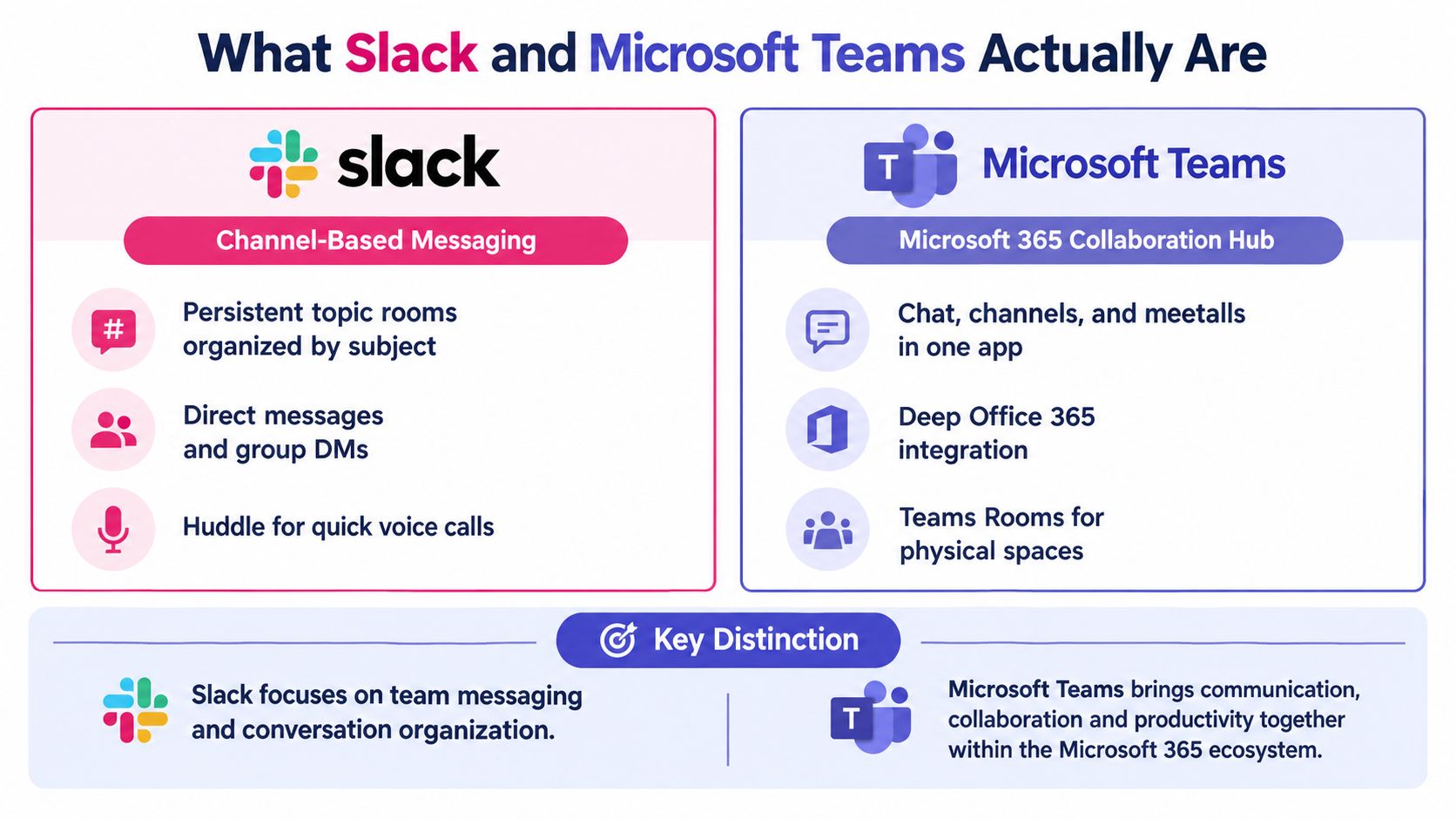
Slack is primarily a channel-based messaging product. Teams create persistent topic rooms, exchange direct messages, reply in threads and add lightweight workflow apps around conversations. Its centre of gravity is the message stream. Documents, calendars, ticketing systems and other business tools can connect to it, but Slack isn't a complete document collaboration suite.
Microsoft Teams is a Microsoft 365 collaboration hub. It combines chat and channels with meetings, calendars, files and co-authoring through services such as SharePoint, OneDrive and Outlook. Teams isn't just a video-conferencing app. It acts as a front door to a wider Microsoft identity, storage and productivity environment.
The difference matters because each product asks the business to organise work differently. Slack usually starts with conversations and adds connected tools around them. Teams usually starts with an organisation's Microsoft 365 structure and brings chat, meetings and documents into that environment.
A UK market estimate placed Microsoft Teams at 44.78% of the UK instant-messaging and chat category in 2023, compared with 28.57% for Slack and 10.71% for Skype, according to UK market estimates for Microsoft Teams. That indicates scale, not suitability. A larger installed base can make external communication easier, but it doesn't prove that every team will communicate more clearly in Teams.
Where each platform puts the work
Slack's appeal is focus. A well-designed workspace can give a product team, support team or agency a clear set of channels without making users move through a larger productivity suite. Its app directory and automation options can bring alerts from project, customer service and development tools into the places where people already talk.
Teams' appeal is consolidation. A meeting can sit alongside its calendar appointment, related files can live in SharePoint or OneDrive, and colleagues can co-author Office documents without creating a second storage convention. That reduces the number of separate systems an SMB has to govern, particularly when Microsoft 365 already supplies the organisation's user accounts.
Neither tool is automatically “more collaborative”. Slack can become a noisy collection of channels and direct messages. Teams can become a maze of teams, channels, chats, meeting threads and document locations. The implementation decision matters as much as the licence.
How to define the products before comparing them
Use Slack when you want messaging to be the primary work surface and your business is comfortable connecting specialist systems around it. Use Teams when you want Microsoft 365 to remain the operational centre, with communication, meetings, files and identity managed together.
That distinction explains most of the practical differences that follow.
Feature by Feature for Small and Medium Businesses
A feature list won't tell you whether a new starter can find a handover or whether a manager can keep a leave request from disappearing in chat. Evaluate each capability against the work your team performs every day.
| Capability | Slack | Microsoft Teams |
|---|---|---|
| Channels and chat | Fast, focused channels, direct messages and threaded replies | Chat, channels and conversations connected to Microsoft 365 |
| Meetings | Useful for quick calls and connected meeting workflows | Strong meeting and calendar experience through Outlook |
| Files | Integrates with external storage and document tools | SharePoint and OneDrive provide native storage and co-authoring |
| Search | Strong conversation search across a messaging-first workspace | Searches chats, files, meetings and Microsoft 365 content |
| Notifications | Detailed controls, but busy workspaces can still become noisy | Status, meeting and Microsoft 365 alerts can span several surfaces |
| Automation | Broad app ecosystem and workflow integrations | Power Automate and Microsoft 365 workflows |
| Mobile work | Clear chat-first experience | Broad mobile access to chat, meetings, files and collaboration |
Channels and conversations
Slack generally feels quicker for teams that live in channels. Threads keep replies attached to the original message, and direct messages handle short conversations. That structure works well for project updates, incident discussions and informal team knowledge.
Teams offers channels too, but users often move between channels, group chats, meetings and documents. That breadth is useful when a conversation needs a file, a calendar event or an Office document. It can also make it less obvious where the authoritative update belongs.
Meetings and handovers
Teams has the natural advantage for a business that schedules customer meetings in Outlook and stores working documents in Microsoft 365. The meeting, calendar and file context can sit in one environment.
Slack works well for quick voice conversations and for teams that want to decide in chat whether a meeting is necessary. It can support a calmer asynchronous model, provided managers set expectations about response times and don't treat presence indicators as proof that someone is available.
Files, search and automation
For document-heavy work, Teams is usually the safer operational choice. SharePoint and OneDrive give the business an established location for ownership, permissions and co-authoring. Slack can connect those services, but the business must decide where documents belong and prevent important files from becoming attachments nobody can find later.
Slack's app ecosystem is a strong fit for teams that want alerts from specialist systems in a single messaging workspace. Teams has a comparable advantage when the organisation already uses Microsoft 365 automation and wants to build workflows around existing identities, calendars and files.
For a broader evaluation of how collaboration tools affect staff communication, review this guide to find the right employee communication app. It's useful because the selection criteria should include adoption, governance and employee experience, not just integrations.
The operational difference: Teams brings documents and meetings close to the conversation. Slack makes conversation feel lighter and faster. Pick based on where your work starts.
Features such as advanced room systems, elaborate AI functions and complex enterprise routing rarely decide the outcome for a 20 to 100-person firm. Focus on channel discipline, search, notifications, document ownership, leave visibility and the quality of the mobile experience.
Pricing, Bundling and Total Cost of Ownership
A growing UK business can choose Slack because it appears to add only a messaging cost. Then approved leave, calendars, files and availability remain spread across separate tools. Managers spend time checking who is away and whether a handover is covered. That operational cost can outweigh the difference between two licence prices.
The standalone comparison favours Teams. Microsoft Teams Essentials is listed at £3.30 per user per month, while Slack Pro is listed at £5.25 per user per month on annual commitments. That is a difference of £1.95 per user per month before VAT, according to this UK comparison of Slack and Microsoft Teams pricing.
| Plan | Per user per month (GBP) | Annual commitment |
|---|---|---|
| Microsoft Teams Essentials | £3.30 | Yes |
| Slack Pro | £5.25 | Yes |
| Microsoft 365 Business Basic | £4.95 | Check current vendor terms |
| Microsoft 365 Business Standard | £10.35 | Check current vendor terms |
| Microsoft 365 Business Premium | £18.25 | Check current vendor terms |
Microsoft 365 plan prices change, so verify the current UK terms before budgeting. The listed Business Basic, Standard and Premium figures provide a useful comparison, not a permanent quote.
The bundle is the cost lever many comparisons miss. A UK SMB already paying for Microsoft 365 may already have Teams, identity, email, files and meetings within its existing environment. In that case, adding Slack creates another subscription and another place to manage conversations. Teams may deliver better value without being free, because administration, training, support and licence allocation still consume time.
A Google Workspace business faces a different calculation. Adding Microsoft licensing for Teams can duplicate email, calendars, storage and identity services. Slack may suit the organisation that wants to retain Google Workspace and add a dedicated messaging layer.
Build the business case around the complete workflow:
- Licensing overlap: Include Microsoft 365, Slack, storage and specialist tools that remain in use.
- Administration: Cost time for permissions, joiners, leavers and account support.
- Implementation: Include channel design, migration, training and internal documentation.
- Workflow connections: Check paid connectors or custom work for leave, HR, payroll, ticketing and project systems.
- Absence administration: Count spreadsheet maintenance and the effort required to keep approved leave visible.
Test both options with real employees, handovers and approved absence scenarios. The cheaper seat is the wrong choice if managers spend their week reconciling leave, chasing approvals and copying updates between systems.
Integrations and Admin Controls for HR and Operations
HR and operations teams don't need another place for conversations. They need reliable connections between identity, leave, payroll, service requests and management reporting.
Start with the employee lifecycle. A new starter should receive the correct account and group access. Someone leaving the business should lose access promptly. A manager should be able to see approved absence without relying on an employee to remember to update a status manually.
Identity and governance
Teams fits naturally where Microsoft Entra ID, Outlook, SharePoint and OneDrive already form the business's core identity and productivity stack. Central administration can reduce the number of separate accounts and permission models that a small IT team has to understand.
Slack supports enterprise controls such as single sign-on, encryption, audit logs and enterprise key management. It can work well in a mixed technology estate, but administrators need to check which controls belong to the selected plan and how they interact with connected services.
Microsoft Teams provides UK tenant data storage in London and Cardiff data centres, alongside centralised data-loss prevention, eDiscovery, legal hold and audit logging. Slack positions UK data residency as an Enterprise Grid capability, so administrators should verify the specific plan and residency configuration before selecting it for regulated workloads, as outlined in this comparison of Microsoft Teams and Slack controls.

Connecting leave and operational workflows
Don't make absence management a second silo. A leave request should move through an approval process, update availability and notify the people who need to plan cover. The collaboration tool is the communication layer, not necessarily the system of record.
LeaveWizard's Slack integration shows the kind of connection to test. Look for absence-related notifications, clear approval ownership and a calendar view that managers can trust. The same test applies to Teams, payroll alerts, HR workflows and service tickets.
For a small business without a dedicated IT hire, the winning platform is the one administrators can govern during an ordinary week, not just the one that passes a security review. Ask who will handle access changes, investigate an audit event, manage external users and explain the notification rules to a new manager.
Remote Work, Boundaries and the Hidden Hybrid Problem
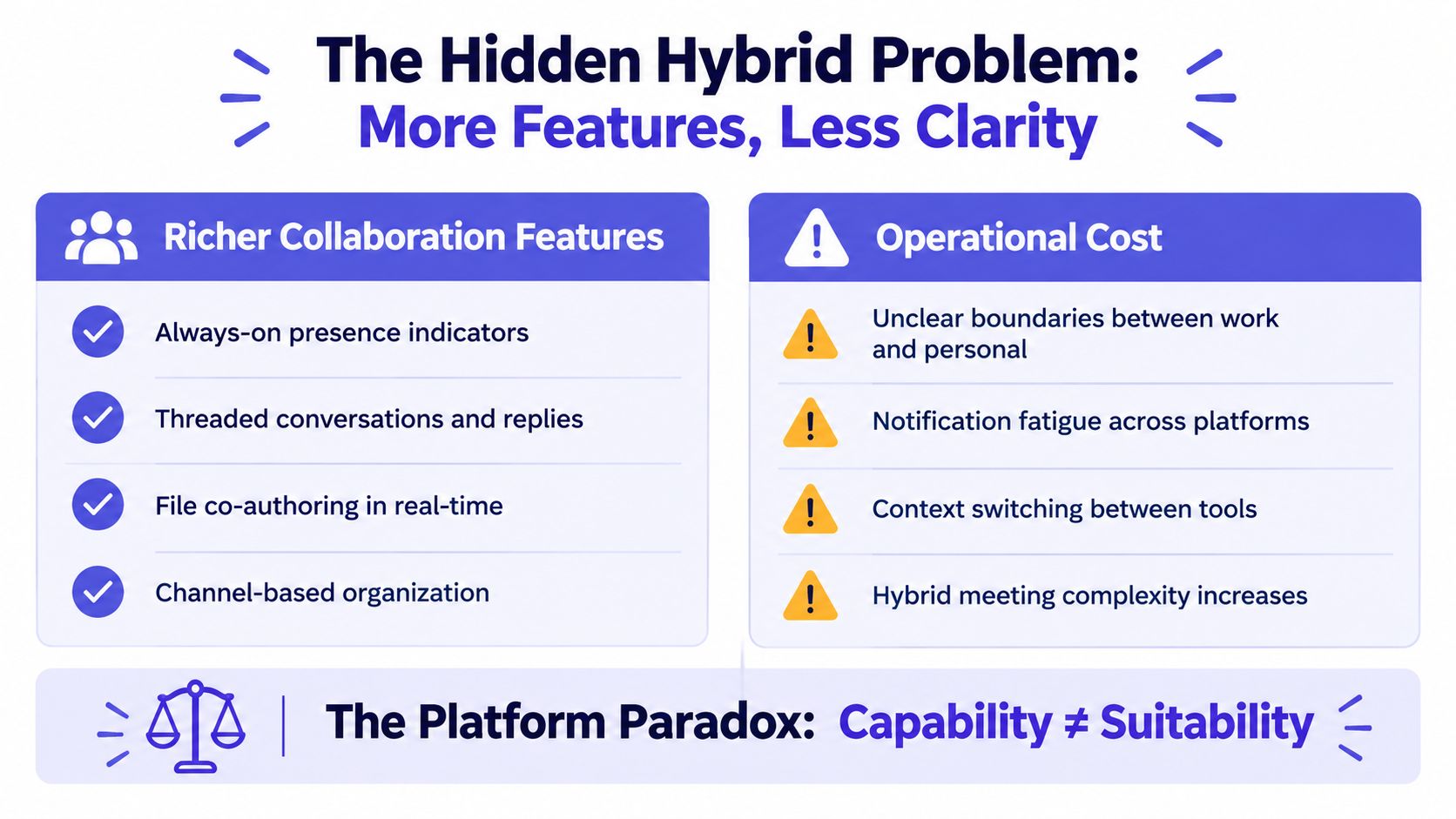
The strongest collaboration platform can be the wrong operational choice if it makes employees easier to interrupt and planned absences harder to understand.
A UK parliamentary evidence submission drawing on employee surveys through 2025 found that 70% to 85% of employees in remote-capable roles favour hybrid working, while also reporting psychological burdens from digital collaboration tools, as recorded in the UK parliamentary evidence on hybrid work and digital collaboration. That should change the evaluation criteria for Slack and Teams.
Presence indicators don't answer the question a manager has. “Away” may mean someone is in a meeting, travelling, taking a break or on approved leave. A team needs a reliable absence signal, an agreed handover and a clear rule about contact outside contracted hours.
Test the workflow, not the demo
Run both platforms through the same practical exercise:
- Approve leave: Ask an employee to request time off and a manager to approve it.
- Plan cover: Give the manager a customer task and check whether the team can identify the replacement.
- Protect the boundary: Check whether the absent employee is still targeted by reminders, mentions or mobile alerts.
- Hand over asynchronously: Remove the employee from the live discussion and see whether the remaining team can continue without another meeting.
- Restore the context: Ask a returning employee to find the decisions, files and next actions they need.
Slack may feel calmer for teams that prefer concise, asynchronous updates. Teams may be more practical where meetings, calendars and documents already run through Microsoft 365. Neither choice is safe if the organisation leaves status conventions and leave visibility undefined.
For practical guidance on key principles for remote alignment, focus on agreed response windows, written handovers and fewer assumptions about online presence. You can also use this guide to managing remote teams to test whether your people processes support the collaboration workflow.
Capability isn't suitability. More channels, integrations and presence signals can create more places for an employee to be interrupted.
Which Tool Fits Which UK SMB Scenario
The right recommendation changes with the organisation's existing stack and the person making the decision.
For HR and operations leads, choose Teams when Microsoft 365 already holds your identities, calendars, documents and meetings. It gives you a stronger foundation for connecting leave visibility to the environment managers already use. Choose Slack when your business wants a standalone messaging layer, keeps its documents elsewhere and values a focused channel experience over Microsoft consolidation.
For line managers, choose Slack when the main problem is scattered team conversation and your managers need a straightforward place for project updates and handovers. Choose Teams when managers spend much of their day in Outlook meetings, Office files and Microsoft 365 groups. In either case, require an approved-leave signal that is separate from a generic presence status.
For distributed and remote-first firms, choose Slack when asynchronous channel communication is the centre of work and employees need a lighter chat-first experience. Choose Teams when the business depends on shared documents, scheduled meetings and one administrative identity. Test mobile notifications in both products, especially for employees who work varied hours.
UK hybrid-work data indicates that 28% of working adults were in hybrid roles between January and March 2025, so dependable remote coordination remains a continuing business requirement, according to this UK hybrid-work overview. Treat the platform as part of your coverage process, not just as a chat application.
Before changing tools, use this guide to choosing small-business HR software to map approval, reporting and employee self-service requirements. The decision trigger is clear: choose Slack for focused, independent collaboration; choose Teams for Microsoft-centred operations and document work.
Your Short Decision Checklist
Ask these questions before you approve a contract:
- Microsoft 365: Are Outlook, SharePoint, OneDrive and Microsoft identities already central to daily work?
- Absence visibility: Can managers see approved leave without checking a spreadsheet or relying on a manual status?
- Team behaviour: Will employees use channels and handovers, or will they continue working through direct messages and email?
- Remote coordination: Do people need asynchronous updates across locations and varied working hours?
- Governance: Do you need UK data residency and stronger central controls now, or as your compliance needs develop?
- Total cost: Have you included administration, training, integrations, storage and the separate absence process?
The common mistakes are predictable: treating per-seat pricing as total cost, selecting the longer feature list without testing adoption, and leaving leave management in a spreadsheet nobody consistently updates. Pick the tool your team will use daily, then wire leave and HR data into it rather than around it.