
At its simplest, an employee clock-in system is a digital tool that automatically and accurately tracks when your team starts and stops their work. Think of it as the modern, error-proof replacement for paper timesheets, making sure every minute worked is properly recorded.
Understanding Your First Clock-In System
Let's go beyond a simple definition. Remember the old paper timesheets? They were prone to human error, tedious manual entry, and sometimes, pure guesswork. Now, imagine a system that precisely captures every minute of work without anyone lifting a pen. That’s the real job of a modern employee clock-in system.
These tools take the mystery out of time tracking by turning simple actions—like a quick card swipe, a fingerprint scan, or a tap on a mobile app—into secure, digital records. The system instantly logs the time, creating a clear and indisputable record of working hours.
Why It's More Than Just Watching the Clock
If you're a business owner new to this kind of tech, it's easy to think it's all about surveillance. But that's not the point at all. It's about bringing fairness and efficiency into your operations. These systems are designed to solve the real-world headaches that plague small businesses, from payroll disputes to administrative bottlenecks.
At its core, a clock-in system builds a foundation of trust. It ensures employees are paid accurately for their time, and it gives managers the data they need to run their operations smoothly and fairly.
Here in the UK, these systems are a game-changer for payroll accuracy and workplace fairness. Good clocking software helps prevent common issues like "buddy punching"—where one employee clocks in for another—which can lead to time theft and mess up your payroll. By digitally recording exact start and end times, these systems also help you stay compliant with UK employment laws on working hours, overtime, and rest breaks.
The Core Technology Explained
At the heart of it all, understanding employee attendance tracking software is key. These platforms are built around a central database that pulls in timestamp data from all the different ways your staff clock in.
This data is then organised and made ready for payroll, reporting, and management oversight, turning raw time entries into genuinely useful business information. For a deeper dive into how these tools can transform your workforce management, check out our complete guide to modern employee attendance tracking.
The Real-World Benefits of Upgrading Your Time Tracking
Moving away from old-school manual timesheets isn’t just a small tweak; it’s a strategic upgrade that delivers real, measurable results for your business. When you bring in a modern employee clock-in system, you’re strengthening four key pillars: your financial stability, operational efficiency, legal compliance, and team morale. This simple change turns time tracking from a necessary chore into a powerful business asset.
Think about it: what would it mean to completely eliminate the payroll errors that might be costing you thousands each year? Manual calculations are full of tripwires. A simple maths mistake or misreading some messy handwriting can easily lead to overpayments or underpayments, which harms both your bottom line and the trust your employees have in you. An automated system simply removes that risk.
This infographic lays out the stark difference in key business metrics when you compare outdated manual timesheets with a modern clock-in system.
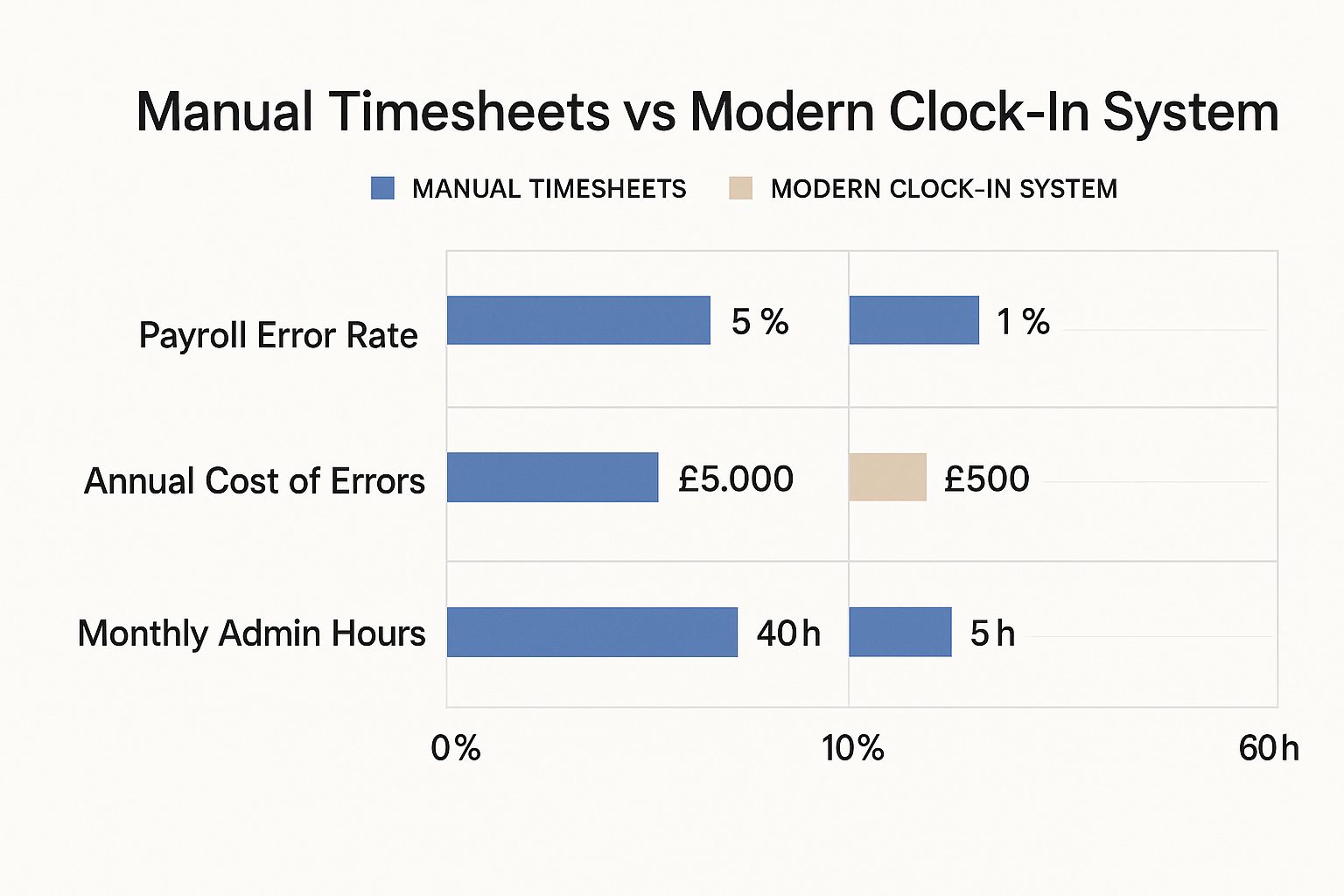
As the data shows, the impact is massive. You're not just cutting down on payroll errors, you're also freeing up dozens of admin hours every month – time that can be poured back into actually growing the business.
Gaining Operational Freedom
Imagine the sheer administrative headache of chasing up timesheets, trying to figure out what’s written on them, and then manually typing all that data in for payroll. A modern system frees your admin team from that grind. This automation gives managers real-time attendance data, which means smarter scheduling decisions and a much quicker reaction time when staffing issues pop up.
And this isn't just theory. In the UK, companies that have switched to electronic clock-in systems have seen their labour and payroll management get, on average, 17% more efficient. These systems are also critical for staying on the right side of the UK's Working Time Regulations, which set rules like the 48-hour maximum working week. You can find out more about the impact of these systems in the UK from Timegrip's 2025 guide.
Securing Compliance and Building Trust
Keeping up with complex labour laws is a challenge for any business, but automated systems make it so much simpler. They create a precise, indisputable digital log of all hours worked, giving you crucial documentation if you ever need it for an audit or dispute. This transparency doesn’t just protect your business; it helps build a culture of trust.
When your team knows, without a doubt, that their time is being tracked accurately and they're being paid fairly for every minute, it does wonders for morale.
A fair and transparent time tracking process is foundational to a positive workplace culture. It demonstrates respect for your employees' contributions and removes any ambiguity or potential for disputes over pay.
Ultimately, this fosters a more engaged and motivated team. That’s probably one of the most powerful benefits a clock-in system can offer. It's about creating an environment where everyone feels valued and respected.
Finding the Right Type of System for Your Team

Choosing an employee clock-in system isn’t a one-size-fits-all decision. The best tool for a construction site with staff spread across multiple locations will be vastly different from what a single-site retail shop needs. Your choice really boils down to your unique work environment, how your team is structured, and what you’re trying to achieve.
The journey starts with understanding the two main camps these systems fall into: hardware-based and software-based. Each has its own strengths and is built for different kinds of businesses. Making the right call means matching the technology to how your team actually works day-to-day.
Hardware-Based Clock-In Systems
Hardware solutions are the physical devices you install at your workplace. You’ve probably seen them before. They’re a familiar sight in many industries and are known for being reliable and straightforward. Think of them as the designated "check-in points" for your staff.
These systems typically include:
- Card-Swipe Machines: Employees use an assigned keycard or fob to clock in and out. It's quick, simple, and works a treat for places where everyone works from one central location, like a warehouse or factory floor.
- Biometric Scanners: These offer a much higher level of security by using unique biological traits. Fingerprint scanners are the most common, but facial recognition is catching on fast. They completely eliminate the risk of "buddy punching," making them perfect for businesses that need strict attendance control.
The main plus of hardware is its physical presence, which creates a clear and consistent process for everyone. The downside? The initial investment in the devices can be higher, and they offer very little flexibility for staff who work from home or travel between sites.
Biometric systems provide unmatched security by ensuring the person clocking in is physically present. However, it's vital to get clear employee consent and adhere to UK data protection laws when handling this sensitive personal data.
Software-Based Clock-In Systems
On the other side of the coin, software-based systems offer incredible flexibility by moving the whole clock-in process online. These solutions are a perfect fit for modern workforces, especially those with remote or hybrid setups. They let employees log their hours from pretty much anywhere, using the devices they already have in their pockets.
Popular software options are:
- Web Portals: Staff can log in from any computer to clock in, check their timesheets, and request time off. This is a great, low-cost option for office-based teams.
- Mobile Apps: This is the go-to solution for any team out in the field. Employees use a smartphone app to clock in, often with GPS tracking or geofencing to confirm they are at the correct work location. This is invaluable for industries like construction, home care, or logistics.
To help you get a clearer picture, let's compare these options side-by-side.
Comparison of Employee Clock In System Types
| System Type | How It Works | Key Advantages | Best For |
|---|---|---|---|
| Card-Swipe Machines | Employees tap a physical card or fob on a reader installed at the workplace. | Quick, easy to use, and creates a clear time-stamping process. | Single-site businesses like factories, warehouses, and large offices. |
| Biometric Scanners | Staff use a unique physical trait (fingerprint, face) to clock in on a scanner. | Eliminates "buddy punching" entirely, offering maximum security and accuracy. | High-security environments or businesses with strict attendance policies. |
| Web Portals | Employees log into a website on their computer to start and end their workday. | Low setup cost, accessible from any computer, easy to manage. | Office-based teams, call centres, and businesses with desk-based workers. |
| Mobile Apps | Staff use a smartphone app to clock in, often with GPS or geofencing features. | Ultimate flexibility for tracking hours anywhere, real-time data from the field. | Remote teams, field services, construction, logistics, and multi-location businesses. |
As you can see, the right choice really depends on where and how your team works.
When exploring the diverse types of employee clock-in systems available, you might consider time management solutions like Clockodo, which are designed to streamline attendance and project tracking. The primary benefit of software is its adaptability. Your team isn't chained to a physical location, and you get real-time data no matter where your staff are. The main thing to remember is that these systems rely on a decent internet connection and, often, your employees' own devices.
Must-Have Features That Deliver Real Value
A modern employee clock-in system should do much more than just track when people start and finish their shifts. The best ones are the command centre for your workforce, packed with features that solve real-world business headaches and give you a proper return on your investment. When you're looking at different options, think beyond basic time capture and focus on the tools that will actually make a difference.
It helps to think of it like this: a basic system is a bit like a simple calculator. It does one job, and that's it. But a system with the right features is more like a smartphone, bringing together several essential tools into one slick package. It’s this combination that saves you time, cuts down on costs, and gives you a much clearer picture of what's happening in your business.
Seamless Payroll Integration
One of the most powerful features you can get is seamless payroll integration. Forget the tedious process of manually exporting timesheets, hunting for errors, and typing everything back into your payroll software. A connected system automates the entire thing.
It syncs approved hours directly, applying the correct pay rates for standard time, overtime, and any other allowances without you lifting a finger. This isn't just about saving time; it's a vital financial control. It pretty much eliminates the costly human errors that lead to overpayments or underpayments, ensuring every payslip is spot on. A single slip-up in a manual calculation can cost hundreds of pounds, but an integrated system makes that risk a thing of the past.
By directly connecting your time tracking with your payroll, you transform a time-consuming administrative task into a smooth, error-free workflow. This frees up valuable hours and ensures your team is always paid correctly and on time.
Absence and Leave Management
Another game-changer is having absence and leave management built right in. A great system lets employees request holidays, report sick days, and check their remaining leave allowance all in one place. Managers get instant alerts, can approve or deny requests with a click, and see an up-to-the-minute team calendar.
This centralises all your attendance information, giving you a single source of truth for who is working, who is on holiday, and who is off sick. You can finally ditch the messy spreadsheets and endless email chains, making rota planning and resource allocation far more straightforward.
Powerful Reporting and Analytics
Finally, don't underestimate the importance of powerful reporting tools. The data your clock-in system collects is a goldmine of business insight, but only if you can get to it easily. Look for systems that offer:
- Real-Time Dashboards: Get an at-a-glance view of who is clocked in, who's on a break, and who is absent right now.
- Labour Cost Reports: Keep a close eye on wage costs against budgets or specific projects to protect your profitability.
- Overtime Monitoring: Set up alerts to get a heads-up when employees are nearing their overtime limits, so you can manage costs before they become a problem.
These analytics turn your raw timesheet data into a strategic asset. By spotting trends, you can make smarter staffing decisions, get a handle on overtime before it spirals, and find new ways to improve productivity. For businesses wanting to dig even deeper, it's possible to connect this data to advanced tools. You can learn more about bringing your data to PowerBI using APIs for some seriously powerful business insights.
How to Make Your New System a Success

Choosing the right clock-in system is a huge step, but the rollout is where the magic really happens. A thoughtful implementation process is what gets your team on board, minimises any disruption, and ensures you start seeing a return on your investment from day one.
Think of it less as just installing some software and more as introducing a positive change to how you operate. The whole thing hinges on crystal-clear communication and a solid plan. Get those right, and what could have been a tricky transition becomes a simple, straightforward upgrade for everyone.
Start with a Clear Plan
Before you even think about looking at different systems, you need to map out what success actually looks like for your business. A proper needs assessment is your foundation. This means getting really specific about what you need and setting clear goals for the new system.
Ask yourself these key questions:
- Team Structure: How many people are on your team? Are they all in one place, working from home, or a mix of both?
- Work Environment: Is your team based in an office, on a factory floor, or out in the field at different job sites?
- Budget: What’s a realistic budget for the initial setup and the ongoing monthly cost per employee?
- Compliance Needs: Are there any specific industry rules you need to follow for tracking work hours or breaks?
Jotting down the answers to these questions first will make evaluating different providers a much more focused and efficient process.
Communicating the Change to Your Team
This is, without a doubt, the most critical part of the whole process. How you introduce the new system will completely shape how your team feels about it. It’s absolutely essential to frame the change around fairness, accuracy, and convenience for them, not just as another management tool.
By 2025, using digital time tracking has become an almost universal practice for UK businesses. Industry data shows that around 96% of companies now use some form of digital clock-in system to manage attendance and stay compliant, especially as hybrid and remote work have become the norm.
Focus on the "what's in it for me" for your employees. Emphasise that the new system guarantees they're paid accurately for every single minute they work and makes simple things like booking holidays much easier.
Get their buy-in by being completely transparent. Explain exactly why you're making the change and how it's going to benefit everyone involved. This kind of proactive communication builds trust and stops people from feeling like the system is about surveillance or a lack of trust.
Training and Rollout
Effective training is the final piece of the puzzle. Don't just fire off an email with a link and hope for the best. Set aside some time for dedicated sessions where you can actually walk the team through the new process. A hands-on approach always works best.
Follow a simple, phased rollout plan:
- Run a Pilot: Start by testing the system with a small group, like your managers or a single department.
- Gather Feedback: Use this pilot phase to iron out any kinks and get some real feedback before you launch it company-wide.
- Provide Resources: Create some simple how-to guides or short videos that your team can refer back to if they get stuck.
- Launch and Support: When you go live, make sure you're around to answer questions and help with any initial teething problems.
A well-executed launch sets you up for long-term success, turning your new clock-in system into a genuinely valued tool for the whole company. For more detailed guidance, check out our article on how to implement the best attendance control system.
Your Top Questions Answered
Stepping into the world of employee clock-in systems can bring up a few important questions. It's totally normal to wonder about the legal side of things, the costs involved, and how your team will react to a new way of doing things.
Let's clear up these common concerns with some straightforward answers. Getting this right isn't just about plugging in new tech; it's about building a better, fairer, and more efficient workplace for everyone.
Are Employee Clock-In Systems Legal in the UK?
Yes, using an employee clock-in system is perfectly legal in the UK and is a standard business practice. The main thing you need to get right is how you handle the data, which falls under the General Data Protection Regulation (GDPR).
This really boils down to being transparent with your team. You need to clearly communicate what data you’re collecting (like clock-in times) and explain the legitimate business reason for it—which is usually for accurate payroll and keeping track of attendance.
The key to compliance is transparency. Let your employees know about the system, explain its purpose, and make sure their data is stored securely. If you're looking at biometric systems that use fingerprints or facial scans, you must get explicit consent from each employee before you start using them.
How Do I Get My Team to Adopt a New System?
Getting your team on board is all about good communication and framing. Instead of rolling it out as just another management rule, introduce it as a tool that’s genuinely there to benefit everyone. The most successful rollouts focus on fairness and convenience for the employees themselves.
Highlight what's in it for them:
- Guaranteed Fair Pay: The system makes sure they're paid accurately for every single minute they work, including any overtime. No more guesswork.
- Simpler Processes: It makes everyday tasks like requesting holidays or checking leave balances much quicker and easier for them.
- Total Transparency: Everyone can see their own hours, which gets rid of any confusion or potential disputes over old-school timesheets.
Provide clear, simple training and, most importantly, lead by example. When managers and senior staff use the system consistently, it sends a powerful message that this is the new, better way of doing things for the whole company.
What Is the Typical Cost of These Systems?
The cost of an employee clock-in system can vary quite a bit depending on what you need. Most modern software solutions run on a subscription model, which is often the most budget-friendly way to go for small businesses.
Typically, you can expect to pay somewhere between £2 to £10 per employee, per month. This pricing structure is great because it scales with your business—you only pay for what you actually use. Any hardware, like biometric scanners or card readers, involves an initial one-off cost, which can range from a hundred to several hundred pounds per device.
When you're getting quotes, always ask for a full breakdown. Make sure it includes any potential fees for setup, training, or ongoing customer support so there are no nasty surprises down the line.
Can Clock-In Systems Work for Remote Employees?
Absolutely. In fact, modern employee clock-in systems are an ideal solution for managing remote, hybrid, and field-based teams. The trick is to choose a system that comes with a high-quality mobile app.
These apps allow employees to clock in and out right from their smartphones. Many come with handy features like GPS tracking or geofencing, which simply confirms an employee is at their designated work location when they start their shift. This gives you accurate, real-time attendance data and a clear view of your workforce, no matter where they are. That kind of flexibility is essential for any business that operates beyond a single office.


