
Think of an absentee management system as a digital hub for all things leave-related. It's a specialised tool that takes over the messy job of tracking employee holidays, sickness, and other time off, replacing cluttered spreadsheets and paper forms with a single, clear process for everyone.
The True Cost of Employee Absence for UK Businesses
Wrestling with employee absence can feel like a constant, low-level headache for many UK businesses. Trying to stay on top of it with out-of-date spreadsheets and a flurry of emails is like trying to patch a leaky pipe with sticky tape – it's messy, unreliable, and eventually, it's going to cost you. The disruption is so much more than just having one person out of the office for a day.
This kind of administrative tangle creates hidden costs that quietly chip away at your bottom line and productivity. Every hour a manager spends manually logging leave requests or scrambling to rejig schedules is an hour they're not spending on growing the business. This has a knock-on effect on everything from hitting project deadlines to keeping team morale high.
Uncovering the Financial Impact
When you look at the numbers, the financial hit is genuinely staggering. Projections show that in 2025, UK employers are facing a colossal £103 billion annual cost from staff absenteeism. Small businesses are set to lose around £547 per employee, while for larger companies, that figure climbs to £702 per employee each year. A huge chunk of this—around £25 billion—is down to 'presenteeism', where people come into work while unwell and can't perform at their best.
This infographic breaks down just how these annual costs are spread across different business sizes here in the UK.
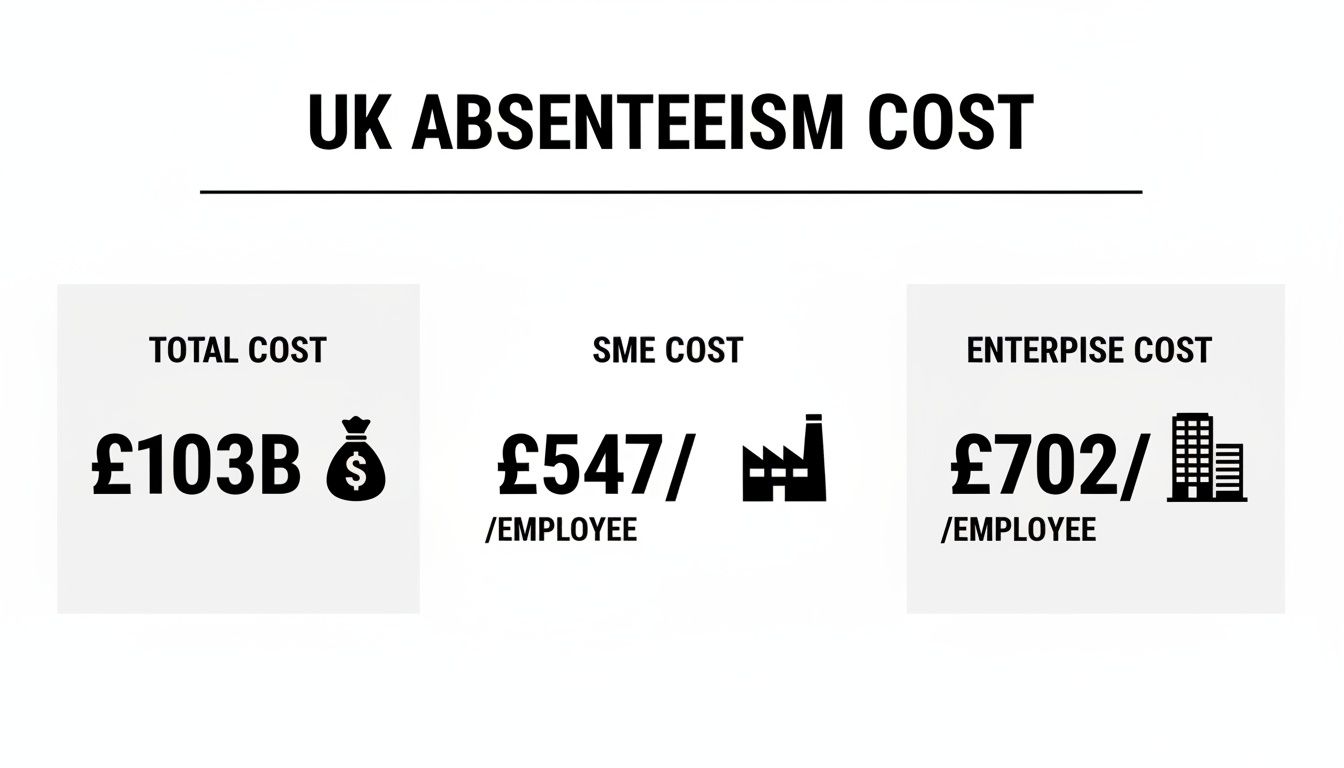
The data makes it crystal clear: no business gets a free pass. It also shows that the per-employee costs can actually hit bigger organisations the hardest. These figures really drive home the need for a much smarter way of handling absence.
The Hidden Operational and Cultural Toll
Looking past the balance sheet, the operational chaos can be just as damaging. Unplanned absences often trigger a chain reaction:
- Productivity nosedives as the remaining team members are stretched thin trying to cover the extra workload.
- Team morale takes a hit, often due to the increased pressure and a sense of unfairness.
- The administrative load on HR professionals and line managers becomes heavier and more stressful.
It's also worth noting that a poor working environment can be a major factor in these costs. Taking the time to understand and implement solid workplace safety standards is a proactive step that can help reduce preventable absences from the get-go.
This is why a proper absentee management system isn't a luxury item; it's a core tool for smart planning and building a positive, productive work culture. It helps turn a reactive problem into a proactive, manageable part of your business. To get a better sense of how these issues could be playing out in your own company, you might find it helpful to read our guide on how employee absence impacts your business.
What Is an Absentee Management System, Really?
Forget the idea of a digital wall calendar or a fancy spreadsheet. At its heart, an absentee management system is your company's air traffic control for employee availability. It gives you a single, reliable, real-time view of who's in, who's out, and—crucially—why they're out.
This clarity is what pulls businesses away from the chaotic, last-minute scrambles to cover shifts. It introduces a predictable, proactive way to manage your most valuable asset: your people. Think of it as the central hub where every piece of leave information lives, from planned annual holidays and parental leave to unexpected sick days.
This kind of system doesn't just record data; it actively manages the entire process, turning a tangled web of emails, paper forms, and verbal nods into one organised, automated workflow. The result is fairness, consistency, and complete transparency for everyone.

From Simple Tracking to Strategic Control
At first glance, an absentee management system is all about straightforward leave tracking. It automates holiday entitlement calculations, tracks balances in real time, and keeps a clear record of all time off. This foundational layer immediately gets rid of the common errors that creep in with manual tracking—errors that can lead to costly payroll mistakes or disputes over how much leave someone has left.
But its true power is unleashed when it moves beyond simple bookkeeping. The system becomes a tool for strategic control by embedding your company's specific absence policies directly into its workflows. This means the rules get applied consistently to every single request, every time, removing the risk of human error or unconscious bias.
The real value of an absentee management system isn't just in tracking who is out, but in providing the structure to manage why and how leave is handled, ensuring fairness and compliance automatically.
This automated enforcement is what separates a basic tool from a genuine management system. It makes sure every manager, from the shop floor to the head office, is playing by the same rulebook, creating a level playing field for all staff.
The Engine of Communication and Planning
A robust system also acts as a powerful communication engine. Instead of managers and employees getting stuck in a back-and-forth email chain just to book a day off, the whole process becomes a streamlined, self-service affair. Here’s a typical snapshot of how it works:
- Employee Request: An employee logs into a portal or mobile app, sees their leave balance, checks the team calendar for clashes, and submits a request in seconds.
- Automated Routing: The request is automatically sent to the correct line manager for approval, along with all the context they need to make a decision.
- Informed Approval: The manager can see team availability and project deadlines before approving or declining the request with a single click.
This simple, automated loop slashes administrative time for everyone involved. What’s more, the centralised team calendar gives managers the visibility they need for proper resource planning. They can spot potential staffing gaps weeks or even months in advance, making sure projects stay on track and customer service levels don't dip. It’s this foresight that helps a business run smoothly, even when key team members are away.
Essential Features of a Powerful Absence Platform
When you start looking for an absentee management system, it's easy to get lost in a sea of options. But here’s the thing: not all platforms are created equal. A genuinely useful system is more than just a fancy digital calendar; it’s a living, breathing tool that helps you manage your workforce. To find the right fit, you need to cut through the noise and focus on the core features that actually make a difference day-to-day.
Think of it like building a high-performance engine. You can't skip the essential components. Without them, you'll end up with something that looks shiny but just doesn't have the power to deliver the efficiency and insight your business really needs. These are the non-negotiables that work together to save time, keep things fair, and give you a crystal-clear picture of who's in and who's out.
Intuitive Employee Self-Service Portals
The bedrock of any modern absence platform is a straightforward self-service portal. This is all about empowering your employees to manage their own leave without having to fire off an email or hunt down their manager. They should be able to log in from their phone or computer, instantly see how much holiday they have left, check the team calendar for clashes, and pop in a request in a matter of seconds.
This one feature has a massive ripple effect. It slashes the administrative back-and-forth, freeing up managers and HR to concentrate on work that matters. Just as importantly, it gives employees a sense of ownership and transparency, which does wonders for morale.
Automated Approval Workflows
Let's be honest, manual approval processes are a total time-sink and a breeding ground for inconsistency. A powerful system takes this entire headache away by automating the sequence. When an employee submits a request, the system should instantly route it to the right line manager based on rules you’ve already set.
This kind of automation means nothing ever falls through the cracks. The manager gets a notification with all the context they need—like who else is off and the employee’s remaining balance—so they can approve or deny the request on the spot. This guarantees your leave policies are applied the same way for everyone, every single time.
Centralised Team Calendars
When it comes to planning, visibility is everything. A centralised team calendar is an absolute must-have, giving you an at-a-glance view of who is scheduled to be out of the office and when. It’s the simplest way to prevent those nightmare scenarios where half your critical team members are on a beach at the same time.
For managers, this is a game-changer for forward planning. They can spot potential staffing gaps for big projects well in advance and make sure customer service never takes a hit. For employees, it provides the clarity they need to plan their own time off without treading on their colleagues' toes. It turns scheduling from a wild guess into a smart, strategic activity. You can explore this in the broader context of workforce management in our guide to modern employee attendance tracking software.
Customisable Leave Policies
Your business has its own way of doing things, and your leave policies are no different. A one-size-fits-all approach just won’t cut it. Any top-tier system must let you configure customisable leave policies that perfectly mirror your company's rulebook.
This means setting up various leave types (like holiday, sickness, parental, or compassionate leave), defining how leave is accrued, and establishing rules for carrying days over. Getting this right is vital for staying compliant and ensuring everyone is treated fairly.
A system that forces you to adapt your policies to its limitations is the wrong system. The right platform adapts to you, embedding your specific rules into every automated action it performs.
It's this level of customisation that transforms the software from a generic tool into a true extension of your HR function, one that understands and supports your unique operational needs.
Robust Reporting and Analytics
Finally, the best systems don't just collect data; they turn it into intelligence. Robust reporting and analytics tools are crucial for understanding the story behind absence in your organisation. The software should be able to generate reports that help you spot patterns, like recurring absences on a Monday or higher-than-average sickness in one department.
These insights are pure gold. They can shine a light on potential problems like employee burnout or flagging morale, allowing you to step in and address them before they escalate. This data-driven approach shifts you from simply tracking absence to strategically managing employee wellbeing and productivity.
Unlocking the Financial and Cultural Benefits
Bringing an absentee management system into your business delivers a return on investment that goes way beyond just tracking days off. It's really an investment in efficiency, transparency, and a healthier company culture. The benefits ripple across the entire organisation, creating real financial gains, smoother workflows, and a more supportive environment for everyone on the team.
Think of it this way: managing absence with spreadsheets is like trying to navigate a busy city with an old paper map. You might get there eventually, but it's slow, full of potential errors, and incredibly stressful. An automated system is your GPS—it gives you real-time data, suggests the best routes, and lets you focus on the destination, not just the directions.
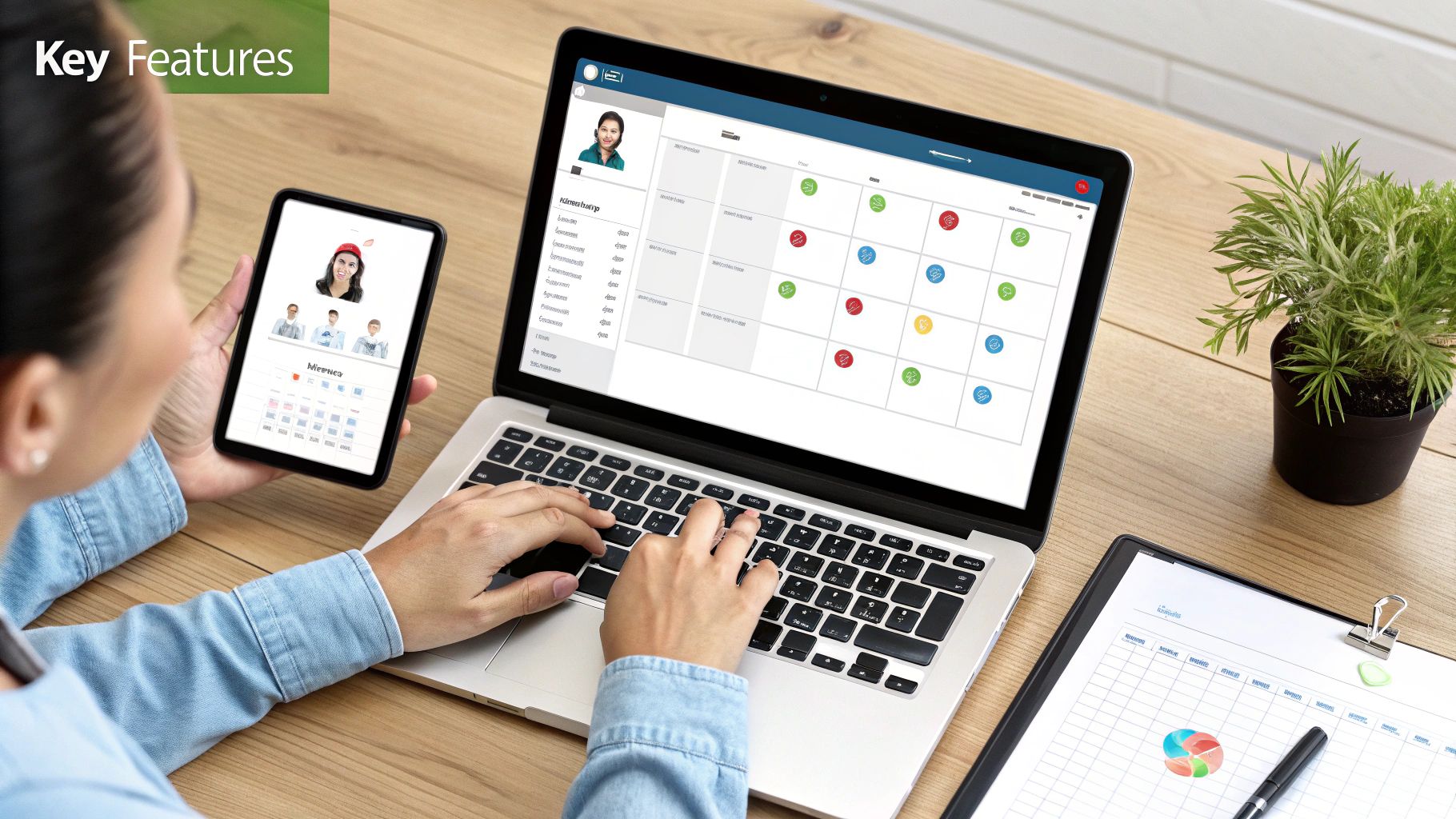
This shift from being reactive to proactive is where the true value lies, turning what was an administrative headache into a strategic advantage.
Bolstering Your Bottom Line
The most immediate and obvious benefit is financial. Unplanned absences hit productivity hard and drive up administrative costs. An absentee management system tackles these costs head-on by automating tedious tasks and giving you clear insights into why people are off.
Just think about the sheer amount of time managers and HR staff spend manually processing leave requests, updating calendars, and fixing payroll mistakes. A system does all that for them, freeing up countless hours that can be put towards more important work. This reclaimed time is a direct cost saving and a massive boost to productivity.
Plus, a clearer view of absence patterns helps you get to the root of problems. The UK's sickness absence rate was 2.0% of working hours lost in 2024, with UK workers losing a staggering 148.9 million days to sickness or injury. A system with detailed analytics can flag departments with high absence rates, letting you offer targeted support and reduce that financial drain. You can read more about UK sickness absence trends at Eminence Recruitment.
Streamlining Operational Efficiency
Beyond the direct cost savings, an absentee management system makes day-to-day operations run so much more smoothly. When all absence is managed in one central place, planning becomes more reliable and disruptions are kept to a minimum.
Imagine a project manager trying to finalise a critical timeline. With a central team calendar, they can see in an instant who is available and when. This means they can allocate resources accurately and set realistic deadlines, avoiding those last-minute scrambles when a key team member is unexpectedly away.
- Improved Project Planning: Managers can confidently assign work, knowing the team’s availability is accurate and up-to-date.
- Minimised Workflow Disruptions: Clear visibility helps prevent scheduling clashes and ensures proper cover can be arranged well in advance.
- Consistent Policy Application: Automated workflows make sure company leave policies are applied fairly to everyone, which cuts down on confusion and disputes.
This level of operational clarity keeps projects on track and service levels high, even when lots of people are on holiday.
Cultivating a Positive Company Culture
Perhaps the biggest benefit of all is the positive impact it has on your company culture. A transparent, fair, and consistent way of handling absence builds trust and really boosts morale.
When employees can easily check their leave balances and put in requests through a simple portal, they feel empowered and respected. The clarity of an automated system gets rid of any sense of favouritism that can creep in with manual, inconsistent approvals. It creates a feeling of fairness and trust between employees and management.
A well-implemented absentee management system sends a clear message to your team: we value your time, we trust you to manage it, and we are committed to applying our policies fairly to everyone.
This cultural shift is invaluable. It helps create a work environment where people feel supported, which leads to higher engagement, better staff retention, and a stronger, more connected team. Ultimately, the data you gather can also guide your wellbeing initiatives, helping you proactively support your staff's health and work-life balance.
Choosing and Implementing Your Ideal System
Selecting the right absentee management system is a big deal. It’s not just about buying a piece of software; it's about finding a partner that will help you simplify your processes, maintain fairness, and win back precious time you’re currently losing to admin.
The whole thing can be broken down into two straightforward stages: first, finding the platform that genuinely fits your business, and second, rolling it out smoothly so your team actually embraces it. Let's walk through how to get both parts right.
Finding Your Perfect Match
Choosing the right platform means looking past the flashy feature list and thinking about how it will actually fit into your day-to-day. Every business is different, so you need to zero in on the things that will solve your specific headaches.
Your evaluation should really boil down to a few key things:
- Scalability: Will this system grow with you? A platform that works for ten employees should be just as effective when you have fifty. Look for flexible pricing and features you can switch on as your team expands.
- Seamless Integration: The best tools don't work in isolation. Check if it can connect with your existing payroll, HR, or project management software. This is crucial for creating a smooth flow of information and finally killing off double data entry.
- User-Friendly Design: This one is non-negotiable. If the system is clunky or complicated, your team just won't use it. It needs a clean, intuitive interface that makes it a breeze for employees to request leave and for managers to approve it, ideally from their phone or laptop.
A great way to get a feel for this is to see the platform in action. A clear, visual dashboard, for example, can give a manager an instant snapshot of who's in and who's out.
This kind of at-a-glance clarity is the hallmark of a well-designed system. It empowers managers to make quick, informed decisions without having to dig through confusing menus or run complex reports.
Your Step-by-Step Implementation Checklist
Once you've made your choice, a successful rollout is all about good planning and clear communication. A rushed implementation can create confusion and resistance, completely undermining the benefits you were trying to achieve in the first place.
Follow this checklist for a smooth transition from your old spreadsheets to a new, automated way of working.
-
Configure Your Leave Policies: This is the bedrock of your new system. Take the time to carefully transfer all of your company's rules—from annual holiday entitlement and accrual rates to sickness reporting procedures—into the software. Double-check that everything lines up with your employee handbook and current UK legal requirements.
-
Run a Pilot Programme: Before going live across the whole company, test the system with a single department or a small group of volunteers. This lets you iron out any kinks, get some honest feedback, and create a few internal champions who can help get their colleagues on board later.
Running a pilot isn't just a test of the software; it's a test of your process. The feedback you get from this small group is invaluable for ensuring a seamless launch for the entire company.
-
Communicate the Change Clearly: Announce the new system well in advance. Explain why the change is happening, and be sure to focus on the benefits for employees—like being able to easily request leave and instantly see their remaining balance. Give everyone a clear timeline for the switch.
-
Provide Effective Training: Don't just assume everyone will figure it out. Organise short, sharp training sessions tailored to different groups (employees, managers, and admins). Focus on the core tasks each group will actually need to do to avoid overwhelming them with features they'll never use.
-
Secure Stakeholder Buy-In: Make sure your managers and team leaders are fully bought in. They are your key partners in making this a success. When they actively use and endorse the system, their teams are far more likely to follow their lead.
By following this structured approach, you can introduce your new absentee management system in a way that feels like a natural and positive step forward for everyone.
Measuring Success and Proving Your ROI
So, you’ve implemented a new absentee management system. That’s a big step, but the real work starts now: proving it was worth it. To really justify the investment, you need to move beyond gut feelings and dig into the hard data. This means tracking the right Key Performance Indicators (KPIs) to build a clear, compelling return on investment (ROI) story for your leadership team.
Measuring success isn't just about counting sick days. It’s about understanding the story your absence data is telling you. By focusing on a few key metrics, you can show exactly how the system is saving money, making everyone more efficient, and contributing to a healthier workplace. The goal is to prove that the cost of the software is easily outweighed by real, tangible business gains.
Key Metrics to Track
To build a solid business case, start by keeping an eye on a few core KPIs that directly show the system's impact. These metrics give you a clear "before and after" picture of its value.
- Overall Absence Rate: This is your headline figure. It’s a simple calculation: take the total number of unscheduled absence days and divide it by the total number of available workdays in a set period. A steady downward trend is one of the most powerful signs of success you can have.
- Bradford Factor Score: A particularly useful metric in the UK, the Bradford Factor highlights the disruptive effect of frequent, short-term absences, which are often more damaging than a single long-term sickness. If you can show a drop in the average scores across your teams, you’re demonstrating much healthier attendance patterns.
- Administrative Hours Saved: Think about all the time your HR team and line managers used to spend processing leave requests, updating calendars, and fixing payroll errors. Tally it up. This reclaimed time isn't just a convenience; it translates directly into cost savings and lets your people focus on more important work.
The need for accurate tracking is obvious everywhere you look. For instance, the rate of severely absent pupils in UK schools has shot up by 167% since before the pandemic. This mirrors broader trends where public sector employees tend to log more days off than those in the private sector, highlighting why a robust system for logging and analysis is essential for any large organisation. You can explore more of these UK absence trends at the Centre for Social Justice.
Building Your ROI Narrative
Once you have this data, you can start weaving it into a powerful story. Let's say you reduce your company’s absence rate by just 0.5% and save each manager two hours of admin time per week. It doesn't take much to calculate the direct financial savings from that alone.
Your ROI is not just a number; it’s a narrative that demonstrates how an absentee management system transforms a major cost centre into a well-managed, data-driven operation.
Using your system’s built-in reporting tools, you can pull this data together and present it clearly. For those who want to take their analysis a step further and create more advanced visualisations, you can learn more about connecting your data to Power BI through APIs. This is a great way to show leadership, in black and white, exactly how their investment is paying off.
Frequently Asked Questions
Got questions about bringing an absentee management system into your business? You're not alone. Here are some straightforward answers to the queries we hear most often.
Is an Absentee Management System Right for My Small Business?
Absolutely. In fact, you could argue it's more critical for a small business. When you're a tight-knit team, the absence of just one person is felt much more keenly than in a huge corporation. A good system takes the manual, time-sucking tasks off a busy owner or manager's plate, freeing up precious hours.
Modern cloud-based tools are designed to be affordable and scalable, so they fit small business budgets perfectly. Crucially, they also make sure your company policies are applied consistently to everyone, which is vital for keeping things fair and morale high.
How Does a System Help with UK Compliance?
This is one of the biggest wins. An absentee management system is a massive help in staying on the right side of UK employment law. It helps you stick to rules like the Working Time Regulations by automatically and accurately tracking holiday entitlement, making sure every employee gets their statutory leave.
It also creates a crystal-clear digital audit trail for every type of leave. Should a dispute ever pop up, that record is invaluable. By automating your policies, the system ensures everyone is treated fairly and by the book, which dramatically cuts down your risk of legal headaches.
Think of an automated system as your compliance safety net. It takes the guesswork and human error out of enforcing policies, protecting your business while ensuring everyone is treated fairly.
That consistency is absolutely fundamental to managing legal risk.
Can This System Integrate with Our Payroll Software?
Yes, and you should insist on it. Most modern systems are built to play nicely with others. A quality absentee management system will connect with popular payroll and HR software, creating a seamless flow of absence data that keeps your payroll spot-on.
This connection gets rid of manual data entry, a process that’s notoriously famous for causing costly mistakes. When absence data syncs directly to your payroll, you save your admin team a tonne of time and stress every single month. Honestly, this should be a deal-breaker when you're choosing a system.
Will Employees Find the System Difficult to Use?
Quite the opposite! The best systems are designed for real people, not tech wizards. They feature intuitive self-service portals that staff can access from a web browser or a simple mobile app. This makes it dead easy for them to check their leave balance, see who else is off on the team calendar, and pop in a request in just a couple of clicks.
Giving people this kind of control is usually a huge improvement over digging out old paper forms or getting lost in confusing email chains. It almost always leads to staff actually using the system and giving it a thumbs-up.


