
Managing employee time off is a critical operational task, but creating the necessary paperwork from scratch is an inefficient use of valuable time. A standardised holiday request process prevents misunderstandings, ensures fair scheduling, and maintains clear records for payroll and compliance. Implementing a well-designed template holiday request form is the most direct path to achieving this organisational efficiency. It formalises the procedure, guaranteeing that managers receive all necessary information-such as dates, type of leave, and employee details-in a consistent format every time. This simple tool eliminates back-and-forth emails and misplaced verbal requests, streamlining workflow for HR managers and team leaders alike.
This resource list provides a curated selection of the best holiday request form templates available across different platforms, from Microsoft Office and Google Forms to specialised tools like Jotform and Smartsheet. We will analyse each option, highlighting its specific use cases, customisation potential, and practical limitations. For businesses using WordPress, building a custom solution is also a viable option; the Contact Form 7 Widget documentation offers a detailed guide for creating flexible, integrated forms. This guide will help you select and implement the ideal template to formalise your leave management process effectively.
1. Microsoft Office Templates – Holiday Request Form
For many organisations, particularly those already invested in the Microsoft ecosystem, the most straightforward starting point is the official Microsoft Office template library. These templates, available for applications like Word and Excel, offer a professional, standardised foundation for creating a template holiday request form. They are designed for easy adoption and customisation, making them a go-to choice for businesses that need a functional solution without a steep learning curve or additional software investment.
The primary appeal lies in their familiarity and integration. Most employees are comfortable using Word or Excel, which minimises training requirements. These templates can be quickly adapted to reflect specific company branding, such as adding a logo or adjusting colour schemes. They serve as a reliable baseline, covering all essential fields like employee details, requested dates, and manager approval signatures.
When to Use Microsoft Office Templates
This approach is ideal for small to medium-sized businesses (SMBs) with relatively simple approval workflows. If your process involves an employee filling out a document, emailing it to their manager, and the manager signing it digitally or physically, a Word or Excel template is perfectly sufficient. Large corporations, like some Fortune 500 companies, also leverage these by creating highly customised versions that are then distributed as a standard internal document, ensuring consistency across departments.
However, their limitations become apparent as complexity grows. These static documents lack automated tracking, making it difficult for HR to get a real-time overview of staff leave. Managing multiple requests via email can become cumbersome and lead to errors, such as double-bookings or lost requests. For organisations needing robust reporting, calendar integration, and automated approval chains, a dedicated software solution is a more scalable option.
This decision tree infographic helps visualise whether a Microsoft Office template is the right fit for your organisation's needs.
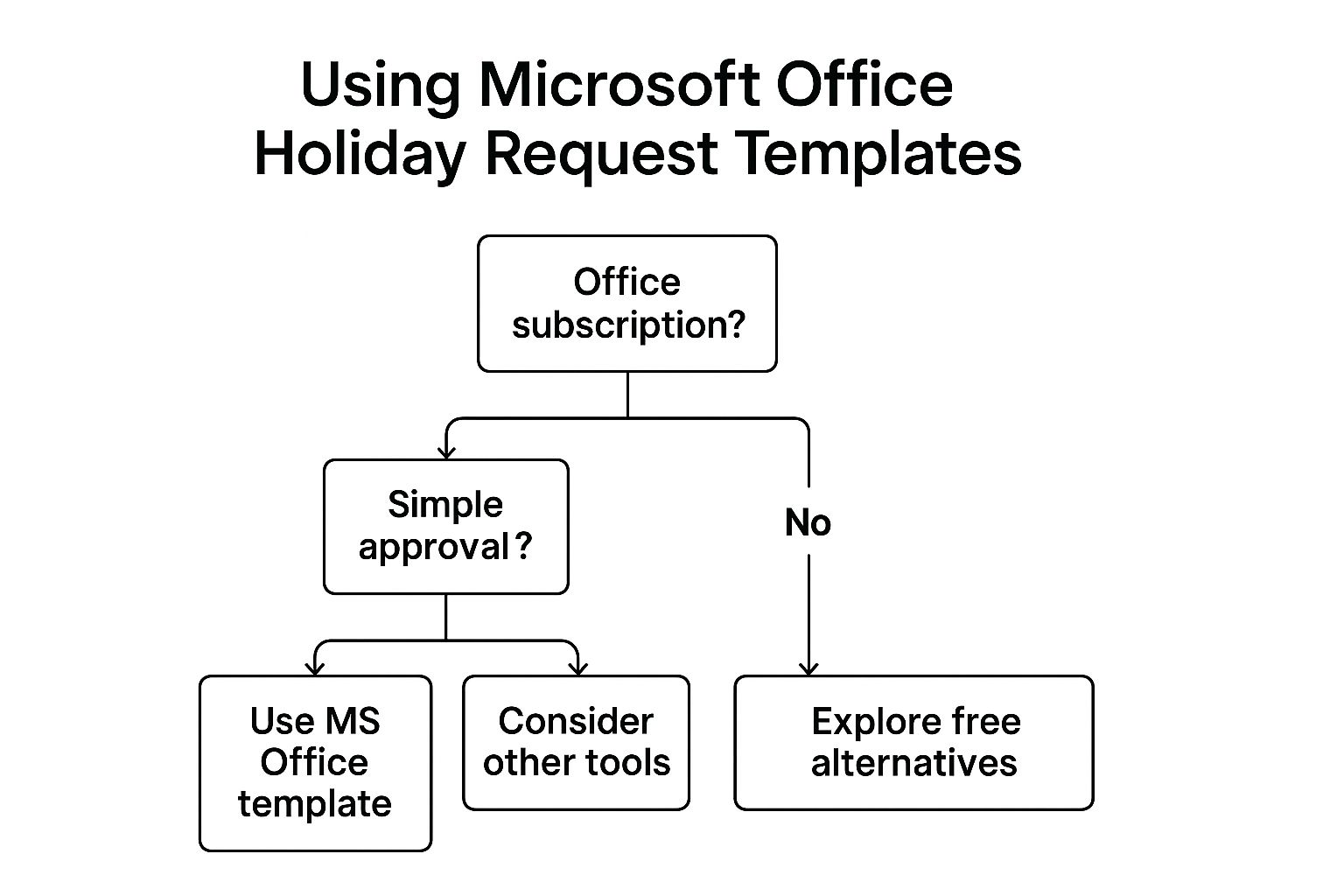
The flowchart highlights that while having an Office subscription is the first step, the simplicity of your approval process is the key determinant for using these templates effectively.
Actionable Customisation Tips
- Integrate Policy Links: Add hyperlinks directly in the form to your company’s detailed leave policy, reducing employee queries.
- Use Dropdown Menus: In Excel, use data validation to create dropdown lists for "Leave Type" (e.g., Annual Leave, Sick Leave, Unpaid) to standardise data entry.
- Automate Submission: Set up a simple macro or provide clear instructions for employees to save the file with a consistent naming convention (e.g., "HolidayRequest_JohnSmith_2024-12-10") and email it to a specific address.
While Microsoft provides a solid foundation, you can explore a wider array of options. For further reading and alternative downloads, you can learn more about how to find the perfect template holiday request form for your business needs.
2. Google Forms Holiday Request Templates
For organisations deeply integrated with the Google Workspace ecosystem, or those seeking a free, cloud-native alternative, Google Forms is a powerful choice. It allows you to create a dynamic and easily shareable template holiday request form that automates data collection. Unlike static documents, a Google Form gathers all submissions into a single, organised Google Sheet in real-time.
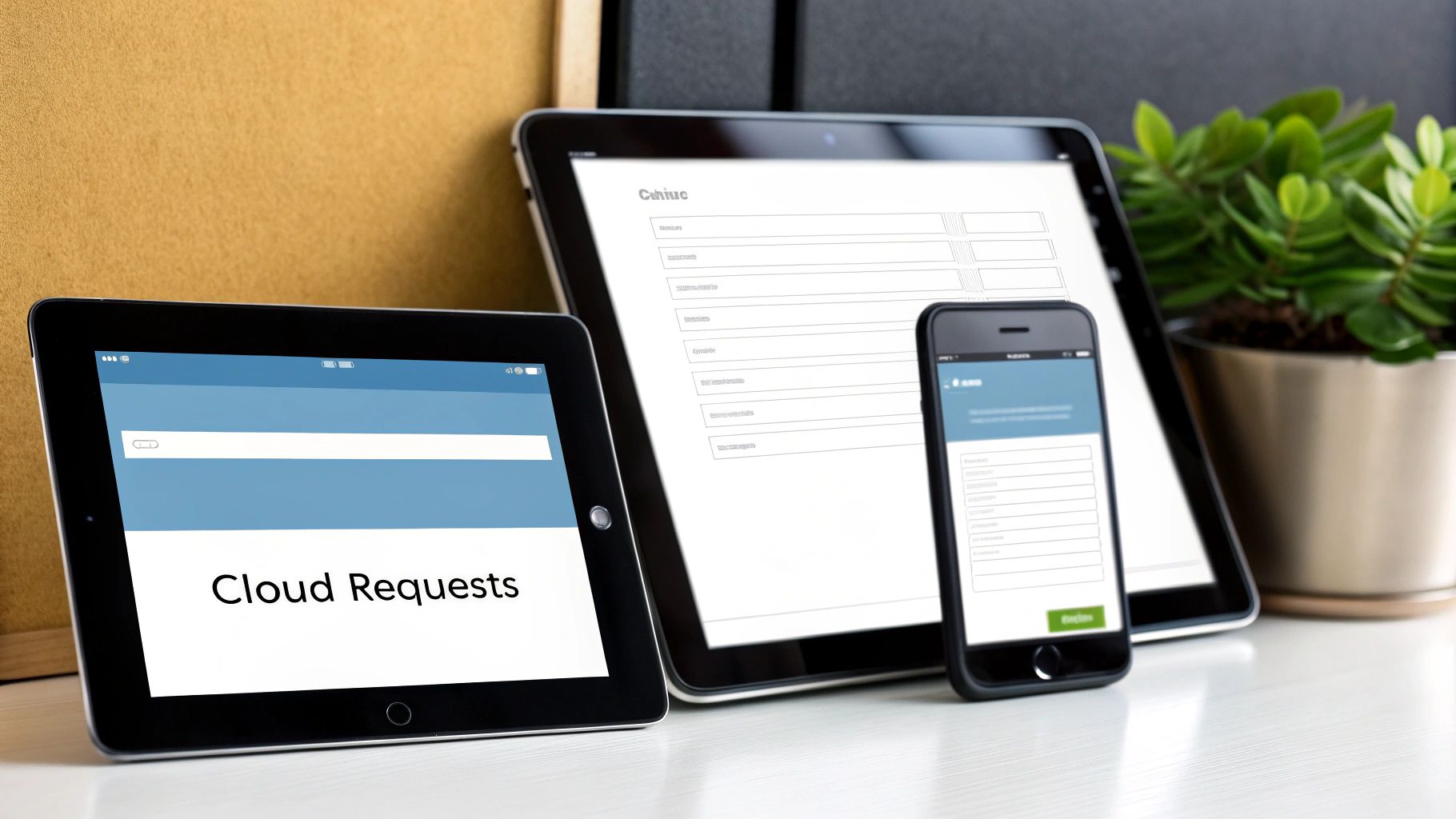
The key advantage of this method is its blend of simplicity and automation. Building a form is intuitive, with drag-and-drop functionality, and sharing it is as easy as sending a link. This accessibility makes it a favourite among startups, remote-first companies, and non-profit organisations looking to streamline administrative tasks without incurring costs. The automatic compilation of responses into a spreadsheet eliminates manual data entry, providing an instant, filterable overview of all leave requests.
When to Use Google Forms
Google Forms is the perfect solution for businesses that have outgrown email and spreadsheet attachments but are not yet ready for a fully-featured HR software suite. It excels in environments where real-time visibility is crucial. For example, a remote team manager can receive instant notifications of new requests and view an up-to-date leave schedule in the linked Google Sheet without chasing down individual files. It is also ideal for organisations that need a central, accessible system that employees can use from any device, anywhere.
However, Google Forms has its limitations. The standard approval process is indirect; a manager receives a notification but must then communicate their approval outside the form, perhaps via email or a chat message, and then manually update the status in the spreadsheet. While advanced automation is possible with Google Apps Script, it requires technical expertise to implement custom workflows like multi-level approvals or automatic calendar entries. Organisations requiring sophisticated, built-in approval chains may find this solution lacking.
Actionable Customisation Tips
- Set Up Email Notifications: Configure the form settings to send an automatic email to a specific address (e.g., your HR inbox or the line manager) the moment an employee submits a request.
- Use Data Validation: Ensure accurate data by setting rules for key fields. Use the "Date" question type to prevent text entries and use response validation to ensure the end date is after the start date.
- Create Separate Forms: To keep reporting clean, consider creating separate forms for different leave types (e.g., annual holiday, sick leave, parental leave), each feeding into a different tab on the master Google Sheet.
- Leverage Google Apps Script: For more advanced needs, use the script editor to build custom functions. You could create a script that automatically sends a confirmation email to the employee or adds the approved leave dates to a shared Google Calendar.
3. Template.net Holiday Leave Request Forms
For organisations seeking a wider variety of professionally designed options beyond standard office software, Template.net presents a vast library of templates. This platform offers a comprehensive collection of holiday request forms available in multiple formats, including Word, Excel, PDF, and Google Docs. It serves as a one-stop-shop for a template holiday request form, providing designs that cater to numerous industries and business sizes.
The main advantage of Template.net is the sheer breadth and quality of its designs, which are often created by professional graphic designers. This allows a business to select a form that not only functions well but also aligns with its brand aesthetic from the outset. These templates provide a strong, structured starting point, often featuring more sophisticated layouts and industry-specific fields than generic alternatives.
When to Use Template.net Forms
This resource is particularly useful for businesses that want a polished, professional document without investing in custom design work. It's an excellent fit for companies in specialised sectors, like manufacturing firms that need forms accounting for shift patterns, or healthcare organisations requiring specific fields for clinical staff leave. Retail businesses can also find templates tailored for managing seasonal leave requests during peak trading periods.
The platform's multi-format availability is a key strength, allowing you to choose a file type that integrates seamlessly with your existing operational workflows, whether that's a printable PDF or an editable Google Doc. However, like any static template, these forms lack real-time tracking and automation. They are a step up in design from basic templates but still require a manual process for submission, approval, and record-keeping, which can be inefficient for organisations with high request volumes or complex approval hierarchies.
Actionable Customisation Tips
- Select the Right Format: Before downloading, decide which format (e.g., Word for easy editing, PDF for fixed printing) best suits your internal process to avoid compatibility issues.
- Update Branding and Policies: Customise the template by inserting your company logo and contact details. Critically, review and replace any placeholder policy text with your organisation’s specific leave rules and procedures.
- Create Role-Specific Versions: If you have different leave policies for different employee groups (e.g., full-time vs. part-time, office vs. field staff), consider customising and saving separate versions of the form for each group.
- Establish a Naming Convention: Instruct employees to save and submit the form using a consistent file name (e.g., "LeaveRequest_EmployeeName_StartDate") to help HR and managers organise submissions effectively.
By leveraging these professionally designed templates, you can significantly improve the look and feel of your internal documents. You can explore their extensive collection to find the perfect template holiday request form for your needs.
4. JotForm Holiday Request Form Templates
For organisations seeking a solution that bridges the gap between static documents and full-scale HR software, JotForm offers an advanced yet accessible alternative. Its platform provides a powerful drag-and-drop form builder with a library of specialised templates, including a robust template holiday request form. These are designed for businesses needing sophisticated features like conditional logic, e-signatures, and third-party integrations without requiring extensive technical expertise.
The core advantage of JotForm is its blend of user-friendliness and advanced functionality. While starting with a pre-built template is simple, the platform allows for deep customisation. You can create dynamic forms that change based on user input, automate notification emails to multiple stakeholders, and connect the form directly to other business systems like project management tools or calendars. This makes it a highly versatile tool for streamlining leave management.
When to Use JotForm Templates
This approach is particularly well-suited for mid-size companies that have outgrown simple spreadsheets but are not yet ready for a dedicated, enterprise-level HR system. International organisations can also benefit by incorporating specific fields or logic to handle regional compliance variations. Any company looking to implement a formal, trackable e-signature approval workflow will find JotForm’s built-in signature fields extremely useful.
The main limitation is that while it excels at form submission and data collection, it is not a comprehensive leave management system. It doesn't inherently track leave balances or provide detailed, out-of-the-box reporting on company-wide absences without significant manual setup or integration work. For businesses whose primary need is a holistic view of employee leave allowances and patterns, a more specialised tool might be necessary. To understand how such a tool fits into a broader strategy, you can explore the simple steps for an efficient leave approval process.
Actionable Customisation Tips
- Utilise Conditional Logic: Create dynamic approval workflows. For example, set up a rule where requests for more than 10 consecutive days are automatically forwarded to a senior manager as well as the direct line manager.
- Integrate with Your Tools: Connect your form to Google Sheets to automatically log all requests, or link it to project management tools like Asana or Trello to create tasks for handover cover.
- Ensure Mobile Usability: Use the mobile preview feature during customisation to confirm the form is easy for employees to complete and submit from their smartphones.
- Start Simple and Iterate: Begin with a basic template covering essential fields. Gradually introduce more advanced features like automated PDF generation or payment processing for unpaid leave deductions as your team becomes comfortable with the system.
5. Smartsheet Holiday Request Form Templates
For organisations that have outgrown simple spreadsheets but are not yet ready for a fully dedicated HR platform, Smartsheet offers a powerful middle ground. It enhances the familiar spreadsheet interface with robust project management features, making its template holiday request form a dynamic and interactive tool. These templates are designed to build automated workflows, track requests in real-time, and provide visual dashboards for comprehensive oversight.
The main advantage of Smartsheet is its ability to bridge the gap between static documents and complex software. It allows businesses to create a centralised system where holiday requests are submitted via a clean web form, automatically populating a master sheet. This sheet can then trigger approval requests, send notifications, and update calendars, significantly reducing manual administrative work for HR and line managers.
When to Use Smartsheet Templates
This solution is particularly effective for medium to large businesses and project-based organisations where coordinating team availability is critical. If your approval process involves multiple stakeholders (e.g., line manager, head of department, HR), Smartsheet’s customisable automated workflows can manage the sequence seamlessly. Government agencies and other bodies with strict compliance and auditing requirements also benefit from its clear, traceable record of all leave requests and approvals.
However, Smartsheet comes with a steeper learning curve than a basic Word or Excel document. Setting up the initial workflows and dashboards requires a level of technical confidence and a clear understanding of your internal processes. While more powerful, it is a subscription-based service, so the cost is a key consideration compared to free templates. For very small teams with straightforward needs, its feature set may be overkill.
Actionable Customisation Tips
- Map Your Workflow First: Before touching the template, visually map out every step of your approval process, from submission to final confirmation. This blueprint will make configuring the automation rules in Smartsheet much simpler.
- Utilise Dashboard Widgets: Create a management-level dashboard that pulls data from the request sheet. Use charts to show leave trends, a calendar view for team availability, and metric widgets to display pending requests, ensuring managers have instant oversight.
- Set Up Automated Reminders: Configure automated alerts to notify managers if a request has been pending for more than a set number of days. This helps prevent bottlenecks and ensures employees receive timely responses.
- Train Key Users: Provide dedicated training for HR staff and managers who will be administering the system. A well-informed team can leverage its full potential and troubleshoot minor issues independently.
Smartsheet provides a scalable framework, but understanding its place alongside other tools is key. To see how these features compare to dedicated platforms, you can find out more about the benefits of an advanced staff holiday tracker.
6. Typeform Holiday Request Templates
Typeform revolutionises the data collection process by transforming standard forms into engaging, conversational experiences. Their approach to a template holiday request form replaces static fields with interactive, one-question-at-a-time flows that feel less like paperwork and more like a friendly chat with HR. This user-centric design is proven to boost completion rates and improve the overall employee experience, especially for organisations that prioritise modern, people-first processes.
The core advantage of Typeform is its ability to make mundane administrative tasks feel more human. The sleek interface and smooth animations create a positive interaction from the start. This makes it an excellent choice for businesses aiming to embed their company culture into every touchpoint, including internal HR procedures. Forms are inherently mobile-friendly, ensuring staff can submit requests easily from any device.
When to Use Typeform Templates
Typeform is particularly effective for creative agencies, tech start-ups, and modern retail companies that want their internal tools to reflect a forward-thinking and user-friendly brand image. If your goal is to enhance employee engagement with HR processes and reduce administrative friction, Typeform’s conversational format is a perfect fit. It is also ideal for companies managing seasonal or temporary workers, as the intuitive process requires minimal training.
However, its strength in user experience can also be a limitation for complex, multi-stage approval workflows that require deep integration with legacy HR systems. While it can connect to thousands of other apps via integrations like Zapier, it doesn't offer the built-in, comprehensive leave management features of a dedicated HR platform. It is best suited for the "request" part of the process, with approvals and tracking often managed in a connected spreadsheet or another tool.
Actionable Customisation Tips
- Use Logic Jumps: Create a personalised path for employees. For example, if a user selects "Other" as the leave type, use logic to ask a follow-up question for more details, keeping the form clean for everyone else.
- Keep it Conversational: Frame questions in a friendly tone. Instead of "Start Date," try "Great! When would you like your time off to start?". This small change significantly improves the user experience.
- Utilise Custom 'Thank You' Pages: After submission, direct employees to a custom page that clearly outlines the next steps, such as "Thanks, [Name]! Your manager has been notified and will review your request within 48 hours."
- Embed in Your Intranet: Instead of just sending a link, embed the Typeform directly into your company’s internal portal or SharePoint site for seamless access.
By focusing on a superior user interface, Typeform ensures that submitting a holiday request is a smooth and pleasant task, not a chore. You can explore their template library and start building your own conversational form to see the difference it makes.
Holiday Request Form Templates Comparison
| Solution | Core Features ✨ | User Experience ★★★★☆ | Value Proposition 💰 | Target Audience 👥 | Unique Selling Points 🏆 |
|---|---|---|---|---|---|
| Microsoft Office Templates | Pre-built fields, Office integration, leave tracking | Professional, familiar interface | Free with Office subscription | Corporate environments, Office users | Seamless MS Office ecosystem integration ✨ |
| Google Forms Holiday Request Templates | Cloud-based, real-time collaboration, conditional logic | Easy, mobile-responsive, real-time tracking | Completely free | Small businesses, startups, cost-sensitive users | Auto response compilation, Google Sheets integration 🏆 |
| Template.net Holiday Leave Requests | Multi-format, industry-specific, customizable designs | Professional look, print & digital ready | One-time purchase, no subscription | Organizations valuing design quality | Extensive format support, policy/legal text included ✨ |
| JotForm Holiday Request Form Templates | Drag-and-drop builder, conditional logic, integrations | Customizable, advanced features but complex | Freemium with paid premium features | Mid-size orgs needing advanced forms & integrations | E-signatures, payments, GDPR/HIPAA compliance 🏆 |
| Smartsheet Holiday Request Templates | Automated workflows, dashboards, resource management | Robust but complex, enterprise-grade | Subscription-based, higher cost | Large organizations, enterprise teams | Project mgmt & real-time dashboards ✨ |
| Typeform Holiday Request Templates | Conversational UI, logic jumps, multi-device responsive | Engaging, mobile-first, reduces abandonment | Freemium with paid premium features | UX-focused firms, creative agencies | Conversational forms boosting completion rates 🏆 |
Final Thoughts
Navigating the landscape of leave management can feel complex, but as we have demonstrated, selecting the right template holiday request form is a powerful first step towards clarity and efficiency. Throughout this guide, we've explored a variety of robust solutions, each with its own unique strengths, from the familiar interfaces of Microsoft Office and Google Forms to the dynamic, workflow-driven platforms like Smartsheet and JotForm. The key takeaway is that there is no single "best" option; the ideal choice depends entirely on your organisation's specific needs, existing software ecosystem, and desired level of automation.
Key Insights and Next Steps
The journey from a basic downloadable template to a fully integrated system is a strategic one. Reflect on the resources we have covered:
- For Simplicity and Familiarity: Microsoft Office and Google Forms offer accessible, no-cost starting points. They are perfect for small businesses or teams just beginning to formalise their leave request process. Their main limitation is the manual effort required for tracking and reporting.
- For Advanced Features and Automation: Platforms like Smartsheet, JotForm, and Typeform introduce powerful capabilities. They excel at automating notifications, integrating with other business tools, and providing sophisticated data analysis, which saves administrative time and reduces human error.
Your immediate next step should be to evaluate your current process. Are you grappling with lost paper forms, confusing email chains, or inaccurate leave balance tracking? Pinpointing these specific pain points will guide you towards the most suitable template or platform. For those who prefer highly customisable solutions or are already using Notion, the platform also offers capabilities for creating and embedding custom forms, giving you even greater control over your internal tools.
The Value of a Streamlined Process
Ultimately, implementing a well-structured template holiday request form is about more than just logging time off. It is about fostering a culture of transparency, fairness, and respect for your employees' well-earned breaks. A clear and efficient system ensures that requests are handled promptly and equitably, which boosts morale and minimises operational disruption. It empowers managers with the visibility they need for effective resource planning and provides employees with the confidence that their requests are being managed professionally. By moving away from ad-hoc methods, you are investing in a more organised, productive, and harmonious workplace.


