
In 2024, 19% of UK small-business owners and sole traders said they would take no annual leave that year, while the average respondent took 13 days, according to an Aviva news release on a Censuswide survey of 502 respondents.
That shortfall is a cost problem as much as a culture problem. People skip leave when nobody can see whether cover exists, and the days stay owed on the books. Leave management software for small business earns its place when it calculates entitlement for staff on irregular hours, keeps a record you can still produce six years later, and shows the cost of an empty shift before anyone says yes.
I wouldn't buy a tool because the calendar looks tidy. I'd buy one that stops wrong holiday pay and double-booked cover.
The checks below cover what a small team should test before it commits to a system and stops relying on spreadsheets.
Table of Contents
- What Leave Management Software Replaces
- Must-Have Features and the Questions to Ask Vendors
- Holiday Rules Your Software Must Calculate Correctly
- Sickness Absence and the Real Cost of Cover
- How It Works in a Real Week
- How to Roll Out Leave Software in Six Weeks
- Pricing, ROI and the Decision to Switch
What Leave Management Software Replaces
Every Monday the same question lands: who is off this week, and do we have cover? Leave management software is a shared system that records holiday, sickness and other absence, calculates balances, routes approvals and shows team availability. Everyone looks at one version.
A spreadsheet is a paper diary pinned to the kitchen wall. Only the person holding the pen can trust it. The software is a shared shift board that updates itself. If two people open it, they see the same week.
Three failures show up as soon as more than one person edits the file.
- Broken formulas: Someone overtypes a cell, the balance still looks neat, and payroll uses a figure that no longer matches the contract.
- Two copies in circulation: A manager approves from last week's file while HR has already moved carry-over into a new one.
- Email that never hits the record: The yes sits in an inbox. The sheet still shows the person as working.
A leave record is only useful if the person who needs it can trust it.
Owners who never book time off often can't see that cover is already possible. The file doesn't show a deputy, a quieter day, or a balance that will otherwise pile up. Staff copy that habit. If you're still comparing a file with a system, this look at spreadsheets versus leave management software for an SME sets out where the file stops being enough.
This suits small and medium-sized businesses replacing spreadsheets, growing HR teams, line managers who coordinate cover, and distributed teams working across regions. It doesn't suit a two-person shop that never clashes, until the third hire arrives.
Must-Have Features and the Questions to Ask Vendors
A long feature list is a poor buying guide. Match each feature to a daily job, then ask the vendor the question in the last column before you sit through a demo. If the answer is vague, the product will be vague on a Monday.
| Feature | What it does for a small team | Question to ask the vendor |
|---|---|---|
| Automated balance calculation | Recalculates entitlement from start date, contracted hours and carry-over | Does it handle part-year starters and hours-based accrual? |
| Approval workflow | Routes requests to the right manager with reminders and deadlines | Can approvals happen on mobile, and can I set a backup approver? |
| Live team calendar | Shows who is off each day so cover can be planned | Can it show shift patterns and remote staff across time zones? |
| Self-service app or portal | Lets staff request leave, view balances and see history | What does the experience look like for staff without a company email? |
| Absence recording by type | Separates holiday, sickness, unpaid and statutory leave | Can sickness be recorded by individual date, not only as a total? |
| Audit trail and records export | Keeps approvals, carried-over balances and absence history | How long are records kept, and can I export them in full? |
| Payroll integration | Passes approved leave and holiday pay data to payroll | Is the link direct, or is it a CSV export I must upload? |
| Policy configuration | Sets accrual rules, carry-over limits and notice periods | Can I change a policy myself without raising a support ticket? |
| Reporting | Shows absence trends and coverage by team | Can I export raw data into a spreadsheet for my own analysis? |
What to test in a free trial
Don't click around the dashboard for ten minutes. Use one real person from your records.
- Part-time mid-year starter: Enter contracted days and a start date halfway through the leave year, then work the balance by hand.
- Backup approver: Send a request while the line manager is marked off, and see who receives it.
- No company email: Ask a shift worker to request leave from a personal phone and check the balance they see.
- Sickness by date: Enter three separate sick dates and confirm they don't collapse into one lump.
- Export: Download approvals and carry-over, and open the file in your payroll spreadsheet.
Where a specialist tool fits
LeaveWizard handles manager approvals, employee requests through a smartphone app and a web portal, live calendars and absence reports. Treat that as a shortlist fact, not a reason to skip the trial. Confirm import, payroll link and policy limits with the vendor against your own contracts. A full HR suite can do the same jobs, and you'll pay for recruitment and performance modules you may never open.
Holiday Rules Your Software Must Calculate Correctly
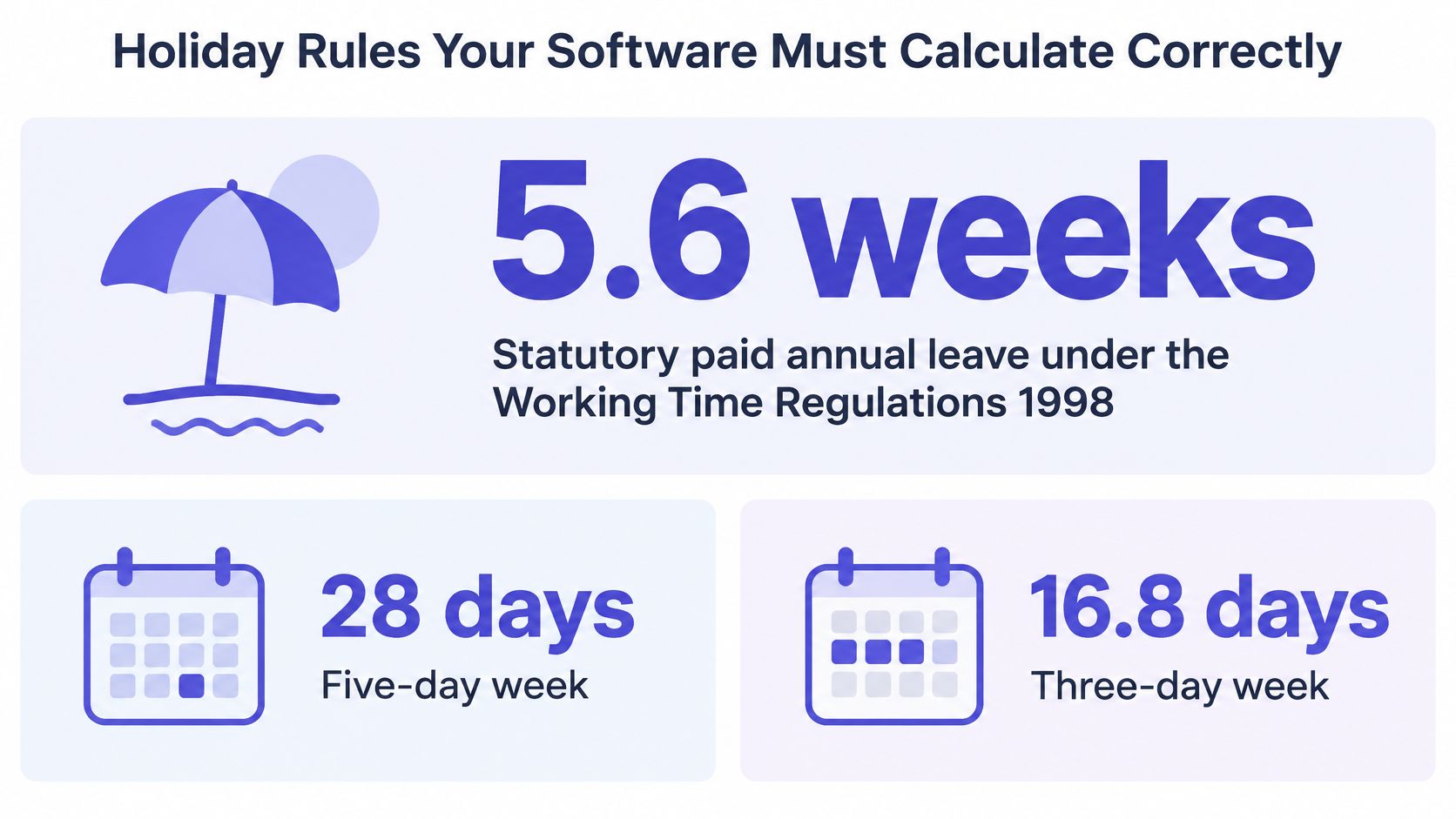
Almost all workers are legally entitled to 5.6 weeks of paid annual leave each year under the Working Time Regulations 1998, as set out on GOV.UK's holiday entitlement pages. For a typical five-day week that is at least 28 days. For a three-day week the statutory minimum is 16.8 days. The allowance follows contracted working days, not a flat 28 for everyone on the payroll.
The same entitlement covers agency workers, zero-hours workers, irregular-hours workers and part-year workers. The method changes with the contract. A system that stores one annual pot for every name will mis-state part-time and casual staff. It also needs to keep statutory entitlement separate from any extra days in the contract. Those extra days are yours to define. The 5.6 weeks is not.
Starters, irregular hours and rounding
Someone who joins part-way through the leave year is not given a full year on day one. The basic calculation is 5.6 weeks multiplied by the number of months started, divided by 12. Six months started is 2.8 weeks. On a five-day pattern that is 14 days, not 28. Check the software shows the months it counted. A start date typed into the wrong leave year is a common import error.
For leave years beginning on or after 1 April 2024, statutory holiday for irregular-hours and part-year workers accrues at 12.07% of hours worked in each pay period, capped at 5.6 weeks a year. GOV.UK's holiday pay and entitlement reforms set that rate. An employee who works 68 hours in a pay period accrues 8.2076 hours before rounding. Entitlement is rounded up to the nearest hour when the result is at least 0.5 of an hour. Thirty hours worked produces 3.621 hours, which becomes 4 hours under that example.
A fixed annual allowance for those staff is the wrong tool. The system should store pay-period hours, apply the cap, and keep an auditable history. If you want a second opinion on a single employee, run the same inputs through a holiday entitlement calculator and compare the hours.
| Working pattern | Statutory entitlement | What the software must calculate |
|---|---|---|
| Five days a week, full leave year | 5.6 weeks = 28 days | Full annual balance, with pro-rata for joiners and leavers |
| Three days a week, full leave year | 5.6 weeks = 16.8 days | Entitlement from contracted working days, not a flat 28 |
| Five days a week, starts 6 months into leave year | 2.8 weeks (5.6 × 6 ÷ 12), 14 days on a five-day pattern | Pro-rata balance from the start month |
| Irregular hours or part-year | 12.07% of hours worked each pay period, up to 5.6 weeks a year | Accrual from pay-period hours, not a fixed allowance |
| 68 hours worked in one pay period | 8.2076 hours before rounding | Stores hours and applies the rounding rule |
| 30 hours worked in one pay period | 3.621 hours, rounded up to 4 hours | Shows the rounded figure and keeps the working record |
Five fields have to stay on the employee, or the maths can't be rebuilt later: hours per pay period, contract pattern, joiner date, carry-over, and absence type. Sickness and statutory leave can keep accrual running for irregular-hours and part-year workers, so those categories must not be folded into holiday taken. Rolled-up holiday pay, a 12.07% uplift on pay for qualifying workers, is a pay method, not a reason to skip the hours record.
Sickness Absence and the Real Cost of Cover
Holiday and sickness belong in the same system and in different boxes. Sickness absence accounted for 2.0% of working hours in 2025, equal to 148.8 million lost working days or 4.4 days per worker, according to the Office for National Statistics. The national figure matters less to a small team than the pattern underneath it. On a rota where one person covers a shift, repeated short absences are the difference between a week that holds and a week of overtime. If your only sickness record is a total in a holiday column, you cannot see that pattern or plan the cover.
What a usable sickness record contains
Statutory sick pay depends on the days the employee normally works. Government calculation guidance treats these as qualifying or contracted working days, so a record of calendar dates, or a note saying "three days sick", may not support the payment. From 6 April 2026, that guidance says the previous waiting-day rule no longer applies and Statutory Sick Pay is payable from the first full day of sickness absence. Date-level tracking is the point, not a nice extra.
For irregular-hours and part-year workers, accrual continues during sick leave or statutory leave, and the holiday pay regulations require separate records of hours worked, sickness or statutory leave, pay periods and holiday already taken. One merged balance produces the wrong entitlement or the wrong pay. Retention matters too: hold absence and pay-period records for six years, because a payment challenged later can only be answered if the dates behind it still exist.
- Record each sickness absence by date.
- Tag whether that date was a contracted working day.
- Review repeat absence by team once a month, with access limited to the managers who plan cover.
Check the current waiting-day guidance before you configure the system. Rules in the software should follow the guidance you checked, not a default carried over from an older setup. A stale waiting-day rule is a rollout mistake that surfaces in the first payroll run after go-live, usually as an underpayment you then have to correct by hand.
The cost of the absence is rarely the sick pay itself. An absent server on a Saturday is paid once in wages and again when overtime or an agency worker fills the gap, and plenty of small businesses cannot put a figure on that second cost because nobody tracks it. A visible record lets a manager arrange cover before the gap opens. Practices that already use outside admin support, including Medical Virtual Assistants from MedicalVirtual, still need those dates inside the leave system. The person booking cover is often not the person calculating statutory pay. For a wider view of why the record matters operationally, see why absence management matters. You don't need a surveillance file. You need dates, cover and a monthly look at repeats.
How It Works in a Real Week
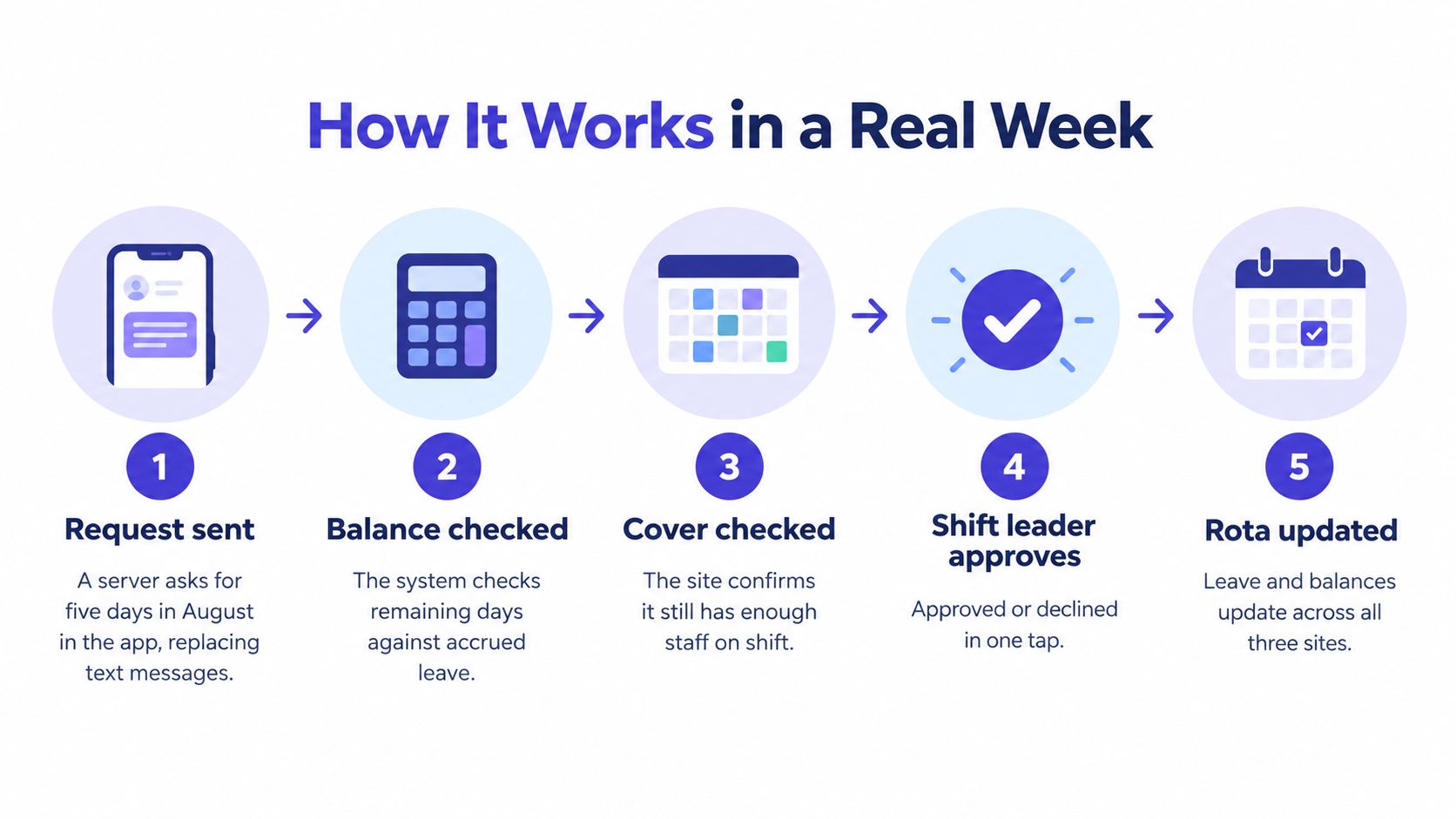
Take an illustrative composite, not a named customer: an 18-person café group with three sites. Shift leaders used to approve leave by text. Balances lived in a sheet the owner updated on Sundays, if at all.
A server asks for five days in August. The request goes into the app instead of a message thread. The system checks remaining leave against what that person has accrued. The shift leader opens the team calendar and sees two other staff already off that week. The request routes to the site manager because cover is tight. The manager approves on a phone between services. The balance and the calendar update at all three sites at once. Nobody retypes the yes into a spreadsheet.
The variable-hours kitchen worker
The second case is the one spreadsheets usually get wrong. A part-time kitchen worker's hours change every pay period. The system stores those hours and accrues holiday from them, rather than dropping a fixed day allowance on 1 January. When the worker later books a day, the balance falls in hours, and payroll can see the pay period the accrual came from. If the hours aren't entered, the balance is a guess. Software doesn't invent hours you never recorded.
You should get three things from that week.
- One balance: Staff and managers see the same figure, so the "how many days have I got left?" messages drop.
- A visible approval trail: You can see who approved, when, and which calendar they were looking at.
- Cover before the yes: The clash shows up while the request is still open, not when two people fail to arrive.
If the approval happens in a text message and not in the system, the record is already wrong.
That is the common mistake. Staff request leave in the app, then a shift leader replies "yes" by text and never taps approve. The calendar stays empty, another site books the same weekend, and payroll never sees the absence. Turn off the side channel in week one, or the new system becomes a second inbox.
How to Roll Out Leave Software in Six Weeks
A switch fails when balances are imported dirty and the old file is deleted the same afternoon. Six weeks is enough for a small team if each week has one job.
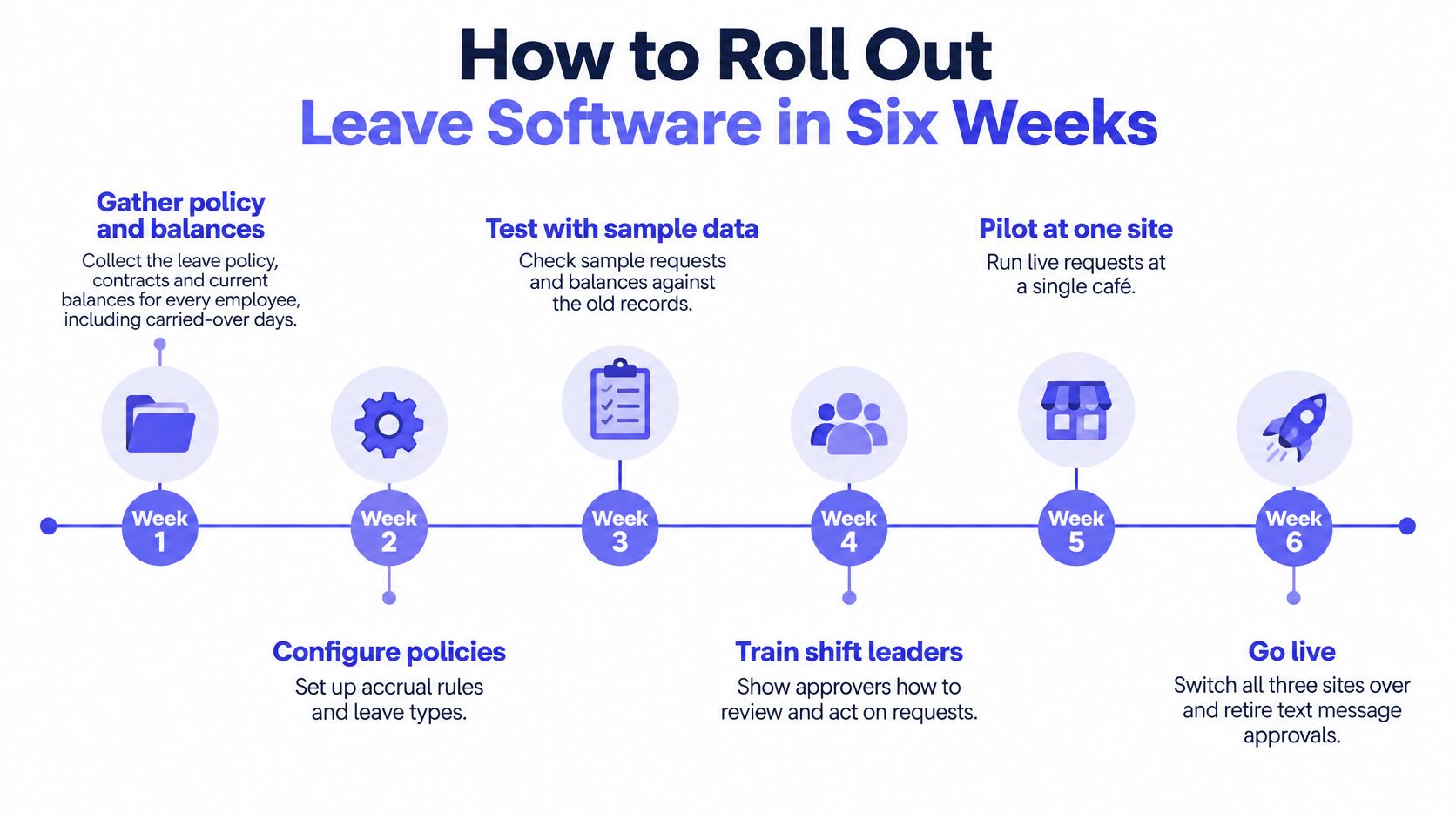
- Week 1, gather the source documents. Collect the leave policy, contracts and current balances for every employee, including carried-over days. You're building the file the software will be judged against.
- Week 2, configure before you import. Set accrual, carry-over limits, notice periods and approval routes. Separate statutory leave from contractual leave so a policy change doesn't rewrite the legal minimum.
- Week 3, import and check by hand. Start with a part-time worker and an irregular-hours worker. If those two match the spreadsheet, the full-time majority usually will. If they don't, fix the rule, not the person. This is the step that protects holiday pay, because an irregular-hours balance imported wrong stays wrong until someone is underpaid.
- Week 4, pilot with one team. Run live requests and collect feedback from staff and managers. A pilot on your quietest team hides the cover problems you really have.
- Week 5, train the approvers. Show line managers how to check cover and use a backup approver. Publish a one-page self-service guide. Employees rarely need a course. Managers do, because they can bypass the system.
- Week 6, run both systems for one payroll cycle. Compare approved leave with what payroll paid. Then retire the spreadsheet as the live record.
From 6 April 2026, ACAS guidance says employers must keep records of annual leave and holiday pay, including holiday taken, leave carried over, holiday pay and payments in lieu when employment ends. Records must be kept for at least six years, in any reasonable format. If an employer can't prove appropriate holiday records exist, failure may be a criminal offence. You also need to show what sits inside holiday pay, such as bonuses or commission.
What to keep after you switch
Archive the old spreadsheet. Don't delete it until someone has checked the migrated history against it, line by line for the staff whose balances were hardest to calculate. That archive is also your fallback for the six-year retention duty: if the new system ever loses history, the old file is what proves entitlement. A central system helps because approval history, carry-over and absence sit in one place, but only the data you imported exists on day one.
LeaveWizard gives staff self-service smartphone apps and web portals, so requests and balances are visible without an administrator in the middle. Training stays short when staff meet that app or portal during the pilot, because they learn the process they will use after go-live. Confirm whether historic records can be imported, and in what format, before you promise managers that last year's carry-over will appear on its own.
Pricing, ROI and the Decision to Switch
Switch if at least two of these are true: you have irregular-hours, part-year or mid-year starters, you need sickness recorded by date, or you can run the old and new systems together for one payroll cycle. Don't switch in the weeks before a peak holiday period. The headline price is the wrong comparison, because five models hide cost in different places. Confirm current list prices with each vendor. They move.
| Pricing model | How you pay | Suits | Watch for |
|---|---|---|---|
| Per employee per month | Fee multiplied by headcount | Teams where headcount grows steadily | Costs rise with every hire; check minimum seat counts |
| Flat monthly fee | One fee for the account, often with a user cap | Stable teams with few administrators | Check the cap and the cost of going over it |
| Tiered plans | Price steps up at user bands or feature sets | Businesses that expect to need reporting or payroll links later | Key features such as payroll sync may sit in higher tiers |
| Free or basic tier | No fee up to a small headcount | Very small teams testing a switch | Limits on approvals, history or support |
| One-off setup fee | Charged on top of the subscription | Businesses migrating years of records | Ask whether migration of historic records is included |
Say a 15-person firm. An office manager spends six hours a month on leave admin at £25 an hour. That's £150 a month, or £1,800 a year, before a wrong holiday-pay figure or a double-booked shift covered at short notice. Cover is usually the bigger cost: one absence nobody saw coming can swallow a month of subscription fees in overtime. Subtract the subscription and any setup fee. Payback is clearest where hours-based accrual replaces a guessed allowance, because a wrong accrual lands in payroll. Measure your own admin hours for one month before you buy.
The same test applies to your records. Approval history, carry-over and absence dates have to survive the switch and stay retrievable for years afterwards, so ask what the migration covers and what you can export before you compare prices.
This month, list the features you tested in practice, request trials from two or three vendors using one employee from your own records, and set a switch date at least six weeks ahead. If the team is growing and records sit in several places, start that trial now.
LeaveWizard gives small teams one place for leave requests, approvals, balances and team availability, including the hours-based calculations and date-level absence records this guide is built around. If your holiday maths still lives in a spreadsheet, visit LeaveWizard and check it against a part-time starter and an irregular-hours worker from your own records before you set a switch date.


