
148.8 million working days were lost because of sickness or injury in 2025, equivalent to an average of 4.4 days per worker, according to the Office for National Statistics sickness absence release. In a large employer, that's a reporting problem. In a team of eight, one person off sick, one on holiday and one on unpaid leave can remove more than a third of your capacity before the day starts. That's why HR software for small companies shouldn't start with a grand transformation plan. It should start where spreadsheets fail first, which is usually leave, absence and the payroll inputs that follow from them.
Table of Contents
- What HR Software for Small Companies Covers
- Core Features Small Companies Need First
- Small-Business Priorities and Trade-Offs
- Leave Rules and Payroll Data to Get Right
- Pricing Models and Payback Calculations
- Selection Checklist Before You Buy
- How to Roll Out HR Software Without Upsetting Staff
- Shortlist, Trial and Choose Your Vendor
What HR Software for Small Companies Covers
The adoption gap tells you where most small employers still are. In the 2025 Longitudinal Small Business Survey, 44% of small businesses reported using HR management software, compared with only 18% of micro businesses. The same survey put payroll software at 80% among small businesses and 60% among micro businesses. Payroll gets digitised first. Leave balances, absence notes, onboarding documents and staff records often stay in spreadsheets, inboxes and filing cabinets long after pay runs have moved online.
A useful analogy is the paper rota pinned to the staff room wall. It shows names and dates, but it can't check entitlement, flag a clash, apply a carry-over deadline or stop two people approving the same week. A booking system does those checks before anyone gives approval. That's the practical shift small companies are buying, not a digital filing cabinet with a nicer font.
The Four Jobs Most Small Firms Mean
When owner-managers say they need HR software, they usually mean four jobs.
- Leave and absence management: Holiday requests, approvals, sickness recording, balances and team calendars.
- Payroll basics: Clean hours, leave and absence data that feeds payroll without retyping.
- Onboarding: Joiner records, contracts, right-to-work documents and start dates that set entitlement.
- Employee self-service: Staff check their own balances and submit requests without emailing a manager.
Employee records and reporting sit underneath those jobs. They're supporting layers, not the reason you buy. A payroll package pays people accurately but rarely manages approvals or tracks who's available next Tuesday. A full enterprise suite will sell you recruitment, performance reviews and learning modules, most of which a 15-person firm won't touch in year one.
The scale that matters here is roughly 5 to 50 staff. Below that, one careful person can still hold a spreadsheet together. Above it, managers need consistent rules across teams. In between, a single absence changes the capacity of a whole team, and manual records start producing payroll queries and coverage gaps. What follows gives you a module priority order, the leave rules to test any system against, the pricing models you'll meet, a scored selection checklist, a rollout plan and a trial process that uses real cases instead of a sales demo.
Core Features Small Companies Need First
Core HR Software Modules and Their Priority for a First Purchase
| Module | What it handles | Priority for a first purchase |
|---|---|---|
| Leave and absence management | Holiday requests, approvals, sickness, carry-over | High |
| Payroll basics | Pay-period hours, leave and deduction exports | High if payroll is unreliable, medium if it is already working |
| Onboarding | New-starter records, joiner dates, document collection | Medium |
| Employee self-service | Smartphone app and web portal for requests and balances | High for teams that email requests today |
| Employee records and documents | Contracts, sensitive files, contact details | Medium |
| Reporting | Absence patterns, overtime, headcount and allowances | Medium, rising as the team grows |
Leave and absence management comes first because it changes every week and drives coverage decisions. Holiday planning works best when it's integrated with absence management, overtime tracking and employee information records, so a manager approving a request sees the whole picture rather than a lone calendar entry. A request that looks harmless on Monday becomes a problem when you can see two colleagues already off and a third recording overtime to cover last week's gap.
Payroll basics come second for most firms, because most already have a payroll provider that works. What they lack is clean data going in. If your payroll bureau gets a tidy export of approved leave, sickness and hours at cut-off, you don't need your HR tool to run payroll itself. For firms reviewing that side of the setup, the payroll insights from Allied Tax Advisors are a useful companion to the questions here. Your HR software only needs to hand payroll accurate, date-stamped inputs.
Onboarding earns its place because joiner dates set pro-rated entitlement. Get the start date, working pattern and leave year right on day one and the balance is right for the rest of the year. It's also when contracts and right-to-work documents get collected, usually by email, usually into three different folders. A structured new-starter record fixes both problems at once.
Self-service is what removes the daily friction. Employees can submit leave requests through a smartphone app or a web self-service portal, check their own balances and see team availability without asking a manager to look it up. Our employee self-service software page sets out how that works in practice, and it includes a mobile app for employees because most requests get made outside office hours, on phones.
Employee records and secure personnel files hold contracts and sensitive documents behind access controls rather than in a shared drive everyone can open. Reporting then turns the records you've collected into absence patterns, overtime totals, headcount and remaining allowances. Neither justifies a purchase on its own, but both grow in value once leave data is accurate. The selection checklist later in this guide gives you the yes or no test for each module, so I won't repeat those tests here.
- Buy the leave module first if you have no HR system.
- Buy the payroll export first if payroll is reliable but leave is not.
Small-Business Priorities and Trade-Offs
Most buying guides assume a small company needs a full HR suite first. I'd challenge that. A suite bundles recruitment, performance and learning into one contract, but it also bundles their setup decisions, their data migration and their training into one project. For a firm with no dedicated HR staff, that project competes with the day job and usually stalls. The pressure pushing firms to act is absence itself. A UK guide to HR software for SMEs reports that 51% of surveyed employers reported increased short-term absence and 55% increased long-term absence or disability over the previous two years. Rising absence on a spreadsheet means rising error risk, not just rising workload.
A Trigger Model You Can Score
Judge your own position against five measures rather than a vendor's feature list.
- Headcount: Manual records strain once managers can't hold everyone's balance in their head.
- Manager workload: Requests, approvals and balance queries eat line management time every week.
- Shift or coverage complexity: Rotas, minimum staffing levels and multi-site cover need real-time visibility.
- Spreadsheet error risk: Count corrections made last year. Each one is a payroll query or a trust problem.
- Frequency of sickness or statutory leave changes: Variable hours and long-term sickness multiply the calculations a spreadsheet handles badly.
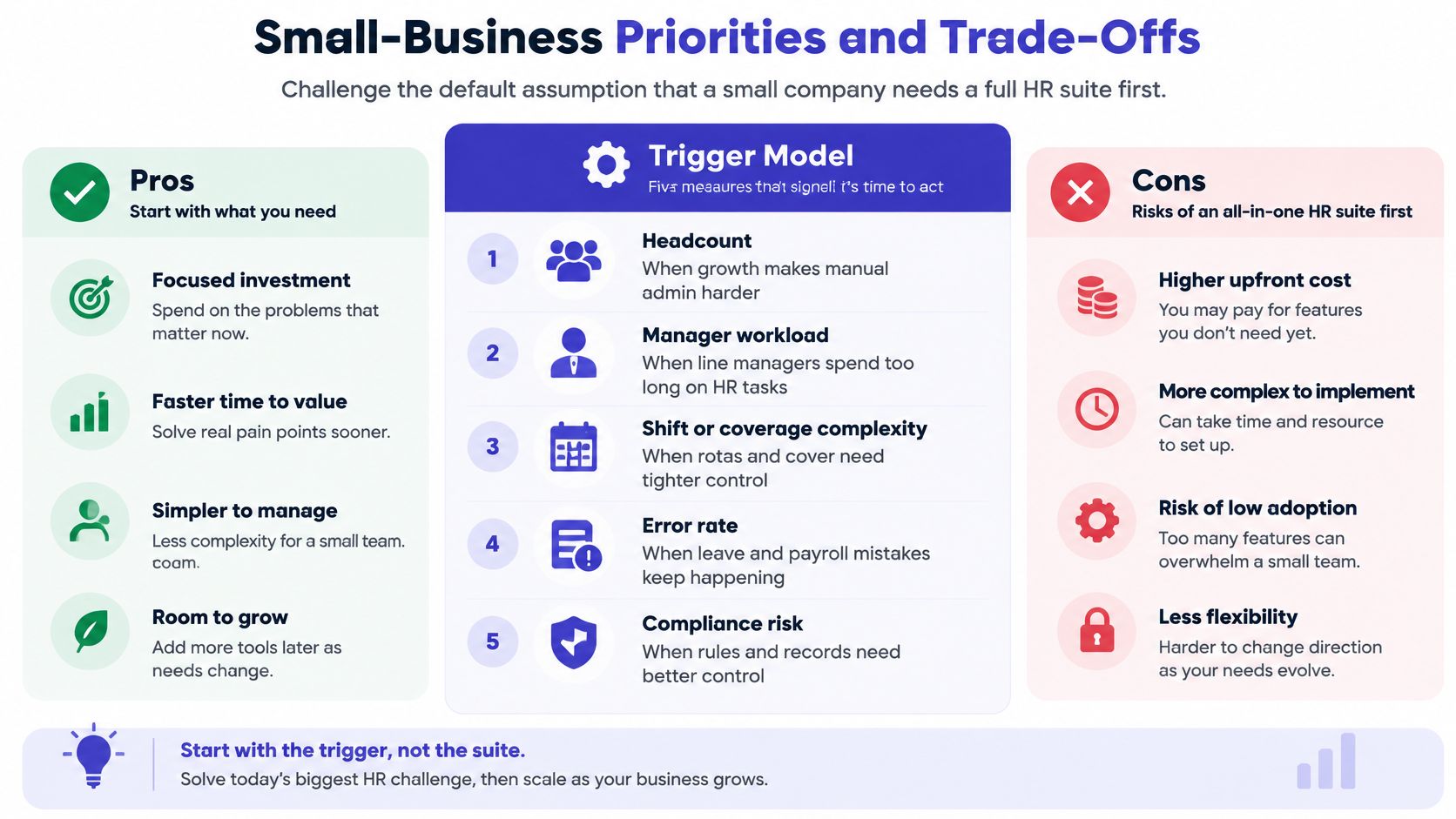
The central trade-off is cost against control. A focused leave tool is cheaper, faster to adopt and makes fewer demands on your time, but it creates a separate data set you'll integrate or migrate later. A full suite gives one record for everything, but needs more configuration and a clear internal owner. Our own platform sits deliberately in between, built for small businesses and SMEs that need more than a holiday calendar but less than a corporate HR suite.
Remember that payroll software doesn't solve approvals, availability or absence recording. Adoption figures back this up, since 18% of micro businesses and 44% of small businesses use HR management software while payroll adoption runs far higher. A firm can pay everyone correctly on Friday and still discover on Monday that three people are away. The common pattern is payroll first, HR tools later, and that's a sensible sequence rather than a failure.
Workgroups that organise employees by team, country, office or any other combination add value only when several sites share one approval process. A single-site firm gains little from elaborate grouping. My rule of thumb is simple. If managers chase availability every week, the trigger has been reached, whatever your headcount happens to be.
Leave Rules and Payroll Data to Get Right
Leave Rules a Small-Company System Must Calculate and Store
| Rule | What the system must store | Common spreadsheet failure |
|---|---|---|
| Part-year starters, months started divided by 12, rounded up to the nearest half day | Joiner date, leave-year start, rounding decision | Pro-rating done by hand and inconsistently |
| Monthly accrual of one-twelfth in the first year | Accrual per month and running balance | Balances not updated monthly |
| Irregular hours, 12.07% of hours worked, capped at 5.6 weeks | Hours per pay period, pay-period boundaries, accrual result | Entitlement drifts when hours change |
| Sickness does not stop accrual | Sickness dates alongside annual leave records | Sickness wrongly pauses or reduces balances |
| Carry-over of up to 4 weeks, used within 18 months | Carry-over amount and expiry date per leave year | Unused days lost or never tracked |
| Payroll link, RTI submitted on or before pay date | Approved leave locked after cut-off, amendment history | Duplicate or incorrect inputs to payroll |
Start with part-year joiners. The GOV.UK guide to calculating holiday entitlement works the example of a five-day worker entitled to 28 days annually who starts on 13 January. January's entitlement is 2.5 days, because 28 divided by 12 equals 2.33 days and the result is rounded up to the nearest half day. In the first year you may also accrue one-twelfth monthly, so after three months that worker has accrued 7 days. A system must hold the joiner date, leave-year start and rounding decision, or two managers will pro-rate the same starter differently.
Irregular-hours and part-year workers are harder. The GOV.UK holiday entitlement rights pages confirm these workers accrue statutory holiday at 12.07% of hours worked in each pay period, capped at 5.6 weeks. Thirty hours in a weekly pay period produces 3.621 hours, rounded up to 4 hours because the fraction is at least 0.5. That calculation depends on actual hours, pay-period boundaries and unpaid gaps, which is exactly where spreadsheets drift. It's also where staff planning meets personal planning, and resources on planning time off as a busy executive make the human case for getting entitlement visibility right.
Sickness is the rule spreadsheets get most dangerously wrong. The Acas guidance on carrying over holiday confirms entitlement keeps accruing while someone is off sick, and up to 4 weeks of statutory holiday can carry over if long-term sickness prevented it being taken, to be used within 18 months from the end of the leave year in which it accrued. Software that pauses accrual during sickness or deletes unused days at year-end creates compliance risk. Our system records absence, leave, non-absence event types and overtime in days or hours and reports on them to help calculate allowances or compensation, and those reports help detect unusual leave or absence patterns before they become disputes.
Finally, the payroll link. The HMRC guidance on preventing payroll errors requires PAYE Real Time Information on or before pay date, with a standard penalty of £100 per tax month for employers with 1 to 9 employees, subject to exemptions. Lock approved leave after payroll cut-off, keep an audit trail for amendments, and export exception reports for changes that affect pay. Software doesn't replace payroll. It removes the manual inputs that cause mismatches, which is the theme running through our guide to the best payroll software for small business.
Pricing Models and Payback Calculations
Common HR Software Pricing Models
| Pricing model | How it bills | Best fit | Watch for |
|---|---|---|---|
| Per employee per month | Headcount multiplied by a monthly rate, for example from 43p per employee per month | Teams that grow gradually | Minimum charges, VAT and add-ons |
| Headcount band | Fixed price for a band such as 5, 10, 20 or 50 tracked employees | Predictable budgets | Moving into the next band as you hire |
| Annual billing | One payment for the year, for example £61.20 plus VAT for 5 tracked employees | Cash-flow planning | Refund terms if you leave early |
| Flat company fee | One fixed fee regardless of headcount | Very small, stable teams | Limits on users or features |
| Free tools | No charge, for example a holiday entitlement calculator | Testing rules before buying | Not a full system for daily use |
Per-employee pricing is the easiest model to compare. LeaveWizard pricing starts from 43p per employee per month, which suits gradual growth because cost rises with headcount rather than jumping at arbitrary thresholds. Check the small print anyway. Minimum charges, VAT and paid add-ons can move a headline rate considerably.
Headcount bands trade smoothness for predictability. Our pricing slider offers plans for 5, 10, 20, 30, 40, 50, 100, 150, 200, 300 or 500 tracked employees, so you pick the band that covers your team and budget a step up when hiring pushes you into the next one. That step is the watch-out. A firm at 19 staff with three hires planned should price the 30 band, not the 20.
Annual billing smooths cash flow into one predictable payment. The price shown for 5 tracked employees is £5.10 per month, billed annually in one payment of £61.20 plus VAT. The trade-off is commitment, so read the refund terms before you pay for a year you might not use. Free tools sit at the other end. An entitlement calculator lets you test the pro-rating and accrual rules against your own contracts before spending anything, but it won't run approvals or calendars day to day.
One Illustrative Payback Calculation
Say a 20-person firm has one manager spending 3 hours a week chasing leave queries and checking spreadsheets at £25 an hour. That's about £3,900 a year of management time on a task software largely removes. Set that against the quoted annual price for your band, then add the cost of manual corrections, such as a payroll query that takes an afternoon or a missed carry-over that becomes a grievance. The case usually closes quickly.
Run your own figures before any demo. Multiply weekly admin hours by the hourly cost of whoever does them, add errors per quarter and the time each correction takes, then compare the total with the quoted price. One caution on the arithmetic. The 43p starting rate and the quoted band prices are separate figures, so compare the quoted total for your band rather than multiplying the starting rate by your headcount.
Selection Checklist Before You Buy
Score each item below 0, 1 or 2 during a trial, with a real staff member testing rather than watching a demo. Give leave rules and the payroll link double weight, because errors there cost money and trust. Reject any product that fails the rule accuracy test outright, whatever else it does well.
- Leave rules: Can it set accrual by joiner date, part-year hours and carry-over expiry without manual overrides?
- Approvals: Does routing follow your reporting lines and cover arrangements when a manager is away?
- Team structure: Can workgroups by team, country or office control who sees which calendars?
- Self-service: Is there a smartphone app and a web portal where staff request leave and check balances?
- Payroll link: Can approved leave and hours export cleanly on a fixed cut-off date?
- Records: Is there a secure personnel file with access controls for contracts and sensitive documents?
- Reporting: Can it flag unusual absence patterns and produce figures for allowances or compensation?
- Data protection: Who is the data controller, and does the vendor process staff data under contract? With us, the employer is the data controller and we process personal information on the employer's behalf under contract.
- Exit: Can you export all your data in a usable format if you leave?
- Support: Who answers questions, and how quickly, on a normal working day?
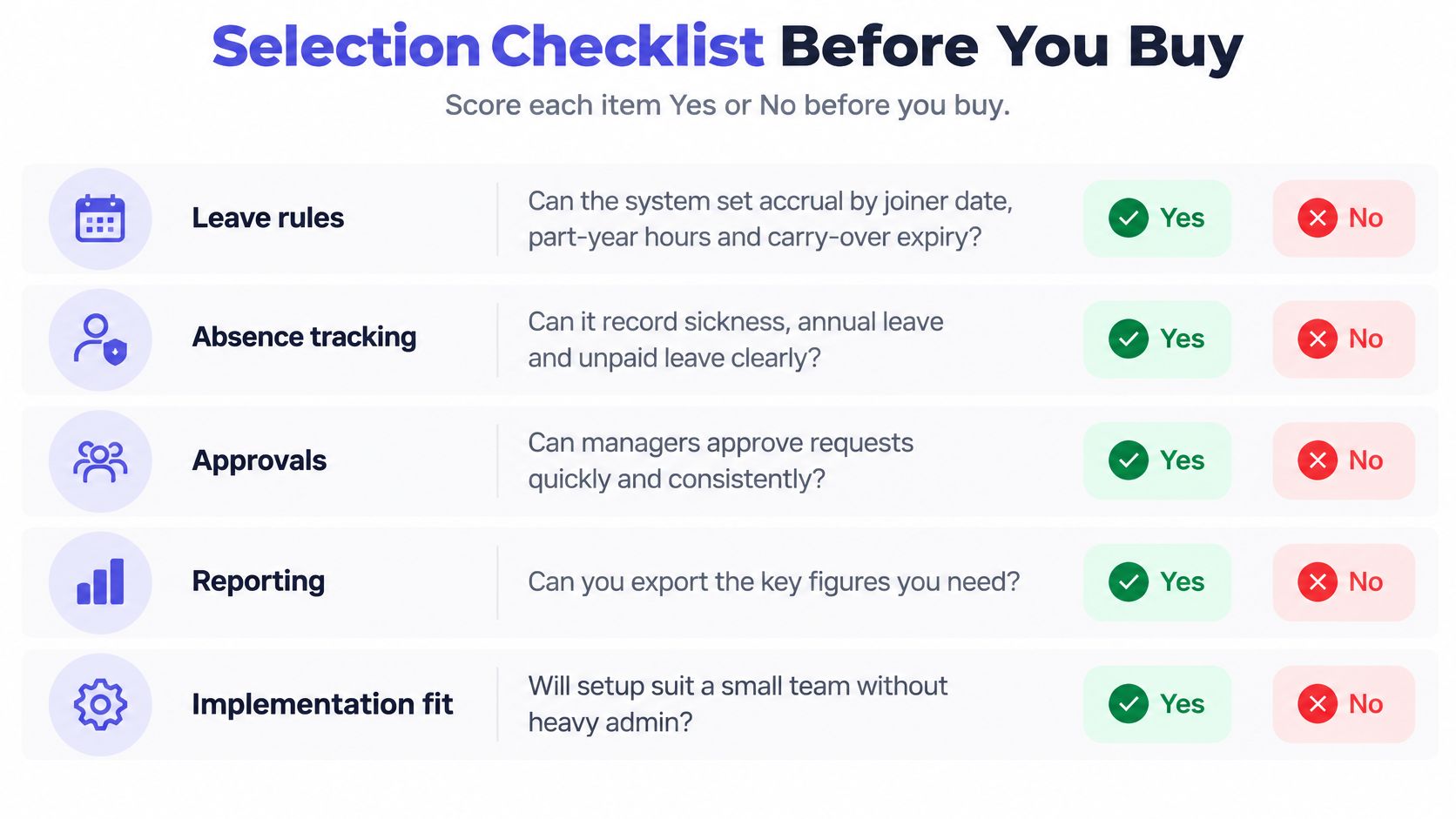
Each test exists for a concrete reason. Rule accuracy decides whether balances survive a part-year joiner or a sickness carry-over. Approval routing decides whether requests stall when one manager is on holiday. The payroll export decides whether your cut-off stays clean month after month. The exit test is the one buyers skip and later regret, because leave history has to move with you for records to stay continuous.
A good score on features you won't use never compensates for a failed accrual calculation.
Treat the checklist as a compliance exercise as much as a shopping one. Our HR compliance software page explains how leave records, entitlement and approvals support that side of the job. If two products tie on score, choose the one your least technical manager completed a request in without help.
How to Roll Out HR Software Without Upsetting Staff
Plan on about six weeks from spreadsheet to go-live. The software is rarely the hard part. Balances people don't trust are.
- Audit the spreadsheet: Count the leave types, the rules buried in formulas and the errors corrected in the past year. This audit becomes your configuration list and your evidence that change was needed.
- Load policies and leave types: Enter your current rules, then test them against three cases, a new joiner, a sickness carry-over and a part-year worker with variable hours. Fix discrepancies now, while only you can see them.
- Import balances at a clean cut-over: Choose the start of a leave year or a payroll period so opening balances reconcile to a known date. Staff will ask first whether their balance is right, so have the workings ready.
- Pilot with one team for two weeks: Pick a team with a supportive manager, collect feedback on approvals and notifications, and adjust before everyone else arrives.
- Train managers first, then staff: Short sessions and a one-page guide beat a long launch meeting. Managers who can approve confidently stop staff routing questions around the system.
- Run the spreadsheet in parallel for one leave cycle: Reconcile differences weekly. Disagreements here are useful, because they expose rules nobody had written down.
- Review reports at 30 days, then retire the spreadsheet: Check absence patterns and outstanding balances, confirm the parallel run agrees, and archive the old file read-only.
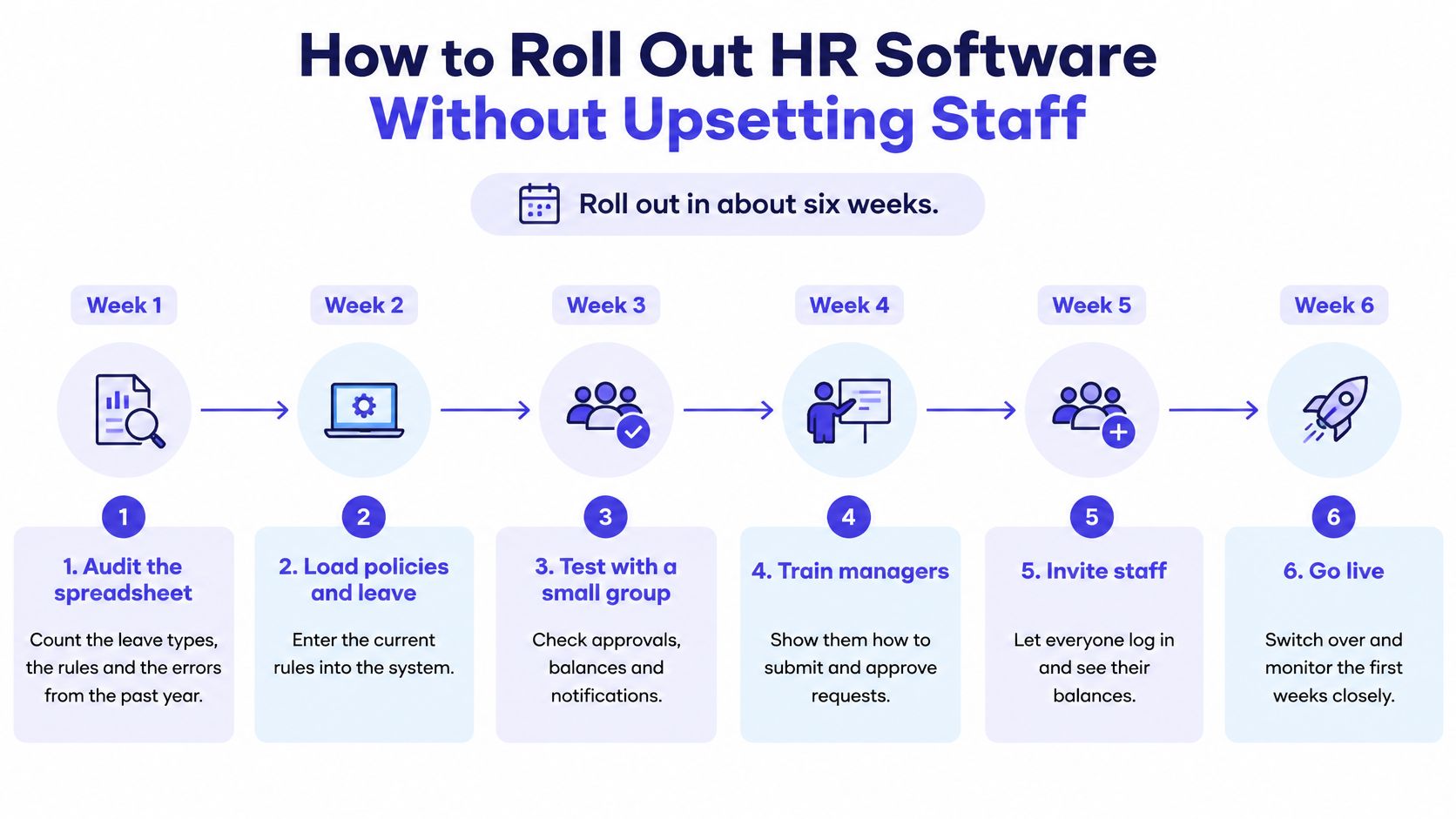
Two change points decide whether this sticks. First, name a system owner. The spreadsheet survived because it worked for one person, and software without an owner drifts the same way. We started in 2011 precisely because spreadsheets and paper were still the main tools used to manage staff annual leave and absence, and that one-person dependency was the usual failure. Second, announce what staff gain, which is checking their own balance on their phone instead of asking. Avoid launching during a peak absence period such as winter illness season, when queries peak and patience is shortest.
Shortlist, Trial and Choose Your Vendor
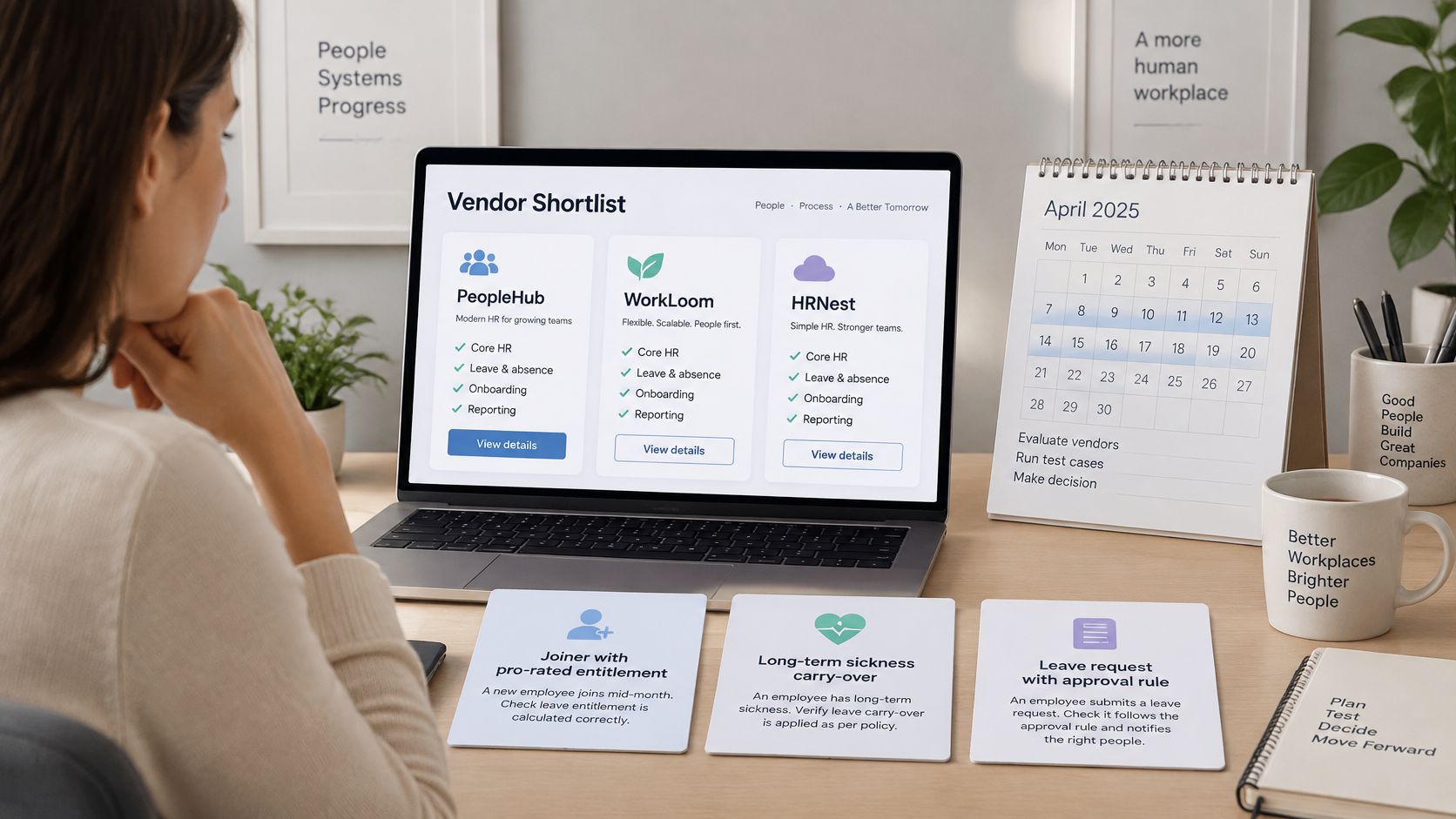
Shortlist three vendors and test them inside two weeks, using the same three cases for each. Give every vendor a joiner with pro-rated entitlement, a long-term sickness carry-over with an 18-month deadline, and a part-year worker whose hours vary by pay period. Score each product against the checklist, time a leave request from submission to approval, and ask for a sample payroll export in the format your provider accepts.
Use the trials on offer rather than extending demos. LeaveWizard offers a 30-day free trial of its holiday tracker, interested businesses can book a demo, and the Holiday Entitlement Calculator is a free tool available whether or not a business has a subscription. Run your three cases through the calculator first, then through the trial, and compare the answers with your own hand calculations.
Take an illustrative example. A 25-person firm across two sites, replacing a shared spreadsheet, would look for a smartphone app for staff requests, workgroups for each site, absence reports that flag patterns, and a secure personnel file. Against that list, we'd map our employee app and web portal, workgroup structure, absence and overtime recording, reports and calendars, and Digital Personnel File. That's a fit test, not a results claim, and the firm should still run the three cases before believing any of it.
The decision rule is straightforward. Choose the product that passes all three test cases and produces a clean payroll export, then start the trial before your next leave year begins so opening balances land on a clean date. A vendor that handles your awkward cases in week one will handle your ordinary weeks without attention. A vendor that needs workarounds for them will need workarounds forever.
If leave requests, sickness records and payroll inputs are still held together by a spreadsheet, LeaveWizard gives your team self-service requests, automatic entitlement calculations, real-time availability and absence reports built for small companies. Start the 30-day free trial, run your three hardest leave cases through it, and book a demo if you'd like us to check the setup with you.


