
You've got a spreadsheet open, an employee asking if they can book next Friday, and three different totals depending on which tab you trust. One shows 9 days left, another counts a bank holiday twice, and neither shows where a carried-over day came from. That's the moment a simple balance stops helping. A good holiday remaining calculator doesn't just give a number, it gives you a dated ledger you can defend when payroll, the employee or a leaver queries it.
Table of Contents
- Work Out Remaining Holiday in Four Steps
- Statutory Holiday Entitlement by Working Pattern
- Pro Rata Holiday for Starters and Leavers
- Calculating Leave for Irregular-Hours Workers
- Carry-Over, Sickness and Unpaid Leave Adjustments
- Set Up a Reusable Holiday Remaining Template
Work Out Remaining Holiday in Four Steps
Remaining holiday equals entitlement for the period, plus carried-over days, plus or minus approved adjustments, minus holiday already taken. Use that formula every time, and record each element separately. If you overwrite a single total, you'll never be able to explain why it changed.
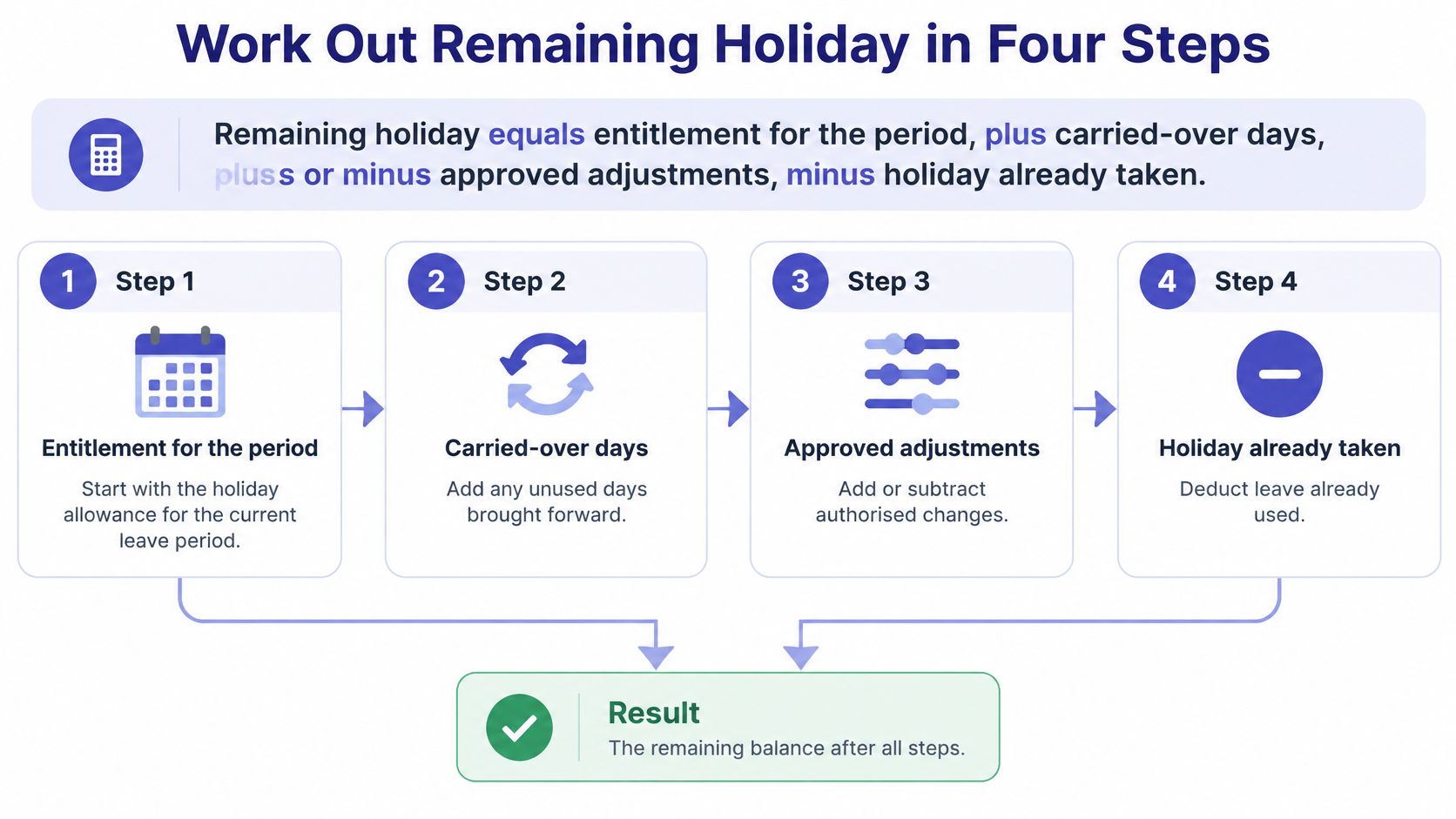
The Four Checks in Order
- Confirm the leave year and worker type: Find the leave-year start date in the contract and check whether the person works fixed hours or irregular hours. Fixed-hours staff are usually tracked in days, while irregular-hours staff accrue in hours, so this decides which calculation route you follow from the start.
- Find the full-year entitlement: Use the statutory figure for the working pattern, or the higher contractual figure if the contract gives more. Don't mix the two. Write down which one you're using and whether bank holidays sit inside it.
- Pro-rate for part of a year: If someone started or is leaving part way through, multiply the full-year figure by the months worked and divide by 12. Apply this before you deduct anything, otherwise you'll compare leave taken against an entitlement they never had.
- Deduct taken leave and add carry-over: Subtract approved holiday taken, counting a half-day as 0.5 days. Add carried-over days on their own line with the source year, then add or subtract any approved adjustments with a reason and date.
A Worked Example You Can Copy
Say Priya works five days a week, your leave year starts on 1 January, and she joined on 1 July. Her full-year entitlement is 28 days. For six months, the sum is 28 × 6 ÷ 12 = 14 days. She's taken 5 days in August, so 14 − 5 = 9 days remaining. If she later books a half-day, that balance becomes 8.5 days, not a rounded-down 8.
Ledger rule: Never edit the total directly. Add a new dated line for every booking, carry-over or correction, so the balance rebuilds itself from traceable entries.
That discipline matters more than the tool. A paper ledger with dates and reasons is more useful than a polished holiday remaining calculator that hides its workings. When an employee says, "I thought I had 11 days," you want to point to the entry that moved the figure, not shrug at a cell someone overwrote in March.
I would also lock the entitlement, carry-over and adjustment columns so only HR or the approving manager can change them. Employees and team leaders can view taken and remaining figures, but one accidental edit to an entitlement cell can distort every later check. Keep booked-but-not-yet-taken leave in a separate column too. It doesn't reduce today's taken figure, but it shows committed leave, which managers need when they approve the next request.
Statutory Holiday Entitlement by Working Pattern
For fixed-hours workers, start with 5.6 weeks a year and convert it to the person's working pattern. The table below uses a 7.5-hour day so you can compare days and hours side by side.
| Working pattern | Statutory days a year | Hours at 7.5 per day |
|---|---|---|
| 5 days a week | 28 | 210 |
| 4 days a week | 22.4 | 168 |
| 3 days a week | 16.8 | 126 |
| 2 days a week | 11.2 | 84 |
| 1 day a week | 5.6 | 42 |
The conversion is straightforward. Multiply 5.6 weeks by the days worked each week to get days, then multiply by the contracted hours in a day to get hours. A three-day worker on 6-hour days gets 100.8 hours, not 126, because the day length changes even though the 16.8 days stay the same. That's why I'd record part-time balances in hours when shifts vary in length. Days hide the difference between a short Tuesday and a long Friday.
Bank Holidays and Contractual Extras
Bank holidays don't sit outside this calculation automatically. If the contract says they're included, they count toward the 5.6 weeks and you deduct them when they're taken as leave. If the contract gives annual leave in addition to bank holidays, add them separately and label them clearly.
A contract can also give more than the statutory minimum. In that case, the contract figure replaces the table figure for the total, but I'd still split the ledger into statutory and contractual parts. You'll need that split at year end when you're deciding what can carry over and what can't.
Before you calculate anything, compare the contract wording with the table, decide whether you're tracking days or hours, and write that unit at the top of the record. Mixing units mid-year is where most part-time errors start.
Pro Rata Holiday for Starters and Leavers
Starters and leavers use the same principle at opposite ends of the leave year. The GOV.UK guidance on calculating holiday entitlement for workers says statutory entitlement for a worker who starts part-way through a UK leave year is calculated by multiplying the full-year entitlement by the number of months started and dividing by 12, then the resulting figure is rounded up to the next half-day or whole day, whichever is closer.
Starters
Take a worker with a 28-day full-year entitlement who starts after six months. The calculation gives 14 days before applying the relevant rounding rule. Decide in advance how your payroll treats a start date in mid-month, record that rule in your holiday policy, and use it every time. Inconsistent rounding is a small error that creates a disproportionate number of disputes because two starters in the same month end up with different balances.
For a deeper walkthrough of date counting, see this guide on how to work out pro rata holiday and then apply the same method in your own ledger.
Leavers
For a leaver, pro-rate by the proportion of the leave year worked, then subtract holiday already taken. Say your leave year starts on 1 January and someone finishes on 30 September. They've worked nine months, so 28 × 9 ÷ 12 = 21 days of entitlement. If they've taken 18 days, 3 days remain and those are normally paid out on termination.
Don't deduct over-taken holiday from final pay until you've checked the contract and the legal position. Recovering it is restricted, and an unlawful deduction turns a routine leaver calculation into a grievance.
Close every starter and leaver record with the same checklist.
- Start or leaving date: The exact date used in the sum, not the date payroll processed it
- Leave-year start: The date the proportion was measured from
- Full-year entitlement: Statutory figure or contract figure, labelled clearly
- Days taken: Approved leave only, with half-days shown as 0.5
- Days to pay or recover: The final figure and the authority for paying or deducting it
Keep that checklist with the final payslip. If the leaver queries the payment six months later, you'll have the inputs, not just the answer.
Calculating Leave for Irregular-Hours Workers
A fixed days-per-year figure misleads for people whose hours change every week. The balance has to move as they work, or you'll either let them book leave they haven't accrued or hold back leave they've already earned.
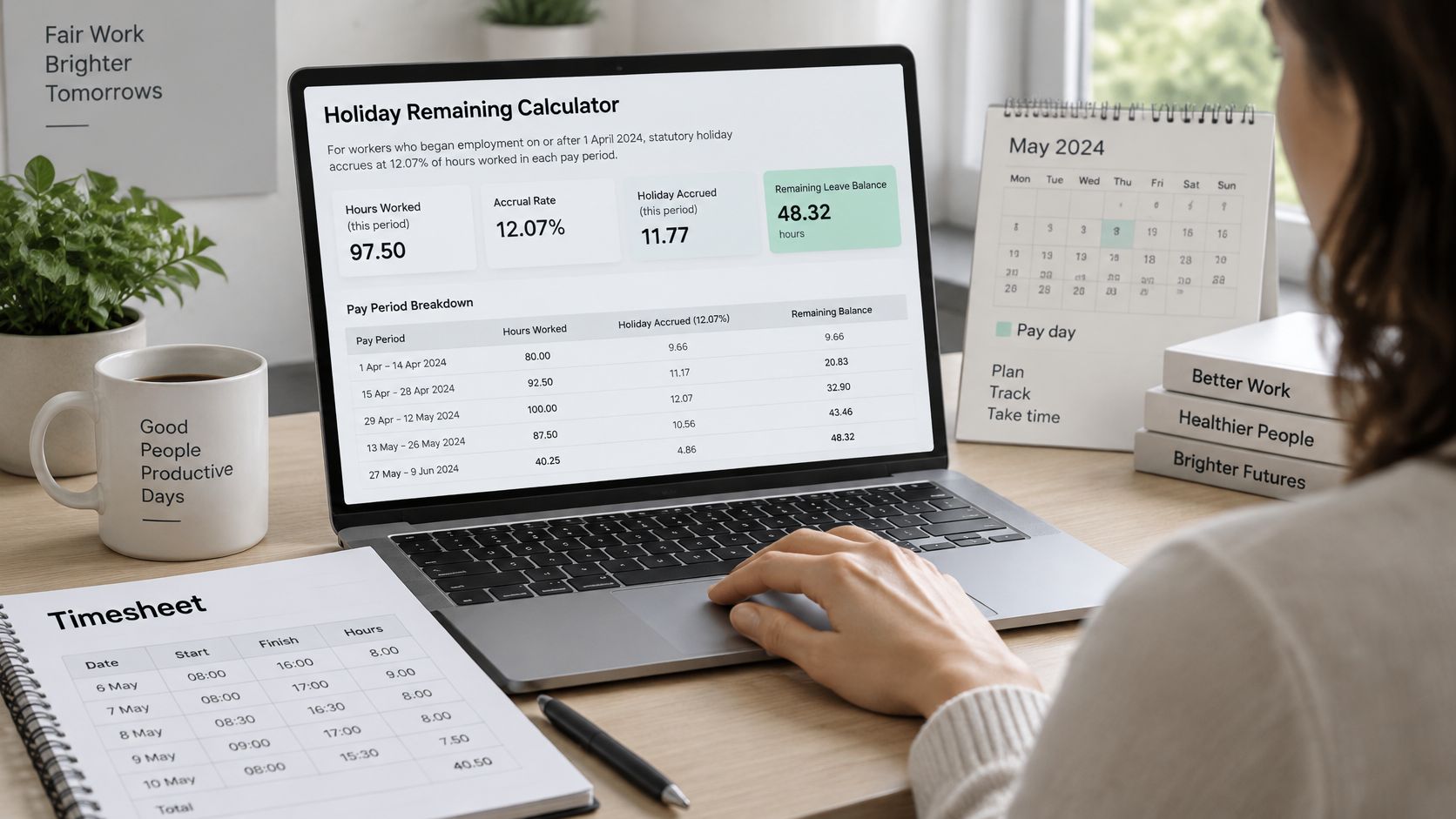
The Acas guidance for irregular-hours and part-year workers states that irregular-hours and part-year workers who began employment on or after 1 April 2024 generally accrue statutory holiday at 12.07% of the hours worked in each pay period. It gives the example of a worker completing 70 hours in a month accruing 8 hours after applying 12.07% and rounding down a fraction below 30 minutes. The percentage is based on the 5.6-week statutory minimum and must be adjusted if the contract provides more than the statutory minimum.
The Pay Period Method
- Total the hours worked: Add up hours worked in the pay period, including paid time that counts toward accrual under the contract.
- Multiply by 12.07 per cent: Use the statutory rate, or your adjusted contractual rate if the contract is more generous.
- Apply the rounding rule: A fraction of an hour below 30 minutes is rounded down. Record the pre-rounding figure too, so the rounding is visible.
- Credit hours, not days: Add the result to an hours balance. When leave is taken, deduct the length of the shift the person would have worked, in hours.
| Hours worked in pay period | Accrued at 12.07 per cent | Holiday hours credited |
|---|---|---|
| 50 | 6.035 | 6 |
| 65 | 7.85 | 8 |
| 70 | 8.45 | 8 |
| 100 | 12.07 | 12 |
This short video walks through the accrual approach visually, which helps if you're training a payroll colleague or a shift manager.
Keep accrued to date and projected for the year as separate figures. An employee who's worked heavy overtime in spring has accrued more by June, but that doesn't mean the same pace will continue. A dedicated holiday calculator for irregular hours helps you check individual pay periods without rebuilding the spreadsheet each month.
At each leave-year end, reconcile total hours worked, total hours accrued and total hours taken against the contract. I would do this quarterly for irregular-hours staff, not annually. Small rounding differences are easy to fix in the same quarter and painful to unpick after twelve pay periods.
Carry-Over, Sickness and Unpaid Leave Adjustments
The most common error is subtracting approved holiday from the annual allowance and stopping there. That single figure ignores the events that legally change a balance during the year. The GOV.UK holiday pay guidance notes UK workers are generally entitled to 5.6 weeks of paid annual leave, but unused leave may need to be carried over where the worker could not take it because of statutory leave or sickness, and a leaver's entitlement is prorated according to the proportion of the leave year worked.
| Event | Effect on remaining balance | What to record |
|---|---|---|
| Carry-over from last year | Adds to the current year where the rules allow | Source year and days carried over |
| Sickness absence | Unused leave may carry over where it could not be taken | Dates of sickness and leave not taken |
| Family leave | Holiday accrues during the leave and may carry over | Leave dates, type and any days carried over |
| Unpaid leave agreed with the worker | Does not use paid holiday, so no deduction from paid balance | Dates and agreed terms |
| Leaving the business | Entitlement prorated by leave year worked; untaken leave normally paid | Leaving date, balance and any days to pay |
Keep Separate Balances
Hold current-year statutory, contractual, carried-over and accrued-to-date balances in separate columns. When a manager asks why someone returning from family leave has more leave than expected, you can show the accrual during leave and the carry-over line instead of defending one unexplained total. Our guide to carry-over of annual leave sets out how to label those buckets consistently.
For the sickness side, it's worth reading practical absence management advice from Relief Chefs UK alongside your own policy, because the dates and fit notes you record during absence are exactly what you'll need later for the carry-over decision.
Unpaid leave needs care too. Agreed unpaid leave isn't paid holiday, so it shouldn't reduce the paid balance, but check the contract for any agreed reduction and record the terms. The question you're really answering isn't only how many days are left. It's which balance is legally available, which can carry forward, and what should be paid on termination.
Set Up a Reusable Holiday Remaining Template
Build one sheet your whole team reuses, rather than letting each manager keep a private version. One layout, one formula and one place to check will cut most balance queries before they reach HR.
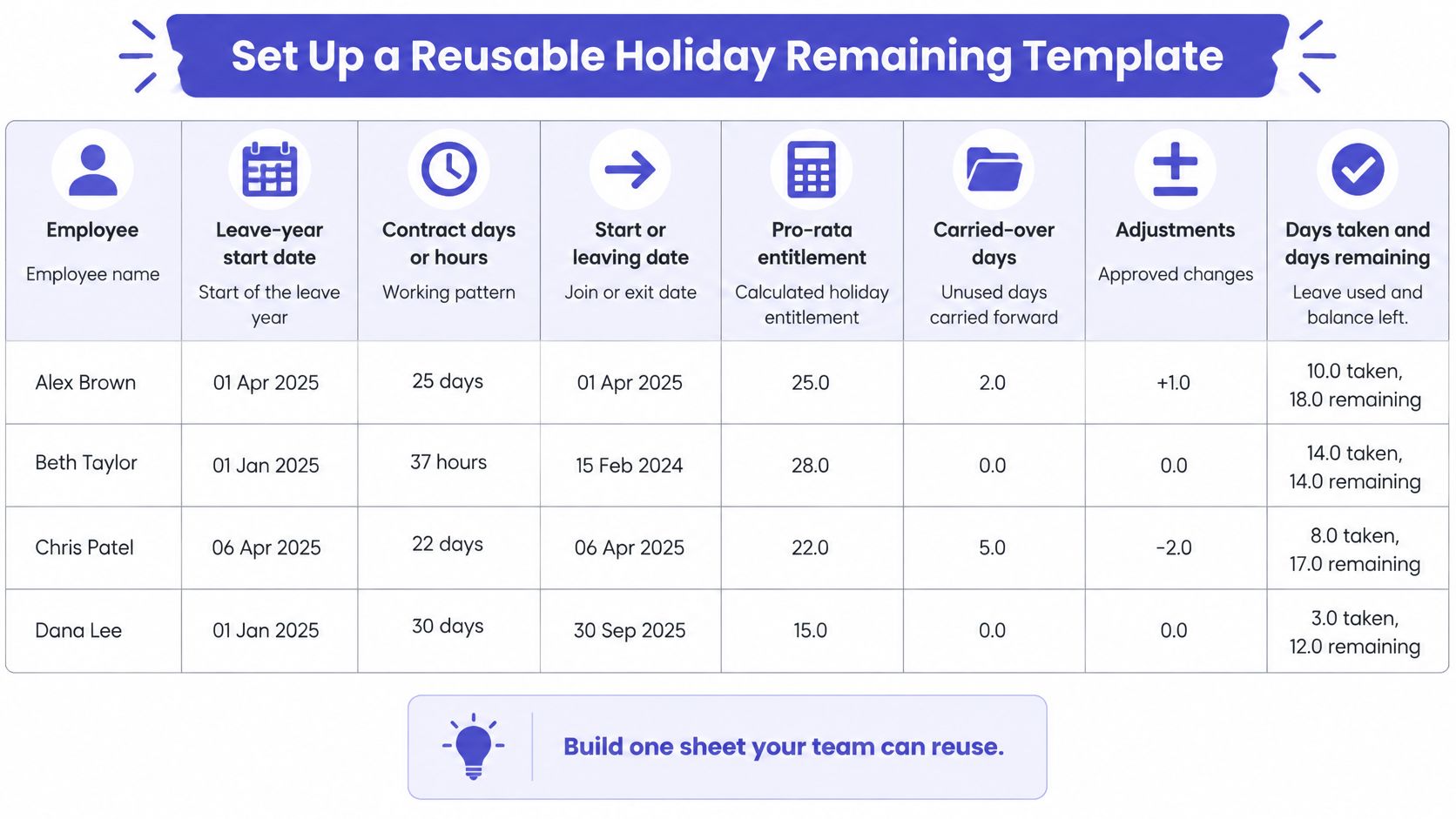
Columns to Include From Day One
- Employee and leave-year start date: Who the record belongs to and the year it measures
- Contract days or hours: The working pattern and the unit you're tracking
- Start or leaving date: The date that drives any pro-rata calculation
- Pro-rata entitlement: One formula copied down every row, so dates update the figure automatically
- Carried-over days and adjustments: Each change on its own line with a dated reason
- Days taken and days remaining: Taken from approved requests only, never typed from memory
Add separate columns for statutory, contractual, carried-over and accrued-to-date balances next to those core fields. That separation is what turns a spreadsheet into an audit trail.
Checks That Keep It Honest
Reconcile the sheet against approved requests monthly. For irregular-hours staff, add a quarterly check that converts accrued hours into the ledger and compares the total with payroll hours. Test the template first with one employee whose figure you already know is correct. If the sheet can't reproduce that known balance, fix the formula before you roll it out.
If spreadsheets are still costing you time, our application holds holiday, sickness and other absence records, leave allowances, and employment start and end dates in one place. Our Holiday Entitlement Calculator is a free tool available whether or not you've got a subscription, and there's a 30-day free trial of the holiday tracker if you want to compare it with your template.
Build the sheet this week, prove it on one employee, then roll it out team by team.
Stop defending unexplained totals and give every employee a balance they can trace line by line. LeaveWizard calculates allowances, accruals and carry-over automatically while keeping holiday, sickness and start and end dates in one audit trail built for small businesses. Try the tracker free for 30 days and check your trickiest starter, leaver and irregular-hours balances against it before your next leave-year end.


