
It's Monday morning. One person is off sick, another is on annual leave, and the person who usually handles the customer inbox also knows how to process refunds, update the rota, and find the file everyone suddenly needs. Small businesses feel absence faster than large organisations because every role carries more hidden knowledge.
That's why coverage planning matters. Not as a paperwork exercise, but as a practical way to stop a normal absence turning into missed work, frustrated customers, and a tired team picking up the pieces. If you run a small business without a dedicated HR department, the aim isn't to build a perfect system. It's to build one that's clear, fair, affordable, and strong enough to work on a bad day.
Table of Contents
- Why Every Small Business Needs a Coverage Plan
- Assess Your True Coverage Needs Beyond Headcount
- Build Your Master Coverage Roster and Policies
- Develop Resilient Teams with Cross-Training and Backups
- Automate Scheduling and Streamline Communication Protocols
- Measure Success with Key Coverage KPIs and Reports
- Coverage Planning FAQs
Why Every Small Business Needs a Coverage Plan
Most owners start planning for absence only when someone is already away. That's too late. The core problem usually isn't the empty chair. It's the skills gap left behind.
One employee might be physically absent, but what hurts the business is everything only they know how to do. Passwords nobody can find. Supplier contacts saved in one inbox. A payroll task that has to happen today. Customer promises that can't wait until next week. Good coverage planning identifies those pressure points before they become emergencies.
Start with business risk, not annual leave dates
A practical plan begins by asking four questions:
- Which tasks are critical: List the work that must happen even if someone is off. Think payroll runs, opening procedures, client response, order dispatch, and compliance tasks.
- When pressure hits: Note your busiest hours, days, and seasons. A café, warehouse, clinic, and accountancy firm all have different pinch points.
- Who can do the work: Don't rely on job titles. Write down the names of people who can complete each task safely and correctly.
- What leave rules apply: Full-time, part-time, irregular-hours, and part-year workers may need different handling, so your plan has to reflect how entitlement and approvals work in practice.
Practical rule: Plan for work continuity, not just absence cover.
For small teams, this is also a wellbeing issue. If every absence means the same dependable person works late, skips breaks, or carries two jobs at once, burnout follows. A coverage plan spreads load more fairly and gives managers a more defensible way to approve or delay leave.
You'll also make better decisions when support work is visible. For example, if missed calls are part of the problem during absences, looking at services that compare real estate answering can help you think through what should stay in-house, what needs backup, and what can be routed externally during peak pressure.
A basic checklist for your first draft
Use this simple review before you build anything formal:
- Critical processes: Which daily, weekly, and monthly tasks can't slip?
- Single points of failure: Which tasks depend on one person, one login, or one inbox?
- Peak trading periods: When do you need stricter leave controls?
- Minimum safe staffing: What is the fewest number of people or skills needed on each shift or workday?
- Legal leave handling: Are entitlements and approvals being applied consistently across worker types?
A small business doesn't need a complicated model. It needs a realistic one that protects service, reduces panic, and gives managers a repeatable way to make fair calls.
Assess Your True Coverage Needs Beyond Headcount
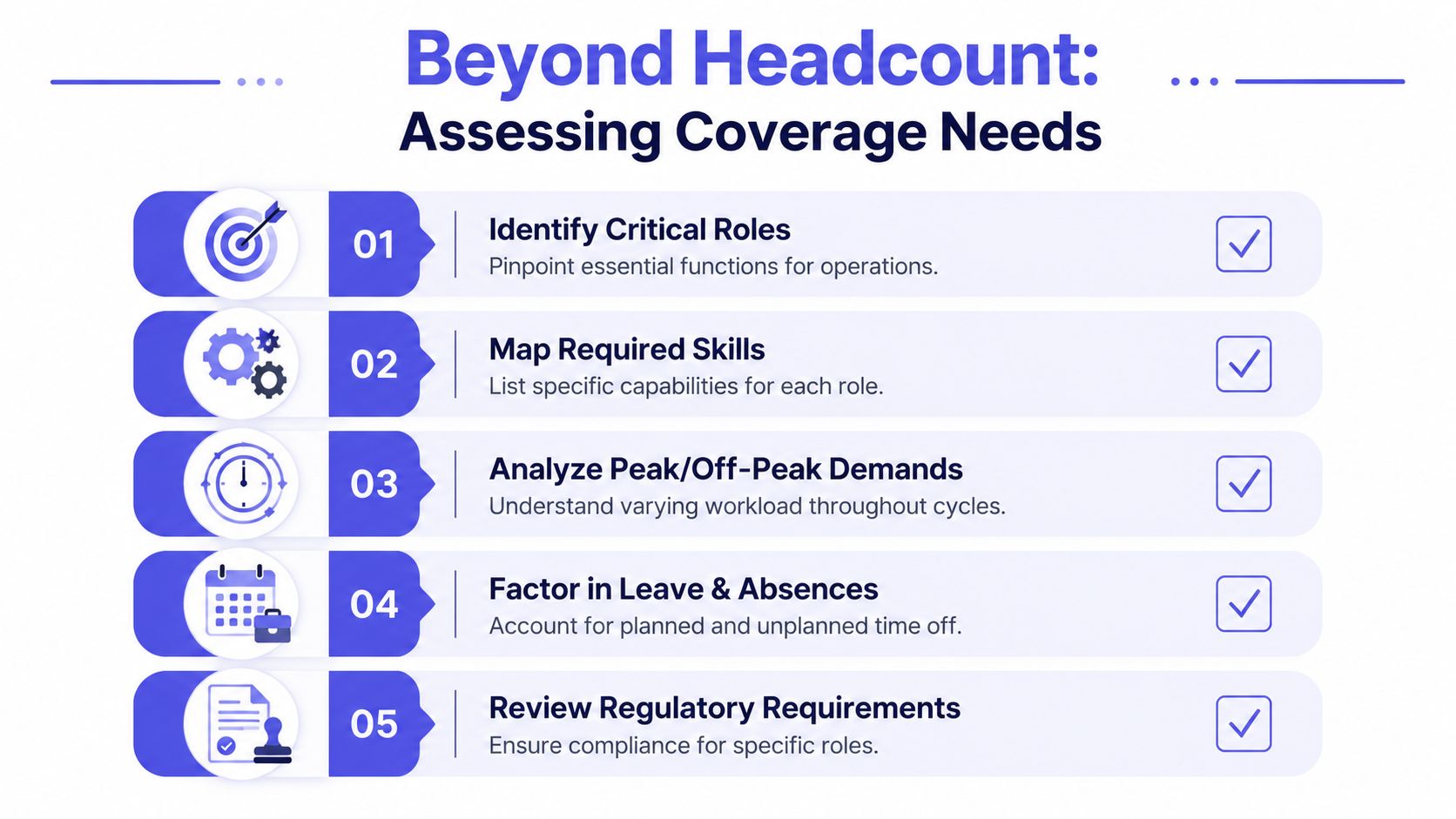
Headcount can be misleading. Three people on site doesn't mean you have cover if all three rely on the same person for approvals, stock access, or technical know-how. Good coverage planning looks beneath the schedule and maps the actual work that keeps the business moving.
Look at work, not just roles
Start with a plain-language task audit. For each role, write down the recurring tasks attached to it. Then mark each one as either essential now, important soon, or can wait. This gives you a much clearer picture than a list of job titles ever will.
The next step is to capture what the role really requires:
- Technical tasks: System access, reporting, payroll entries, stock ordering, account changes.
- Decision tasks: Approvals, customer escalations, pricing exceptions, supplier sign-off.
- Relationship tasks: Key client contact, site opening, team supervision, handovers.
- Timing sensitivity: What has to be done at a fixed time, and what can shift by a day?
If you employ irregular-hours staff, leave calculations need to be built into the plan properly. For those workers in the UK, annual leave is calculated using 12.07% of total hours worked in each pay period, capped at the 28-day maximum, which simplifies administration for small businesses when handled correctly, as outlined in this guide to annual leave policy examples for UK small business.
Build a simple coverage matrix
You don't need specialist software to start. A spreadsheet or shared document is enough if it's current and easy to read.
Use a matrix like this:
| Role or task | Primary owner | Backup 1 | Backup 2 | Notes |
|---|---|---|---|---|
| Customer inbox | Name | Name | Name | Include response standards |
| Payroll prep | Name | Name | Name | Add cut-off date |
| Supplier orders | Name | Name | Note approval limits | |
| Opening shift | Name | Name | Name | Include key access details |
What matters is clarity. If Backup 1 is “sometimes available” or “used to do it last year”, that isn't cover.
You also need a place to test whether the matrix holds up over real leave patterns. If you want a framework for mapping gaps against time-off and operational demand, these workforce planning tools are useful for thinking through availability in a more structured way.
The best coverage matrix is boring. Everyone knows where it is, what it means, and who steps in when someone is away.
Policies make the matrix usable. Without them, managers improvise and staff assume decisions are personal.
A workable policy set should cover:
- Notice requirements: What staff must submit before leave can be approved.
- Peak periods: Which dates have tighter controls.
- Conflict rules: How you decide between overlapping requests.
- Escalation cover: Who takes over if both the primary and first backup are unavailable.
A small business gains control when role coverage, leave rules, and real workload are documented in one place. That's the point where absence stops being a surprise and becomes something you can manage.
Build Your Master Coverage Roster and Policies
A small business usually feels the gap fast. One supervisor is on leave, a delivery arrives late, the phone starts ringing, and everyone suddenly realizes three tasks were living in one person's head.
That is why the master coverage roster matters. It gives you one working document that shows who is on, what must still happen, who steps in, and who can approve changes when the plan starts to wobble. For an owner or manager without a dedicated HR team, that clarity saves time and arguments.
Build the roster around work, not just shifts
A rota tells people when they are due in. A coverage roster does more than that. It ties each period of work to the tasks that cannot be missed.
For a small business, that often includes jobs that do not sit neatly inside one role title. Opening up, checking the customer inbox, approving supplier orders, chasing late invoices, processing payroll, locking up, and handling keyholder access all need a named owner. If you leave those duties off the roster, they still exist. They just get handled late, badly, or by whoever looks least busy.
A practical master roster should answer these questions at a glance:
- Who is scheduled to work
- Which critical tasks fall in that shift, day, or week
- Who takes over each task if the usual person is away
- Who can approve exceptions, overtime, or service changes
Here is a simple format that works well for smaller teams:
| Day or period | Scheduled staff | Critical tasks | Assigned cover | Approval owner |
|---|---|---|---|---|
| Monday AM | Names | Inbox, opening, delivery checks | Named backups | Manager |
| Payroll week | Names | Timesheets, approvals, export | Named backups | Owner |
| Summer holiday week | Names | Customer support, dispatch | Named backups | Ops lead |
Keep it visible and easy to update. A shared spreadsheet, a simple HR system, or a printed weekly sheet can all work if managers use it. If you need a practical template for planning shift cover for staff leave, use one that makes responsibilities and backup owners clear, not just hours.
Set policy rules that save managers from making ad hoc calls
The roster shows the plan. The policy explains how decisions get made.
Without policy rules, two employees can make the same request and get different answers depending on who is on duty, how stressed the manager is, or whether the owner happens to be available. Staff notice that quickly. Once they believe leave decisions are personal, every request becomes harder to handle.
Your policies do not need to be long. They do need to be specific enough that a line manager can apply them without guessing.
A workable set usually covers:
- How much notice employees should give
- Which peak periods have tighter approval rules
- How overlapping requests are decided
- Who signs off exceptions
- What handover is required before leave starts
- What happens if cover falls through at short notice
The goal is consistency, not bureaucracy. In a small business, short written rules beat a polished handbook nobody reads.
Write policies for the real constraints of a small team
Large companies can absorb more overlap. Small teams usually cannot. If two people out of six are away, you may lose a third of your practical operating capacity, especially if one of them handles specialist work.
So write policies that reflect the business you run.
For example, you might allow only one person from a key function off during payroll week. You might require handover notes before annual leave is approved. You might decide that customer-facing shifts need confirmed cover before leave is signed off, while office-based work can be rearranged more easily. Those are reasonable controls when they are written down, explained clearly, and applied the same way to everyone.
The external guidance on UK annual leave rights and notice expectations is useful context, but each business still needs its own clear operating rules.
Use one-page standards where possible
Owners often delay this step because “policy” sounds heavy. It does not have to be.
A one-page leave and coverage standard is often enough if it includes the main rules, the approval route, and the handover requirement. I have found that shorter documents get followed more often because managers can check them quickly in the middle of a busy day.
If the rule needs three verbal explanations every time, it is not clear enough yet.
A strong coverage roster and a short set of written policies give a small business something very valuable. Fewer last-minute scrambles, fewer fairness disputes, and fewer tasks dropped when someone takes time off.
Develop Resilient Teams with Cross-Training and Backups
It is 7:15 on a Monday. Your opener has called in sick, the person who usually handles supplier orders is on leave, and the only employee who knows the refund process starts at 10. For a small business, that is not a minor inconvenience. It is the difference between a normal day and a backlog that spills into the rest of the week.
A coverage plan starts to fail when the backup exists only on paper. I see this often in smaller teams. Someone is listed as cover, but they have never completed the task alone, do not have the right system access, or are still asking the primary person what to do at the exact moment the primary is unavailable.
Why backups must be planned in advance
Regular absence is part of running a business. Annual leave, sickness, family emergencies, school holidays, and appointments all pull people out of the rota. Small businesses feel that pressure more sharply because there is rarely spare capacity sitting on the bench.
The question is simple. Which tasks can keep moving if one person is out tomorrow?
Cross-training helps in three practical ways:
- Work keeps moving: Customer queries, orders, payroll inputs, and admin tasks do not stop with one absence.
- Leave approvals get easier: Managers can approve time off with less reshuffling and fewer last-minute favours.
- Employees become more useful across the week: That matters when trading patterns change or two people are off at once.
If you want a practical example of how to organise cover responsibilities, this guide to shift cover for staff leave is a useful reference.
Build backup strength without a big training budget
Small businesses usually do not need formal programmes. They need repeatable habits that fit around the working day.
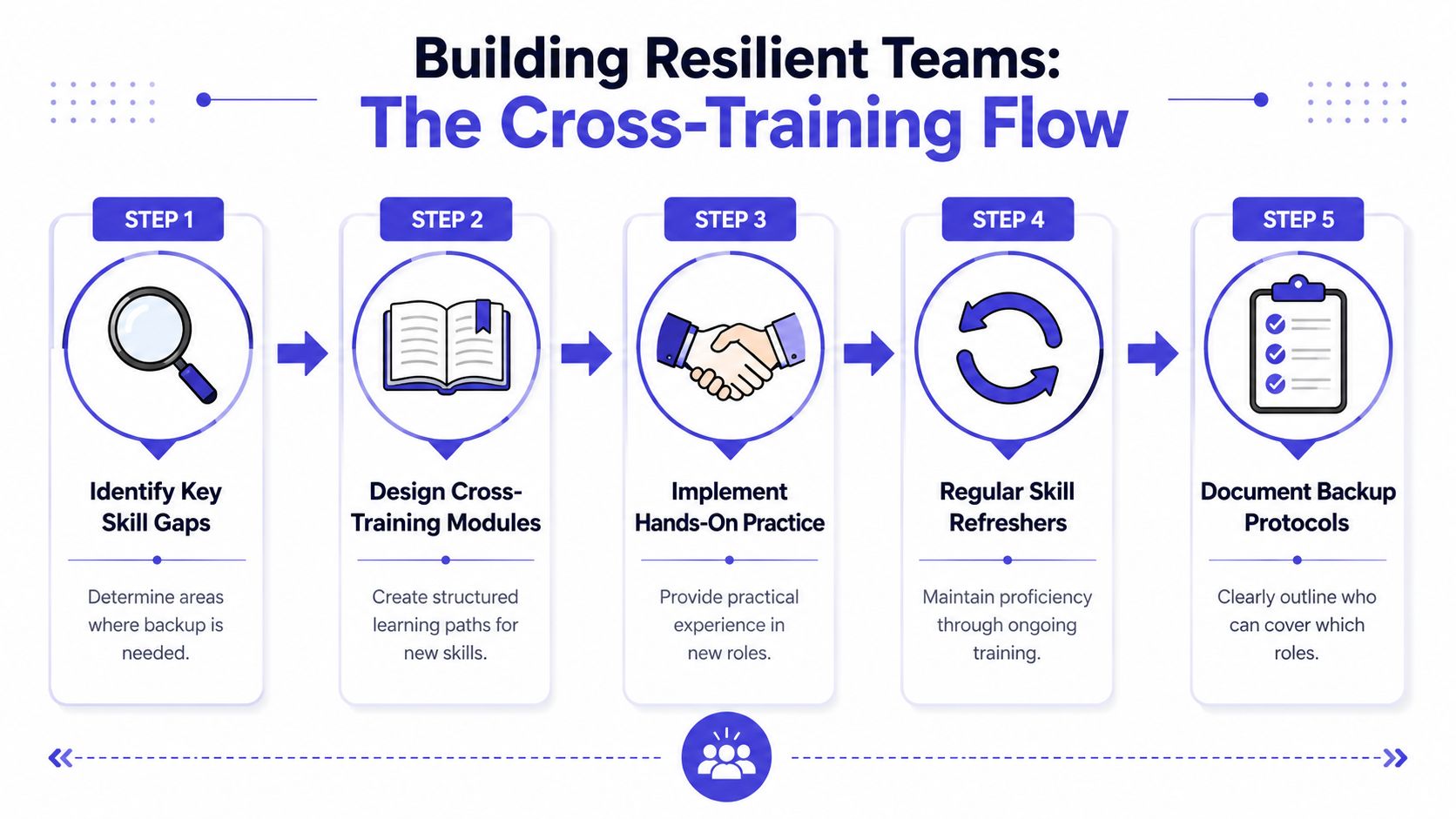
Start with the roles that create the biggest operational risk if uncovered. That might be opening and closing, payroll prep, quoting, dispatch, keyholder duties, invoicing, or any task tied to one login or one experienced employee. Train backups for those first. Do not try to cross-train everyone on everything. That spreads effort too thin and usually leads to shallow knowledge.
A simple approach works well:
- Pair people during live work: Let the backup shadow a real shift, order cycle, month-end task, or customer process.
- Use one-page task guides: Short instructions get used. Long manuals get ignored.
- Run supervised practice: The backup completes the task while the primary watches and corrects.
- Check system access early: Logins, permissions, approval rights, keys, and shared folders should be tested before leave starts.
- Set a clear backup order: Name first cover and second cover for critical duties, not just “someone on the team.”
Good cross-training is targeted. It protects business-critical work without turning every role into a blurred job description.
I also recommend testing backups under normal conditions, not just in theory. Ask a supervisor to step back for one cycle and let the backup handle the work. That is usually when gaps appear. Missing passwords, unclear handovers, and unwritten exceptions are easier to fix on a calm Wednesday than during a holiday week.
Avoid common small-business mistakes
The biggest mistake is assuming experience in the business equals readiness to cover the task. It does not. A reliable employee can still struggle with a process they have only watched once.
The second mistake is loading the same dependable person with every backup duty. Owners do this for sensible reasons. You trust them, they pick things up quickly, and they rarely say no. But over time, that person becomes the hidden safety net for the whole business. Then they burn out, or they leave, and the risk gets worse.
Spread coverage where you can. If one employee already covers stock ordering, do not automatically give them payroll queries and complaint handling as well. Build depth across the team, even if progress is gradual.
For businesses managing shift-based teams, a dedicated tool like the AnchOps scheduling solution can help managers see who is trained for which duties before they approve time off.
A useful standard is this: every critical task should have a named owner, a trained first backup, and basic written instructions. If you cannot identify those three things quickly, the role is still a coverage risk.
Automate Scheduling and Streamline Communication Protocols
Manual coverage planning usually breaks in familiar ways. Someone updates one spreadsheet but not the shared calendar. A manager approves leave in a message but forgets to tell payroll. A backup is named, but nobody confirms the handover. The problem isn't effort. It's fragmentation.
Where manual systems break
The pressure gets worse when compliance enters the picture. From 6 April 2026, UK employers must retain adequate records of workers' annual leave and pay entitlements for six years from the date of creation, and failure to comply is an offence punishable by a fine, as outlined by Littler in this note on annual leave record-keeping from April 2026.
That legal duty changes the conversation. Coverage planning is no longer just about the rota. It's also about whether you can show who took leave, what they were entitled to, how it was calculated, and what happened when requests overlapped.
A centralised scheduling system helps because it can combine:
- Availability visibility: Managers can see approved leave, pending requests, and likely gaps.
- Rule enforcement: Notice periods and peak-period restrictions can be applied consistently.
- Audit trail: Approvals, changes, and records are easier to retrieve.
- Communication flow: Staff know where to request leave and who covers what.
For operations-heavy teams, it can also be useful to review specialist options outside HR software. For example, an AnchOps scheduling solution shows how structured scheduling tools can reduce confusion where shifts, field work, or changing assignments are involved.
What to measure before and after
Automation only matters if it improves how the business runs. Measure it against the problems you already have.
Track these before and after introducing a more structured system:
- Unplanned overtime: Are the same people staying late when colleagues are off?
- Approval delays: How long does it take to confirm leave?
- Missed handovers: How often does key work get lost between people?
- Manager time spent chasing: How much time goes into messages, spreadsheets, and clarifications?
- Staff confidence: Do people know who covers them when they're away?
Keep communication protocols simple. Planned leave should trigger a handover checklist, backup confirmation, and manager sign-off. Unplanned absence should trigger a same-day message chain, priority review, and a single decision-maker who reallocates work.
A short walkthrough helps teams adopt the process consistently:
Write the protocol so that a tired supervisor can follow it at 7am. If it only works when everyone has time, it won't work when you need it most.
Measure Success with Key Coverage KPIs and Reports
Coverage planning works when it reduces disruption and makes decisions easier. You don't need a complex dashboard to prove that. A small set of practical KPIs will tell you whether the plan is helping or just adding admin.
Start with a short list
Use measures that connect directly to cost, service, and team strain.
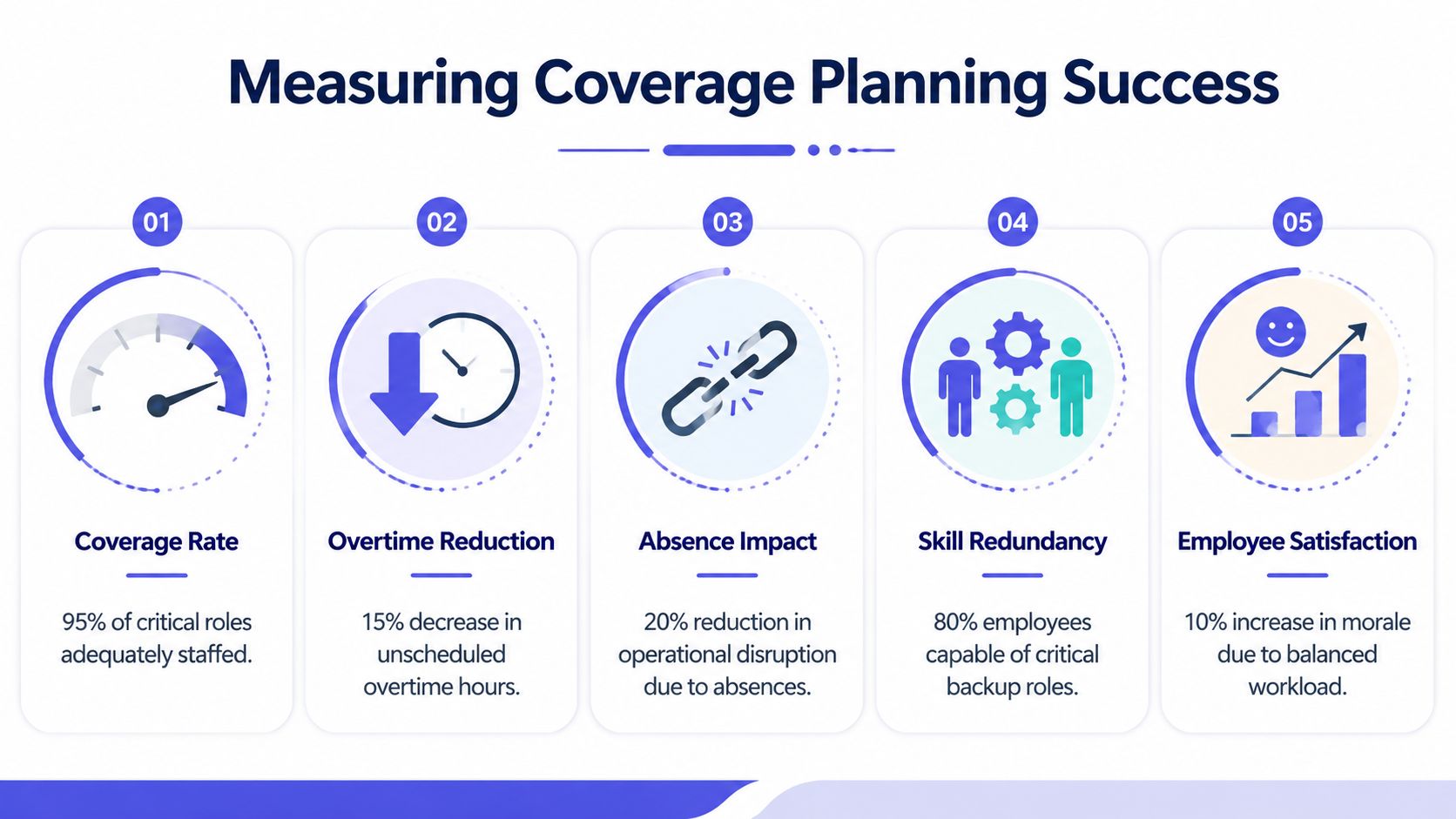
A sensible shortlist includes:
- Coverage gaps: Which critical roles had no trained backup when someone was away.
- Unscheduled overtime: Whether absences are driving extra hours for the same employees.
- Delayed work: Which deadlines slipped because cover arrangements failed.
- Leave approval speed: How quickly requests are processed and confirmed.
- Team feedback: Whether staff feel workloads remain fair during a colleague's absence.
If you need a practical starting point for how to present and review those figures, these business reporting templates can help you structure the conversation without overcomplicating it.
You can review these monthly. What matters is consistency. If one department always struggles when a certain role is off, that's not bad luck. It's a planning issue.
How to handle common objections
Small business owners often resist measurement because it sounds too corporate. It doesn't have to be. You're not building a board pack. You're checking whether the plan is reducing friction.
Here are common objections and the right response:
- “We're too small for KPIs.” If you're small, every absence has more impact. That makes simple tracking more useful, not less.
- “We don't have enough data.” Start with what you already know: overtime, missed tasks, approval delays, and staff complaints.
- “It changes every week.” That's exactly why you need a steady way to compare patterns over time.
- “My team will think I'm micromanaging.” Position it as workload protection. Good reporting helps you spot when cover arrangements are unfair or unrealistic.
A useful KPI should help you make a decision. If it doesn't change what you do next, drop it.
The point isn't perfect reporting. It's to learn where your coverage plan holds up and where it still depends on luck.
Coverage Planning FAQs
| Question | Answer |
|---|---|
| Do very small teams really need coverage planning? | Yes. Small teams need it more because one absence removes a larger share of your capacity and knowledge. Keep it light, but don't skip it. |
| What if only one person knows a critical process? | Treat that as your first risk to fix. Document the task, assign a backup, and schedule hands-on practice until that backup can run it alone. |
| How do I handle resistance to cross-training? | Explain the reason clearly. It isn't about loading extra work onto people. It's about reducing stress, improving fairness, and making leave easier to approve without panic. |
| What if two people want the same time off? | Use your published rules. Apply the same standard every time, whether that's first-come, role criticality, or minimum staffing. Consistency matters more than pleasing everyone in the moment. |
| What should happen in a last-minute absence? | Use a short escalation process: confirm absence, review critical tasks for the day, assign backup, notify affected staff, and reduce non-essential work if needed. |
| Do I need software to do this well? | Not on day one. Many teams start with a spreadsheet and a shared process note. Software becomes useful when leave volumes, backups, or compliance requirements make manual tracking unreliable. |


