
The UK statutory minimum is 5.6 weeks of paid annual leave a year, which is 28 days for someone working five days a week. For a regular working pattern, multiply the days worked each week by 5.6, subject to the statutory cap; irregular-hours and part-year workers need a different calculation.
You're probably checking a spreadsheet before payroll, answering a new starter's holiday question, or trying to reconcile a manager's balance with an employee's booking history. The arithmetic is usually straightforward. Choosing the right method, handling contractual extras and keeping entitlement separate from holiday pay are where mistakes happen.
A useful annual leave entitlement calculator should give you a balance you can explain, not just a number you have to trust.
Table of Contents
- Annual Leave Entitlement at a Glance
- How to Calculate Your Annual Leave Entitlement Step by Step
- Pro-Rata Leave for Joiners, Leavers and Part-Year Staff
- Accrual Rules for Irregular Hours and Part-Year Workers
- Holiday Pay Reference Periods Explained
- Sickness and Statutory Leave Edge Cases to Test
- Write Your Leave Policy and Check the Numbers Today
Annual Leave Entitlement at a Glance
Start with the employee's working pattern, not their job title. Someone described as part-time might work short days throughout the week or longer shifts on fewer days. Those arrangements need different inputs, even if their weekly hours are similar.
For regular, equal-length working days, the statutory baseline converts weeks into days. The table shows that conversion, including the cap that prevents the statutory day count increasing indefinitely.
Statutory minimum leave days by working pattern
| Working pattern | Days worked per week | Statutory minimum days a year |
|---|---|---|
| One day a week | 1 | 5.6 |
| Two days a week | 2 | 11.2 |
| Three days a week | 3 | 16.8 |
| Four days a week | 4 | 22.4 |
| Five days a week | 5 | 28 |
| Six days a week | 6 | 28 |
Use the contract and current work schedule to choose the days-per-week input. Don't enter a full-time equivalent figure just because payroll has one. If working days have unequal lengths, an hours-based balance is usually easier to administer fairly because the deduction can match the scheduled hours missed.
Keep statutory and contractual allowances separate
The statutory figure is a floor, not necessarily the employee's actual allowance. A more generous contract should have its own field in your calculator, alongside the statutory baseline. That lets you check that the contractual entitlement hasn't been accidentally replaced by the minimum.
Bank holidays need an explicit setting. Record whether they're included in the allowance or provided in addition, then check how public-holiday absences are deducted. Otherwise, an administrator can add them to the allowance while the booking system also treats them as extra leave.
Practical rule: A balance is only meaningful when the allowance and the deductions use the same unit and the same bank-holiday treatment.
Avoid a spreadsheet field labelled “holiday”. Use separate labels for annual entitlement, leave taken, approved future bookings and available balance. That small distinction prevents an employee's remaining balance being mistaken for their full-year entitlement.
For a quick baseline, collect the employee's days worked per week, leave-year start date, and employment start and end dates, leaving the end date blank where employment continues. Then confirm the contractual allowance and bank-holiday treatment before publishing the result. Those checks take longer than multiplication, but they're what make the answer usable.
How to Calculate Your Annual Leave Entitlement Step by Step
Suppose Priya works three days a week, her leave year runs from 1 January to 31 December, and her contract gives her personally 25 days of annual leave. That last point matters: this example assumes the allowance is hers, not a full-time allowance that still needs adjusting.
Her statutory baseline is 5.6 × 3 = 16.8 days. Her contractual entitlement is higher, so the calculator should retain both figures rather than overwrite one with the other.
The visual below summarises the inputs and calculation.
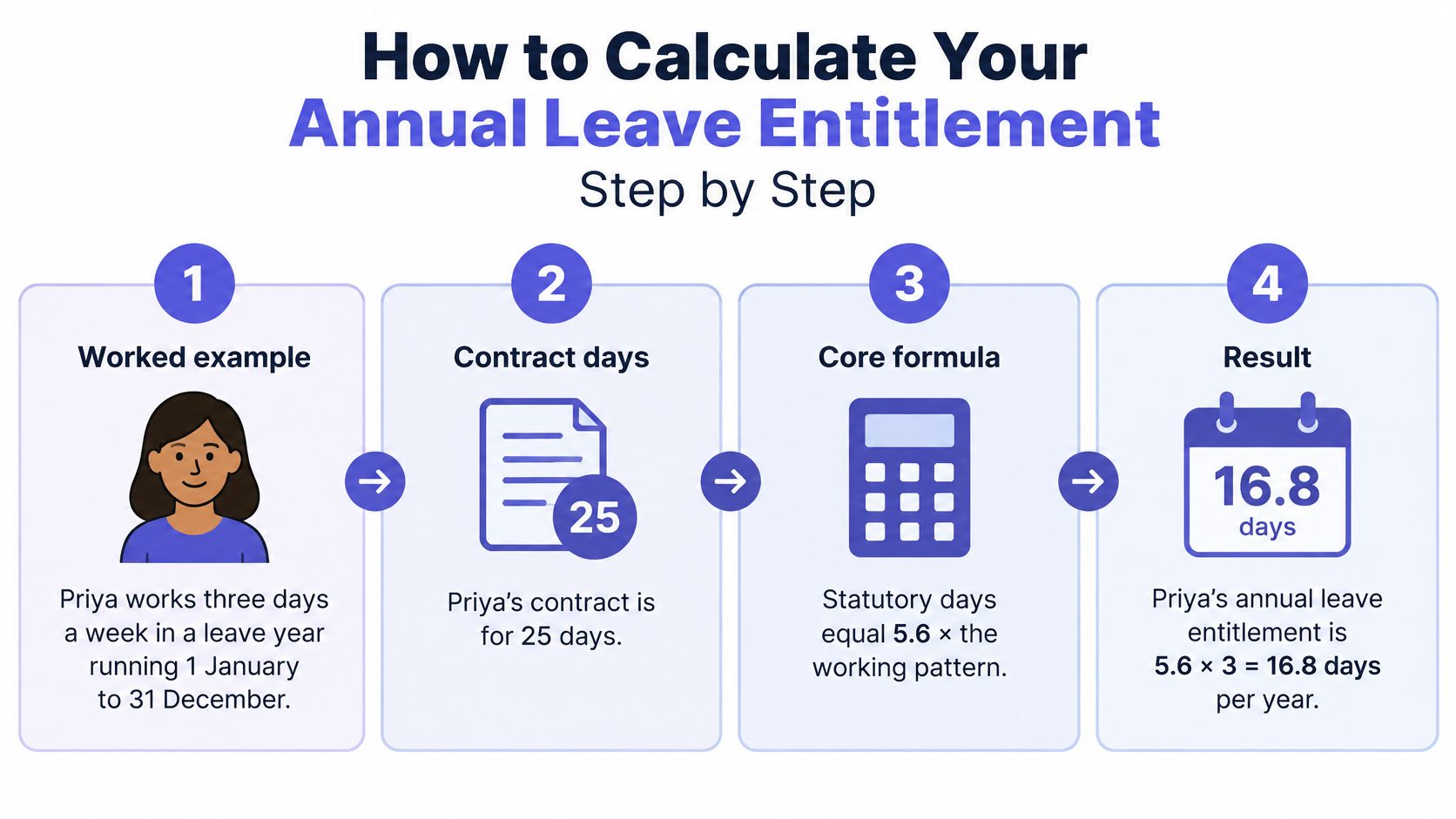
Build the calculation in a checkable order
Confirm the leave-year dates. Priya's allowance belongs to the calendar-year period in this example. Don't assume every employee uses the same dates, particularly after a business acquisition or a change of policy.
Classify the worker. Establish whether the employee has fixed hours, irregular hours or a part-year arrangement before selecting a formula. A worker's label in payroll isn't enough if it doesn't reflect their contractual working arrangement.
Calculate the statutory baseline. For Priya's regular working pattern, multiplying the weekly working days by the statutory weeks produces the baseline above. Keep this result visible as a control rather than hiding it inside the contractual calculation.
Identify the contractual enhancement. Priya's additional contractual allowance is 25 − 16.8 = 8.2 days. This is the difference between her total entitlement and the statutory minimum, not another allowance to add to the contractual total.
Adjust for employment dates where necessary. In this scenario, Priya works throughout the leave year, so no joining or leaving adjustment is needed. For an employee who starts or leaves during it, apply the appropriate pro-rata method before calculating their balance.
Deduct leave without double counting. Suppose Priya takes 6 days in March and has no other approved bookings: 25 − 6 = 19 days remaining. If future approved requests exist, show them separately or deduct them to produce an explicitly labelled available-to-book balance.
Apply the policy's booking unit and save the calculation. A policy might allow half-day bookings, but that doesn't justify rounding an entitlement down below the applicable minimum. Retain the unrounded result, any permitted adjustment and the final displayed figure.
Check the output before sharing it
For this hypothetical example, enter a working pattern of 3 days, the stated calendar leave year, 25 contractual days, the bank-holiday setting specified in Priya's contract and 6 days taken. The expected outputs are 16.8 statutory days, 8.2 contractual days above the minimum and 19 days remaining.
If the result differs, check the working pattern and leave-year dates first, then confirm whether the contractual field expects a personal allowance or a full-time equivalent allowance. Also check that the system hasn't deducted the same request once as approved and again as taken.
Compare like with like. A remaining balance can legitimately fall below the annual statutory entitlement after leave has been taken. The warning sign is an annual entitlement below the applicable minimum, or an unexplained balance above the employee's allowance after accounting for authorised adjustments.
Pro-Rata Leave for Joiners, Leavers and Part-Year Staff
For a regular-hours employee whose employment covers only part of the leave year, a months-based calculation is:
Full-year entitlement × months employed in the leave year ÷ 12
That's a practical worked method for complete months. If someone joins mid-month, a days-based calculation can give a more precise result: multiply their full-year allowance by the proportion of the leave year they're employed. State the method in the policy rather than letting administrators choose whichever gives the tidiest answer.
Pro-rata statutory days for a five-day worker
| Months worked in the leave year | Pro-rata days (five-day worker) | Calculation |
|---|---|---|
| 3 months | 7 | 28 × 3 ÷ 12 |
| 6 months | 14 | 28 × 6 ÷ 12 |
| 9 months | 21 | 28 × 9 ÷ 12 |
| 12 months | 28 | 28 × 12 ÷ 12 |
These are worked calculations for a regular pattern, not a replacement for the accrual method applicable to legally defined part-year workers. Joining halfway through a year doesn't, by itself, tell you which worker classification applies.
A part-time starter example
Suppose an employee works three days a week and joins on 1 October, with six months remaining in a leave year ending 31 March. Using complete months, their statutory calculation is 16.8 × 6 ÷ 12 = 8.4 days.
If the policy uses half-day booking units, retain the exact entitlement and ensure any rounding doesn't reduce the applicable minimum. Applying an ordinary nearest-half-day formula indiscriminately can round an employee's entitlement down, even though the spreadsheet appears consistent.
Use the guide to working out pro-rata holiday to check the relationship between the full-year allowance, employment dates and working pattern.
Consistency means using the same defensible method, not forcing every employee's result into a convenient whole number.
For leavers, establish entitlement up to the leaving date, then deduct leave already taken. Review approved bookings after that date so they don't remain in the calculation as though the employee will still take them. Where leave taken exceeds entitlement, check the contract and current UK rules before making any deduction from final pay.
A common spreadsheet mismatch is to pro-rate the contractual allowance while leaving the statutory comparison at its full-year value. Adjust both to the same employment period before checking them. Otherwise, payroll may flag a perfectly reasonable part-year allowance as an underpayment, or an administrator may increase it unnecessarily.
Accrual Rules for Irregular Hours and Part-Year Workers
Irregular-hours and part-year workers need an accrual calculation rather than an assumed weekly day count. For leave years beginning on or after 1 April 2024, GOV.UK's holiday entitlement guidance sets out accrual at 12.07% of hours worked in each pay period, with rounding up where the fraction reaches at least 0.5 of an hour.
Start with approved hours records, not an estimate copied from a rota. The discussion between the person approving shifts and the person maintaining leave balances is an important control.
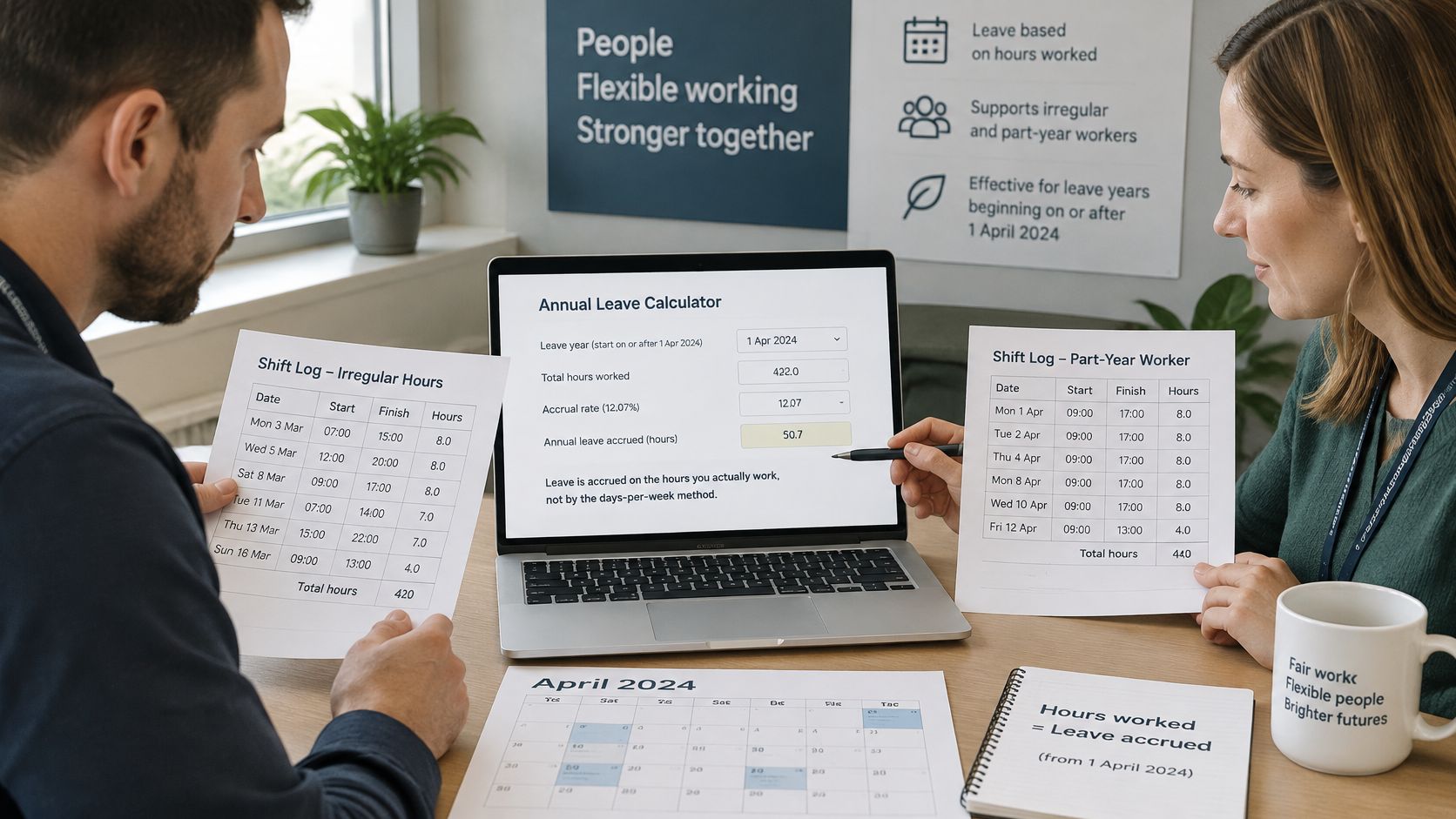
Calculate and round by pay period
For a hypothetical bar worker who works 40 hours in the relevant pay period, the calculation is 40 × 0.1207 = 4.828 hours, or approximately 4.83 hours. Applying the prescribed whole-hour rounding produces 5 hours of accrued leave.
Accrued leave at 12.07 per cent of hours worked
| Hours worked | Accrual at 12.07% | Rounded under the 0.5-hour rule |
|---|---|---|
| 40 hours | 4.828 hours | 5 hours |
| 100 hours | 12.07 hours | 12 hours |
| 120 hours | 14.484 hours | 14 hours |
| 250 hours | 30.175 hours | 30 hours |
The table shows worked pay-period examples. Don't round the displayed decimal first and then use that shortened number to decide the statutory rounding, particularly where the underlying result is close to the threshold.
Build the workflow in this order:
- Approve actual hours. Resolve missing shifts and corrections before running accrual.
- Calculate and round accrual. Keep the raw result and the rounded result in separate fields.
- Update the balance. Deduct leave taken and account for any contractual enhancement without adding the statutory allowance twice.
- Retain the audit trail. Save the pay period, source hours, formula, rounding and reasons for adjustments.
A spreadsheet can perform this arithmetic well. It becomes unreliable when administrators overwrite formulas, combine pay periods before rounding, or paste corrected hours without recalculating the affected balance.
The video provides another way to review the calculation process.
Don't use the percentage universally
The accrual percentage isn't a shortcut for fixed-hours employees. Applying it to everyone can replace an established annual entitlement with an inappropriate hours-worked calculation. Select the method by worker classification, not by whichever formula is easiest to maintain.
The irregular-hours holiday calculator guide is useful when setting up the relevant inputs and checking the calculation workflow.
Keep balances in hours where shift lengths change. If you also display days, divide by the agreed day length used for booking leave and make that conversion visible. A displayed day balance shouldn't imply that every shift costs the same number of hours when it doesn't.
Holiday Pay Reference Periods Explained
A spreadsheet can calculate the correct leave balance and still produce the wrong payroll amount. Multiplying every booked hour by the employee's current basic rate isn't a reliable substitute for checking how holiday pay should be valued.
Entitlement measures time off. Holiday pay values that time. For irregular-hours and part-year workers, GOV.UK's holiday pay guidance normally uses the previous 52 paid weeks, skipping unpaid weeks and looking back up to 104 weeks to obtain the qualifying paid history.
Build a paid-week history
Keep a weekly pay table separate from the entitlement ledger. Each row should identify the week, the relevant pay, whether it qualifies for the calculation and the reason for any exclusion. That allows payroll to check the average without reconstructing it from payslips.
The calculation process should:
- Store weekly paid amounts. Use consistent week boundaries and identify the pay components being included.
- Exclude unpaid weeks appropriately. Don't turn missing paid history into invented zero-pay entries.
- Select qualifying history. Work backwards through the available records within the permitted look-back.
- Calculate the average. Use the qualifying paid history to value the relevant leave, keeping the entitlement deduction separate.
For example, suppose a worker was paid in 47 of the last 52 calendar weeks. The calculation needs five earlier paid weeks, where available within the permitted window, rather than averaging the recent calendar period with unpaid weeks included.
A blank week, an unpaid week and a paid week with low earnings aren't interchangeable spreadsheet entries.
Remove the misleading shortcuts
Three errors deserve explicit checks in your workbook or payroll specification:
- Calendar weeks substituted for paid weeks. A fixed date-range average can depress the result if it includes unpaid weeks incorrectly.
- An obsolete reference period. An inherited workbook may still contain the former 12-week formula, even when the sheet's title has been updated.
- Basic pay treated as the complete answer. Check the normal remuneration that should be reflected rather than assuming the current basic hourly rate covers every case.
The UK holiday pay rules guide provides supporting context when reviewing the payroll treatment.
Before relying on the calculation, test zero-hours work, sickness, statutory leave and a recent starter with fewer qualifying paid weeks than the full reference period. Use the available qualifying paid history where the full history doesn't exist. Don't manufacture zero-value weeks to fill the spreadsheet.
Keep the payroll output distinct from the leave ledger: one confirms the amount payable, while the other confirms the time deducted. That separation makes a query much easier to investigate.
Sickness and Statutory Leave Edge Cases to Test
No work doesn't necessarily mean no holiday accrual. For irregular-hours and part-year workers, Acas guidance on calculating holiday pay explains continuing accrual during sickness and statutory leave using a 52-week reference period, excluding sickness and statutory-leave weeks, including other non-working weeks and applying 12.07% to average weekly hours.
Using the employee's current zero hours would therefore produce the wrong entitlement. The reason for the absence determines how the reference history is assembled.
Test the absence categories separately
- Long-term sickness. Continue the entitlement calculation using the appropriate average, excluding sickness weeks from the reference period.
- Maternity or other statutory leave. Apply the relevant absence-accrual treatment rather than treating the worker as having no qualifying hours.
- Other non-working weeks. Retain these where required in the entitlement reference period. Don't copy the paid-week exclusion logic from the holiday-pay calculation.
Holiday pay still needs its own valuation. An entitlement average and a pay average answer different questions, so avoid a shared spreadsheet filter that assumes the same weeks belong in both.
Retain the evidence behind the balance
Keep pay records, hours logs, absence dates, the rounding rule and manual adjustments with reasons. Record who approved a correction and preserve the original input where practical.
Annual-leave record provisions and the treatment of rolled-up holiday pay make a saved calculator total insufficient as an operational record. If an employee challenges a balance, you need to explain which weeks were included, which were excluded and why.
Write Your Leave Policy and Check the Numbers Today
Use adaptable policy wording that separates regular entitlement from the accrual arrangements for other worker types:
Suggested policy wording
Annual leave is based on the applicable statutory entitlement or the employee's more favourable contractual allowance. Regular-hours allowances are adjusted for working pattern and employment dates. Irregular-hours and part-year workers accrue leave under the applicable statutory method, including the required rounding and absence treatment. Where the policy and contract differ, the more favourable applicable term will be honoured.
State whether joining and leaving calculations use months or days, how partial periods are handled and which booking units apply. Don't let a rounding preference reduce the employee's entitlement.
Use this checklist when reviewing the policy and system settings.
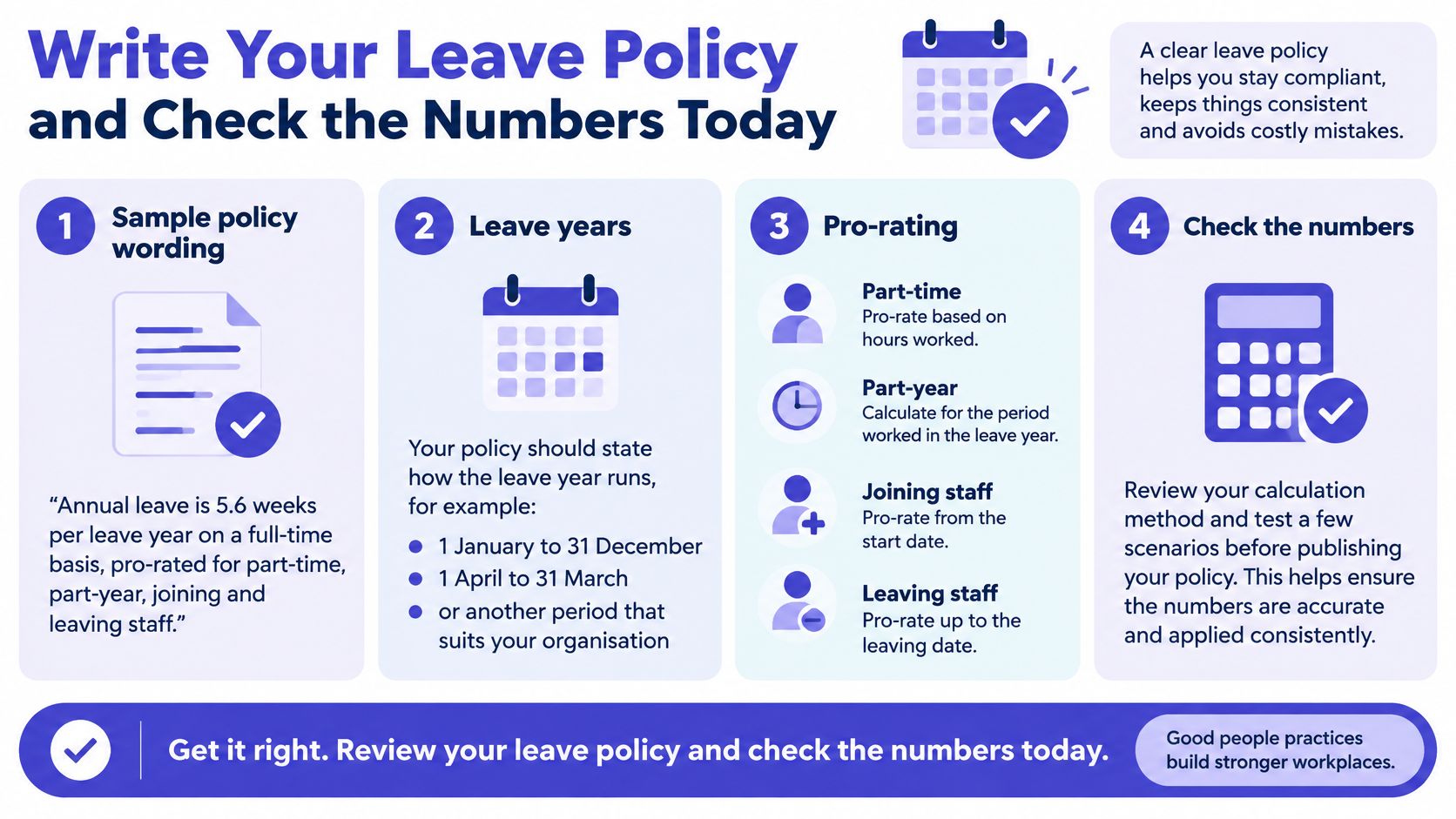
Check the setup before publishing allowances
- Confirm leave-year dates for each staff group.
- Record working patterns and worker classifications against the correct employee.
- Set bank-holiday treatment from the contract.
- Maintain hours and paid-week history for the calculations that need them.
- Review opening balances when each employee's leave year starts.
Our LeaveWizard Holiday Entitlement Calculator is free, whether or not your business has a subscription. Within the application, automatic leave and balance calculations support ongoing administration, employees can check their entitlement through the smartphone app, and monthly allowance reports show permitted event types using each employee's correct leave-year dates.
This week, calculate an employee's allowance manually, compare it with the calculator result and resolve any difference before sending the figure to payroll.
LeaveWizard brings leave calculations, absence records and employee balance checks into one system, reducing reliance on disconnected spreadsheets. Visit LeaveWizard to try the free Holiday Entitlement Calculator and check an employee's allowance against your current records.


